
apple-books-mcp
Apple Books MCP Server
Documentation
Apple Books MCP
Model Context Protocol (MCP) server for Apple Books.





At a glance
- Pick up where you left off — Claude sees the chapter you're on *and* its text, plus recent highlights in the book.
- Expand on any highlight — get the surrounding paragraph explained in context, with the exact anchor you marked shown in `«...»`.
- Revisit a book — pull your highlights, cluster them by theme, and quote you back to yourself.
- Reflect on your reading — patterns across books, recurring ideas in your highlights, what you're actually drawn to.
https://github.com/user-attachments/assets/77a5a29b-bfd7-4275-a4af-8d6c51a4527e
And much more!
Available Tools
Collections
| Tool | Description | Parameters |
|---|---|---|
| list_all_collections | List all collections | limit?: int |
| get_collection_books | Get all books in a collection | collection_id: str |
| describe_collection | Get details of a collection | collection_id: str |
| search_collections_by_title | Search for collections by title | title: str |
Editing collections (opt-in)
Off by default. Enable by adding `--enable-writes` to the server args:
"args": ["apple-books-mcp@latest", "--enable-writes"]Apple provides no automation API for collections, so these write directly to the library database — behind guard rails: every write refuses while Books is open, takes an automatic WAL-safe backup first (`~/.py_apple_books/backups/`), validates the schema and aborts on drift, and only touches user-created collections (plus "Want to Read" membership). Deleting a collection never deletes the books in it.
> ⚠️ If iCloud sync for collections is enabled, direct edits may not propagate to other devices and can be reverted by a cloud re-sync.
| Tool | Description | Parameters |
|---|---|---|
| create_collection | Create a new collection | title: str, details?: str |
| rename_collection | Rename a user-created collection | collection_id: int, new_title: str |
| delete_collection | Delete a user-created collection (books untouched) | collection_id: int |
| add_book_to_collection | Add a book to a collection (idempotent) | collection_id: int, book_id: int |
| remove_book_from_collection | Remove a book from a collection (idempotent) | collection_id: int, book_id: int |
Books
| Tool | Description | Parameters |
|---|---|---|
| list_all_books | List all books | limit?: int |
| describe_book | Get details of a particular book (metadata, progress, annotation count, description) | book_id: str |
| list_annotations | Get all annotations for a book (id + text + chapter per row, chapter-ordered) | book_id: int, limit?: int |
| search_books_by_title | Search for books by title | title: str |
| get_books_by_genre | Get books by genre (substring match) | genre: str, limit?: int |
Reading Status
| Tool | Description | Parameters |
|---|---|---|
| get_books_in_progress | Get books currently being read | limit?: int |
| get_finished_books | Get books that have been finished | limit?: int |
| get_unstarted_books | Get books not yet started | limit?: int |
| get_recently_read_books | Get most recently opened books | limit?: int (default: 10) |
Annotations
| Tool | Description | Parameters |
|---|---|---|
| list_all_annotations | Browse every annotation grouped by book, newest first | limit?: int |
| recent_annotations | Get most recent annotations (flat, with date + book per row) | limit?: int (default: 10) |
| describe_annotation | Get full details of a single annotation | annotation_id: str |
| get_annotation_context | Text window around a highlight (the paragraph it's in), with the highlight marked `«...»` | annotation_id: int, chars_before?: int (default: 500), chars_after?: int (default: 500) |
| get_highlights_by_color | Highlights of a particular color, grouped by book | color: str, limit?: int |
| search_notes | Search user notes (shows highlight + note inline) | note: str, limit?: int |
| search_annotations | Search across highlights + notes + surrounding text | text: str, limit?: int |
| get_annotations_by_date_range | Annotations within a date range (flat, with date + book per row) | after?: YYYY-MM-DD, before?: YYYY-MM-DD, limit?: int |
Library Stats
| Tool | Description | Parameters |
|---|---|---|
| get_library_stats | Get library summary with reading stats | None |
Book Content
Only works for non-DRM EPUBs (imported books, Project Gutenberg, Standard Ebooks, etc.). Apple Books Store purchases are FairPlay-protected and return a clear error. iCloud-only books return a "not downloaded" hint.
| Tool | Description | Parameters |
|---|---|---|
| list_book_chapters | Table of contents for a book (chapter titles, order, nesting) | book_id: int |
| get_chapter_content | Plain-text content of a chapter, with optional `offset` + `max_chars` slicing | book_id: int, chapter_id: str, offset?: int, max_chars?: int |
| get_current_reading_position | The chapter the user last left off reading (via Apple Books' auto-bookmark CFI) | book_id: int |
Available Resources
Attachable data objects accessible from Claude Desktop's resource picker.
| Resource | URI | Description |
|---|---|---|
| Currently Reading | `apple-books://currently-reading` | The book you're reading right now — most recently opened in-progress book, with metadata, the chapter you left off on plus a preview of its text (for non-DRM EPUBs), and recent annotations. Attach to any conversation to focus Claude on your current read. |
Available Prompts
One-click workflows, accessible from Claude Desktop's prompt picker.
| Prompt | Description | Arguments |
|---|---|---|
| weekly_digest | Summarize what I've read and highlighted in the past week | days?: int (default: 7) |
| library_snapshot | A reflection on my whole reading life | None |
| revisit_book | Revisit your notes and highlights from a specific book | book_title: str |
Installation
Using uv (recommended)
uvx can be used to directly run apple-books-mcp (without installing it).
brew install uv  # for macos
uvx apple-books-mcp
Using pip
pip install apple-books-mcpAfter installing, you can run the server using:
python -m apple_books_mcpUsing Docker
docker run -v ~/Library/Containers/com.apple.iBooksX/Data/Documents:/root/Library/Containers/com.apple.iBooksX/Data/Documents:ro ghcr.io/vgnshiyer/apple-books-mcp:latestFirst-run permission prompt (macOS)
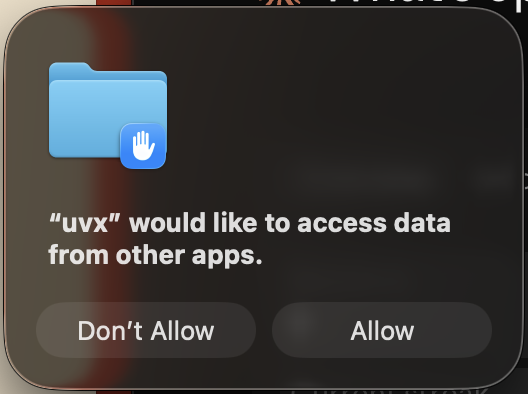
On first use, macOS will ask whether `uvx` (or `python` / `docker`, depending on how you launched) may "access data from other apps." Click Allow — the MCP reads Apple Books' private container at `~/Library/Containers/com.apple.iBooksX/`, which macOS treats as another app's sandboxed data. Access is read-only and scoped to that container; the server starts successfully either way, but without permission every tool comes back empty.
Configuration
Claude Desktop Setup
Using uvx (recommended)
{
    "mcpServers": {
        "apple-books-mcp": {
            "command": "uvx",
            "args": [ "apple-books-mcp@latest" ]
        }
    }
}
Using python
{
    "mcpServers": {
        "apple-books-mcp": {
            "command": "python",
            "args": ["-m", "apple_books_mcp"]
        }
    }
}
Using Docker
{
    "mcpServers": {
        "apple-books-mcp": {
            "command": "docker",
            "args": [
                "run", "-i", "--rm",
                "-v", "~/Library/Containers/com.apple.iBooksX/Data/Documents:/root/Library/Containers/com.apple.iBooksX/Data/Documents:ro",
                "ghcr.io/vgnshiyer/apple-books-mcp:latest"
            ]
        }
    }
}
Upcoming Features
- [ ] PDF content access (currently EPUB-only)
- [ ] fuller annotation context via CFI → paragraph resolution
Contribution
Thank you for considering contributing to this project!
Development
If you cloned this repository, you can test it using Claude Desktop with below configuration:
Use `uv venv` to create a virtual environment and install the dependencies.
uv venv
uv sync
Debugging
With Claude Desktop
{
    "mcpServers": {
        "apple-books-mcp": {
            "command": "uv",
            "args": [
                "--directory",
                "/path/to/apple-books-mcp/",
                "run",
                "apple_books_mcp",
                "-v"
            ]
        }
    }
}
With inspector
npx @modelcontextprotocol/inspector uvx apple-books-mcpOpening Issues
If you encounter a bug, have a feature request, or want to discuss something related to the project, please open an issue on the GitHub repository. When opening an issue, please provide:
Bug Reports: Describe the issue in detail. Include steps to reproduce the bug if possible, along with any error messages or screenshots.
Feature Requests: Clearly explain the new feature you'd like to see added to the project. Provide context on why this feature would be beneficial.
General Discussions: Feel free to start discussions on broader topics related to the project.
Contributing
1️⃣ Fork the GitHub repository https://github.com/vgnshiyer/apple-books-mcp \
2️⃣ Create a new branch for your changes (git checkout -b feature/my-new-feature). \
3️⃣ Make your changes and test them thoroughly. \
4️⃣ Push your changes and open a Pull Request to `main`.
*Please provide a clear title and description of your changes.*
License
Apple Books MCP is licensed under the Apache 2.0 license. See the LICENSE file for details.
Frequently asked questions
What is apple-books-mcp?
apple-books-mcp is Apple Books MCP Server
How do I install apple-books-mcp?
Open the GitHub repository and follow its README. Most MCP servers are added to your client's MCP config, then called by your agent.
Is apple-books-mcp open source?
Yes — it is hosted on GitHub at https://github.com/vgnshiyer/apple-books-mcp and has 33 stars.
Related MCP tools
 fastapi_mcp
Expose your FastAPI endpoints as Model Context Protocol (MCP) tools, with Auth! Python-based implementation. Trusted by 11000+ developers.
 basic-memory
AI conversations that actually remember. Never re-explain your project to Claude again. Local-first, integrates with Obsidian.
 mcp-client-for-ollama
A text-based user interface (TUI) client for interacting with MCP servers using Ollama. Features include multi-server, dynamic model switching, streaming res...
 chatgpt-on-wechat
基于大模型搭建的聊天机器人,同时支持 微信公众号、企业微信应用、飞书、钉钉 等接入,可选择ChatGPT/Claude/DeepSeek/文心一言/讯飞星火/通义千问/ Gemini/GLM-4/Kimi/LinkAI,能处理文本、语音和图片,访问操作系统和互联网,支持基于自有知识库进行定制企业智能客服。
 gpt-researcher
An LLM agent that conducts deep research (local and web) on any given topic and generates a long report with citations. Built for the Model Context Protocol to
 mcp-agent
Build effective agents using Model Context Protocol and simple workflow patterns Python-based implementation. Trusted by 7600+ developers.
Run your own MCP server? See who uses it and what to fix.
Measure it with TrackMCP