
MaxMSP-MCP-Server
MCP (Model Context Protocol) Server for Max (Max/MSP/Jitter)
Documentation
Note: An extended version by ersatzben and BenCello can be found at: https://github.com/ersatzben/maxmsp-mcp
MaxMSP-MCP Server
This project uses the Model Context Protocol (MCP) to let LLMs directly understand and generate Max patches.
Understand: LLM Explaining a Max Patch
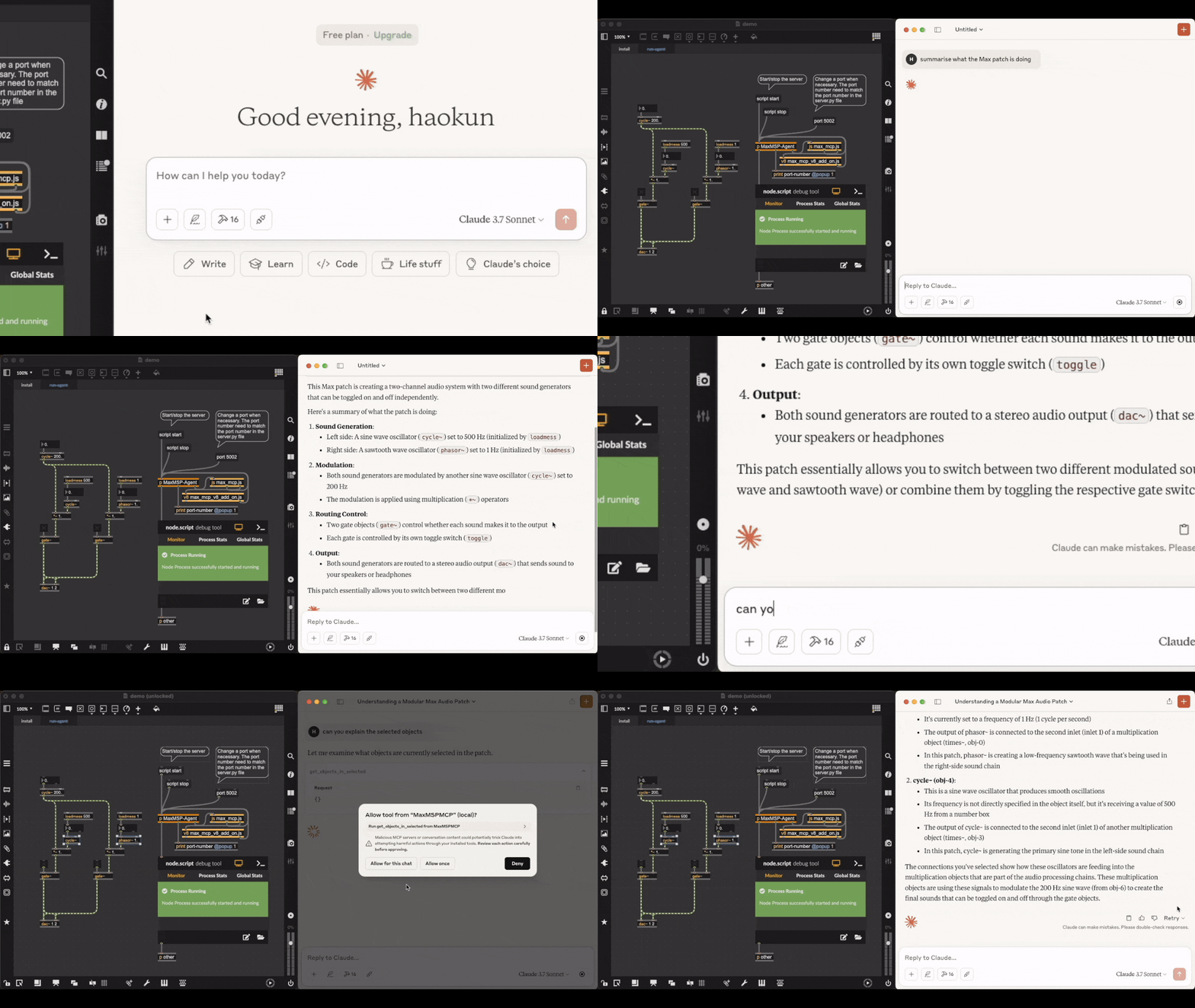
Video link. Acknowledgement: the patch being explained is downloaded from here. Text comments in the original file are deleted.
Generate: LLM Making an FM Synth

Check out the full video where you can listen to the synthesised sounds.
The LLM agent has access to the official documentation of each object, as well as objects in the current patch and subpatch windows, which helps in retrieving and explaining objects, debugging, and verifying their own actions.
Installation
Prerequisites
Installing the MCP server
1. Install uv:
# On macOS and Linux:
curl -LsSf https://astral.sh/uv/install.sh | sh
# On Windows:
powershell -ExecutionPolicy ByPass -c "irm https://astral.sh/uv/install.ps1 | iex"
2. Clone this repository and open its directory:
git clone https://github.com/tiianhk/MaxMSP-MCP-Server.git
cd MaxMSP-MCP-Server
3. Start a new environment and install python dependencies:
uv venv
source .venv/bin/activate
uv pip install -r requirements.txt
4. Connect the MCP server to a MCP client (which hosts LLMs):
# Claude:
python install.py --client claude
# or Cursor:
python install.py --client cursor
To use other clients (check the list), you need to download, mannually add the configuration file path to here, and connect by running `python install.py --client {your_client_name}`.
Installing to a Max patch
Use or copy from `MaxMSP_Agent/demo.maxpat`. In the first tab, click the `script npm version` message to verify that npm is installed. Then click `script npm install` to install the required dependencies. Switch to the second tab to access the agent. Click `script start` to initiate communication with Python. Once connected, you can interact with the LLM interface to have it explain, modify, or create Max objects within the patch.
Disclaimer
This is a third party implementation and not made by Cycling '74.
Frequently asked questions
What is MaxMSP-MCP-Server?
MaxMSP-MCP-Server is MCP (Model Context Protocol) Server for Max (Max/MSP/Jitter)
How do I install MaxMSP-MCP-Server?
Open the GitHub repository and follow its README. Most MCP servers are added to your client's MCP config, then called by your agent.
Is MaxMSP-MCP-Server open source?
Yes — it is hosted on GitHub at https://github.com/tiianhk/MaxMSP-MCP-Server and has 99 stars.
Related MCP tools
 openhands
🙌 OpenHands: Code Less, Make More for the Model Context Protocol. Enhance AI assistants with powerful integrations. Python-based implementation.
 anything-llm
The all-in-one Desktop & Docker AI application with built-in RAG, AI agents, No-code agent builder, MCP compatibility, and more.
 mem0
mem0Universal memory layer for AI Agents; Announcing OpenMemory MCP - local and secure memory management. Python-based implementation.
 chatgpt-on-wechat
基于大模型搭建的聊天机器人,同时支持 微信公众号、企业微信应用、飞书、钉钉 等接入,可选择ChatGPT/Claude/DeepSeek/文心一言/讯飞星火/通义千问/ Gemini/GLM-4/Kimi/LinkAI,能处理文本、语音和图片,访问操作系统和互联网,支持基于自有知识库进行定制企业智能客服。
 localai
:robot: The free, Open Source alternative to OpenAI, Claude and others. Self-hosted and local-first. Drop-in replacement for OpenAI, running on consumer-gra...
 cherry-studio
🍒 Cherry Studio is a desktop client that supports for multiple LLM providers. Built for the Model Context Protocol to enhance AI capabilities.
Run your own MCP server? See who uses it and what to fix.
Measure it with TrackMCP