
zotero-mcp-server
MCP server to expose local zotero repository to MCP clients
Documentation
Zotero MCP Server
A MCP (Model Context Protocol) server to let your MCP clients (e.g. Anthropic Claude App, Goose, possibly vscode Cline too) interact with your local Zotero repository. This server enables programmatic access to your Zotero library, allowing you to search papers, manage notes, and more.
Note: If you don't want to set up API keys, see the SQLite database server option below.
Setup
1. Install dependencies:
pip install -e .2. Create a `.env` file in the root directory with your Zotero credentials:
ZOTERO_API_KEY=your_api_key_here
ZOTERO_USER_ID=your_user_id_here
You can get your Zotero API key and user ID from Zotero's settings page.
Integration with Anthropic Desktop App
To integrate with the Anthropic Desktop app, add the following configuration to `~/Library/Application Support/Claude/claude_desktop_config.json`:
{
  "mcpServers": {
    "zotero-mcp-server": {
      "command": "uv",
      "args": [
        "--directory",
        "/Users/swairshah/work/research/zotero-mcp",
        "run",
        "python",
        "-m",
        "zotero_mcp.server"
      ]
    }
  }
}
If this gives an error like
{"method":"initialize","params":{"protocolVersion":"2024-11-05","capabilities":{},"clientInfo":{"name":"claude-ai","version":"0.1.0"}},"jsonrpc":"2.0","id":0}
  error: unexpected argument '--directory' found
Then use the following config, make sure to do `uv venv`; `source .venv/bin/activate`; `uv pip install ".[dev]"` to make sure the server can be run with all dependencies.
{
   "mcpServers": {
      "zotero-mcp-server": {
        "command": "bash",
        "args": [
          "-c",
          "cd /Users/shahswai/personal/zotero-mcp-server && source .venv/bin/activate && python -m zotero_mcp.server"
        ]
      }
    }
  }
Alternative: Direct SQLite Database Access
If you prefer to bypass the Zotero API entirely and work directly with the SQLite database, use `zotero_mcp/db_server.py`. This approach gives you full control over your Zotero data without API limitations. Note that you'll need to close Zotero completely before using this method since SQLite locks the database when Zotero is running.
Claude MCP config for the SQLite version:
{
  "mcpServers": {
    "zotero-mcp-server": {
      "command": "uv",
      "args": [
        "--directory",
        "/Users/swair/work/code/zotero-mcp-server",
        "run",
        "python",
        "-m",
        "zotero_mcp.db_server"
      ]
    }
  }
}
Example Usage
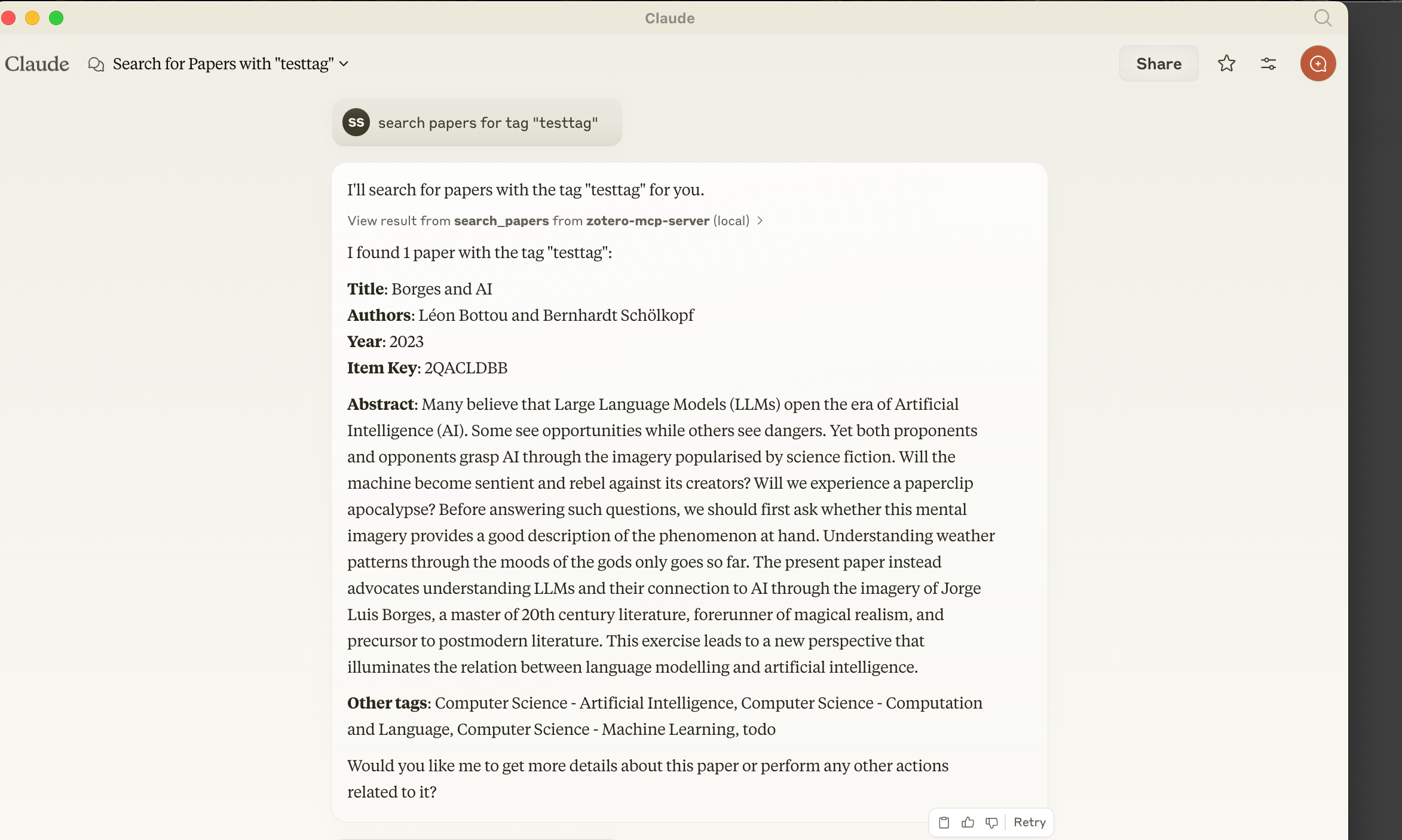
The server allows you to:
- Search papers by tags
- Get paper details and attached notes
- Add notes to papers
- Request paper summaries
Frequently asked questions
What is zotero-mcp-server?
zotero-mcp-server is MCP server to expose local zotero repository to MCP clients
How do I install zotero-mcp-server?
Open the GitHub repository and follow its README. Most MCP servers are added to your client's MCP config, then called by your agent.
Is zotero-mcp-server open source?
Yes — it is hosted on GitHub at https://github.com/swairshah/zotero-mcp-server and has 20 stars.
Related MCP tools
 mcp
mcpAWS MCP Servers — helping you get the most out of AWS, wherever you use MCP. Python-based implementation. Trusted by 6900+ developers.
 mcpo
mcpoA simple, secure MCP-to-OpenAPI proxy server Python-based implementation. Trusted by 3500+ developers. Trusted by 3500+ developers.
 mcp-obsidian
MCP server that interacts with Obsidian via the Obsidian rest API community plugin Python-based implementation. Trusted by 2300+ developers.
 mcp-cli
Default Configuration: MCP CLI defaults to using Ollama with the gpt-oss reasoning model for local, privacy-focused operation without requiring API keys.
 minimax-mcp
Official MiniMax Model Context Protocol (MCP) server that enables interaction with powerful Text to Speech, image generation and video generation APIs.
 mcp-mem0
MCP server for long term agent memory with Mem0. Also useful as a template to get you started building your own MCP server with Python!
Run your own MCP server? See who uses it and what to fix.
Measure it with TrackMCP