
sbox-mcp-server
An integration of an MCP server for the game S&box.
Documentation
> [!IMPORTANT]
> ## Project Discontinued
>
> Development of this library has been discontinued.
>
> I decided to stop maintaining this project as the MCP ecosystem for s&box started moving forward in a different direction. Around the same time, Braxen began developing their own MCP, and multiple other MCPs started to be released.
>
> The main issue with this library is that it required building and running an external bridge server between the coding agent and the game engine. While this approach worked, it was not easy to set up, was painful to maintain, and added unnecessary complexity for users.
>
> In the end, I moved toward a different solution: **sdocs.suiram.dev**, an MCP focused on providing agents with better context about the s&box documentation and API.
>
> This turned out to be more useful than an MCP that directly bridges with the game engine. The bigger problem was not engine communication, but the lack of reliable documentation and API context available to coding agents.
>
> This repository will remain available for reference, but it should be considered deprecated and is no longer actively developed.
Model Context Protocol for s&box


A Model Context Protocol (MCP) server that enables AI assistants to interact with the s&box editor through real-time WebSocket communication.
This MCP server works in conjunction with the separate s&box Adapter Library to provide seamless integration between AI assistants and your s&box projects.
Prerequisites
- Docker (recommended) or .NET SDK (for manual installation)
- s&box
- An AI assistant that supports MCP (for example, Cursor, Claude Desktop, etc.) is suggested
Quick Start
Step 1: Install and Run the MCP Server
To get started, make sure you have Docker installed on your system. Cursor users can simply click the button below to install and launch the MCP Server automatically, or you can follow the manual instructions below.
1. Run the container
docker run -d -p 8080:8080 --name sbox-mcp-server ghcr.io/suiramdev/sbox-mcp-server:latest2. Connect your AI assistant to the running MCP Server

Manual Installation using .NET SDK
1. Build the server
dotnet build2. Run the server
dotnet run3. Connect your AI assistant to the running MCP Server
Step 2: Install the Adapter Library in s&box
To enable interaction with s&box, you need to install the adapter library. This library allows the MCP Server to communicate with the s&box editor.
1. Install the Adapter Library from the sbox-mcp-library repository
2. Follow the setup instructions in the Adapter Library repository to:
> [!IMPORTANT]
> The server must be running for the s&box adapter library to function. Please ensure the server is running before proceeding to the next step.
Usage
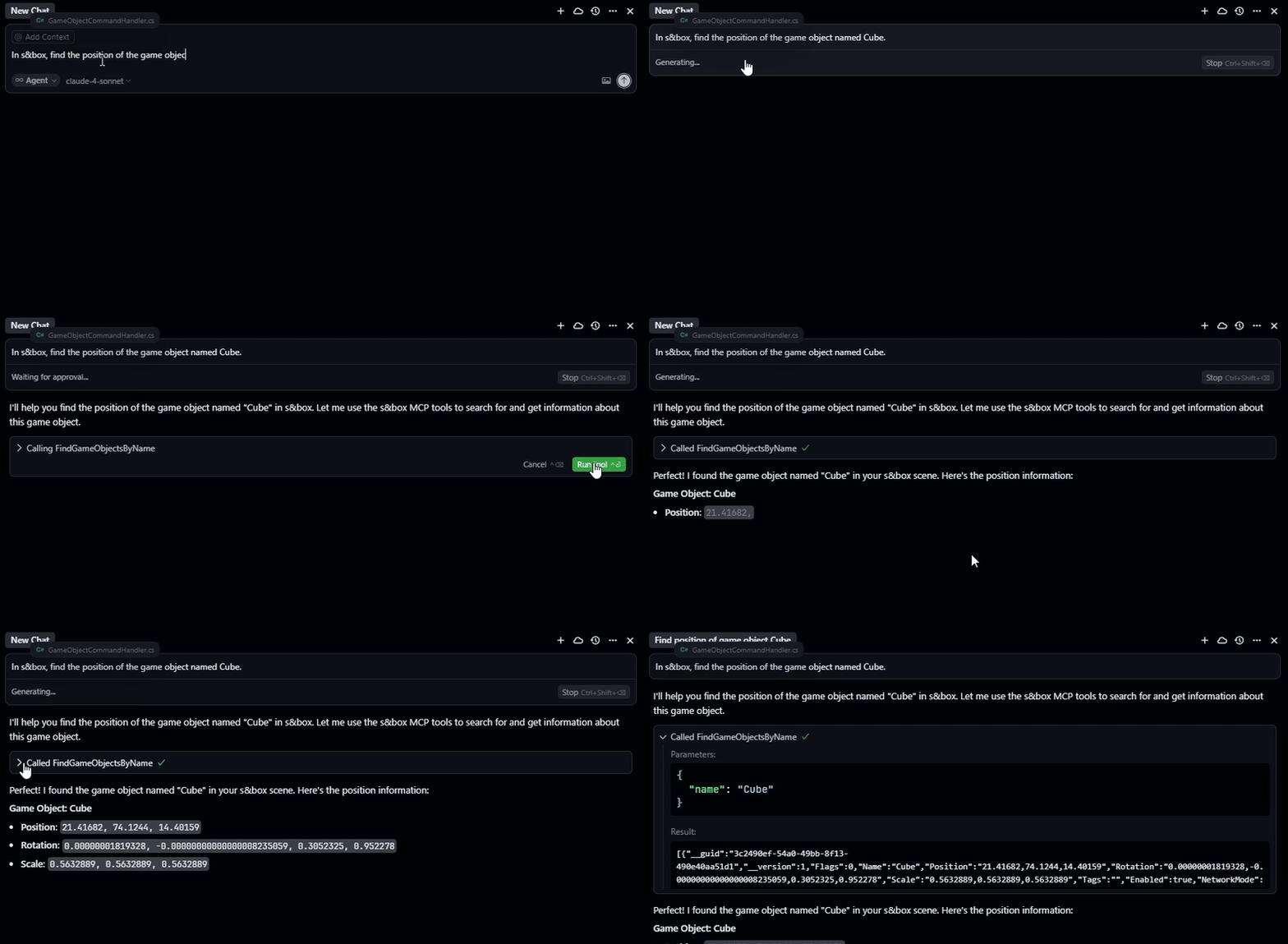
Once both this MCP Server and the s&box Adapter Library are installed and connected, you can interact with your s&box editor using natural language through your AI assistant:
"Create a ModelRenderer component on the Cube object"
"Find all game objects named 'Player'"
"Set the Scale property of the Transform component on MainCamera to 2,2,2"
"Remove the Rigidbody component from the Ball object"
"Show me all components attached to the Ground object"
Architecture
This MCP Server acts as a bridge between:
- AI Assistant ↔ This MCP Server ↔ s&box Adapter Library ↔ s&box Editor
The MCP Server:
- Receives commands from AI assistants via the Model Context Protocol
- Translates MCP tool calls into structured WebSocket commands
- Sends commands to the s&box Adapter Library for execution
- Returns responses back to AI assistants
Contributing
Contributions are welcome! Please feel free to submit a Pull Request. For major changes, please open an issue first to discuss what you would like to change.
Related Repositories
- This Repository: sbox-mcp-server - The main MCP server component
- Adapter Library: sbox-mcp-library - s&box integration library
Support
- Issues: GitHub Issues
- Discussions: GitHub Discussions
- Adapter Library Support: sbox-mcp-library Issues
Frequently asked questions
What is sbox-mcp-server?
sbox-mcp-server is An integration of an MCP server for the game S&box.
How do I install sbox-mcp-server?
Open the GitHub repository and follow its README. Most MCP servers are added to your client's MCP config, then called by your agent.
Is sbox-mcp-server open source?
Yes — it is hosted on GitHub at https://github.com/suiramdev/sbox-mcp-server and has 10 stars.
Related MCP tools
 Unity-MCP
AI Skills, MCP Tools, and CLI for Unity Engine. Full AI develop and test loop. Use cli for quick setup. Efficient token usage, advanced tools. Any C# method may be turned into a tool by a single line. Works with Claude Code, Gemini, Copilot, Cursor and any other absolutely for free.
 unity-mcp
Unity MCP acts as a bridge between AI assistants and your Unity Editor. Give your LLM tools to manage assets, control scenes, edit scripts, and automate tasks within Unity.
 UI-TARS-desktop
The Open-Source Multimodal AI Agent Stack: Connecting Cutting-Edge AI Models and Agent Infra
 n8n-mcp
A MCP for Claude Desktop / Claude Code / Windsurf / Cursor to build n8n workflows for you
 firecrawl-mcp-server
🔥 Official Firecrawl MCP Server - Adds powerful web scraping and search to Cursor, Claude and any other LLM clients.
 mcp
mcpBrowser MCP is a Model Context Provider (MCP) server that allows AI applications to control your browser
Run your own MCP server? See who uses it and what to fix.
Measure it with TrackMCP