
paprika-3-mcp
MCP Server for creating/editing recipes in Paprika 3 with natural language
Documentation
paprika-3-mcp
A Model Context Protocol (MCP) server that exposes your Paprika 3 recipes as LLM-readable resources — and lets an LLM like Claude create or update recipes in your Paprika app.
🖼️ Example: Claude using the Paprika MCP server
🚀 Features
See anything missing? Open an issue on this repo to request a feature!
📄 Resources
- Recipes ✅
- Recipe Photos 🚧
🛠 Tools
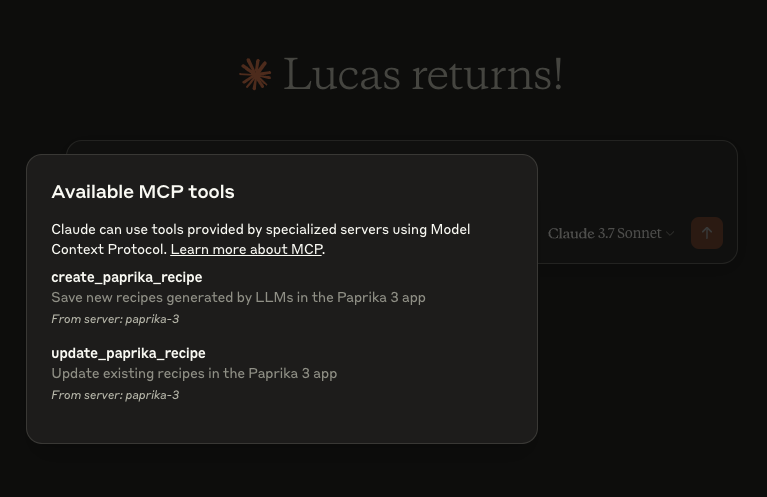
- `create_paprika_recipe`
Allows Claude to save a new recipe to your Paprika app
- `update_paprika_recipe`
Allows Claude to modify an existing recipe
⚙️ Prerequisites
- ✅ A Mac, Linux, or Windows system
- ✅ Paprika 3 installed with cloud sync enabled
- ✅ Your Paprika 3 username and password
- ✅ Claude or any LLM client with MCP tool support enabled
🛠 Installation
You can download a prebuilt binary from the Releases page.
🍎 macOS (via Homebrew)
If you're on macOS, the easiest way to install is with Homebrew:
brew tap soggycactus/tap
brew install paprika-3-mcp
🐧 Linux / 🪟 Windows
1. Go to the latest release.
2. Download the appropriate archive for your operating system and architecture:
3. Extract the zip archive:
unzip paprika-3-mcp___.zip4. Move the binary to a directory in your system's `$PATH`:
sudo mv paprika-3-mcp /usr/local/bin/✅ Test the installation
You can verify the server is installed by checking:
paprika-3-mcp --versionYou should see:
paprika-3-mcp version v0.1.0🤖 Setting up Claude
If you haven't setup MCP before, first read more about how to install Claude Desktop client & configure an MCP server.
To add `paprika-3-mcp` to Claude, all you need to do is create another entry in the `mcpServers` section of your `claude_desktop_config.json` file:
{
  "mcpServers": {
    "paprika-3": {
      "command": "paprika-3-mcp",
      "args": [
        "--username",
        "",
        "--password",
        ""
      ]
    }
  }
}
Restart Claude and you should see the MCP server tools after clicking on the hammerhead icon:
📄 License
This project is open source under the MIT License © 2025 Lucas Stephens.
🗂 Miscellaneous
📄 Where can I see the server logs?
The MCP server writes structured logs using Go’s `slog` with rotation via `lumberjack`. Log files are automatically created based on your operating system:
| Operating System | Log File Path |
|---|---|
| macOS | `~/Library/Logs/paprika-3-mcp/server.log` |
| Linux | `/var/log/paprika-3-mcp/server.log` |
| Windows | `%APPDATA%\paprika-3-mcp\server.log` |
| Other / Unknown | `/tmp/paprika-3-mcp/server.log` |
> 💡 Logs are rotated automatically at 100MB, with only 5 backup files kept. Logs are also wiped after 10 days.
Frequently asked questions
What is paprika-3-mcp?
paprika-3-mcp is MCP Server for creating/editing recipes in Paprika 3 with natural language
How do I install paprika-3-mcp?
Open the GitHub repository and follow its README. Most MCP servers are added to your client's MCP config, then called by your agent.
Is paprika-3-mcp open source?
Yes — it is hosted on GitHub at https://github.com/soggycactus/paprika-3-mcp and has 38 stars.
Related MCP tools
 kubeshark
eBPF-powered network observability for Kubernetes. Indexes L4/L7 traffic with full K8s context, decrypts TLS without keys. Queryable by AI agents via MCP and humans via dashboard.
 go-whatsapp-web-multidevice
GOWA - WhatsApp REST API with support for UI, Multi Account, Webhooks, and MCP, and Chatwoot. Built with Golang for efficient memory use.
 radar
radarThe missing open-source Kubernetes UI with a built-in MCP server for AI agents. See what's broken, why, and what changed. Issues, Topology, event timeline, Helm, GitOps, live service traffic, and cluster audits - all in one Go binary.
 mcp-language-server
mcp-language-server gives MCP enabled clients access semantic tools like get definition, references, rename, and diagnostics.
 terraform-mcp-server
The Terraform MCP Server provides seamless integration with Terraform ecosystem, enabling advanced automation and interaction capabilities for Infrastructure as Code (IaC) development.
 matlab-mcp-server
Run MATLAB® using AI applications with the official MATLAB MCP Server from MathWorks®. This MCP server for MATLAB supports a wide range of coding agents like Claude Code® and Visual Studio® Code.
Run your own MCP server? See who uses it and what to fix.
Measure it with TrackMCP