
mcp-cisco-support
Comprehensive TypeScript MCP server for Cisco Support APIs with dual transport support
Documentation
Cisco Support MCP Server





A production-ready TypeScript MCP (Model Context Protocol) server for Cisco Support APIs with comprehensive security and dual transport support. This extensible server provides access to multiple Cisco Support APIs including Bug Search, Case Management, and End-of-Life information.
🚀 Current Features
- Multi-API Support: 8 Cisco Support APIs fully implemented (46 total tools)
- OAuth 2.1 Server: ✨ Production-grade authentication with fine-grained scope-based access control
- ElicitationRequest Support: Dynamic user interaction for gathering missing parameters
- Triple Auth Modes: stdio (no auth), Bearer token (simple), OAuth 2.1 (production)
- Configurable API Access: Enable only the Cisco Support APIs you have access to
- Specialized Prompts: 9 workflow prompts for guided Cisco support scenarios
- Dual Transport: stdio (local MCP clients) and HTTP (remote server with auth)
- OAuth2 Authentication: Automatic token management with Cisco API
- Real-time Updates: Server-Sent Events for HTTP mode
- TypeScript: Full type safety and MCP SDK integration
- Production Security: Helmet, CORS, input validation, PKCE, scope validation
- Docker Support: Containerized deployment with OAuth config volume mounts
- Comprehensive Logging: Structured logging with timestamps
📊 Supported Cisco APIs
The server supports the following Cisco Support APIs (configurable via `SUPPORT_API` environment variable):
| API | Status | Tools | Description |
|---|---|---|---|
| Enhanced Analysis (`enhanced_analysis`) | ⭐ RECOMMENDED | 6 tools | Advanced analysis tools for comprehensive product assessment |
| Bug (`bug`) | ✅ Complete | 14 tools | Bug Search, Details, Product-specific searches + Enhanced tools |
| Case (`case`) | ✅ Complete | 4 tools | Support case management and operations |
| EoX (`eox`) | ✅ Complete | 4 tools | End of Life/Sale information and lifecycle planning |
| PSIRT (`psirt`) | ✅ Complete | 8 tools | Product Security Incident Response Team vulnerability data |
| Product (`product`) | ✅ Complete | 3 tools | Product details, specifications, and technical information |
| Software (`software`) | ✅ Complete | 6 tools | Software suggestions, releases, and upgrade recommendations |
| Serial (`serial`) | ✅ Complete | 3 tools | Serial number to coverage, warranty, and product information |
| RMA (`rma`) | ✅ Complete | 3 tools | Return Merchandise Authorization tracking and management |
| Smart Bonding (`smart_bonding`) | ⚠️ EXPERIMENTAL | 8 tools | Complete ticket lifecycle management and TSP codes (UNTESTED - requires special credentials) |
Implementation Status: 8/8 Core APIs complete (100%) with 46 total tools + 1 experimental API (8 tools)
Configuration Examples:
- `SUPPORT_API=enhanced_analysis` - Enhanced analysis tools only (6 tools) ← RECOMMENDED for most users
- `SUPPORT_API=bug` - All Bug API tools including enhanced analysis (14 tools)
- `SUPPORT_API=bug,case,eox,psirt` - Core support APIs (28 tools)
- `SUPPORT_API=bug,case,eox,psirt,product,software` - All implemented APIs (39 tools)
- `SUPPORT_API=all` - All available APIs (includes 2 placeholder APIs)
Quick Start
NPX Installation (Recommended)
Start in stdio mode for Claude Desktop:
npx mcp-cisco-supportStart HTTP server with authentication:
npx mcp-cisco-support --http
# Token displayed in console for authentication
Generate Bearer token for HTTP mode:
npx mcp-cisco-support --generate-tokenGet help and see all options:
npx mcp-cisco-support --helpEnvironment Setup
1. Generate authentication token (for HTTP mode):
npx mcp-cisco-support --generate-token
   export MCP_BEARER_TOKEN=
2. Set Cisco API credentials:
export CISCO_CLIENT_ID=your_client_id_here
   export CISCO_CLIENT_SECRET=your_client_secret_here
   export SUPPORT_API=bug,case,eox,psirt,product,software  # All implemented APIs (recommended)
3. Start the server:
# For Claude Desktop (stdio mode)
   npx mcp-cisco-support

   # For HTTP access (with authentication)
   npx mcp-cisco-support --http
Local Development
git clone https://github.com/sieteunoseis/mcp-cisco-support.git
cd mcp-cisco-support
npm install
npm run build
npm start
Claude Desktop Integration
Prerequisites
1. Get Cisco API Credentials:
2. Install Claude Desktop:
Step-by-Step Setup
1. Locate Claude Desktop Config File:
2. Create or Edit the Config File:
{
     "mcpServers": {
       "cisco-support": {
         "command": "npx",
         "args": ["-y", "mcp-cisco-support"],
         "env": {
           "CISCO_CLIENT_ID": "your_client_id_here",
           "CISCO_CLIENT_SECRET": "your_client_secret_here",
           "SUPPORT_API": "bug,product"
         }
       }
     }
   }
> Note: The `-y` flag automatically accepts package installation, which is required for Claude Desktop since it runs in the background without user interaction.
Optional Environment Variables:
Configure which APIs to enable with `SUPPORT_API`:
Product Autocomplete (optional, requires `SUPPORT_API` to include `product`):
"env": {
     "CISCO_CLIENT_ID": "your_client_id_here",
     "CISCO_CLIENT_SECRET": "your_client_secret_here",
     "SUPPORT_API": "bug,product",
     "CISCO_WEB_COOKIE": "JSESSIONID=...; OptanonConsent=..."
   }
See the Product Autocomplete section for setup instructions.
3. Replace Your Credentials:
4. Restart Claude Desktop:
Verification
After setup, you should be able to:
1. Ask Claude about Cisco bugs:
"Search for bugs related to memory leaks in Cisco switches"2. Get specific bug details:
"Get details for Cisco bug CSCab12345"3. Search by product:
"Find bugs affecting Cisco Catalyst 3560 switches"Example Usage in Claude Desktop
Once configured, you can ask Claude questions like:
- Basic Bug Search:
- "Search for recent bugs related to 'crash' in Cisco products"
- "Find open bugs with severity 1 or 2"
- "Show me bugs modified in the last 30 days"
- Product-Specific Searches:
- "Find bugs for product ID C9200-24P"
- "Search for bugs in Cisco Catalyst 9200 Series affecting release 17.5.1"
- "Show bugs fixed in software release 17.5.2"
- Bug Details:
- "Get full details for bug CSCab12345"
- "Show me information about bugs CSCab12345,CSCcd67890"
- Advanced Filtering:
- "Find resolved bugs with severity 3 modified after 2023-01-01"
- "Search for bugs in 'Cisco ASR 9000 Series' sorted by severity"
- "Can you show me all the cisco bugs in the last 30 days for the product Cisco Unified Communications Manager (CallManager)?" (uses keyword search)
- "Find bugs for Cisco Unified Communications Manager affecting releases 14.0 and 15.0" (uses product series search)
Claude will use the appropriate MCP tools to fetch real-time data from Cisco's Bug API and provide comprehensive responses with the latest information.
MCP Prompts
The server includes 10+ specialized prompts for guided Cisco support workflows:
- 🔍 cisco-high-severity-search - Search high-severity bugs by product or serial number
- 🚨 cisco-incident-investigation - Investigate symptoms and errors
- 🔄 cisco-upgrade-planning - Research issues before upgrades
- 🔧 cisco-maintenance-prep - Prepare for maintenance windows
- 🔒 cisco-security-advisory - Research security vulnerabilities
- ⚠️ cisco-known-issues - Check for software release issues
- 📋 cisco-case-investigation - Investigate support cases
- ⏰ cisco-lifecycle-planning - End-of-life planning
- 🎯 cisco-smart-search - Intelligent search with automatic refinement
- ✨ cisco-interactive-search - Interactive search with elicitation
Serial Number Support: Most prompts now accept either a product name OR a serial number. When you provide a serial number (e.g., "SAL09232Q0Z"), the server automatically looks up the product details and uses them for the search. This makes it easy to investigate issues when you have a device serial number but don't know the exact product model.
Each prompt provides structured investigation plans and expert recommendations.
Interactive Search with Elicitation
The cisco-interactive-search prompt demonstrates MCP's elicitation feature, allowing the server to dynamically request additional information from users during tool execution. This makes searches more natural and helps gather missing parameters without restarting requests.
Example Usage:
Use the "cisco-interactive-search" prompt with:
- initial_query: "memory leak"
- use_elicitation: true
See **examples/elicitation-example.md for detailed usage examples and ⚡ MCP Prompts** for complete prompt documentation.
🔍 MCP Resources - Product Autocomplete
The server exposes Cisco data as MCP Resources for direct client access. This includes a new Product Autocomplete feature that lets you search Cisco's internal product catalog using your browser session cookie.
Available Product Resources
When `SUPPORT_API` includes `product`, the following resources are available:
Resource Templates (dynamic URIs):
- `cisco://products/{product_id}` - Get product details by ID (e.g., C9300-24P, ISR4431)
- `cisco://products/autocomplete/{search_term}` - ✨ NEW: Search product catalog by name or model
Static Resources:
- `cisco://products/catalog` - Product catalog overview
- `cisco://products/autocomplete-help` - ✨ NEW: Setup instructions for product autocomplete
Product Autocomplete Setup
The product autocomplete feature requires your Cisco.com session cookie to access Cisco's internal API.
Quick Setup:
1. Log in to Cisco:
2. Extract Your Cookie:
3. Set Environment Variable:
export CISCO_WEB_COOKIE="JSESSIONID=...; OptanonConsent=...; ..."4. Query Products:
cisco://products/autocomplete/4431
   cisco://products/autocomplete/catalyst
   cisco://products/autocomplete/ASA
Cookie Lifecycle:
- Typical Validity: 24 hours
- Recommended Refresh: Daily before heavy use
- Expiration Signs: 401/403 errors, "Cookie expired" messages
For detailed setup instructions, query the help resource:
cisco://products/autocomplete-helpExample Response
Query: `cisco://products/autocomplete/4431`
{
  "autoPopulateHMPProductDetails": [{
    "parentMdfConceptId": 286281708,
    "parentMdfConceptName": "Cisco 4000 Series Integrated Services Routers",
    "mdfConceptId": 284358776,
    "mdfConceptName": "Cisco 4431 Integrated Services Router",
    "mdfMetaclass": "Model"
  }]
}
Security Best Practices
- ✅ Never commit cookies - they're like passwords
- ✅ Use .env file - already in .gitignore
- ✅ Refresh regularly - cookies expire after ~24 hours
- ✅ Monitor activity - check your Cisco account
- ✅ Use dedicated account - not your primary login
Usage in Claude Desktop
Ask Claude:
- "Show me the help for product autocomplete"
- "Search for Cisco product 4431 using autocomplete"
- "What is the full name of product ISR4431?"
- "Find products matching 'catalyst switch'"
See **docs/PRODUCT_AUTOCOMPLETE_SOLUTIONS.md for implementation details and docs/CISCO_COOKIE_ANALYSIS.md** for cookie lifecycle information.
⚠️ Smart Bonding Customer API (EXPERIMENTAL/UNTESTED)
The server includes experimental support for Cisco's Smart Bonding Customer API for ticket management and problem code classification. This feature is UNTESTED and requires special credentials obtained through your Cisco Account Manager.
Smart Bonding Features
Available Tools (8 total):
- `get_smart_bonding_tsp_codes` - Retrieve TSP (Technology, Sub-Technology, Problem Code) details for ticket classification
- `pull_smart_bonding_tickets` - Retrieve ticket updates from Cisco that haven't been pulled yet
- `create_smart_bonding_ticket` - Create a new support ticket (returns upload credentials in response)
- `update_smart_bonding_ticket` - Add work notes and update ticket status
- `upload_file_to_smart_bonding_ticket` - Upload files using credentials from ticket creation (HTTPS PUT to cxd.cisco.com)
- `escalate_smart_bonding_ticket` - Escalate critical issues to Cisco
- `resolve_smart_bonding_ticket` - Mark tickets as resolved with resolution notes
- `close_smart_bonding_ticket` - Close completed tickets with diagnosis and solution
File Upload Process
Smart Bonding uses a separate upload mechanism from the REST API:
1. Create ticket → Response includes upload credentials (Field80-82)
2. Save credentials → Cannot be retrieved later!
3. Upload files → Use `upload_file_to_smart_bonding_ticket` tool or curl
4. 72-day expiration → Token expires 72 days after creation
Upload credentials provided in ticket creation response:
- Field80: Upload domain (e.g., cxd.cisco.com)
- Field81: Authentication token (password)
- Field82: Token expiration timestamp
Files cannot be modified after upload - submit new files for corrections.
Authentication Differences
Smart Bonding API uses a different authentication system than standard Cisco Support APIs:
| Feature | Standard Support APIs | Smart Bonding API |
|---|---|---|
| OAuth2 Endpoint | `https://id.cisco.com/oauth2/default/v1/token` | `https://cloudsso.cisco.com/as/token.oauth2` |
| Token Validity | 12 hours | 1 hour |
| Credentials | Self-service via Cisco Developer Portal | Contact Cisco Account Manager |
| Environment Variables | `CISCO_CLIENT_ID`, `CISCO_CLIENT_SECRET` | `SMART_BONDING_CLIENT_ID`, `SMART_BONDING_CLIENT_SECRET` |
Configuration
1. Obtain Credentials - Contact your Cisco Account Manager to request Smart Bonding API access
2. Set Environment Variables:
export SMART_BONDING_CLIENT_ID=your_smart_bonding_client_id
   export SMART_BONDING_CLIENT_SECRET=your_smart_bonding_client_secret
   export SMART_BONDING_ENV=production  # or 'staging' for test environment
   export SUPPORT_API=smart_bonding     # Enable Smart Bonding API
3. Use Smart Bonding Tools:
Important Notes
- ⚠️ EXPERIMENTAL/UNTESTED - This implementation has not been tested with live Smart Bonding credentials
- ⚠️ Separate Credentials Required - Smart Bonding uses different OAuth2 credentials than standard Support APIs
- ⚠️ Not Included in `SUPPORT_API=all` - Must be explicitly enabled with `SUPPORT_API=smart_bonding`
- ⚠️ Special Access Required - Contact Cisco Account Manager for credential provisioning
- Base URLs differ for staging vs production environments
- Supports correlation IDs for end-to-end request traceability
Example Usage
# With Claude Desktop - add to claude_desktop_config.json
{
  "mcpServers": {
    "cisco-smart-bonding": {
      "command": "npx",
      "args": ["-y", "mcp-cisco-support"],
      "env": {
        "SMART_BONDING_CLIENT_ID": "your_id",
        "SMART_BONDING_CLIENT_SECRET": "your_secret",
        "SMART_BONDING_ENV": "production",
        "SUPPORT_API": "smart_bonding"
      }
    }
  }
}
For complete implementation details and API architecture, see **SMART_BONDING_IMPLEMENTATION.md**.
Screenshots
Claude Desktop Integration
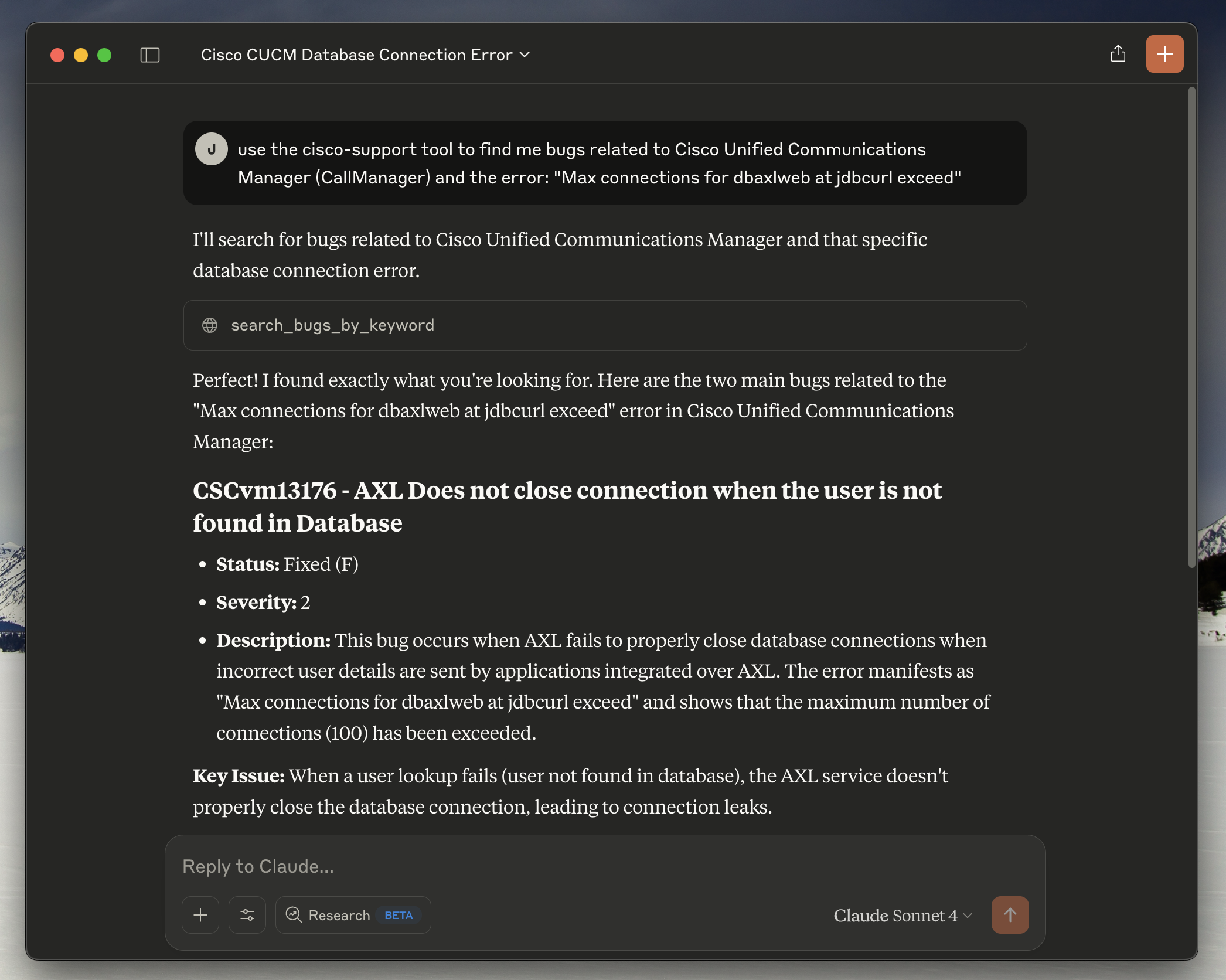
*Claude Desktop successfully connected to the Cisco Support MCP server, demonstrating the bug search functionality with real-time responses from Cisco's Bug API.*
MCP Inspector
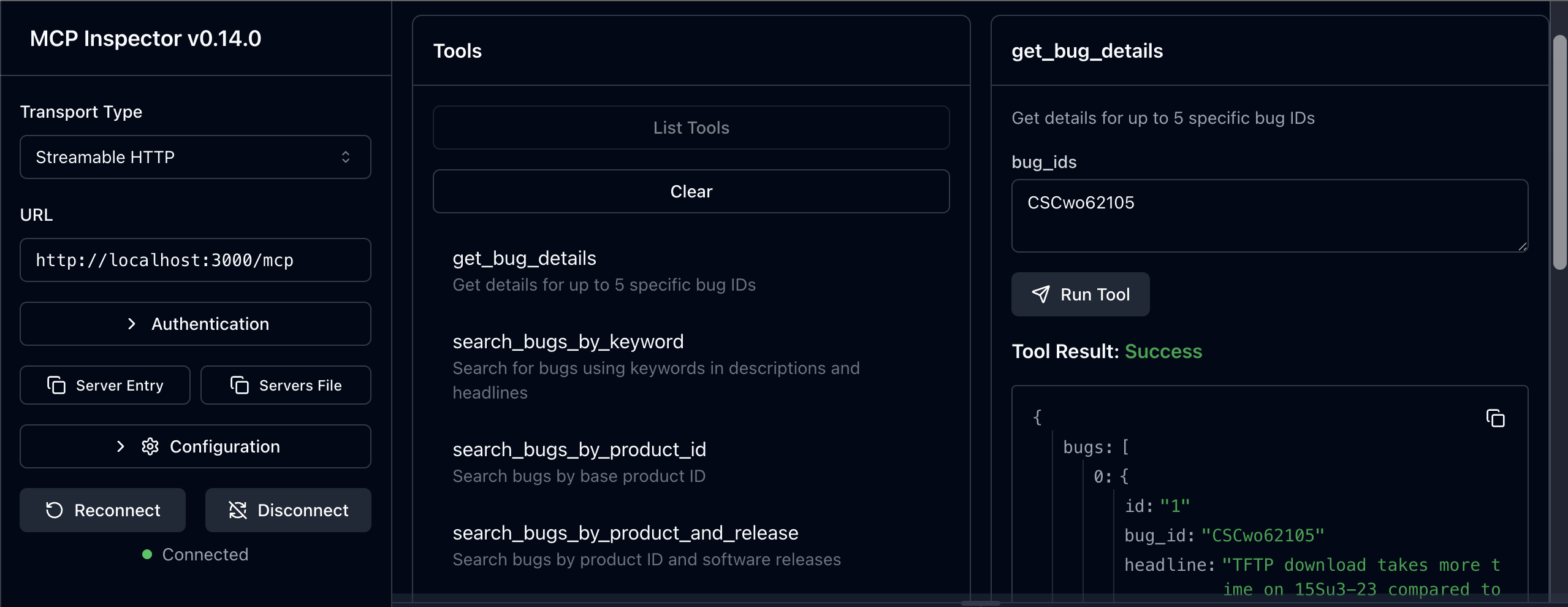
*MCP Inspector v0.14.0+ showing the available tools and server connectivity testing capabilities.*
Alternative Installation Methods
Global Installation
If you prefer to install globally instead of using npx:
npm install -g mcp-cisco-supportThen use this config:
{
  "mcpServers": {
    "cisco-support": {
      "command": "mcp-cisco-support",
      "env": {
        "CISCO_CLIENT_ID": "your_client_id_here",
        "CISCO_CLIENT_SECRET": "your_client_secret_here",
        "SUPPORT_API": "bug"
      }
    }
  }
}
Local Installation
For development or custom setups:
git clone https://github.com/sieteunoseis/mcp-cisco-support.git
cd mcp-cisco-support
npm install
npm run build
Then use this config:
{
  "mcpServers": {
    "cisco-support": {
      "command": "node",
      "args": ["/path/to/mcp-cisco-support/dist/index.js"],
      "env": {
        "CISCO_CLIENT_ID": "your_client_id_here",
        "CISCO_CLIENT_SECRET": "your_client_secret_here",
        "SUPPORT_API": "bug"
      }
    }
  }
}
Troubleshooting
Common Issues
1. "Command not found" errors:
2. Authentication failures:
3. MCP server not loading:
4. Permission errors:
Debugging
1. Test the server manually:
npx mcp-cisco-supportThis should start the server in stdio mode without errors.
2. Validate your config:
Use a JSON validator to ensure your config file is properly formatted.
3. Check Claude Desktop logs:
Monitor logs in real-time (macOS):
# Follow logs in real-time
   tail -n 20 -F ~/Library/Logs/Claude/mcp*.log
On Windows:
# Check logs directory
   %APPDATA%\Claude\logs\
Getting Help
- Issues: GitHub Issues
- Cisco API: Cisco Developer Documentation
- MCP Protocol: Model Context Protocol
Docker Deployment
# Use pre-built image
docker pull ghcr.io/sieteunoseis/mcp-cisco-support:latest
docker run -p 3000:3000 \
  -e CISCO_CLIENT_ID=your_id \
  -e CISCO_CLIENT_SECRET=your_secret \
  -e SUPPORT_API=bug \
  ghcr.io/sieteunoseis/mcp-cisco-support:latest --http

# Or build locally
docker-compose up -d
🔐 Security
- stdio mode: No authentication (Claude Desktop, local clients)
- HTTP mode: Bearer token authentication required
# Generate secure token
npx mcp-cisco-support --generate-token

# Use token for HTTP mode
export MCP_BEARER_TOKEN=your_token
npx mcp-cisco-support --http
See **🔒 Security Guide** for complete security documentation.
Configuration
Environment Variables
Create a `.env` file with your configuration:
# 🔑 Cisco API OAuth2 Configuration (REQUIRED)
CISCO_CLIENT_ID=your_client_id_here
CISCO_CLIENT_SECRET=your_client_secret_here

# 🌐 Server Configuration
PORT=3000
NODE_ENV=development

# 🚀 API Support Configuration
# Enable specific Cisco Support APIs you have access to
# Options: bug, case, eox (plus planned: product, serial, rma, software, asd)
SUPPORT_API=bug,case,eox              # Multiple APIs
# SUPPORT_API=all                     # All available APIs
# SUPPORT_API=bug                     # Single API (default)

# 🔐 HTTP Authentication Configuration (HTTP mode only)
# Custom Bearer token for HTTP authentication (optional - generates random if not set)
MCP_BEARER_TOKEN=your_custom_secure_token_here

# ⚠️ SECURITY WARNING: Only use in development/testing
# DANGEROUSLY_OMIT_AUTH=true          # Disables HTTP authentication entirely
OAuth 2.1 Authentication (Advanced)
For production-grade authentication with fine-grained access control, use OAuth 2.1 mode:
Quick Start
# 1. Copy example configuration files
cp config/oauth-clients.example.json config/oauth-clients.json
cp config/oauth-secrets.example.json config/oauth-secrets.json

# 2. Edit config/oauth-clients.json to configure your clients
# 3. Add client secrets to config/oauth-secrets.json (optional, for confidential clients)

# 4. Start server in OAuth 2.1 mode
AUTH_TYPE=oauth2.1 npm run oauth:start
# or for development with hot reload:
npm run oauth:dev
Configuration Files
config/oauth-clients.json - Client configuration (can be version controlled):
{
  "clients": [
    {
      "client_id": "mcp_inspector_dev",
      "client_uri": "http://localhost:6274",
      "redirect_uris": ["http://localhost:6274/oauth/callback"],
      "scopes": ["mcp:bug", "mcp:psirt"],
      "grant_types": ["authorization_code"],
      "description": "MCP Inspector - Limited to Bug + Security APIs",
      "enabled": true
    }
  ],
  "settings": {
    "allow_dynamic_registration": true,
    "token_expiry_seconds": 3600
  }
}
config/oauth-secrets.json - Client secrets (gitignored, never commit):
{
  "secrets": {
    "mcp_inspector_prod": "your_production_secret_here"
  }
}
OAuth Scopes
Control API access with fine-grained scopes:
| Scope | API Access | Description |
|---|---|---|
| `mcp` | All APIs | Full access to all MCP tools |
| `mcp:bug` | Bug API | Bug search and details only |
| `mcp:case` | Case API | Support case management only |
| `mcp:eox` | EoX API | End-of-life information only |
| `mcp:psirt` | Security API | Security advisories only |
| `mcp:product` | Product API | Product information only |
| `mcp:software` | Software API | Software suggestions only |
| `mcp:serial` | Serial API | Serial number lookups only |
| `mcp:rma` | RMA API | Return authorization only |
Best Practice: Grant only the scopes each application needs (principle of least privilege).
Environment Variables
Point to custom config file locations:
# OAuth 2.1 Configuration
AUTH_TYPE=oauth2.1

# Optional: Custom config paths (defaults shown)
OAUTH_CLIENTS_CONFIG=config/oauth-clients.json
OAUTH_SECRETS_CONFIG=config/oauth-secrets.json

# Optional: Custom issuer URL (defaults to http://localhost:PORT)
OAUTH2_ISSUER_URL=https://your-server.com
OAuth Endpoints
When running in OAuth 2.1 mode, the server provides:
- `GET /.well-known/oauth-authorization-server` - OAuth discovery metadata
- `GET /authorize` - Authorization endpoint (displays consent page)
- `POST /authorize/approve` - Authorization approval
- `POST /token` - Token endpoint (PKCE required)
- `POST /register` - Dynamic client registration (if enabled)
See docs/OAUTH_CLIENTS_CONFIG.md for complete OAuth 2.1 documentation.
Claude Desktop Integration
Complete configuration for Claude Desktop:
{
  "mcpServers": {
    "cisco-support": {
      "command": "npx",
      "args": ["-y", "mcp-cisco-support"],
      "env": {
        "CISCO_CLIENT_ID": "your_client_id_here",
        "CISCO_CLIENT_SECRET": "your_client_secret_here",
        "SUPPORT_API": "bug,case,eox"
      }
    }
  }
}
Docker Configuration
Option 1: Bearer Token Authentication
docker run -p 3000:3000 \
  -e CISCO_CLIENT_ID=your_client_id \
  -e CISCO_CLIENT_SECRET=your_client_secret \
  -e SUPPORT_API=bug,case,eox \
  -e MCP_BEARER_TOKEN=your_secure_token \
  ghcr.io/sieteunoseis/mcp-cisco-support:latest --http
Option 2: OAuth 2.1 Authentication (Production)
# 1. Create local OAuth config directory
mkdir -p ./oauth-config
cp config/oauth-clients.example.json ./oauth-config/oauth-clients.json
cp config/oauth-secrets.example.json ./oauth-config/oauth-secrets.json

# 2. Edit ./oauth-config/oauth-clients.json and oauth-secrets.json

# 3. Run with volume mount
docker run -p 3000:3000 \
  -e CISCO_CLIENT_ID=your_client_id \
  -e CISCO_CLIENT_SECRET=your_client_secret \
  -e AUTH_TYPE=oauth2.1 \
  -e OAUTH_CLIENTS_CONFIG=/oauth-config/oauth-clients.json \
  -e OAUTH_SECRETS_CONFIG=/oauth-config/oauth-secrets.json \
  -v $(pwd)/oauth-config:/oauth-config:ro \
  ghcr.io/sieteunoseis/mcp-cisco-support:latest --http
Option 3: Without Authentication (Development Only)
docker run -p 3000:3000 \
  -e CISCO_CLIENT_ID=your_client_id \
  -e CISCO_CLIENT_SECRET=your_client_secret \
  -e DANGEROUSLY_OMIT_AUTH=true \
  ghcr.io/sieteunoseis/mcp-cisco-support:latest --http
Docker Compose with OAuth 2.1:
version: '3.8'
services:
  mcp-cisco-support:
    image: ghcr.io/sieteunoseis/mcp-cisco-support:latest
    ports:
      - "3000:3000"
    environment:
      - CISCO_CLIENT_ID=your_client_id
      - CISCO_CLIENT_SECRET=your_client_secret
      - AUTH_TYPE=oauth2.1
      - OAUTH_CLIENTS_CONFIG=/oauth-config/oauth-clients.json
      - OAUTH_SECRETS_CONFIG=/oauth-config/oauth-secrets.json
    volumes:
      - ./oauth-config:/oauth-config:ro
    command: ["node", "dist/index.js", "--http"]
    restart: unless-stopped
API Endpoints
| Endpoint | Method | Description |
|---|---|---|
| `/` | GET | Server information and available endpoints |
| `/mcp` | POST | Main MCP endpoint (JSON-RPC over HTTP) |
| `/messages` | POST | Alternative MCP endpoint for N8N compatibility |
| `/sse` | GET | SSE connection with session management |
| `/sse` | POST | Legacy SSE message endpoint (deprecated) |
| `/sse/session/{sessionId}` | POST | Session-specific MCP message endpoint |
| `/ping` | GET | Simple ping endpoint for connectivity testing |
| `/health` | GET | Health check with detailed status |
📚 Documentation
For detailed information, see our comprehensive GitHub Wiki:
- **📋 Available Tools** - Complete reference for all 46 MCP tools across 8 APIs
- **🔧 Advanced Configuration** - Environment variables and deployment options
- **🔒 Security Guide** - Authentication, tokens, and security best practices
- **🚀 Docker Deployment** - Containerized deployment and production setup
- **🌐 SSE Integration** - Server-Sent Events and real-time communication
- **🧪 Testing Framework** - Comprehensive testing and validation
- **🔧 Development Guide** - Contributing, architecture, and API development
- **🚨 Troubleshooting Guide** - Common issues and debugging
- **⚡ MCP Prompts** - Guided workflows for Cisco support scenarios
Usage Examples
cURL Examples
# Test server connectivity
curl http://localhost:3000/ping

# Check health status
curl http://localhost:3000/health

# List available tools (main MCP endpoint)
curl -X POST http://localhost:3000/mcp \
  -H "Content-Type: application/json" \
  -d '{
    "jsonrpc": "2.0",
    "id": "1",
    "method": "tools/list"
  }'

# List available tools (alternative endpoint for N8N)
curl -X POST http://localhost:3000/messages \
  -H "Content-Type: application/json" \
  -d '{
    "jsonrpc": "2.0",
    "id": "1",
    "method": "tools/list"
  }'

# Test SSE connection (will show endpoint event)
curl -N http://localhost:3000/sse

# Search for bugs by keyword
curl -X POST http://localhost:3000/mcp \
  -H "Content-Type: application/json" \
  -d '{
    "jsonrpc": "2.0",
    "id": "2",
    "method": "tools/call",
    "params": {
      "name": "search_bugs_by_keyword",
      "arguments": {
        "keyword": "crash",
        "severity": "1",
        "status": "open"
      }
    }
  }'

# Get specific bug details
curl -X POST http://localhost:3000/mcp \
  -H "Content-Type: application/json" \
  -d '{
    "jsonrpc": "2.0",
    "id": "3",
    "method": "tools/call",
    "params": {
      "name": "get_bug_details",
      "arguments": {
        "bug_ids": "CSCab12345"
      }
    }
  }'
JavaScript Client Example
async function searchBugs(keyword) {
  const response = await fetch('http://localhost:3000/mcp', {
    method: 'POST',
    headers: {
      'Content-Type': 'application/json',
    },
    body: JSON.stringify({
      jsonrpc: '2.0',
      id: Date.now(),
      method: 'tools/call',
      params: {
        name: 'search_bugs_by_keyword',
        arguments: {
          keyword: keyword,
          page_index: 1,
          status: 'open'
        }
      }
    })
  });

  const result = await response.json();
  return result;
}
Health Monitoring
The server provides a comprehensive health check endpoint:
curl http://localhost:3000/healthResponse includes:
- Server status
- OAuth2 token status
- Memory usage
- Uptime
- Active SSE connections
Security Features
- Helmet: Security headers
- CORS: Cross-origin resource sharing
- Input Validation: Schema-based validation
- Non-root Execution: Docker security
- Environment Variables: Secure credential storage
Troubleshooting
Common Issues
1. OAuth2 Authentication Failed
2. API Calls Failing
3. Docker Issues
Logs
Structured JSON logs include:
- Timestamp
- Log level (info, error, warn)
- Message
- Additional context data
Testing
Running Tests
# Run all tests
npm test

# Run tests in watch mode
npm run test:watch

# Run tests with coverage
npm run test:coverage

# Run specific test suite
npx jest tests/auth.test.js
npx jest tests/mcp-tools.test.js
Test Structure
The test suite includes:
- Authentication Tests (`tests/auth.test.js`): OAuth2 authentication, token management, error handling
- MCP Tools Tests (`tests/mcp-tools.test.js`): All 8 MCP tools, error handling, pagination
- Setup (`tests/setup.js`): Test environment configuration
Recent Test Fixes
The following issues were identified and resolved in the test suite:
✅ Fixed Issues
1. Token Refresh Logic
2. Multiple Bug IDs Handling
3. Search Tools Implementation
4. Error Handling
5. Authentication Failure Scenarios
6. Test State Management
Test Configuration
- Jest: Using Jest with `--forceExit` flag for main test runs
- State Reset: Each test gets a fresh server instance with clean state
- Mock Management: Proper fetch mocking with correct sequence handling
- Test Isolation: Module cache clearing prevents state leakage
Key Implementation Details
- Native fetch: Uses Node.js native fetch instead of external libraries
- Token Management: 12-hour token validity with 30-minute refresh margin
- Error Handling: Comprehensive error handling with proper MCP error responses
- Security: Helmet security headers, CORS support, input validation
- Logging: Structured JSON logging with timestamps
Development
Project Structure
mcp-cisco-support/
├── src/
│   └── index.ts        # Main TypeScript server implementation
├── dist/               # Compiled JavaScript (generated by build)
├── package.json        # Dependencies and scripts
├── tsconfig.json       # TypeScript configuration
├── .env.example       # Environment variables template
├── .env               # Actual environment variables (create from example)
├── .gitignore         # Git ignore rules
├── Dockerfile         # Docker configuration
├── docker-compose.yml # Docker Compose setup
├── screenshots/        # Documentation screenshots
│   └── mcp-inspector-screenshot.png
├── CLAUDE.md          # Project instructions and architecture
└── README.md          # Project documentation
Development Commands
# Install dependencies
npm install

# Start development server with auto-reload
npm run dev

# Run tests
npm test

# Run tests in watch mode
npm run test:watch

# Build Docker image
docker build -t mcp-cisco-support .

# View logs in development
npm run dev 2>&1 | jq '.'  # Pretty print JSON logs
Performance Considerations
- Token caching reduces API calls
- Pagination limits results to 10 per page
- SSE heartbeat every 30 seconds keeps connections alive
- Request timeout set to 30 seconds
Security Notes
- Never commit `.env` file to version control
- Use environment variables for all secrets
- Review Cisco API usage limits and terms
- Monitor logs for suspicious activity
API Reference
Authentication
- OAuth2 URL: `https://id.cisco.com/oauth2/default/v1/token`
- Grant Type: `client_credentials`
- Token Validity: 12 hours
- Auto-refresh: 30 minutes before expiry
Bug API Base URL
- Base URL: `https://apix.cisco.com/bug/v2.0`
MCP Protocol
The server implements the Model Context Protocol with these methods:
- `initialize`: Initialize MCP connection
- `tools/list`: List available tools
- `tools/call`: Execute a tool
Example MCP message:
{
  "jsonrpc": "2.0",
  "id": "1",
  "method": "tools/call",
  "params": {
    "name": "search_bugs_by_keyword",
    "arguments": {
      "keyword": "memory leak",
      "status": "open"
    }
  }
}
Health Monitoring
The server provides a comprehensive health check endpoint:
curl http://localhost:3000/healthResponse includes server status, OAuth2 token status, memory usage, uptime, and active connections.
Testing
Comprehensive Jest-based testing framework with:
- ✅ 46/46 tools tested - All MCP tools across 8 APIs
- ✅ Mock & Real API testing - Unit tests with mocks + integration tests with live APIs
- ✅ Individual tool testing - Standalone test runner for development
# Run all tests
npm test

# Test with real API credentials
CISCO_CLIENT_ID=your_id CISCO_CLIENT_SECRET=your_secret npm test

# Test individual tools
npm run test:tool search_bugs_by_keyword
See **🧪 Testing Framework** for complete testing documentation.
License
MIT License - see LICENSE file for details.
Contributing
1. Fork the repository
2. Create a feature branch
3. Make your changes
4. Add tests for new functionality
5. Ensure all tests pass: `npm test`
6. Submit a pull request
Support
Resources
- **📖 Complete Documentation** - Comprehensive project documentation
- **📚 Wiki** - Detailed guides and troubleshooting
- **🐛 Issues** - Report bugs and request features
External Resources
- **🔧 Cisco Developer Documentation** - Official API documentation
- **🔒 Cisco PSIRT Documentation** - Security vulnerability API documentation
- **💬 Cisco Services Discussions** - Community support and API discussions
- **🌐 MCP Protocol** - Model Context Protocol specification
Frequently asked questions
What is mcp-cisco-support?
mcp-cisco-support is Comprehensive TypeScript MCP server for Cisco Support APIs with dual transport support
How do I install mcp-cisco-support?
Open the GitHub repository and follow its README. Most MCP servers are added to your client's MCP config, then called by your agent.
Is mcp-cisco-support open source?
Yes — it is hosted on GitHub at https://github.com/sieteunoseis/mcp-cisco-support and has 10 stars.
Related MCP tools
 typescript-sdk
The official TypeScript SDK for Model Context Protocol servers and clients Trusted by 10500+ developers. Trusted by 10500+ developers.
inspectorVisual testing tool for MCP servers TypeScript-based implementation. Trusted by 7300+ developers. Trusted by 7300+ developers.
 magic-mcp
It's like v0 but in your Cursor/WindSurf/Cline. 21st dev Magic MCP server for working with your frontend like Magic TypeScript-based implementation.
 mobile-mcp
Model Context Protocol Server for Mobile Automation and Scraping (iOS, Android, Emulators, Simulators and Real Devices) TypeScript-based implementation.
 open-mcp-client
Https://github.com/user-attachments/assets/364b6705-14d4-4e6d-bea7-fb9f12664fab for the Model Context Protocol. Enhance AI assistants with powerful integrations
 n8n-mcp-server
MCP server that provides tools and resources for interacting with n8n API TypeScript-based implementation. Trusted by 1400+ developers.
Run your own MCP server? See who uses it and what to fix.
Measure it with TrackMCP