
mcp-monitor
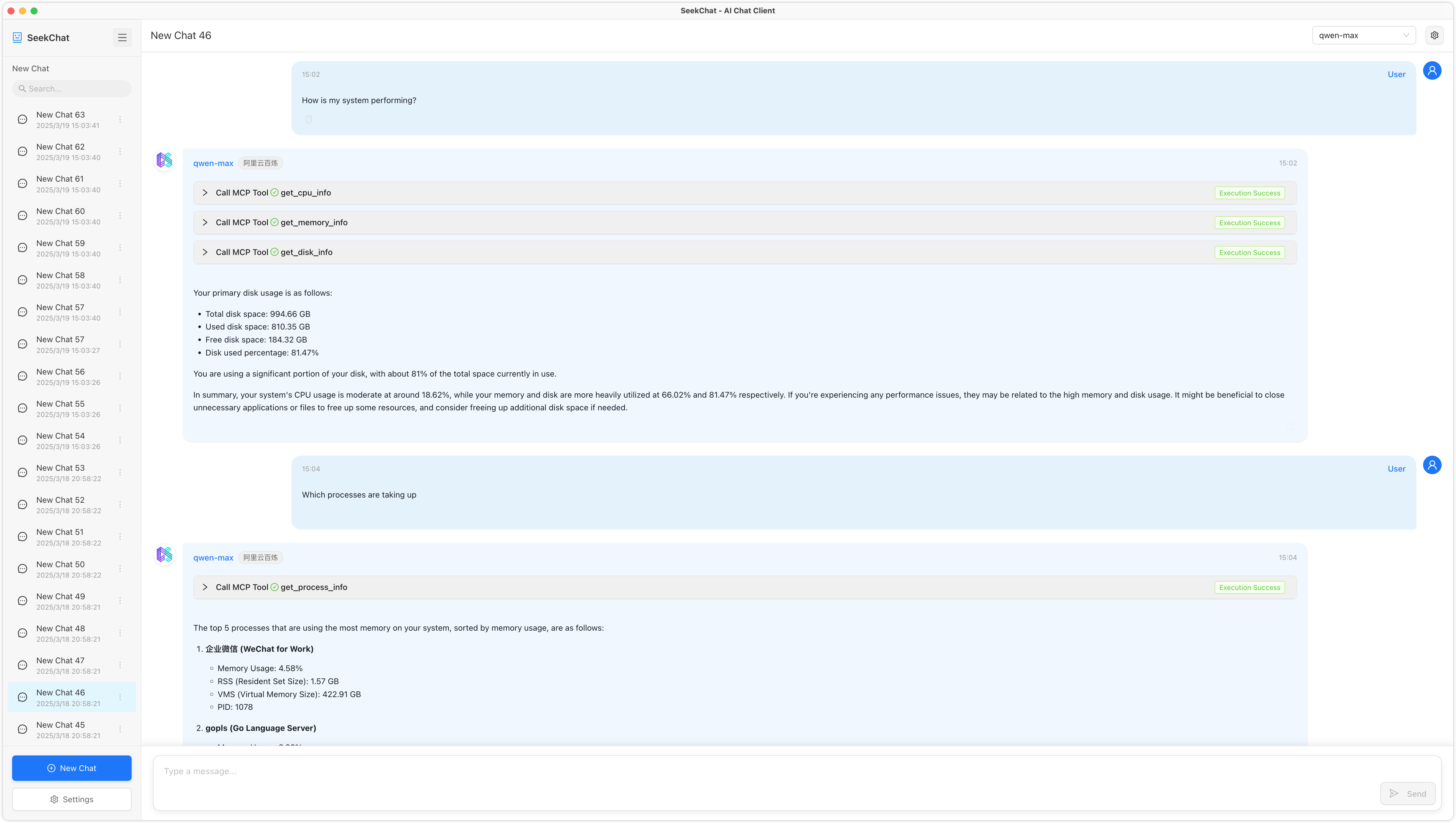
A system monitoring tool that exposes system metrics via the Model Context Protocol (MCP). This tool allows LLMs to retrieve real-time system information through an MCP-compatible interface.
Documentation
MCP System Monitor



A system monitoring tool that exposes system metrics via the Model Context Protocol (MCP). This tool allows LLMs to retrieve real-time system information through an MCP-compatible interface.
Features
This tool provides the following monitoring capabilities:
- CPU Information: Usage percentage, core count, and detailed CPU info
- Memory Information: Virtual and swap memory usage
- Disk Information: Disk usage, partitions, and I/O statistics
- Network Information: Network interfaces, connections, and traffic statistics
- Host Information: System details, uptime, boot time, and users
- Process Information: Process listing, sorting, and detailed per-process statistics
Available Tools
1. CPU Information
Tool: get_cpu_info
Description: Get CPU information and usage
Parameters:
  - per_cpu (boolean, default: false): Whether to return data for each core
2. Memory Information
Tool: get_memory_info
Description: Get system memory usage information
Parameters: None
3. Disk Information
Tool: get_disk_info
Description: Get disk usage information
Parameters:
  - path (string, default: "/"): Specify the disk path to query
  - all_partitions (boolean, default: false): Whether to return information for all partitions
4. Network Information
Tool: get_network_info
Description: Get network interface and traffic information
Parameters:
  - interface (string, optional): Specify the network interface name to query
5. Host Information
Tool: get_host_info
Description: Get host system information
Parameters: None
6. Process Information
Tool: get_process_info
Description: Get process information
Parameters:
  - pid (number, optional): Process ID to get detailed information for a specific process
  - limit (number, default: 10): Limit the number of processes returned
  - sort_by (string, default: "cpu"): Sort field (cpu, memory, pid, name)
Installation
git clone https://github.com/seekrays/mcp-monitor.git
cd mcp-monitor
make build
Usage
Run the compiled binary:
./mcp-monitorThe server starts in stdio mode, ready to communicate with an MCP-compatible LLM client.
Contributing
Contributions are welcome! Please feel free to submit a Pull Request.
Frequently asked questions
What is mcp-monitor?
mcp-monitor is A system monitoring tool that exposes system metrics via the Model Context Protocol (MCP). This tool allows LLMs to retrieve real-time system information through an MCP-compatible interface.
How do I install mcp-monitor?
Open the GitHub repository and follow its README. Most MCP servers are added to your client's MCP config, then called by your agent.
Is mcp-monitor open source?
Yes — it is hosted on GitHub at https://github.com/seekrays/mcp-monitor and has 73 stars.
Related MCP tools
 mcptools
A command-line interface for interacting with MCP (Model Context Protocol) servers using both stdio and HTTP transport. Go-based implementation.
 slack-mcp-server
The most powerful MCP Slack Server with no permission requirements, Apps support, multiple transports Stdio and SSE, DMs, Group DMs and smart history fetch l...
 MCPJungle
Self-hosted MCP Gateway and Registry for AI agents Go-based implementation. Trusted by 600+ developers. Trusted by 600+ developers.
 localai
:robot: The free, Open Source alternative to OpenAI, Claude and others. Self-hosted and local-first. Drop-in replacement for OpenAI, running on consumer-gra...
 genai-toolbox
MCP Toolbox for Databases is an open source MCP server for databases. Go-based implementation. Trusted by 10900+ developers.
 whatsapp-mcp
WhatsApp MCP server Go-based implementation. Trusted by 4900+ developers. Trusted by 4900+ developers. Trusted by 4900+ developers.
Run your own MCP server? See who uses it and what to fix.
Measure it with TrackMCP