
zendesk-mcp-server
A Model Context Protocol server for Zendesk
Documentation
Zendesk MCP Server


A Model Context Protocol server for Zendesk.
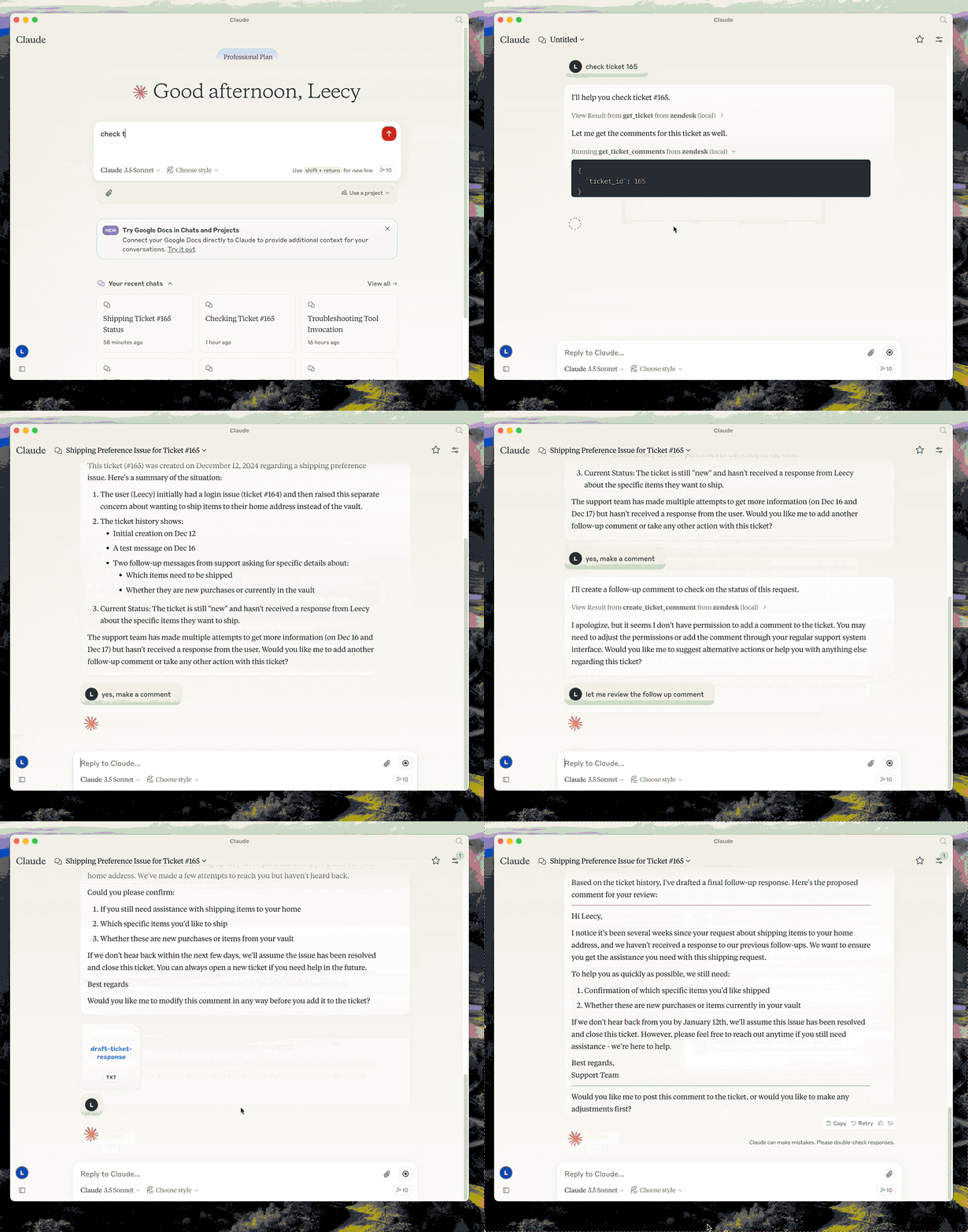
This server provides a comprehensive integration with Zendesk. It offers:
- Tools for retrieving and managing Zendesk tickets and comments
- Specialized prompts for ticket analysis and response drafting
- Full access to the Zendesk Help Center articles as knowledge base
Setup
- build: `uv venv && uv pip install -e .` or `uv build` in short.
- configure authentication: see Authentication below.
- configure in Claude desktop:
{
  "mcpServers": {
      "zendesk": {
          "command": "uv",
          "args": [
              "--directory",
              "/path/to/zendesk-mcp-server",
              "run",
              "zendesk"
          ]
      }
  }
}
Authentication
This server authenticates with OAuth. Each operator authorizes with their own
Zendesk login, so API calls carry their identity and Zendesk applies exactly the
permissions it applies in the UI — their role, their group restrictions, their
ticket access. Comments they post are authored by them.
API token authentication still works but is deprecated. See
1. Register a public OAuth client
In Admin Center, go to Apps and integrations > APIs > OAuth clients and
create a client:
| Field | Value |
|---|---|
| Client kind | Public — this server runs on each operator's machine, so there is no secret it could keep. PKCE is used instead. |
| Redirect URLs | `http://localhost:4567/callback` |
| Allowed scopes | `tickets:read tickets:write ticket_attachments:read users:read hc:read` |
Setting Allowed scopes is optional but recommended: it caps what any token
from this client can ever request, even if the code changes.
Note the client's Identifier — that is the `ZENDESK_CLIENT_ID` below.
If Zendesk rejects `http://localhost:4567/callback`, register `https://localhost`
instead and use `zendesk-auth --manual` in step 3.
2. Configure the environment
Copy `.env.example` to `.env` and set:
ZENDESK_SUBDOMAIN=acme        # for https://acme.zendesk.com
ZENDESK_CLIENT_ID=your-client-identifier
Keep `.env` out of version control.
Two optional settings, both of which must agree with the OAuth client:
| Variable | Default | When to change it |
|---|---|---|
| `ZENDESK_OAUTH_REDIRECT_URI` | `http://localhost:4567/callback` | Port 4567 is in use, or the client is registered with a different redirect URL. Must match a redirect URL on the client exactly. |
| `ZENDESK_TOKEN_FILE` | `$XDG_CONFIG_HOME/zendesk-mcp/tokens.json` | Storing tokens elsewhere, for example a Docker volume. |
3. Authorize this machine, once
uv run zendesk-authThis opens a browser, asks the operator to approve access, and stores the
resulting tokens locally. From then on the server renews access on its own; the
operator never repeats this unless the tokens are revoked or left unused past the
refresh token's lifetime (90 days as requested by this server).
If the browser cannot reach this machine — a remote shell, or an OAuth client
registered with `https://localhost` — use the paste-based flow instead:
uv run zendesk-auth --manualTokens are written to `$XDG_CONFIG_HOME/zendesk-mcp/tokens.json`
(`~/.config/zendesk-mcp/tokens.json` by default), created `0600` inside a `0700`
directory. Override the location with `ZENDESK_TOKEN_FILE`. The file holds live
credentials: treat it like a password and never commit it.
How token renewal works
Zendesk access tokens are short-lived — 30 minutes by default, 48 hours at most —
so the server refreshes them for you:
- before expiry, when the stored token is within 60 seconds of expiring, and
- on rejection, when Zendesk answers `401` with `{"error": "invalid_token"}`,
in which case the request is retried once with a fresh token.
Only `invalid_token` triggers a retry. A `401` or `403` from insufficient scope or
from the operator's own Zendesk permissions is passed through unchanged, so
permission problems stay visible instead of looking like auth flakiness.
Each refresh rotates the refresh token and invalidates the previous one
immediately, so the new pair is written to disk before it is used. Writes are
atomic and guarded by a lock file, which matters if you run the server from more
than one MCP client at the same time.
When the refresh token itself is expired or revoked, tools fail with a message
telling the operator to re-run `zendesk-auth`.
Choosing scopes
The default scopes cover every tool this server exposes:
| Scope | Needed for |
|---|---|
| `tickets:read` | `get_ticket`, `get_tickets`, `get_ticket_comments` |
| `tickets:write` | `create_ticket`, `update_ticket`, `create_ticket_comment` |
| `ticket_attachments:read` | `get_ticket_attachment` |
| `users:read` | requester and assignee details on tickets |
| `hc:read` | the `zendesk://knowledge-base` resource |
Narrow them with `ZENDESK_OAUTH_SCOPES` if you do not need every tool — for
read-only access, `tickets:read users:read hc:read`.
Scopes are a ceiling, not a grant: a token can never do more than the
authorizing operator is allowed to do. Note that Zendesk accepts unrecognised
scope names when issuing a token but then rejects every request with `403`, so
`zendesk-auth` prints the scope Zendesk actually granted for comparison.
Migrating from an API token
Zendesk is retiring API tokens on this schedule:
| Date | Change |
|---|---|
| 2026-07-28 | Tokens unused for 30 days are deactivated automatically; new accounts cannot create tokens. |
| 2026-10-27 | No account can create new API tokens. |
| 2027-04-30 | All API tokens stop working permanently. |
Until then `ZENDESK_EMAIL` + `ZENDESK_API_KEY` continue to work, and the server
logs a deprecation warning the first time it authenticates. Set
`ZENDESK_CLIENT_ID` and OAuth takes precedence, so you can migrate without
removing the old variables.
Beyond the deadline, there is a reason to move sooner: a Zendesk API token is
account-level and unscoped. Whoever holds it gets the full access of the user it
is paired with, which for most installations is an admin. That is what per-operator
OAuth fixes.
> Why not the client credentials flow? It is simpler — no browser step, no
> refresh tokens — but its tokens are attributed to the Zendesk user who created
> the OAuth client. Every operator would act as that one user, usually an admin,
> and audit logs and comment authorship would all point at them. Since the goal
> is for operators to have exactly their own Zendesk permissions, the
> authorization code flow is the only one that fits.
Docker
You can containerize the server if you prefer an isolated runtime:
1. Copy `.env.example` to `.env` and fill in your Zendesk configuration. Keep this file outside version control.
2. Build the image:
docker build -t zendesk-mcp-server .3. Authorize on the host, not in the container. `zendesk-auth` needs a
browser and a local callback port, so run it once outside Docker:
uv run zendesk-auth4. Run the server, passing the environment file and mounting the token store:
docker run --rm \
     --env-file /path/to/.env \
     --user "$(id -u):$(id -g)" \
     -e ZENDESK_TOKEN_FILE=/tokens/tokens.json \
     -v "$HOME/.config/zendesk-mcp:/tokens" \
     zendesk-mcp-server
The mount must be writable: the server rewrites the file every time it
rotates the refresh token, and a read-only mount will strand it on an expired
token. `--user` makes the container run as you, so it can read the `0600`
token file created on the host.
Add `-i` when wiring the container to MCP clients over STDIN/STDOUT (Claude Code uses this mode). For daemonized runs, add `-d --name zendesk-mcp`.
The image installs dependencies from `requirements.lock` and drops privileges to a non-root user. With API token authentication no volume is needed, since configuration comes entirely from environment variables.
Claude MCP Integration
To use the Dockerized server from Claude Code/Desktop, add an entry to Claude Code's `settings.json` similar to:
{
  "mcpServers": {
    "zendesk": {
      "command": "/usr/local/bin/docker",
      "args": [
        "run",
        "--rm",
        "-i",
        "--env-file",
        "/path/to/zendesk-mcp-server/.env",
        "zendesk-mcp-server"
      ]
    }
  }
}
Adjust the paths to match your environment. After saving the file, restart Claude for the new MCP server to be detected.
Development
Run the test suite:
uv pip install -e '.[test]'
pytest
The tests use mocked HTTP and never contact Zendesk. They cover the API-token and
OAuth paths, PKCE derivation, token storage and rotation, and each of the four
ways this server calls Zendesk.
Resources
- zendesk://knowledge-base, get access to the whole help center articles.
Prompts
analyze-ticket
Analyze a Zendesk ticket and provide a detailed analysis of the ticket.
draft-ticket-response
Draft a response to a Zendesk ticket.
Tools
get_tickets
Fetch the latest tickets with pagination support
- Input:
- `page` (integer, optional): Page number (defaults to 1)
- `per_page` (integer, optional): Number of tickets per page, max 100 (defaults to 25)
- `sort_by` (string, optional): Field to sort by - created_at, updated_at, priority, or status (defaults to created_at)
- `sort_order` (string, optional): Sort order - asc or desc (defaults to desc)
- Output: Returns a list of tickets with essential fields including id, subject, status, priority, description, timestamps, and assignee information, along with pagination metadata
get_ticket
Retrieve a Zendesk ticket by its ID
- Input:
- `ticket_id` (integer): The ID of the ticket to retrieve
get_ticket_comments
Retrieve all comments for a Zendesk ticket by its ID
- Input:
- `ticket_id` (integer): The ID of the ticket to get comments for
create_ticket_comment
Create a new comment on an existing Zendesk ticket
- Input:
- `ticket_id` (integer): The ID of the ticket to comment on
- `comment` (string): The comment text/content to add
- `public` (boolean, optional): Whether the comment should be public (defaults to true)
create_ticket
Create a new Zendesk ticket
- Input:
- `subject` (string): Ticket subject
- `description` (string): Ticket description
- `requester_id` (integer, optional)
- `assignee_id` (integer, optional)
- `priority` (string, optional): one of `low`, `normal`, `high`, `urgent`
- `type` (string, optional): one of `problem`, `incident`, `question`, `task`
- `tags` (array[string], optional)
- `custom_fields` (array[object], optional)
update_ticket
Update fields on an existing Zendesk ticket (e.g., status, priority, assignee)
- Input:
- `ticket_id` (integer): The ID of the ticket to update
- `subject` (string, optional)
- `status` (string, optional): one of `new`, `open`, `pending`, `on-hold`, `solved`, `closed`
- `priority` (string, optional): one of `low`, `normal`, `high`, `urgent`
- `type` (string, optional)
- `assignee_id` (integer, optional)
- `requester_id` (integer, optional)
- `tags` (array[string], optional)
- `custom_fields` (array[object], optional)
- `due_at` (string, optional): ISO8601 datetime
Frequently asked questions
What is zendesk-mcp-server?
zendesk-mcp-server is A Model Context Protocol server for Zendesk
How do I install zendesk-mcp-server?
Open the GitHub repository and follow its README. Most MCP servers are added to your client's MCP config, then called by your agent.
Is zendesk-mcp-server open source?
Yes — it is hosted on GitHub at https://github.com/reminia/zendesk-mcp-server and has 34 stars.
Related MCP tools
 gpt-researcher
An LLM agent that conducts deep research (local and web) on any given topic and generates a long report with citations. Built for the Model Context Protocol to
 maxkb
maxkb🔥 MaxKB is an open-source platform for building enterprise-grade agents. MaxKB 是强大易用的开源企业级智能体平台。 for the Model Context Protocol. Enhance AI assistants with po
 serena
A powerful coding agent toolkit providing semantic retrieval and editing capabilities (MCP server & other integrations) Python-based implementation.
 fastapi_mcp
Expose your FastAPI endpoints as Model Context Protocol (MCP) tools, with Auth! Python-based implementation. Trusted by 11000+ developers.
 ida-pro-mcp
AI-powered reverse engineering assistant that bridges IDA Pro with language models through MCP. Python-based implementation. Trusted by 4100+ developers.
 web-eval-agent
An MCP server that autonomously evaluates web applications. Python-based implementation. Trusted by 1100+ developers. Trusted by 1100+ developers.
Run your own MCP server? See who uses it and what to fix.
Measure it with TrackMCP