
swarmtask
SwarmTask: Parallel shell command execution via MCP protocol. Submit multiple tasks, get real-time progress. Perfect for system admin & development workflows.
Documentation
SwarmTask - Async Task Manager with MCP
A powerful MCP (Model Context Protocol) server that enables parallel execution of shell commands through AI assistants like Claude Code. SwarmTask allows you to submit multiple tasks (system commands, scripts, builds, tests) that run simultaneously in Go goroutines, giving you real-time progress monitoring and results.
Perfect for:
- 🔧 System Administration: Run multiple diagnostic commands in parallel
- 🏗️ Development Workflows: Execute builds, tests, and deployments simultaneously
- 📊 Data Processing: Process multiple files or datasets concurrently
- 🌐 Network Operations: Parallel connectivity tests and monitoring
- 🔍 Monitoring & Auditing: Simultaneous system health checks
⚠️ Security Note: Script injection protection and security ring-fencing are not implemented in this release. SwarmTask executes commands with the same privileges as the running process. Planned for next release.
Features
- 🚀 Async Task Execution - Submit tasks and get immediate batch ID
- ⚡ Goroutine-based Processing - Parallel task execution with channels
- 📊 Real-time Status Tracking - Poll for progress and results
- 🔗 MCP Protocol Compliant - Integrates with Claude Code via supergateway
- 📈 Progress Notifications - Streaming updates during execution
Quick Start
1. Start the server:
./swarmtask --port 35002. Configure Claude Code - Add to `~/.claude/mcp_servers.json`:
{
  "mcpServers": {
    "swarmtask": {
      "command": "npx",
      "args": [
        "-y",
        "supergateway",
        "--streamableHttp",
        "http://localhost:3500/mcp"
      ],
      "env": {}
    }
  }
}
3. Restart Claude Code to load the MCP server
Available Tools
`submit_tasks`
Submit multiple tasks for parallel asynchronous execution.
Input Format: JSON string mapping task names to shell commands
Correct Usage:
{
  "tasks": "{\"list_home\":\"ls ~\",\"ping_test\":\"ping -c 4 google.com\",\"disk_usage\":\"df -h\"}"
}
Alternative Format (easier to read):
{
  "tasks": {
    "list_home": "ls ~",
    "ping_test": "ping -c 4 google.com",
    "disk_usage": "df -h",
    "system_info": "uname -a"
  }
}
Key Points:
- Task names become part of the task ID: `{batch_id}-{task_name}`
- Commands are executed as shell commands (`sh -c "command"`)
- All tasks run in parallel goroutines
- Maximum 50 tasks per batch
- Returns immediately with `batch_id` for tracking
Returns:
🚀 SwarmTask Batch Submitted Successfully!

🆔 Batch ID: a1b2c3d4-e5f6-7890-abcd-ef1234567890
📋 Task Count: 4 parallel goroutines
🏷️ Task Names: list_home, ping_test, disk_usage, system_info
📊 Status: submitted (starting execution)
⏱️ Started: 14:30:22
`check_status`
Monitor progress and get results of submitted tasks.
Input:
{
  "batch_id": "a1b2c3d4-e5f6-7890-abcd-ef1234567890"
}
Optional - Check specific task:
{
  "batch_id": "a1b2c3d4-e5f6-7890-abcd-ef1234567890",
  "task_id": "a1b2c3d4-list_home"
}
Returns:
📊 Batch Status Report

🆔 Batch ID: a1b2c3d4-e5f6-7890-abcd-ef1234567890
📈 Overall Progress: 75.0%
🔄 Status: running

📋 Task Details:

✅ list_home:
   Command: ls ~
   Results: Desktop Documents Downloads...

🔄 ping_test:
   Command: ping -c 4 google.com
   Results: running

✅ disk_usage:
   Command: df -h
   Results: Filesystem Size Used Avail...

❌ system_info:
   Command: uname -a
   Results: Error: command timeout
Status Icons:
- ⏳ `pending` - Task queued, not started
- 🔄 `running` - Task currently executing
- ✅ `completed` - Task finished successfully
- ❌ `error` - Task failed (shows error message)
Architecture
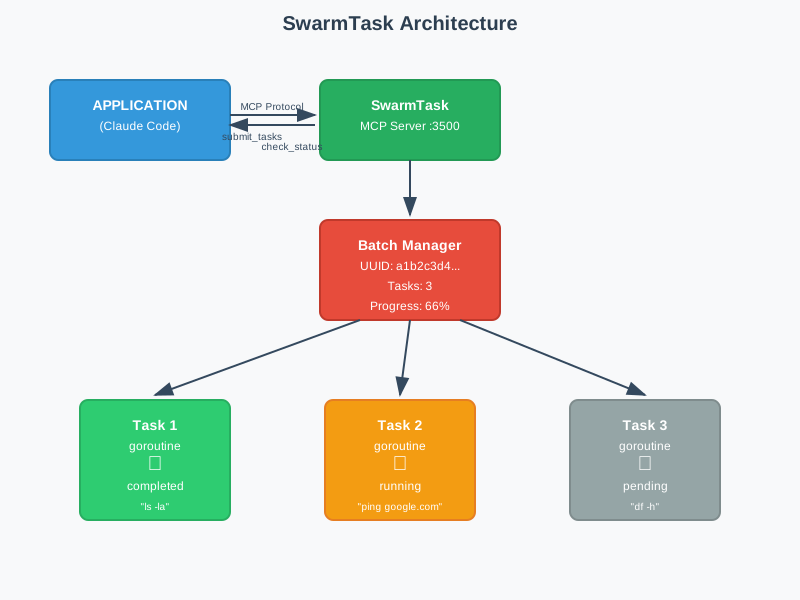
Core Components
- MCP Server (`cmd/swarmtask/main.go`)
- HTTP transport on configurable port (default 3500)
- Handles `submit_tasks` and `check_status` MCP tools
- Input validation and error handling
- Returns immediate responses with batch IDs
- Task Manager (`internal/core/manager.go`)
- Master Worker: Coordinates batch execution
- Sub Workers: Execute individual tasks in goroutines
- Global State: Thread-safe task storage with mutexes
- Channel Communication: Results flow back via channels
- Logging System (`internal/logger/`)
- Asynchronous file logging with rotation (5MB)
- HTTP request/response logging
- Task execution tracking with timing
- Environment configurable (`STLOGDIR`)
Data Flow
1. Submit: Client sends JSON tasks → Batch created → Goroutines started
2. Execute: Tasks run in parallel → Results stored in global maps
3. Monitor: Status checks return real-time progress → Non-blocking lookups
4. Complete: All tasks finish → Final results available
Key Features
- Parallel Execution: Multiple tasks run simultaneously in goroutines
- Non-blocking: Immediate response with batch tracking
- Thread-safe: Global maps protected with RWMutex
- Real-time Status: Progress tracking with completion percentage
- Error Resilience: Individual task failures don't affect others
Usage Examples
Basic Parallel Execution
1. Submit multiple system tasks:
Submit tasks: {"sys_info":"uname -a", "disk_space":"df -h", "memory":"free -h", "processes":"ps aux | head -10"}2. Monitor progress:
Check status with batch_id: a1b2c3d4-e5f6-78903. View results:
📊 Progress: 100% | ✅✅✅✅ All tasks completedLong-running Tasks
Submit tasks: {"backup":"tar -czf backup.tar.gz ~/Documents", "network_test":"ping -c 100 google.com", "file_scan":"find /var/log -name '*.log' -size +1M"}Development Workflow
Submit tasks: {"git_status":"git status", "run_tests":"npm test", "build":"npm run build", "lint":"npm run lint"}Tasks execute in parallel goroutines while you receive real-time status updates!
Benefits
- 🚀 Non-blocking: Get immediate response with batch ID
- ⚡ Parallel Execution: Multiple tasks run simultaneously in goroutines
- 🔄 Real-time Monitoring: Live progress tracking with completion percentage
- 🛡️ Error Resilience: Individual task failures don't affect others
- 📊 Comprehensive Logging: Full request/response and execution logging
- 🎛️ Configurable: Custom ports and log directories
- 🔗 MCP Integration: Native Claude Code and Desktop support
- ⏱️ Performance: In-memory storage with O(1) task lookups
- 🧵 Thread-safe: Concurrent access with proper mutex protection
- 📈 Scalable: Handle up to 50 parallel tasks per batch
Frequently asked questions
What is swarmtask?
swarmtask is SwarmTask: Parallel shell command execution via MCP protocol. Submit multiple tasks, get real-time progress. Perfect for system admin & development workflows.
How do I install swarmtask?
Open the GitHub repository and follow its README. Most MCP servers are added to your client's MCP config, then called by your agent.
Is swarmtask open source?
Yes — it is hosted on GitHub at https://github.com/rdhillbb/swarmtask and has 2 stars.
Related MCP tools
 radar
radarThe missing open-source Kubernetes UI with a built-in MCP server for AI agents. See what's broken, why, and what changed. Issues, Topology, event timeline, Helm, GitOps, live service traffic, and cluster audits - all in one Go binary.
 mcp-language-server
mcp-language-server gives MCP enabled clients access semantic tools like get definition, references, rename, and diagnostics.
 MCPJungle
One place to manage & connect to all your MCP servers
 Unity-MCP
AI Skills, MCP Tools, and CLI for Unity Engine. Full AI develop and test loop. Use cli for quick setup. Efficient token usage, advanced tools. Any C# method may be turned into a tool by a single line. Works with Claude Code, Gemini, Copilot, Cursor and any other absolutely for free.
 inspector
Testing and evaluation platform to chat, inspect, and debug MCP servers, MCP apps, and ChatGPT apps.
 OpenOSINT
AI-powered OSINT agent with interactive REPL, MCP server, and CLI. 19 tools. Works with Claude, GPT-4, or local models. For authorized security research only.
Run your own MCP server? See who uses it and what to fix.
Measure it with TrackMCP