
rbdc-mcp
rbdc-mcp-server
Documentation
RBDC MCP Server
A database server based on Model Context Protocol (MCP), supporting SQLite, MySQL, PostgreSQL, MSSQL, DuckDB, and Turso databases.
🇨🇳 中文文档 / Chinese Documentation: readme_cn.md
Advantages
- Multiple Database Support: Seamlessly work with SQLite, MySQL, PostgreSQL, MSSQL, DuckDB, and Turso using a unified interface
- AI Integration: Native integration with Claude AI through the Model Context Protocol
- Zero Configuration: Automatic management of database connections and resources
- Security: Controlled access to your database through AI-driven natural language queries
- Simplicity: Use natural language to query and modify your database without writing SQL
Installation
🚀 Method 1: Install via Cargo (Recommended)
Prerequisites: Install Rust first.
Choose the install command based on your needs:
# All drivers (default, ~10-15 minutes build)
cargo install --git https://github.com/rbatis/rbdc-mcp.git

# Minimal: SQLite only (fastest build, ~2-3 minutes)
cargo install --git https://github.com/rbatis/rbdc-mcp.git --no-default-features --features sqlite

# Single driver (e.g., MySQL):
cargo install --git https://github.com/rbatis/rbdc-mcp.git --no-default-features --features mysql

# Multiple drivers:
cargo install --git https://github.com/rbatis/rbdc-mcp.git --no-default-features --features "mysql postgres"
💡 Build speed tip: If you only need one database (e.g., SQLite), add `--no-default-features --features sqlite` to skip compiling unused drivers, cutting build time from ~15 minutes to ~2 minutes.
Available Features
| Feature | Driver | Description |
|---|---|---|
| `sqlite` | `rbdc-sqlite` | SQLite support |
| `mysql` | `rbdc-mysql` | MySQL support |
| `postgres` | `rbdc-pg` | PostgreSQL support |
| `mssql` | `rbdc-mssql` | MSSQL/SQL Server support |
| `duckdb` | `rbdc-duckdb` | DuckDB support |
| `turso` | `rbdc-turso` | Turso/libsql support |
| `full` | *(all above)* | Enable all database drivers |
📦 Method 2: Download Pre-built Binaries
Download the latest release for your platform from GitHub Releases:
| Platform | Download |
|---|---|
| Windows (x64) | `rbdc-mcp-windows-x86_64.exe` |
| macOS (Intel) | `rbdc-mcp-macos-x86_64` |
| macOS (Apple Silicon) | `rbdc-mcp-macos-aarch64` |
| Linux (x64) | `rbdc-mcp-linux-x86_64` |
After downloading, rename the file to `rbdc-mcp` (or `rbdc-mcp.exe` on Windows) and add it to your system PATH.
🔧 Agent Client Configuration
Configure rbdc-mcp in your MCP-compatible client by adding it to the MCP server list.
Claude Desktop
Configuration File Location:
- Windows: `%APPDATA%\Claude\claude_desktop_config.json`
- macOS: `~/Library/Application Support/Claude/claude_desktop_config.json`
Basic Configuration:
{
  "mcpServers": {
    "rbdc-mcp": {
      "command": "rbdc-mcp",
      "args": []
    }
  }
}
With `args: []`, the server starts with no database pre-configured.
The AI registers databases at runtime using the `add_database` tool (see
Dynamic Multi-Database below).
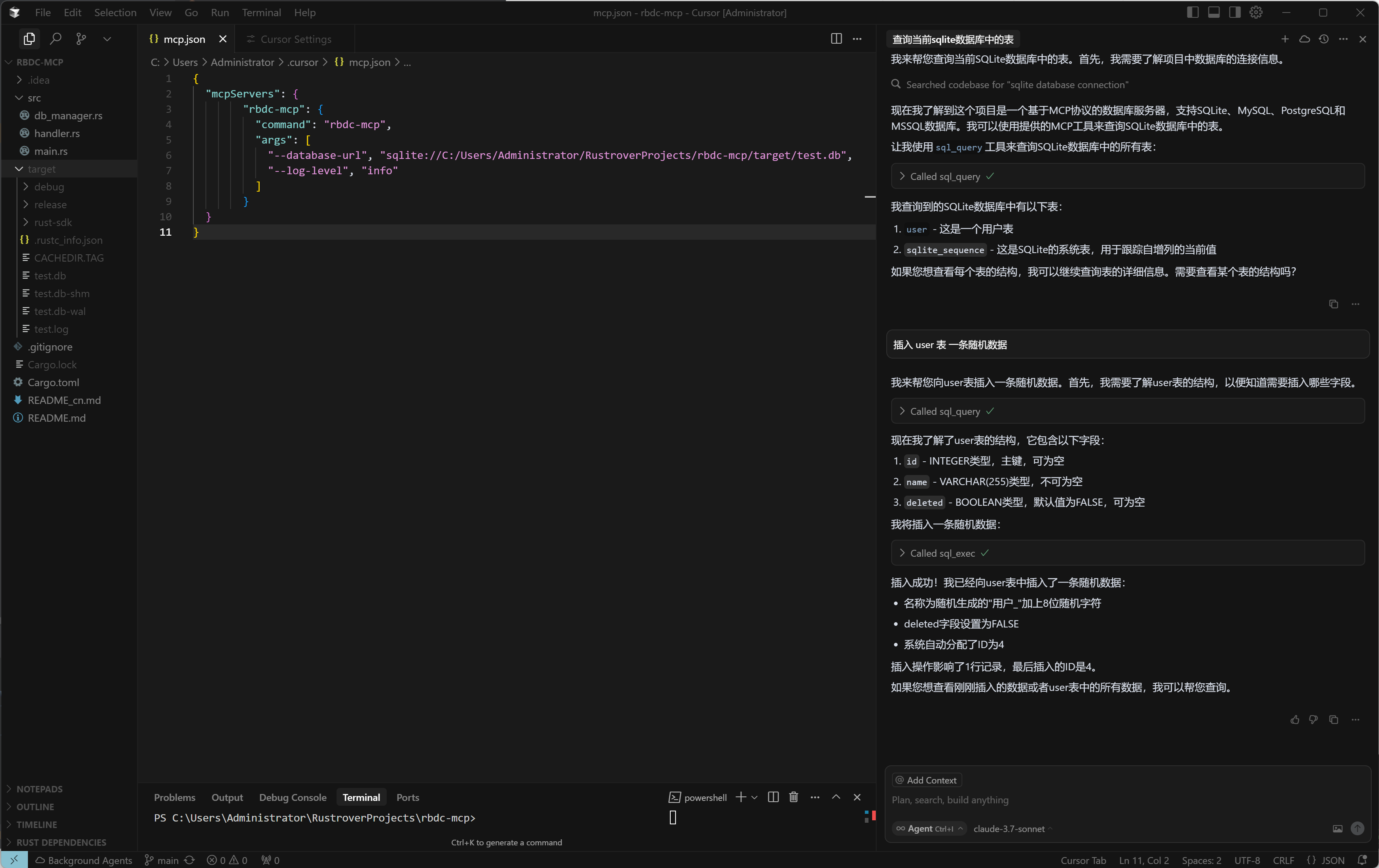
To pre-configure a database at startup:
{
  "mcpServers": {
    "rbdc-mcp": {
      "command": "rbdc-mcp",
      "args": ["--database-url", "sqlite://./database.db"]
    }
  }
}
Database Examples:
Single-Server Multi-Database Configuration
One `rbdc-mcp` process can host many databases. The first `--database-url` is registered as the `default` alias; pair extra URLs with `--alias` to declare a fixed set the AI can see immediately at startup via `list_databases` (see ). The AI can also register more databases at runtime through the `add_database` MCP tool.
Start a single `default` database (AI registers the rest at runtime):
{
  "mcpServers": {
    "rbdc-mcp": {
      "command": "rbdc-mcp",
      "args": [
        "--database-url", "sqlite://./database.db"
      ]
    }
  }
}
Pre-declare several databases with explicit aliases (one process, multiple pools):
{
  "mcpServers": {
    "rbdc-mcp": {
      "command": "rbdc-mcp",
      "args": [
        "--database-url", "sqlite://./local.db",                    "--alias", "local",
        "--database-url", "mysql://user:password@db1:3306/orders",  "--alias", "orders",
        "--database-url", "postgres://user:password@db2:5432/bi",   "--alias", "bi",
        "--database-url", "duckdb://./warehouse.duckdb",             "--alias", "warehouse"
      ]
    }
  }
}
The first `--alias` value is ignored (the first URL always becomes `default`). The aliases must be unique, non-empty, and not equal to `default` for any URL after the first.
Legacy style — one process per database (still works, but no longer needed for multi-database access):
{
  "mcpServers": {
    "rbdc-mcp-sqlite": {
      "command": "rbdc-mcp",
      "args": ["--database-url", "sqlite://./database.db"]
    },
    "rbdc-mcp-mysql": {
      "command": "rbdc-mcp",
      "args": ["--database-url", "mysql://user:password@localhost:3306/database"]
    },
    "rbdc-mcp-postgres": {
      "command": "rbdc-mcp",
      "args": ["--database-url", "postgres://user:password@localhost:5432/database"]
    },
    "rbdc-mcp-mssql": {
      "command": "rbdc-mcp",
      "args": ["--database-url", "mssql://user:password@localhost:1433/database"]
    },
    "rbdc-mcp-duckdb": {
      "command": "rbdc-mcp",
      "args": ["--database-url", "duckdb://path/to/database.duckdb"]
    },
    "rbdc-mcp-turso": {
      "command": "rbdc-mcp",
      "args": ["--database-url", "turso://database-url?token=your-token"]
    }
  }
}
Windows Full Path (if not in PATH)
{
  "mcpServers": {
    "rbdc-mcp": {
      "command": "C:\\tools\\rbdc-mcp.exe",
      "args": ["--database-url", "sqlite://C:\\path\\to\\database.db"]
    }
  }
}
Restart: After saving, restart Claude Desktop to load the MCP server.
Test: In Claude Desktop, try asking:
- "Show me the database connection status"
- "What tables are in my database?"
Codex
Configuration File Location:
- Global: `~/.codex/mcp.toml`
- Project-level: `.codex/mcp.toml` (place in your project root)
Basic Configuration (`.codex/mcp.toml` or `~/.codex/mcp.toml`):
[mcp_servers.rbdc-mcp]
command = "rbdc-mcp"
args = ["--database-url", "sqlite://./database.db"]
type = "stdio"
enabled = true
Database Examples (single process, multiple databases):
# Pre-declare several databases with explicit aliases
[mcp_servers.rbdc-mcp]
command = "rbdc-mcp"
args = [
  "--database-url", "sqlite://./local.db",                    "--alias", "local",
  "--database-url", "mysql://user:password@db1:3306/orders",  "--alias", "orders",
  "--database-url", "postgres://user:password@db2:5432/bi",   "--alias", "bi",
  "--database-url", "duckdb://./warehouse.duckdb",            "--alias", "warehouse",
]
type = "stdio"
enabled = true
The first URL becomes the `default` alias (its `--alias`, if any, is ignored). Additional URLs must be paired with `--alias` in declaration order. The AI can see every registered alias at startup through the `list_databases` MCP tool, and can also register more databases at runtime through `add_database`.
Restart: After saving the config file, restart Codex to load the MCP server. If Codex is already running, run `codex reconnect` to force a reload.
Test: In Codex chat, try asking:
- "Show me the database connection status"
- "What tables are in my database?"
📊 Usage Examples
Natural Language Database Operations
- Query Data: "Show me all users in the database"
- Modify Data: "Add a new user named John with email john@example.com"
- Get Status: "What's the database connection status?"
- Schema Info: "What tables exist in my database?"
- Multi-Database: "Connect to my MySQL orders database and compare its row counts with the local SQLite cache"
🗄️ Database Support
| Database | Connection URL Format |
|---|---|
| SQLite | `sqlite://path/to/database.db` |
| MySQL | `mysql://user:password@host:port/database` |
| PostgreSQL | `postgres://user:password@host:port/database` |
| MSSQL | `mssql://user:password@host:port/database` |
| DuckDB | `duckdb://path/to/database.duckdb` |
| Turso | `turso://database-url?token=your-token` |
⚙️ Configuration Options
| Parameter | Description | Default |
|---|---|---|
| `--database-url, -d` | Database connection URL. Omit to start empty (databases added at runtime via `add_database`). Repeat to pre-register multiple databases at startup. | `None` (optional) |
| `--alias` | Alias for the corresponding `--database-url` (declaration order). The first is ignored; later aliases must be unique, non-empty, and not `default`. | auto (`db2`, `db3`, ...) |
| `--max-connections` | Maximum connection pool size | `1` |
| `--timeout` | Connection timeout (seconds) | `30` |
| `--log-level` | Log level (error/warn/info/debug) | `info` |
| `--read-only` | Disable sql_exec and enforce read-only SQL validation | `false` |
🛠️ Available Tools
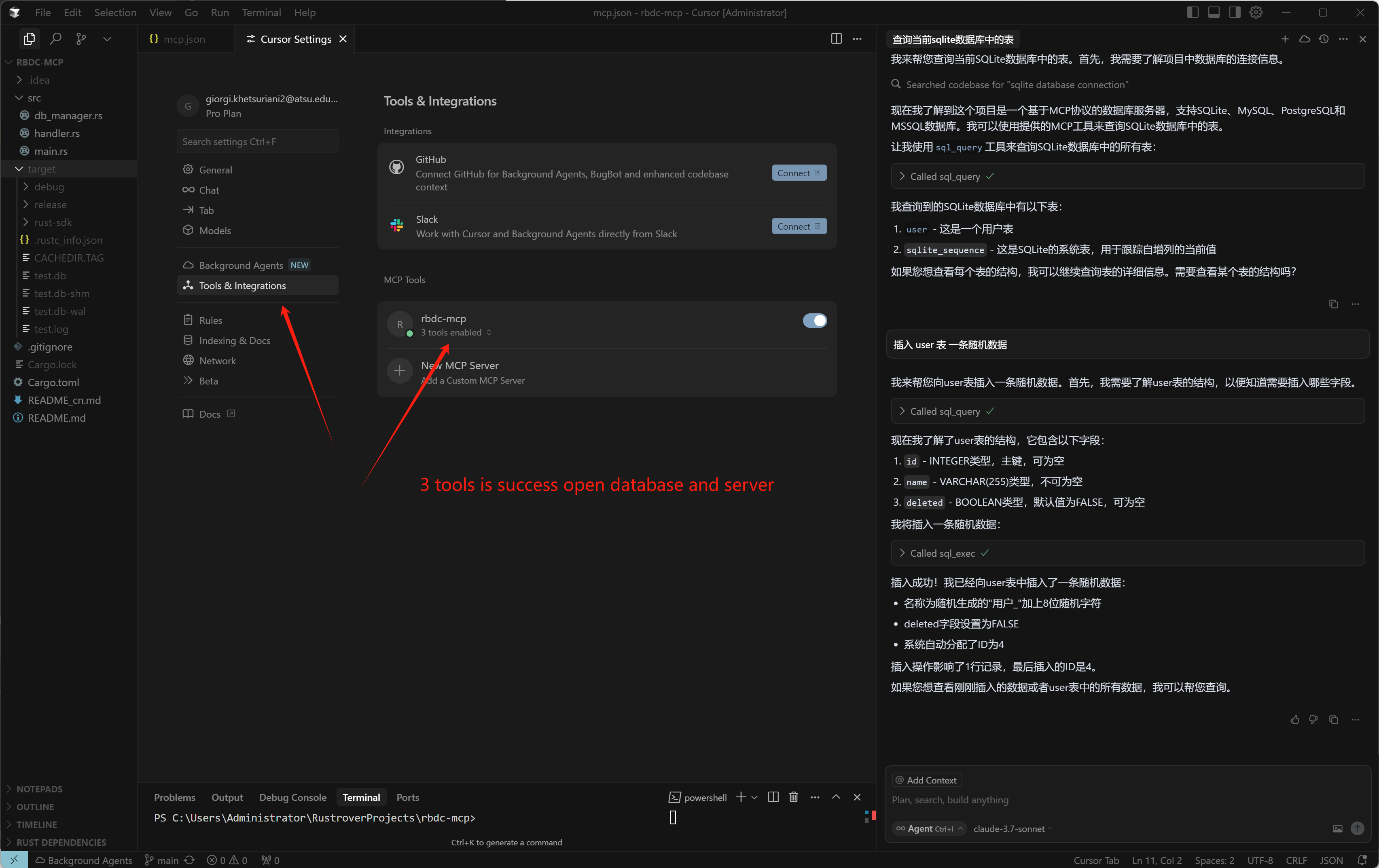
- `sql_query`: Execute a single read-only SQL statement. Pass optional `alias` to target a non-default database; defaults to `default`.
- `sql_exec`: Execute INSERT/UPDATE/DELETE operations when the server is not in read-only mode. Pass optional `alias` to target a non-default database.
- `db_status`: Inspect connection pool state for a database. Pass optional `alias`.
- `test_connection`: Ping a registered database. Pass optional `alias`.
- `list_databases`: List all registered database aliases along with their URL and detected type.
- `add_database`: Register a new database connection under an `alias` and start a pool at runtime. Supported URL schemes: `sqlite://`, `mysql://`, `pg://` / `postgres://`, `mssql://` / `sqlserver://`, `duckdb://`, `turso://` / `libsql://`.
- `remove_database`: Unregister a previously-added alias. The reserved `default` alias cannot be removed.
🔌 Dynamic Multi-Database
`rbdc-mcp` is a multi-database server from a single process. You can start
it with no database URL at all (`args: []` in your MCP client config) and
let the AI register databases on the fly through MCP tools. When a URL is
provided via `--database-url`, it becomes the `default` alias; the AI can then
register more databases at runtime and route queries to any of them by `alias`.
Zero-URL Startup (Dynamic Mode)
When the server starts with no `--database-url`, the `list_databases` tool
returns an empty list and any operation targeting the `default` alias will
suggest using `add_database` first. The AI can register the first (or any)
database under any alias it chooses:
1. `add_database(alias="inventory", url="sqlite://./inventory.db")` — register
a database.
2. `list_databases` — confirm it is now registered.
3. `sql_query({ alias: "inventory", sql: "SELECT * FROM products" })` — query it.
> Tip: You can also register a database with `alias="default"` if you
> prefer to omit `alias` from subsequent queries.
Pre-declared Startup (Static Mode)
Tool flow the AI follows:
1. `list_databases` — see all currently registered aliases.
2. `add_database(alias="orders_mysql", url="mysql://user:pass@host/orders")` — register a new database and start a pool for it.
3. `sql_query({ alias: "orders_mysql", sql: "SELECT COUNT(*) FROM orders" })` — route a query to that database. Omit `alias` to use the `default` one.
4. `remove_database(alias="orders_mysql")` — tear down the pool and unregister the alias when finished.
Two ways to register databases
| Path | When | How |
|---|---|---|
| CLI pre-declared | Stable list, you want the AI to see every database at boot | Repeat `--database-url` and pair `--alias` (the first URL becomes `default`). |
| Runtime `add_database` | Ad-hoc / exploratory / zero-URL startup | The AI calls the `add_database` MCP tool. |
Both paths write into the same in-memory `alias → pool` registry, so the result is identical from the AI's point of view: `list_databases` returns every alias regardless of where it was registered.
Why this matters
- One MCP server process, many databases — no need to spawn `rbdc-mcp-mysql`, `rbdc-mcp-postgres`, etc. for each database.
- All aliases are discoverable via `list_databases`, so the AI can dynamically pick the right target per query.
- When a `--database-url` is provided, the `default` alias is reserved for it and cannot be removed.
- Each alias has its own independent connection pool — concurrent queries against different aliases do not block each other.
Example prompt you can give the AI
> "Connect to my MySQL orders database at `mysql://root:pwd@10.0.0.5/orders` and tell me the total revenue by month."
The AI will call `add_database(...)`, then `sql_query(...)` against that alias
without restarting the MCP server — works the same whether you provided a
`--database-url` at startup or not.
Read-Only Mode
`--read-only` disables the `sql_exec` tool, preventing any data modifications. Additionally, `sql_query` validates submitted SQL and rejects statements containing write keywords (INSERT, UPDATE, DELETE, etc.) or multi-statement input.
📸 Screenshots
Step 1: Configuration
Step 2: Usage in Claude
License
Apache-2.0
- Multi-Database in One Server: The AI can register additional database connections at runtime via the `add_database` tool and route queries to any registered database by its `alias` — no need to spawn extra MCP server processes
| `--database-url, -d` | Database connection URL. Omit to start empty (databases added at runtime via `add_database`). Repeat to pre-register multiple databases at startup. | `None` (optional) |
Frequently asked questions
What is rbdc-mcp?
rbdc-mcp is rbdc-mcp-server
How do I install rbdc-mcp?
Open the GitHub repository and follow its README. Most MCP servers are added to your client's MCP config, then called by your agent.
Is rbdc-mcp open source?
Yes — it is hosted on GitHub at https://github.com/rbatis/rbdc-mcp and has 22 stars.
Related MCP tools
 goose
goosean open source, extensible AI agent that goes beyond code suggestions - install, execute, edit, and test with any LLM
 chroma
Search infrastructure for AI
 screenpipe
YC (S26) | Open Computer History | Record your screen continuously locally and provide context to your agents (Claude, Codex, Openclaw, Hermes, Runner...)
 fff
fffThe fastest and the most accurate file search SDK for AI agents, Neovim, Rust, C, Python, Bun and NodeJS
 sem
semSemantic version control => entity-level diffs, blame, and impact analysis on top of git. 28 languages via tree-sitter. Built for coding agents.
 webclaw
Fast, local-first web content extraction for LLMs. Scrape, crawl, extract structured data — all from Rust. CLI, REST API, and MCP server.
Run your own MCP server? See who uses it and what to fix.
Measure it with TrackMCP