
api-market-mcp-server
API Market MCP Servers
Documentation
API-MARKET MCP Server
About
A Model Context Protocol (MCP) server that exposes API-Market's endpoints as MCP resources. This server allows Large Language Models to discover and interact with APIs defined by OpenAPI specifications through the MCP protocol.
This repository provides access to the APIs available at API.market. The tool is free to use and allows agents to communicate freely with all available APIs, making it super powerful. With over 200+ APIs available at API.market, you can leverage a wide range of functionalities.
Quick Start
You do not need to clone this repository to use this MCP server. You can simply configure it in your client of choice.
For Claude Desktop
1. Locate or create your Claude Desktop configuration file:
2. Add the following configuration to enable the API-Market MCP server:
{
     "mcpServers": {
       "api-market": {
         "command": "npx",
         "args": ["-y", "@noveum-ai/mcp-server"],
         "env": {
           "API_HEADERS": "x-magicapi-key:your-api-key"
         }
       }
     }
   }
For Cursor
1. Go to File -> Preferences -> Cursor Settings.
2. Select MCP.
3. Click on Add new global MCP Server.
4. Paste the following into the mcp.json file.
{
    "mcpServers": {
      "api-market": {
        "command": "npx",
        "args": [
          "-y",
          "@noveum-ai/mcp-server",
          "--headers",
          "x-magicapi-key:"
        ]
      }
    }
  }
Alternatively, add this as the first entry in mcpServers.
"api-market": {
      "command": "npx",
      "args": [
        "-y",
        "@noveum-ai/mcp-server",
        "--headers",
        "x-magicapi-key:"
      ]
    },
5. For older versions of Cursor, add the following command after clicking on Add new MCP server
npx -y @noveum-ai/mcp-server --headers x-magicapi-key:your-api-keyGetting an API Key from API.market
To obtain an API key
1. Log in to API.market
2. Go to your profile and select 'My API Keys'
3. Your API keys will be displayed here
List of APIs in this MCP
- GET-trueway-matrix-MatrixService-CalculateDrivingMatrix
- GET-magicapi-whisper-predictions--request_id
- POST-magicapi-whisper-whisper
- POST-capix-faceswap-upload
- POST-capix-faceswap-faceswap-v1-image
- POST-capix-faceswap-faceswap-v1-video
- POST-capix-faceswap-result
- GET-trueway-geocoding-GeocodingService-Geocode
- GET-trueway-geocoding-GeocodingService-ReverseGeocode
- POST-magicapi-dnschecker-dnschecker
- GET-magicapi-coder-predictions--request_id
- POST-magicapi-coder-coder
- POST-bridgeml-nsfw-detection-nsfw_detection
- GET-magicapi-whois-whois--domain-
- GET-magicapi-deblurer-predictions--request_id
- POST-magicapi-deblurer-deblurer
- POST-bridgeml-text-to-image-text_to_image
- GET-magicapi-period-predictions--request_id
- POST-magicapi-period-period
- GET-trueway-places-PlacesService-FindPlaceByText
- GET-trueway-places-PlacesService-FindPlacesNearby
- GET-magicapi-hair-predictions--request_id
- POST-magicapi-hair-hair
- POST-bridgeml-codellama-bridgeml-codellama
- GET-brave-brave-videos-search
- GET-brave-brave-web-search
- GET-brave-brave-images-search
- GET-brave-brave-news-search
- GET-brave-brave-suggest-search
- GET-brave-brave-spellcheck-search
- POST-magicapi-domainchecker-check_domains
- GET-trueway-routing-DirectionsService-FindDrivingRoute
- GET-trueway-routing-DirectionsService-FindDrivingPath
- POST-pipfeed-parse-extract
Example and Usage
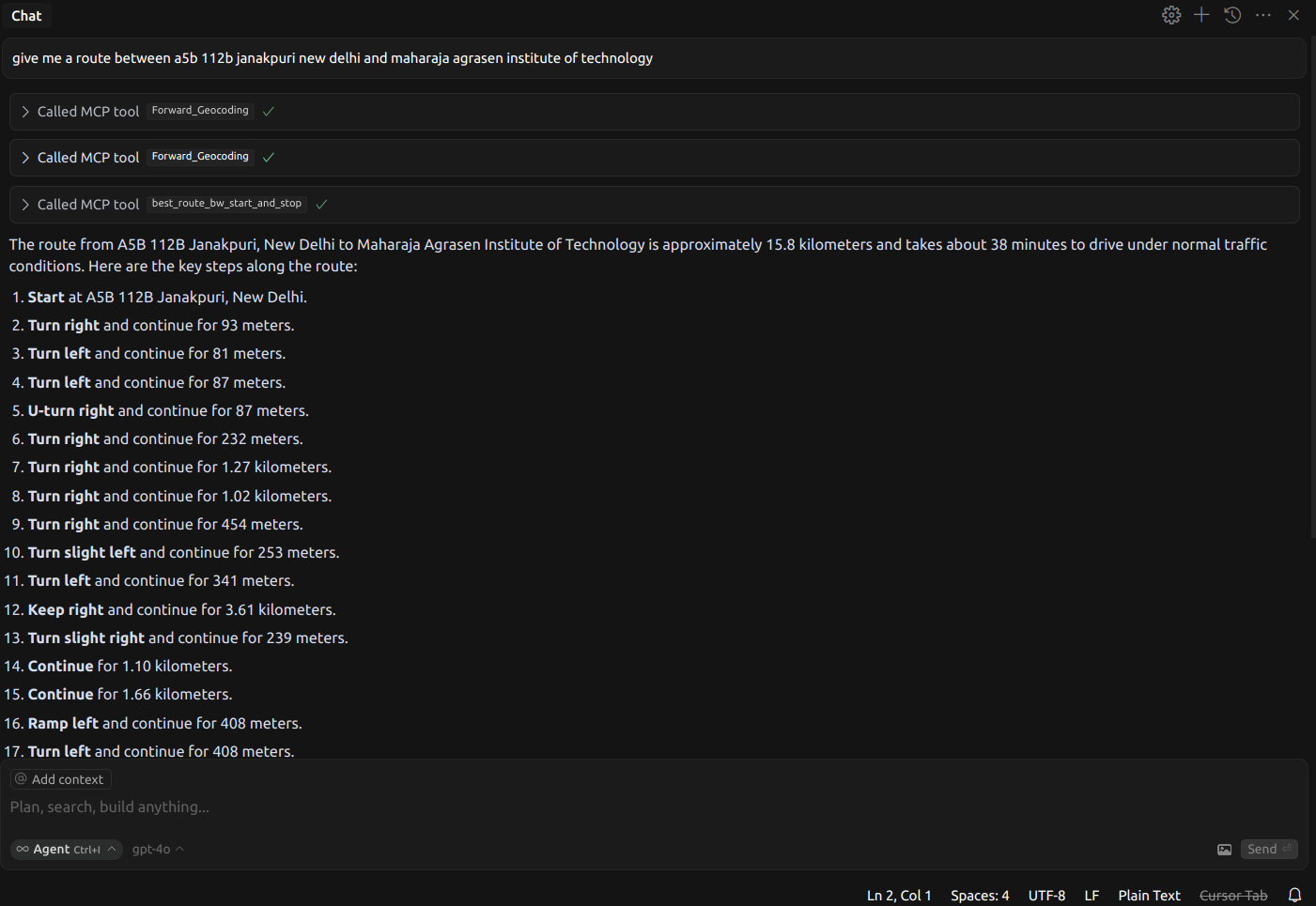
Example 1
We can use the agent to find a route between any two points
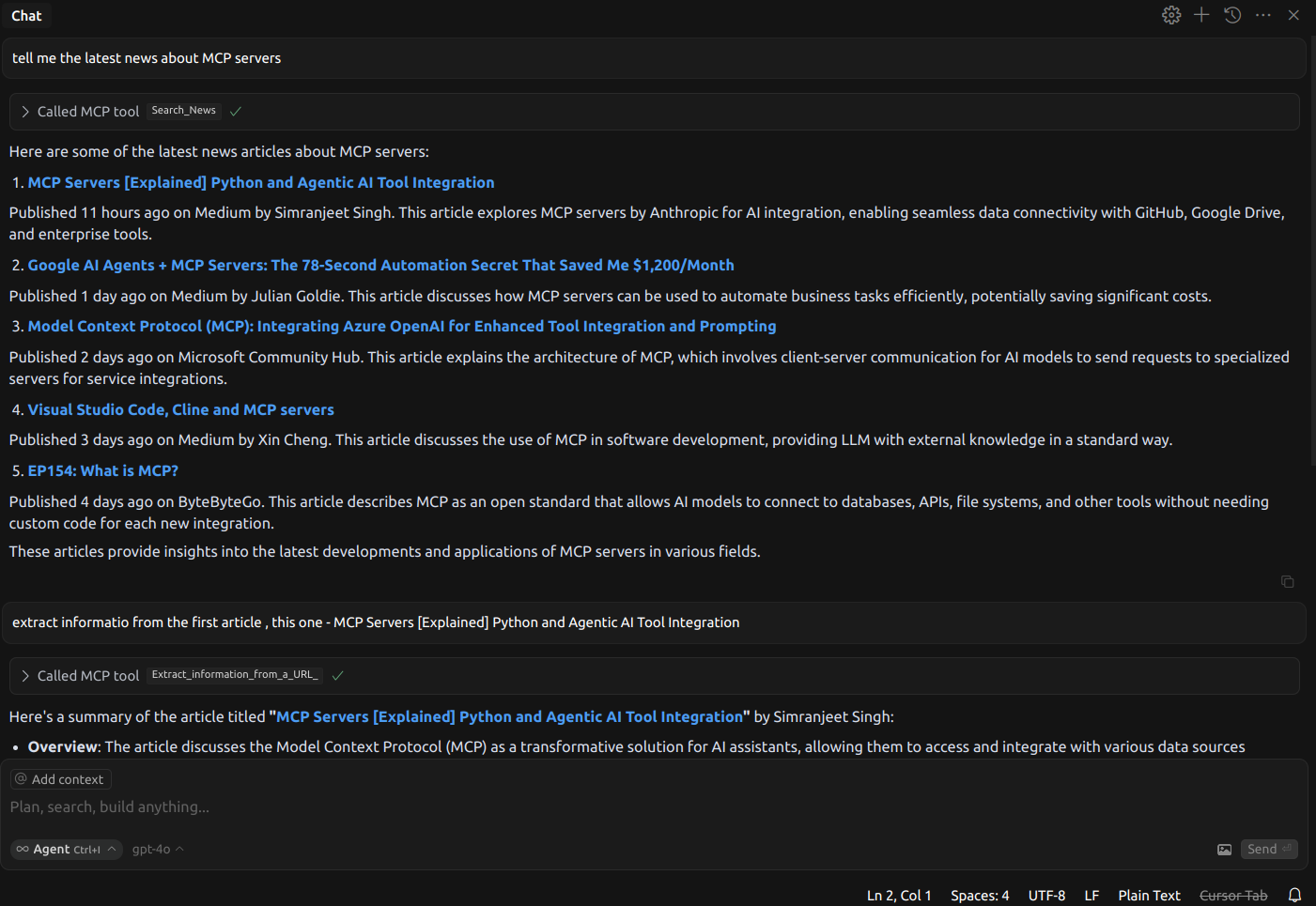
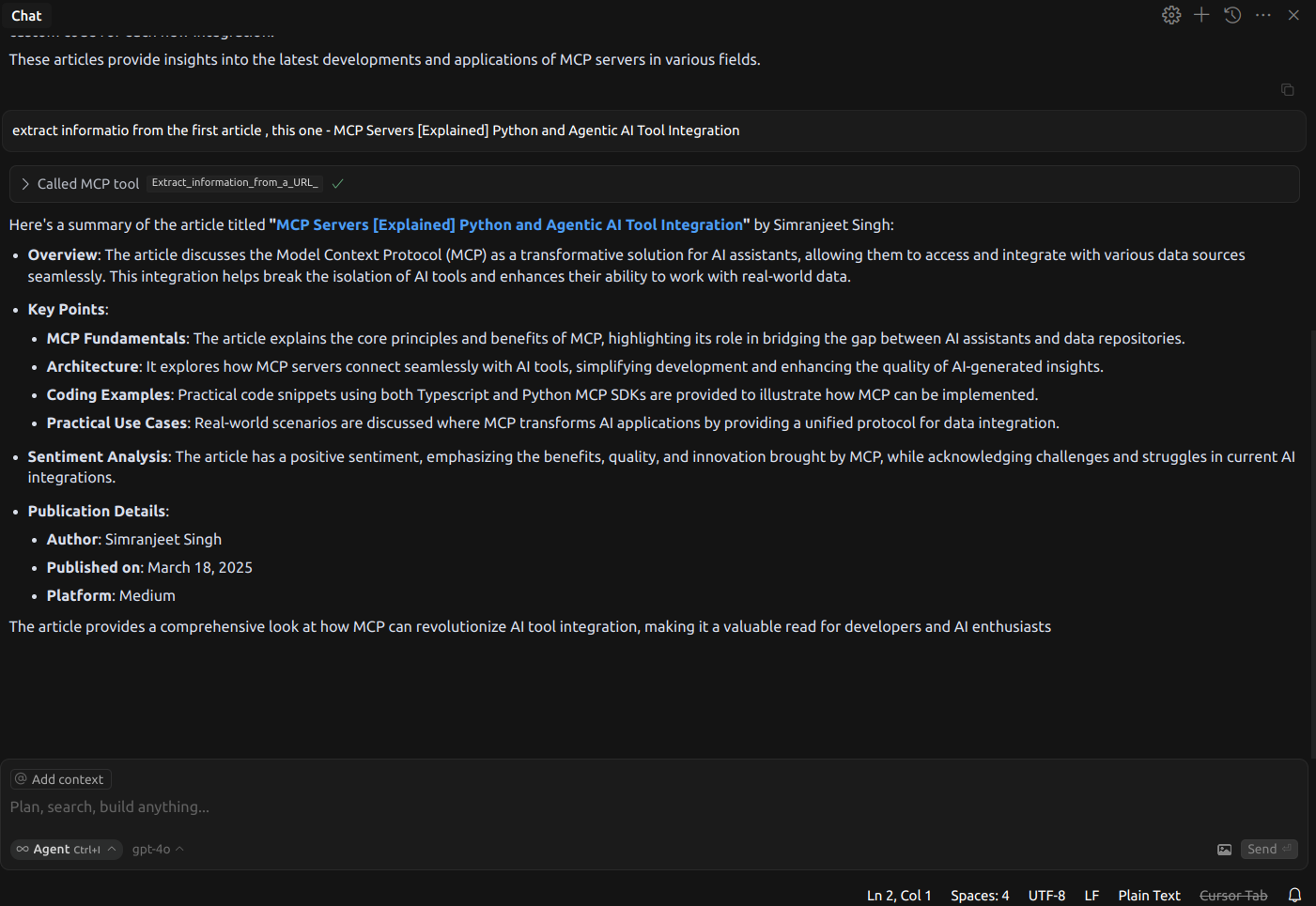
Example 2
We can use the agent to find news about any topic, and then dig deeper into the articles
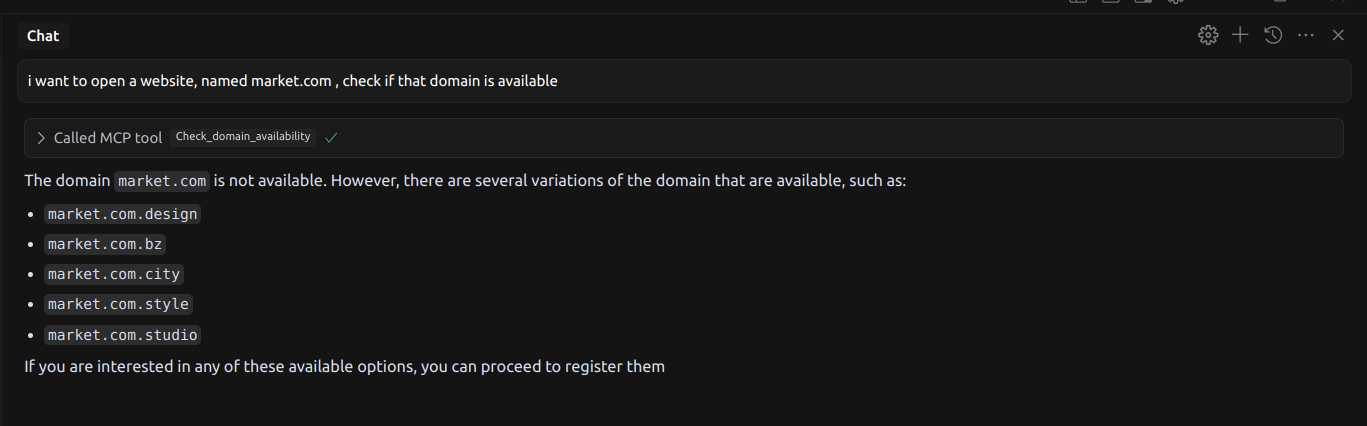
Example 3
We can use the agent to look for available domains
Development
Adding a New API to the MCP Server
The `utils` folder contains helper scripts for managing API configurations, parsing OpenAPI specifications, and registering new APIs into the MCP server.
1. Locate the OpenAPI Specification
Find the OpenAPI JSON for the API you want to integrate. After that, create a folder `json_files` in the root directory of the project and add your OpenAPI JSON spec to the folder
2. Modify the OpenAPI Specification
After obtaining the OpenAPI spec, use `modify_api.py` to update the path inside the spec to include the file name.
python utils/modify_api.py3. Update API Summaries
After modifying the paths, update the API summaries by choosing one of the following options:
- Automatically shorten summaries using an LLM:
python utils/LLM_summary_shortener.py- Manually update the summaries:
python utils/manual_summary_shortener.py4. Build and Test
Rebuild the project to apply the changes:
npm run buildThen, test the new API integration using:
npm run inspect5. Submit Your Changes
If you want to contribute this new API to the repository:
- Fork the repo.
- Create a branch.
- Submit a pull request (PR).
6. Publish the MCP server (Optional)
If you want to publish your changes:
- Update the `package.json` accordingly (e.g., update the version, name, etc.).
- Publish the package:
npm publish --access publicDevelopment Tools
Building
- `npm run build` - Builds the TypeScript source.
- `npm run clean` - Removes build artifacts.
- `npm run typecheck` - Runs TypeScript type checking.
Development Mode
- `npm run dev` - Watches source files and rebuilds on changes.
- `npm run inspect-watch` - Runs the inspector with auto-reload on changes.
Code Quality
- `npm run lint` - Runs ESLint.
- `npm run typecheck` - Verifies TypeScript types.
Command Line Arguments
npm run inspect -- \
  --api-base-url https://api.magicapi.dev/api/v1/ \
  --openapi-spec modified_files.txt \
  --headers "x-magicapi-key:your-api-key" \
  --name "my-mcp-server" \
  --version "1.0.0"
Development Workflow
1. Start the development environment:
npm run inspect-watch2. Modify the TypeScript files in `src/`.
3. The server will automatically rebuild and restart.
4. Use the MCP Inspector UI to test your changes.
Debugging or Running Locally
To debug or run the MCP server locally:
1. Clone the repository and install dependencies:
git clone https://github.com/Noveum/api-market-mcp-server.git
cd api-market-mcp-server
npm install
2. Build the server:
npm run build3. For debugging, you can run:
npm run inspectContributing
1. Fork the repository.
2. Create a feature branch.
3. Make your changes.
4. Run tests and linting:
npm run typecheck
npm run lint
5. Submit a pull request.
License
MIT
Frequently asked questions
What is api-market-mcp-server?
api-market-mcp-server is API Market MCP Servers
How do I install api-market-mcp-server?
Open the GitHub repository and follow its README. Most MCP servers are added to your client's MCP config, then called by your agent.
Is api-market-mcp-server open source?
Yes — it is hosted on GitHub at https://github.com/noveum/api-market-mcp-server and has 3 stars.
Related MCP tools
 repomix
📦 Repomix is a powerful tool that packs your entire repository into a single, AI-friendly file. Perfect for when you need to feed your codebase to Large Lan...
 dive
diveDive is an open-source MCP Host Desktop Application that seamlessly integrates with any LLMs supporting function calling capabilities. ✨
 rednote-mcp
🚀MCP server for accessing RedNote(XiaoHongShu, xhs). TypeScript-based implementation. Trusted by 800+ developers. Trusted by 800+ developers.
 iterm-mcp
A Model Context Protocol server that executes commands in the current iTerm session - useful for REPL and CLI assistance
 minecraft-mcp-server
A Minecraft MCP Server powered by Mineflayer API. It allows to control a Minecraft character in real-time, allowing AI assistants to build structures, explor...
 librechat
Enhanced ChatGPT Clone: Features Agents, MCP, DeepSeek, Anthropic, AWS, OpenAI, Responses API, Azure, Groq, o1, GPT-5, Mistral, OpenRouter, Vertex AI, Gemini...
Run your own MCP server? See who uses it and what to fix.
Measure it with TrackMCP