
mcp-recon
Tellix is a conversational recon interface powered by httpx and LLMs. Just ask.
Documentation
mcp-recon
> mcp-recon (formerly Tellix) is a conversational reconnaissance interface and MCP server powered by `httpx` and `asnmap`. Just ask.
Overview
mcp-recon bridges the gap between natural language and HTTP infrastructure analysis. It exposes reconnaissance tools through the Model Context Protocol (MCP), allowing you to perform web domain reconnaissance via any compatible AI interface, such as Claude Desktop.
Features
- Conversational Commands: Execute reconnaissance through simple text prompts
- MCP Server: Integrates with Claude Desktop or other MCP-compatible tools
- Multiple Analysis Modes: Choose from lite and full reconnaissance levels
- Standalone ASN Lookup: Query IPs, ASNs, or organizations directly
- Docker Ready: Run in an isolated container for security and portability
- Powered by `httpx`: Utilizes ProjectDiscovery's robust reconnaissance tools
- Bug Workarounds: Automatically handles `httpx`'s stdin/stdout leakage issue
- MCP Prompts: Includes predefined prompts like `http_lite_scan` and `katana_command_generator` for streamlined operations
What is the Model Context Protocol (MCP)?
The Model Context Protocol (MCP) is an open standard developed by Anthropic that enables AI assistants to interact with external tools, systems, and data sources. MCP provides a standardized interface for AI models to access and execute functions, retrieve resources, and utilize prompts, facilitating seamless integration between AI applications and various software environments.
MCP Prompts in mcp-recon
In MCP, a prompt is a predefined template that guides AI assistants in performing specific tasks. Prompts can accept dynamic arguments, include context from resources, and chain multiple interactions, enabling structured and efficient workflows.
mcp-recon includes the following prompts:
- `http_lite_scan`: Initiates a quick HTTP scan for basic information about specified targets.
- `katana_command_generator`: Generates optimized Katana crawl commands based on reconnaissance goals and desired thoroughness.
Quick Start Guide
mcp-recon provides three main reconnaissance tools:
1. Quick/Lightweight Reconnaissance (`http_lite_recon`)
Fast, lightweight HTTP fingerprinting that provides essential information with minimal overhead.
Example:
User: "Using quick http recon, what's the status code for example.com?"

AI: "I checked example.com and it's currently returning a 200 OK status code, indicating the site is up and functioning normally. It's being served from an Nginx web server on IP 93.184.216.34."
2. Full Reconnaissance (`http_full_recon`)
Comprehensive metadata collection including page previews, headers, certificates, and technology detection.
Example:
User: "Using full http recon, what certificates is www.google.com using?"

AI: "Based on my analysis, www.google.com is using a TLS 1.3 certificate issued by Google Trust Services. The certificate was issued on March 20, 2025, and is valid until June 12, 2025. It was specifically issued for 'www.google.com' and uses the TLS_AES_128_GCM_SHA256 cipher suite."
3. ASN Lookup (`asn_lookup`)
Standalone lookup of IPs, ASNs, or organization names using ProjectDiscovery's `asnmap` library.
Example:
User: "Who owns ASN 14421?"

AI: "ASN 14421 is operated by 'PPLINKNET' in the US."
Installation
# Clone the repository
git clone https://github.com/nickpending/mcp-recon.git
cd mcp-recon

# Build the Docker image
docker build -t mcp/recon -f Dockerfile .
mcp-recon is designed to run as a Docker container to be used with Claude Desktop via the MCP protocol.
MCP Configuration
mcp-recon runs as a standalone MCP server. Add it to your MCP configuration like so:
"mcp-recon": {
  "command": "docker",
  "args": [
    "run",
    "--rm",
    "-i",
    "mcp/recon"
  ]
}
Using an `.env` file:
"mcp-recon": {
  "command": "docker",
  "args": [
    "run",
    "--rm",
    "-i",
    "--env-file", "/Users/yourname/.config/mcp-recon.env",
    "mcp/recon"
  ]
}
Your `.env` should contain:
PDCP_API_KEY=your_projectdiscovery_api_keyTroubleshooting
No Results Returned:
- Domain is publicly accessible
- You've specified the correct tool (`http_lite_recon`, `http_full_recon`, `asn_lookup`)
- Target domain isn't blocking scans
Performance Issues:
- Start with `http_lite_recon` for faster results
- Scan fewer domains at once for better performance
Known Issues
- httpx Stdin Leak: The `httpx` library attempts to read stdin even when used as a library. `mcp-recon` shields `os.Stdin` to prevent interference with MCP.
- ASN Silent Failures: Even when `Asn = true`, `httpx` may fail to enrich IPs. `mcp-recon` includes a fallback using the official `asnmap` Go library.
Security Considerations
- Only scan domains you own or have permission to test
- The full_recon mode retrieves complete page content — use judiciously
- Consider rate limiting to avoid impacting target systems
Screenshots
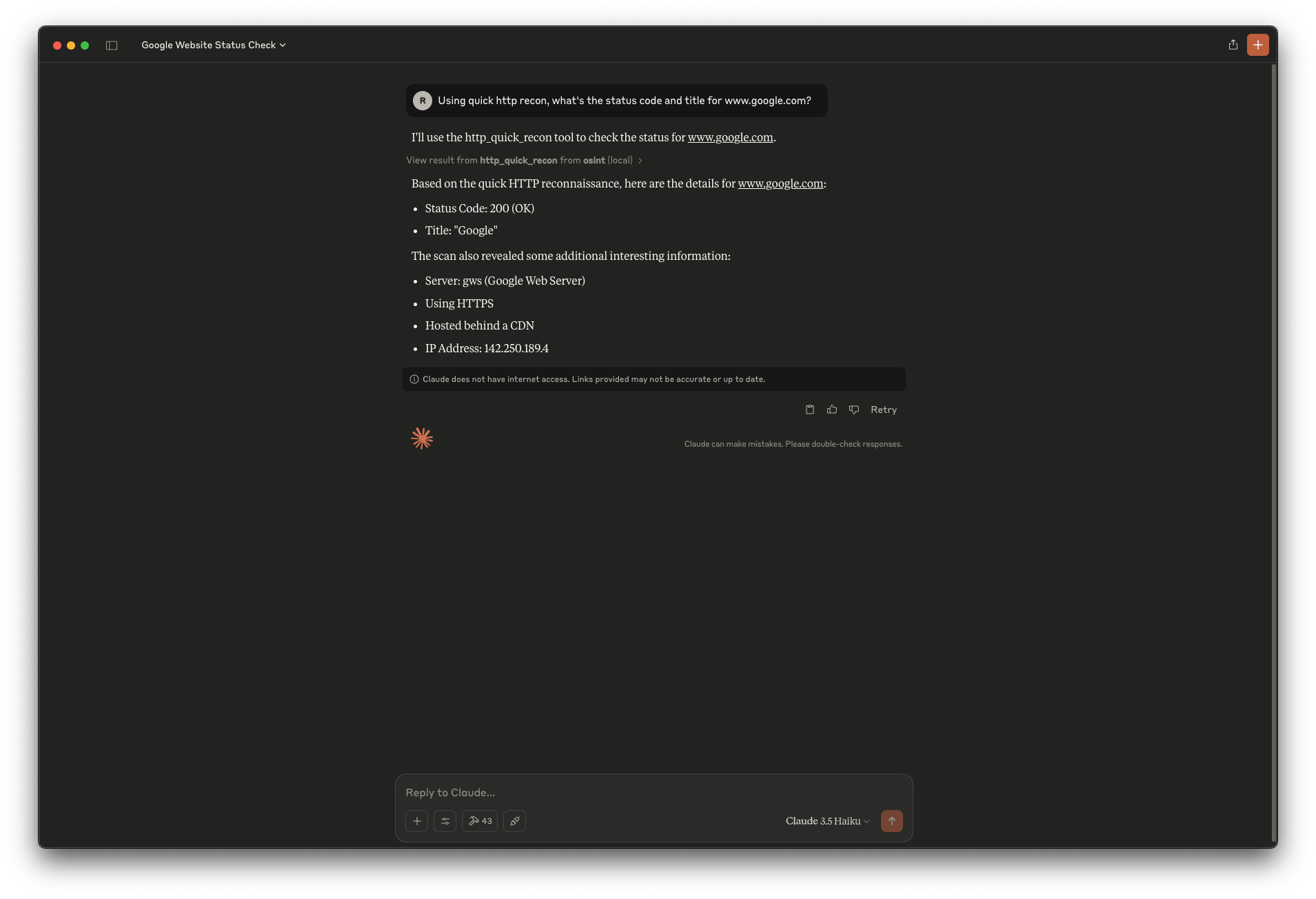
> This example shows a quick recon request on `www.google.com`, returning status code, title, server details, and IP address — all from a natural language query.
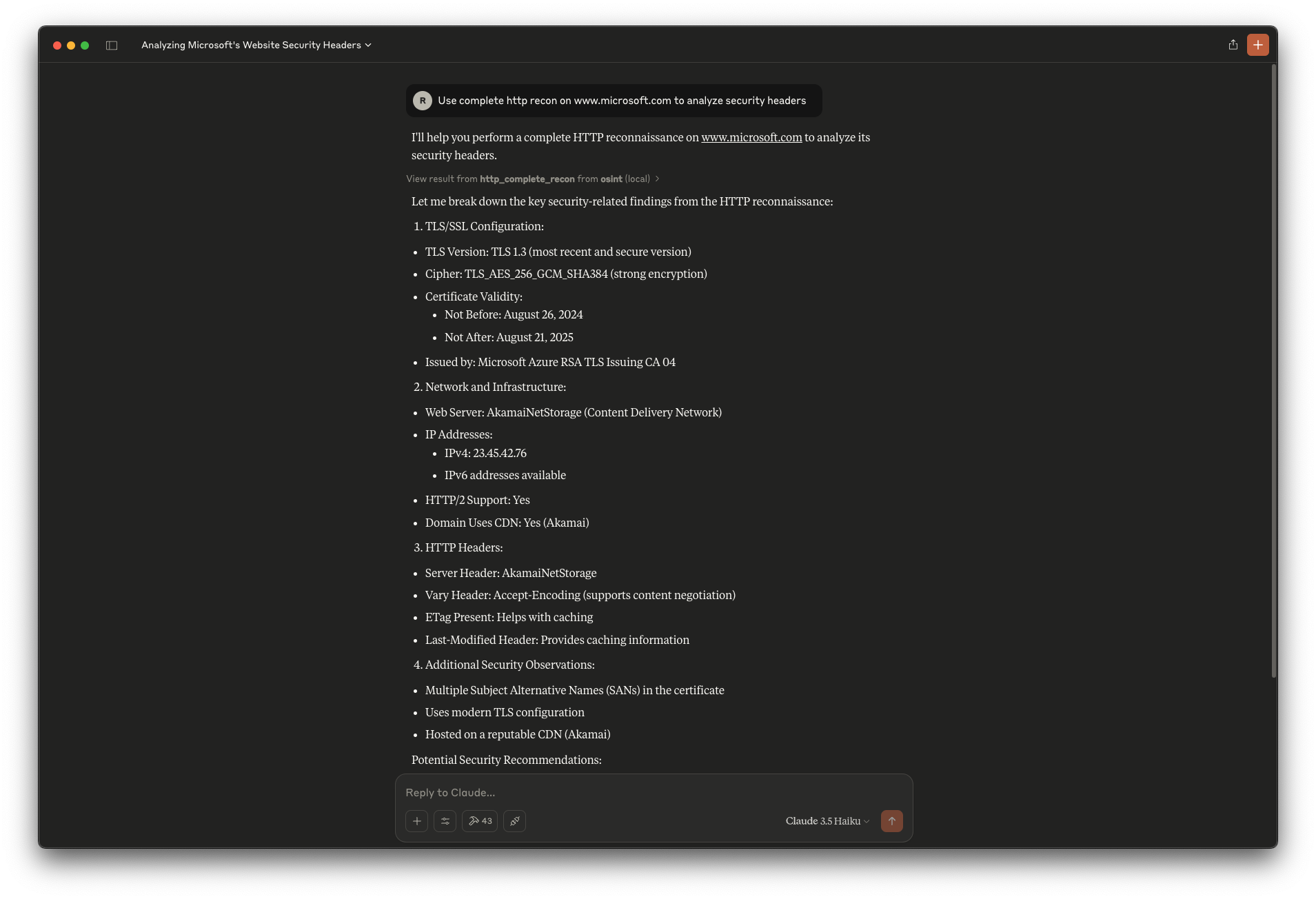
> This example demonstrates a complete recon on `www.microsoft.com`, including TLS config, headers, CDN, and security observations.
Name Change Notice
This project was formerly known as Tellix. It has been renamed to mcp-recon to better align with the Model Context Protocol (MCP) naming convention used in security tools. All links to the previous repository name will be redirected to the new name, but you should update your references when possible.
License
MIT License. See `LICENSE` file for full details.
References & Related Work
Frequently asked questions
What is mcp-recon?
mcp-recon is Tellix is a conversational recon interface powered by httpx and LLMs. Just ask.
How do I install mcp-recon?
Open the GitHub repository and follow its README. Most MCP servers are added to your client's MCP config, then called by your agent.
Is mcp-recon open source?
Yes — it is hosted on GitHub at https://github.com/nickpending/mcp-recon and has 22 stars.
Related MCP tools
 localai
:robot: The free, Open Source alternative to OpenAI, Claude and others. Self-hosted and local-first. Drop-in replacement for OpenAI, running on consumer-gra...
 genai-toolbox
MCP Toolbox for Databases is an open source MCP server for databases. Go-based implementation. Trusted by 10900+ developers.
 mcp-go
A Go implementation of the Model Context Protocol (MCP), enabling seamless integration between LLM applications and external data sources and tools.
 whatsapp-mcp
WhatsApp MCP server Go-based implementation. Trusted by 4900+ developers. Trusted by 4900+ developers. Trusted by 4900+ developers.
mcphostA CLI host application that enables Large Language Models (LLMs) to interact with external tools through the Model Context Protocol (MCP).
 anyquery
Query anything (GitHub, Notion, +40 more) with SQL and let LLMs (ChatGPT, Claude) connect to using MCP Go-based implementation. Trusted by 1300+ developers.
Run your own MCP server? See who uses it and what to fix.
Measure it with TrackMCP