
agent-droid-bridge
Agent Droid Bridge gives AI agents programmatic control over Android devices and emulators via ADB, exposed as an MCP server.
Documentation









Agent Droid Bridge
Agent Droid Bridge is an MCP server that connects AI agents to Android devices and emulators over ADB. It is built for mobile automation, app testing, dynamic analysis, and reverse engineering: exposing the full surface of ADB as structured tools that any MCP-compatible AI client can call directly. If ADB can do it, an agent can do it.
> Purpose-built tools return structured, minimal responses. No raw XML dumps, no wasted context — agents stay fast across long sessions.

Demo
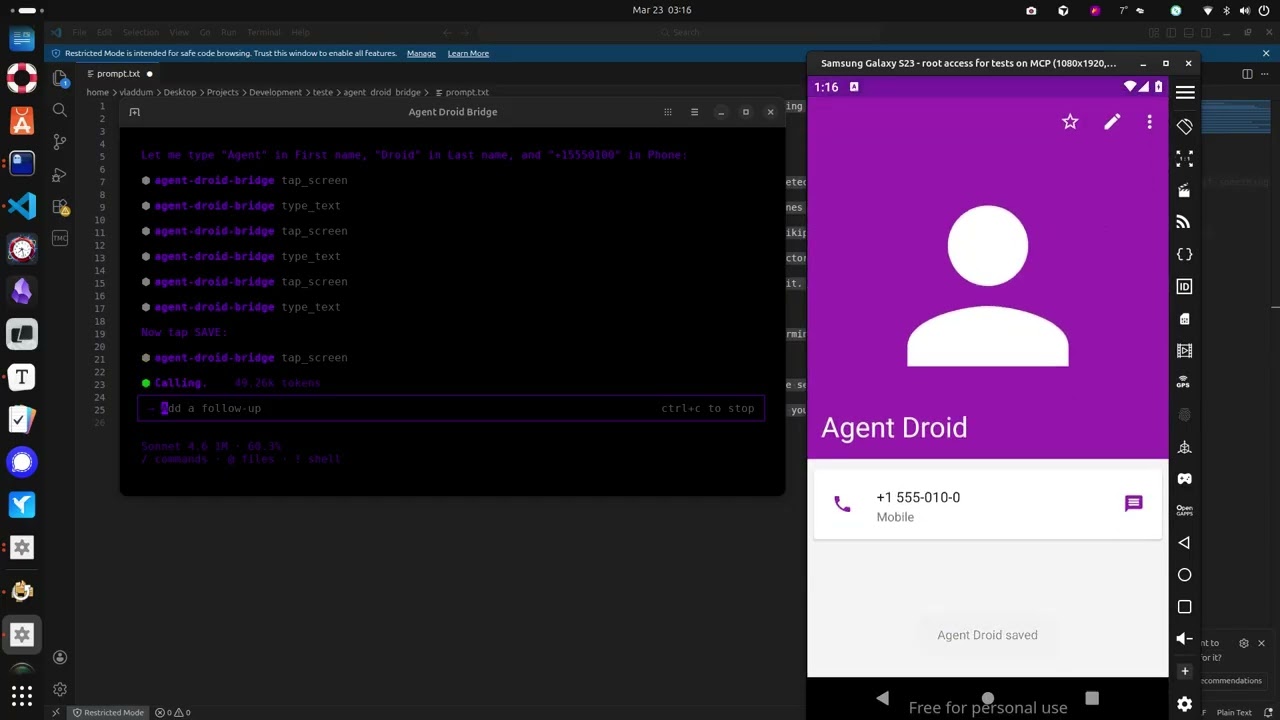
The demo above runs through a few straightforward tasks to show what a connected agent can do, and this is just scratching the surface:
- Installs the Paint app, opens it, and draws a house by calculating pixel coordinates for the walls and roof
- Opens the device browser, searches for "MCP Wikipedia", navigates to the result page, and takes a screenshot
- Opens the Calculator, computes 1337 × 42, and extracts the result to the host machine
- Opens Contacts, creates a new entry with a name and phone number, and confirms it saved
- Opens the Calendar and schedules an appointment for a specific date
- Opens Settings and toggles dark mode
- Extracts the Calculator APK from the device to the host machine
- Installs Notepad, writes a one-sentence summary of every task completed, and takes a final screenshot
What it does
Tools
- 14 built-in tools for screen capture, UI inspection, text reading, element extraction, touch and swipe input, text entry, keycode events, app launching, ADB commands, and device inspection
- `app_manager` pack adds 9 tools for package management, app lifecycle, APK extraction, permissions, and intent injection. Load it with `ADB_EXTRA_TOOL_PACKS=app_manager`
- Tool availability is reflected in the server's startup instructions. Agents receive an accurate catalog at connect time
Device handling
- Auto-detects a single connected device; prompts for selection when multiple devices are present
- Runs over stdio, compatible with any MCP-capable AI client
- Structured responses instead of raw XML dumps, keeping agent context lean across long automation runs
Security
- Two execution modes: `unrestricted` (full ADB access, optional denylist) and `restricted` (allowlist-only, blocks everything not explicitly permitted)
- Set `ADB_ALLOW_SHELL=false` to disable all shell commands regardless of mode
- Hide specific tools from the agent with `ADB_DENIED_TOOLS`
- All commands parsed via `shlex`. No shell injection possible
Observability
- Optional session recorder logs every tool call, ADB command, and security event to structured JSONL files. Enable with `MCP_LOG_ENABLED=true` and `MCP_LOG_DIR`
Use cases
Mobile QA and test automation
Automate UI flows across real devices and emulators without modifying the app or writing test code. Tap, swipe, type, read screen content, take screenshots — all from a natural language prompt.
App security research
Extract APKs, inspect declared permissions, fire arbitrary intents, and observe runtime behavior on screen. No instrumentation, no jailbreak required.
Dynamic analysis
Launch apps in controlled states, drive UI interactions, capture screen state at each step, and pull artifacts — all scriptable through an AI agent.
Development and debugging
Install builds, verify UI states, check app info, and run ADB commands without leaving your coding environment.
Install
uvx agent-droid-bridgeNo cloning or virtual environments needed. Requires Python 3.11+ and ADB installed on your host.
`uvx` is provided by uv. If you don't have it: `curl -LsSf https://astral.sh/uv/install.sh | sh`
To install from source instead, see docs/setup.md — Option B.
To verify the install: `uvx agent-droid-bridge --help`
Quick start
1. Install ADB — see docs/setup.md for platform-specific instructions
2. Connect an Android device or start an emulator
3. Add the server to your MCP client config:
{
  "mcpServers": {
    "agent-droid-bridge": {
      "command": "uvx",
      "args": ["agent-droid-bridge"],
      "env": {
        "ADB_EXECUTION_MODE": "unrestricted",
        "ADB_ALLOW_SHELL": "true",
        "ADB_PATH": "adb",
        "ADB_EXTRA_TOOL_PACKS": "",
        "MCP_LOG_ENABLED": "false",
        "MCP_LOG_DIR": "~/logs/agent-droid-bridge"
      }
    }
  }
}
To enable session logging, set `MCP_LOG_ENABLED` to `"true"` and update `MCP_LOG_DIR` to a writable path on your machine.
| Variable | Default | Description |
|---|---|---|
| `ADB_EXECUTION_MODE` | `unrestricted` | Security mode. `unrestricted` allows all shell commands (with optional denylist); `restricted` allows only commands in `ADB_SHELL_ALLOWLIST`. |
| `ADB_ALLOW_SHELL` | `true` | Set to `false` to block all `adb shell` commands regardless of execution mode. |
| `ADB_PATH` | `adb` | Path to the ADB binary. Replace with a full path if `adb` is not on your system PATH (e.g. `C:\platform-tools\adb.exe` on Windows). |
| `ADB_EXTRA_TOOL_PACKS` | *(empty)* | Comma-separated list of extra tool packs to load. Set to `app_manager` to enable 9 additional app management tools. |
| `MCP_LOG_ENABLED` | `false` | Set to `true` to enable session logging. Requires `MCP_LOG_DIR`. |
| `MCP_LOG_DIR` | *(none)* | Directory where session logs are written. Required when `MCP_LOG_ENABLED` is `true`. |
4. Prompt your agent to use the `agent-droid-bridge` MCP tools
Full setup guide and environment variable reference: docs/setup.md
Tools
| Tool | What it does |
|---|---|
| `get_ui_hierarchy` | Returns the current screen as an XML UI hierarchy |
| `take_screenshot` | Captures the screen as a base64-encoded PNG |
| `tap_screen` | Sends a tap gesture at pixel coordinates |
| `swipe_screen` | Sends a swipe gesture between two points over a given duration |
| `type_text` | Types text into the focused input field |
| `press_key` | Sends an Android keycode event (Back, Home, Enter, etc.) |
| `launch_app` | Launches an app by its `package/activity` component name |
| `execute_adb_command` | Runs an arbitrary ADB or ADB shell command |
| `list_devices` | Lists all Android devices currently visible to ADB with their serial, state, and model |
| `snapshot_ui` | Takes a lightweight UI snapshot and returns a token for use with `detect_ui_change` |
| `detect_ui_change` | Polls for a UI change after an action; accepts a snapshot token as baseline; returns hierarchy only when requested |
| `get_screen_elements` | Parses the UI hierarchy and returns structured elements with coordinates and interaction properties; supports `tappable`, `interactive`, `input`, and `all` modes |
| `get_screen_text` | Returns all visible text on screen sorted top-to-bottom, as plain text |
| `check_device_capabilities` | Returns structured device information — identity, security posture, and hardware specs — in a single call; supports `identity`, `security`, `hardware`, and `all` modes |
Extra tool packs
Optional packs extend the core toolset. Enable them by setting `ADB_EXTRA_TOOL_PACKS` in your MCP client config. See docs/extra-tool-packs.md.
app_manager
Package management, app lifecycle control, APK extraction, permission management, and intent injection.
| Tool | What it does |
|---|---|
| `list_packages` | Lists installed packages with optional filtering, search, and detail levels |
| `get_app_info` | Returns full static metadata for a single installed app |
| `install_app` | Installs an APK from a host path onto the device |
| `uninstall_app` | Removes an installed app by package name |
| `pull_apk` | Extracts the installed APK from the device to the host |
| `manage_permission` | Grants, revokes, checks, or lists runtime permissions for an app |
| `launch_app_extra` | Launches an app by package name, auto-resolving the launcher activity |
| `manage_app` | Controls app runtime state — stop, clear data, clear cache, enable, disable |
| `inject_intent` | Fires an intent at a component via `am start`, `am broadcast`, or `am startservice` |
Full parameter reference: docs/tools.md
Configuration
Configure the server entirely from your MCP client's `env` block. No files to edit. The env block in the Quick Start above covers the most common settings. For the full reference including security filtering, tool visibility, and timeouts, see docs/configuration.md.
To use a YAML config file instead, set `ADB_CONFIG_SOURCE=yaml`. See docs/configuration.md for details.
Session recording is separate. Enable it with `MCP_LOG_ENABLED=true` and `MCP_LOG_DIR`. Full reference: docs/logging.md.
Documentation
| File | Description |
|---|---|
| docs/setup.md | Prerequisites, installation, and MCP client configuration |
| docs/tools.md | Full parameter reference for all tools |
| docs/configuration.md | Reference for environment variables and `adb_config.yaml` |
| docs/logging.md | Session recorder — log files, levels, retention, and activation |
| docs/extra-tool-packs.md | Extra tool packs — enabling packs, the pack contract, and writing your own |
| docs/troubleshooting.md | Common setup issues and ADB problems |
| docs/workflows.md | Common multi-tool workflows with examples |
| CHANGELOG.md | Release history and version changes |
Contributing
Contributions are welcome. See CONTRIBUTING.md for guidelines on setup, code standards, and submitting pull requests.
To report a security vulnerability, follow the process in SECURITY.md — do not open a public issue.
Frequently asked questions
What is agent-droid-bridge?
agent-droid-bridge is Agent Droid Bridge gives AI agents programmatic control over Android devices and emulators via ADB, exposed as an MCP server.
How do I install agent-droid-bridge?
Open the GitHub repository and follow its README. Most MCP servers are added to your client's MCP config, then called by your agent.
Is agent-droid-bridge open source?
Yes — it is hosted on GitHub at https://github.com/Neverlow512/agent-droid-bridge and has 22 stars.
Related MCP tools
 jcodemunch-mcp
Cut AI token costs 95%+ on code exploration. The leading MCP server for precise, symbol-level GitHub code retrieval via tree-sitter AST. Works with Claude Code, Cursor & any MCP client. 313B+ tokens saved.
 projectmem
Open-source coding agent memory. Records issues, attempts, fixes and decisions, then warns your agent before it repeats an approach that already failed. Native MCP server for Claude Code, Cursor, Antigravity and Codex. 100% local, no cloud, no telemetry. MIT.
 skills
Browser automation CLI built for AI agents. Break through anti-bot walls, hand off to humans across platforms when stuck. Parallel multi-task execution, independent multi-session operation, isolated multi-account browsing.
 google_workspace_mcp
Control Gmail, Google Calendar, Docs, Sheets, Slides, Chat, Forms, Tasks, Search & Drive with AI - Comprehensive Google Workspace MCP Server & CLI Tool
 paperbanana
Open source implementation and extension of Google Research’s PaperBanana for automated academic figures, diagrams, and research visuals, expanded to new domains like slide generation.
 memora
Give your AI agents persistent, collective memory — with deduplicating absorb, supersession lineage, semantic search, and a graph UI. Speaks MCP.
Run your own MCP server? See who uses it and what to fix.
Measure it with TrackMCP