
MCPLuceneServer
MCP Lucene Server is a Model Context Protocol (MCP) server that exposes Apache Lucene's full-text search capabilities through a conversational interface. It allows AI assistants (like Claude) to help users search, index, and manage document collections without requiring technical knowledge of Lucene or search engines.
Documentation
MCP Lucene Server

A Model Context Protocol (MCP) server that exposes Apache Lucene fulltext search capabilities with automatic document crawling and indexing. This server supports both STDIO transport (for Claude Desktop integration) and HTTP transport (for web-based clients and remote access).
Features
Automatic Document Crawling
- Automatically indexes PDFs, Microsoft Office, and OpenOffice documents
- Multi-threaded crawling for fast indexing
- Real-time directory monitoring for automatic updates
- Incremental indexing with full reconciliation (skips unchanged files, removes orphans)
Powerful Search
- Simple keyword search (no Lucene syntax needed) and full Lucene query syntax search
- Field-specific filtering (by author, language, file type, etc.)
- Structured passages with quality metadata for LLM consumption
- Paginated results with filter suggestions
Semantic Search
- Optional pure KNN embedding-based semantic search using multilingual-e5 embeddings with Late Chunking
- Finds semantically related documents even without exact keyword matches
- Requires `VECTOR_MODEL` to be configured. See SEMANTICSEARCH.md for details.
Query Profiling & Debugging
- Deep query analysis and profiling (`profileQuery` tool)
- Understand why queries return certain results and how scoring works
- Filter impact analysis showing document reduction per filter
- Document scoring explanations with BM25 breakdown
- Term statistics (IDF, rarity, document frequency)
- Actionable optimization recommendations
- LLM-optimized structured output for easy interpretation
Rich Metadata Extraction
- Automatic language detection
- Author, title, creation date extraction
- File type and size information
- SHA-256 content hashing for change detection
JDBC Metadata Enrichment
- Load additional metadata from PostgreSQL, MySQL, or any JDBC-compatible database at index time
- JSON-based metadata with explicit field types (keyword, text, int, long, date)
- Multi-value field support, automatic facet registration
- Background sync job for incremental metadata updates (configurable interval)
- All DB-sourced fields prefixed with `dbmeta_` to avoid schema collisions
Text Normalization
- Automatic removal of broken/invalid characters (replacement chars, control chars, zero-width chars)
- Whitespace normalization (multiple spaces collapsed to single space)
- Ensures clean, readable search results and passages
Performance Optimized
- Batch processing for efficient indexing
- NRT (Near Real-Time) search with dynamic optimization
- Configurable thread pools for parallel processing
- Progress notifications during bulk operations
Easy Integration
- Dual transport support: STDIO (default) and HTTP
- STDIO transport for seamless Claude Desktop integration
- HTTP transport for web-based clients and remote access
- Comprehensive MCP tools for search and crawler control
- Flexible configuration via YAML and system properties
- Cross-platform notifications (macOS Notification Center, Windows Toast, Linux notify-send)
Table of Contents
- Documentation
- Quick Start
- MCP Tools
- Tool Exposure Configuration
- Index Field Schema
- Usage Examples
- Document Crawler Features
- Troubleshooting
- Security Considerations
- Configuration Options
- JDBC Metadata Enrichment
- Development
Documentation
Additional technical documentation:
- PIPELINE.md — Analyzer chains, query pipeline, and tokenization details
- SEMANTICSEARCH.md — Semantic search architecture: Late Chunking, Block Join indexing, KNN scoring, and configuration
- ONNX.md — ONNX model export, optimization and INT8 quantization guide for e5-base and e5-large
Quick Start
Get up and running with MCP Lucene Server in three steps.
Prerequisites
- Java 25 or later - Required to run the server
- Maven 3.9+ (only if building from source)
Step 1: Get the Server
Option A: Download Pre-built JAR (Recommended)
1. Go to the Actions tab
2. Click on the most recent successful workflow run
3. Scroll down to "Artifacts" and download `luceneserver-X.X.X-SNAPSHOT`
4. Extract the ZIP file to get the JAR
For tagged releases, you can also download from the Releases page.
Option B: Build from Source
./mvnw clean package -DskipTestsThis creates an executable JAR at `target/luceneserver-0.0.1-SNAPSHOT.jar`.
Option C: Use Docker (Only HTTP-Transport is available)
docker run -v ./lucene-data-dir:/userdata -p 9000:9000 -it mirkosertic42/mcpluceneserver:mainThis starts a Docker container with the server listening on port 9000. All configuration data including the
index files is stored in the `./lucene-data-dir` directory on the host machine. Please note that the Lucene
indexer can only access files that are visible to the Docker container, so all files must be placed in the
`./lucene-data-dir` directory or a subdirectory of it. JVM settings can be adjusted by the `JAVA_OPTS`
environment variable, which can be modified using the Docker CLI or a Docker Compose file. The default
maximum JVM Heap size(-Xmx) is 2GB.
To enable semantic search, set the `VECTOR_MODEL` environment variable:
docker run -v ./lucene-data-dir:/userdata -p 9000:9000 \
  -e VECTOR_MODEL=e5-base \
  -e JAVA_OPTS="-Xmx4g" \
-it mirkosertic42/mcpluceneserver:main| Environment Variable | Default | Description |
|---|---|---|
| `VECTOR_MODEL` | (none) | ONNX embedding model: `e5-base` (768 dims, faster) or `e5-large` (1024 dims, higher quality). Set to enable semantic search. |
| `JAVA_OPTS` | `-Xmx2g` | JVM options. Increase to `-Xmx4g` or higher when using semantic search. |
Step 2: Configure Claude Desktop
Locate your Claude Desktop configuration file:
- macOS: `~/Library/Application Support/Claude/claude_desktop_config.json`
- Windows: `%APPDATA%\Claude\claude_desktop_config.json`
- Linux: `~/.config/Claude/claude_desktop_config.json`
Add the Lucene MCP server to the `mcpServers` section:
{
  "mcpServers": {
    "lucene-search": {
      "command": "java",
      "args": [
        "--enable-native-access=ALL-UNNAMED",
        "-Xmx2g",
        "-Dspring.profiles.active=deployed",
        "-jar",
        "/absolute/path/to/luceneserver-0.0.1-SNAPSHOT.jar"
      ]
    }
  }
}
Important: Replace `/absolute/path/to/luceneserver-0.0.1-SNAPSHOT.jar` with the actual absolute path to your JAR file.
The `-Dspring.profiles.active=deployed` flag is required for clean STDIO communication (disables console logging and startup banner).
Step 3: Start Using It
1. Restart Claude Desktop to load the new configuration
2. Verify the server is running in Claude Desktop's developer settings
3. Tell Claude to add your documents:
"Add /Users/yourname/Documents as a crawlable directory and start crawling"That's it! The configuration is saved to `~/.mcplucene/config.yaml` and persists across restarts. You can now search your documents through Claude.
Example searches:
- "Search for machine learning papers"
- "Find all PDFs by John Doe"
- "What documents mention quarterly reports?"
MCP Tools
Tools are organized into groups. Use `LUCENE_TOOLS_INCLUDE` and `LUCENE_TOOLS_EXCLUDE` to control
which tools are exposed (see Tool Exposure Configuration).
Search Tools (group: `search`)
`simpleSearch`
Search the Lucene fulltext index using plain text keyword search. Special characters are treated as literals — no Lucene syntax knowledge required. Uses BM25 with German and English stemming.
Parameters:
- `query` (optional): Plain text search query. Can be `null` or `"*"` to match all documents (useful with filters).
- `filters` (optional): Array of structured filters for precise field-level filtering (see Structured Filters below)
- `page` (optional): Page number, 0-based (default: 0)
- `pageSize` (optional): Results per page (default: 10, max: 100)
- `sortBy` (optional): Sort field - `_score` (default), `modified_date`, `created_date`, `file_size`, or any `dbmeta_*` metadata field (INT/LONG/DATE/KEYWORD) registered from JDBC enrichment
- `sortOrder` (optional): Sort order - `asc` or `desc` (default: `desc`)
`extendedSearch`
Search the Lucene fulltext index using full Lucene query syntax. Supports Boolean operators, wildcards, proximity queries, and field-specific queries. Uses BM25 with German and English stemming.
Parameters:
- `query` (optional): The search query using Lucene query syntax. Can be `null` or `"*"` to match all documents (useful with filters).
- `filters` (optional): Array of structured filters for precise field-level filtering (see Structured Filters below)
- `page` (optional): Page number, 0-based (default: 0)
- `pageSize` (optional): Results per page (default: 10, max: 100)
- `sortBy` (optional): Sort field - `_score` (default), `modified_date`, `created_date`, `file_size`, or any `dbmeta_*` metadata field (INT/LONG/DATE/KEYWORD) registered from JDBC enrichment
- `sortOrder` (optional): Sort order - `asc` or `desc` (default: `desc`)
Sorting Results:
By default, results are sorted by relevance score (most relevant first). You can sort by metadata fields:
| Sort Field | Description | Default Order |
|---|---|---|
| `_score` | Relevance score (default) | Descending (best match first) |
| `modified_date` | Last modified date | Descending (most recent first) |
| `created_date` | Creation date | Descending (most recent first) |
| `file_size` | File size in bytes | Descending (largest first) |
| `dbmeta_*` | Any single-valued JDBC metadata field with type INT, LONG, DATE, or KEYWORD | Ascending or descending |
Sort Examples:
// Most recently modified documents
{ "query": "contract", "sortBy": "modified_date", "sortOrder": "desc" }

// Oldest documents first
{ "query": "contract", "sortBy": "created_date", "sortOrder": "asc" }

// Smallest files (for quick review)
{ "query": "summary", "sortBy": "file_size", "sortOrder": "asc" }

// Combine sorting with filters
{
  "query": "*",
  "sortBy": "modified_date",
  "sortOrder": "desc",
  "filters": [
    { "field": "file_extension", "value": "pdf" },
    { "field": "modified_date", "operator": "range", "from": "2024-01-01" }
  ]
}
Note: When sorting by metadata fields, relevance scores are still computed and used as a secondary sort criterion for tie-breaking.
Structured Filters:
The `filters` array accepts objects with these fields:
| Field | Required | Description |
|---|---|---|
| `field` | yes | Field name to filter on |
| `operator` | no | `eq` (default), `in`, `not`, `not_in`, `range` |
| `value` | for eq/not | Single value for exact match or exclusion |
| `values` | for in/not_in | Array of values (OR semantics within the field) |
| `from` | for range | Range start (inclusive) |
| `to` | for range | Range end (inclusive) |
| `addedAt` | no | Client timestamp — round-tripped in `activeFilters` response |
Operator reference:
| Operator | Description | Example |
|---|---|---|
| `eq` | Exact match (default) | `{field: "language", value: "en"}` |
| `in` | Match any of values | `{field: "file_extension", operator: "in", values: ["pdf", "docx"]}` |
| `not` | Exclude value | `{field: "language", operator: "not", value: "unknown"}` |
| `not_in` | Exclude multiple values | `{field: "language", operator: "not_in", values: ["unknown", ""]}` |
| `range` | Numeric/date range | `{field: "modified_date", operator: "range", from: "2024-01-01", to: "2025-12-31"}` |
Filterable fields:
- Faceted (DrillSideways): `language`, `file_extension`, `file_type`, `author`
- String (exact match): `file_path`, `content_hash`
- Numeric/date (range): `file_size`, `created_date`, `modified_date`, `indexed_date`
Date format: ISO-8601 — `"2024-01-15"`, `"2024-01-15T10:30:00"`, or `"2024-01-15T10:30:00Z"`
Filter combination rules:
- Filters on different fields use AND logic
- Multiple `eq` filters or `in` values on the same faceted field use OR logic (DrillSideways)
- `not`/`not_in` filters are applied as MUST_NOT clauses
AI-Powered Synonym Expansion:
This server is designed to work with AI assistants like Claude. Instead of using traditional Lucene synonym files, the AI generates context-appropriate synonyms automatically by constructing OR queries.
Why this is better than traditional synonyms:
- Context-aware: The AI understands your intent and picks relevant synonyms (e.g., "contract" in legal context vs. "contract" in construction)
- No maintenance: No need to maintain static synonym configuration files
- Domain-adaptive: Works across legal, technical, medical, or casual language automatically
- Multilingual: Generates synonyms in any language without configuration
When you ask Claude to "find documents about cars", it automatically searches for `(car OR automobile OR vehicle)` - giving you better results than a static synonym list.
Technical Details (Lexical Matching):
The server uses a multi-analyzer indexing pipeline and multi-field weighted query pipeline for comprehensive search:
- Unicode normalization — NFKC normalization, diacritic folding, ligature expansion via ICUFoldingFilter
- Leading wildcard optimization — `content_reversed` field stores reversed tokens for efficient `*vertrag`-style queries
- Case-insensitive wildcards — wildcard/prefix terms are automatically lowercased
- OpenNLP lemmatization — dictionary-based lemmatization for German and English, including irregular forms (ran→run, ging→gehen, paid→pay, analyses→analysis)
- Dual-language indexing — both German and English lemma fields indexed for all documents, enabling mixed-language matching
- German umlaut transliteration — `content_translit_de` shadow field maps digraphs (Mueller→Müller)
- Automatic phrase expansion — exact phrases auto-expand to include proximity matches (see below)
- Adaptive prefix scoring — BM25 scoring for specific prefixes (>= 4 chars)
See PIPELINE.md for complete analyzer chain documentation, concrete examples, and query pipeline details.
The AI assistant compensates for remaining limitations (no synonym expansion, no phonetic matching) by expanding queries intelligently.
Best Practices for Better Results:
1. Generate Synonyms Yourself: Use OR to combine related terms:
2. Use Wildcards for Variations: Handle different word forms:
3. Leverage Facets: Use the returned facet values to discover exact terms in the index:
4. Combine Techniques:
(contract* OR agreement*) AND (sign* OR execut*) AND author:"John Doe"Supported Query Syntax (extendedSearch):
- Simple terms: `hello world` (implicit AND between terms)
- Phrase queries: `"exact phrase"` (preserves word order)
- Boolean operators: `term1 AND term2`, `term1 OR term2`, `NOT term`
- Trailing wildcard: `contract*` matches contracts, contracting, contracted
- Leading wildcard: `*vertrag` efficiently finds Arbeitsvertrag, Kaufvertrag (optimised via reverse token field)
- Infix wildcard: `*vertrag*` finds both Vertragsbedingungen and Arbeitsvertrag
- Single char wildcard: `te?t` matches test, text
- Fuzzy search: `term~2` finds terms within Levenshtein edit distance 2 (default: 2)
- Proximity search: `"term1 term2"~5` finds terms within 5 words of each other
- Field-specific search: `title:hello content:world`
- Grouping: `(contract OR agreement) AND signed`
- Range queries: `modified_date:[1609459200000 TO 1640995200000]` (timestamps in milliseconds)
Automatic Phrase Proximity Expansion:
Multi-word phrase queries are automatically expanded: `"Domain Design"` becomes `("Domain Design")^2.0 OR ("Domain Design"~3)`. Exact matches rank highest (2.0x boost), while near-matches (within 3 words) also surface at lower scores. Single-word phrases and user-specified slop are not expanded.
See PIPELINE.md for detailed examples and configuration.
Adaptive Prefix Query Scoring:
Prefix queries with >= 4 characters (`vertrag*`, `design*`) use real BM25 scoring, ranking shorter/more frequent terms higher than long compounds. Shorter prefixes (`ver*`) use constant scoring for performance. This balances ranking quality with speed automatically.
See PIPELINE.md for scoring examples and technical details.
German Compound Word Search:
Use wildcards for German compounds: `*vertrag` finds Arbeitsvertrag, `vertrag*` finds Vertragsbedingungen. Leading wildcards are optimized via the `content_reversed` field.
Automatic Lemmatization:
OpenNLP lemmatization handles morphological variants automatically. German: "Haus" finds "Häuser", "gehen" finds "ging". English: "run" finds "ran", "pay" finds "paid". Exact matches always rank highest.
Dual-Language Support:
All documents indexed with both German and English lemma fields, enabling mixed-language matching. German docs with English technical terms ("Recommendation Engines") match singular queries ("Recommendation Engine") via the English lemmatizer, and vice versa.
German Umlaut Transliteration:
The `content_translit_de` field maps ASCII digraphs to umlauts: "Mueller" matches "Müller", "Kaese" matches "Käse".
See PIPELINE.md for complete analyzer chains, concrete token examples, and query pipeline details.
Returns:
- Paginated document results, each containing a `passages` array with highlighted text and quality metadata
- Document-level relevance scores
- `facets`: Facet values and counts from the result set (uses DrillSideways when facet filters are active, showing alternative values)
- `activeFilters`: Mirrors the input `filters` with a `matchCount` for each filter (count from facets, or -1 for range/non-faceted filters)
- Search execution time in milliseconds (`searchTimeMs`)
Filter examples:
// Browse all English PDFs
{ "query": null, "filters": [
    { "field": "language", "value": "en" },
    { "field": "file_extension", "value": "pdf" }
]}

// Date range filter
{ "query": "contract*", "filters": [
    { "field": "modified_date", "operator": "range", "from": "2024-01-01", "to": "2025-12-31" }
]}

// Multiple values with exclusion
{ "query": "report", "filters": [
    { "field": "file_extension", "operator": "in", "values": ["pdf", "docx"] },
    { "field": "language", "operator": "not", "value": "unknown" }
]}
Semantic Search Tools (group: `semantic`)
Semantic search tools require `VECTOR_MODEL` to be configured (e.g., `VECTOR_MODEL=e5-base`).
`semanticSearch`
Pure KNN embedding-based semantic search. Finds semantically related documents even without exact keyword matches. Results are ordered by cosine similarity. Requires `VECTOR_MODEL` to be configured.
Parameters:
- `query` (required): Natural language query — the server computes an embedding and finds the nearest document chunks.
- `filters` (optional): Array of structured filters (same format as `simpleSearch`/`extendedSearch`)
- `page` (optional): Page number, 0-based (default: 0)
- `pageSize` (optional): Results per page (default: 10, max: 100)
- `similarityThreshold` (optional): Minimum cosine similarity score to include a result (0.0–1.0, default: 0.70). Lower = more results (broader match); higher = fewer results (closer match).
Use `profileSemanticSearch` to tune `similarityThreshold` for your corpus.
`profileSemanticSearch`
Debug tool for semantic search. Shows embedding time, cosine scores, matched chunks, and how many candidates passed the similarity threshold. Use this to tune `similarityThreshold` for your data.
Parameters:
- `query` (required): Natural language query to profile
- `filters` (optional): Array of structured filters
- `similarityThreshold` (optional): Threshold to test (0.0–1.0, default: 0.70)
Debug Tools (group: `debug`)
`profileQuery`
Analyze and debug `simpleSearch` / `extendedSearch` queries. Provides detailed insights into how Lucene processes your query, which terms contribute to scoring, how filters affect results, and where optimization opportunities exist.
Parameters:
- `query` (optional): The search query (same as `simpleSearch`/`extendedSearch`)
- `filters` (optional): Array of structured filters (same as search tools)
- `page` (optional): Page number, 0-based (default: 0)
- `pageSize` (optional): Results per page (default: 10, max: 100)
- `sortBy` (optional): Sort field (same as search tools)
- `sortOrder` (optional): Sort order (same as search tools)
- `queryMode` (optional): `SIMPLE` (default) or `EXTENDED` — selects the query parser mode to match the search tool you are profiling
- `analyzeFilterImpact` (optional): If `true`, analyzes how each filter reduces result count. WARNING: Expensive operation requiring multiple queries. Default: `false`
- `analyzeDocumentScoring` (optional): If `true`, provides detailed scoring explanations for top documents using Lucene's Explanation API. WARNING: Expensive operation. Default: `false`
- `analyzeFacetCost` (optional): If `true`, measures faceting computation overhead. WARNING: Expensive operation. Default: `false`
- `maxDocExplanations` (optional): Maximum number of documents to explain when `analyzeDocumentScoring=true` (default: 5, max: 10)
Analysis Levels:
Level 1: Fast Analysis (Always Included)
- Query structure and component breakdown
- Query type identification (BooleanQuery, TermQuery, WildcardQuery, etc.)
- Estimated cost per query component
- Term statistics (document frequency, IDF, rarity classification)
- Search metrics (total hits, filter reduction percentage)
Level 2: Filter Impact Analysis (Opt-in, Expensive)
- Shows how each filter affects result count
- Calculates selectivity (low/medium/high/very high)
- Measures execution time per filter
- Helps identify redundant or ineffective filters
Level 3: Document Scoring Explanations (Opt-in, Expensive)
- Detailed score breakdown for top-ranked documents
- Shows which terms contribute most to each document's score
- Provides human-readable scoring summaries
- Uses Lucene's Explanation API but parsed into LLM-friendly format
Level 4: Facet Cost Analysis (Opt-in, Expensive)
- Measures faceting computation overhead
- Shows cost per facet dimension
- Helps decide if faceting should be disabled for performance
Returns:
A structured analysis object containing:
{
  success: boolean,
  queryAnalysis: {
    originalQuery: string,
    parsedQueryType: string,
    components: [{
      type: string,              // "TermQuery", "WildcardQuery", etc.
      field: string,
      value: string,
      occur: string,             // "MUST", "SHOULD", "FILTER", "MUST_NOT"
      estimatedCost: number,
      costDescription: string    // "~450 documents (moderate)"
    }],
    rewrites: [{                 // Query optimizations performed by Lucene
      original: string,
      rewritten: string,
      reason: string
    }],
    warnings: string[]
  },
  searchMetrics: {
    totalIndexedDocuments: number,
    documentsMatchingQuery: number,
    documentsAfterFilters: number,
    filterReductionPercent: number,
    termStatistics: {
      [term: string]: {
        term: string,
        documentFrequency: number,
        totalTermFrequency: number,
        idf: number,
        rarity: string           // "very common", "common", "uncommon", "rare"
      }
    }
  },
  filterImpact?: {               // Only if analyzeFilterImpact=true
    baselineHits: number,
    finalHits: number,
    filterImpacts: [{
      filter: {...},
      hitsBeforeFilter: number,
      hitsAfterFilter: number,
      documentsRemoved: number,
      reductionPercent: number,
      selectivity: string,       // "low", "medium", "high", "very high"
      executionTimeMs: number
    }],
    totalExecutionTimeMs: number
  },
  documentExplanations?: [{      // Only if analyzeDocumentScoring=true
    filePath: string,
    rank: number,
    score: number,
    scoringBreakdown: {
      totalScore: number,
      components: [{
        term: string,
        field: string,
        contribution: number,
        contributionPercent: number,
        details: {
          idf: number,
          tf: number,
          termFrequency: number,
          documentLength: number,
          averageDocumentLength: number,
          explanation: string
        }
      }],
      summary: string            // "Score dominated by term 'contract' (60.8%)"
    },
    matchedTerms: string[]
  }],
  facetCost?: {                  // Only if analyzeFacetCost=true
    facetingOverheadMs: number,
    facetingOverheadPercent: number,
    dimensions: {
      [dimension: string]: {
        dimension: string,
        uniqueValues: number,
        totalCount: number,
        computationTimeMs: number
      }
    }
  },
  recommendations: string[]      // Actionable optimization suggestions
}
Example: Basic Query Analysis
Ask Claude: "Profile my search for 'contract AND signed' to understand its performance"This performs fast analysis showing:
- Query structure (Boolean AND query with two terms)
- Term statistics (how common "contract" and "signed" are)
- Cost estimates (how many documents will be examined)
- Optimization recommendations
Example: Deep Analysis with Scoring
{
  "query": "(contract OR agreement) AND signed",
  "filters": [
    { "field": "language", "value": "en" },
    { "field": "modified_date", "operator": "range", "from": "2024-01-01" }
  ],
  "analyzeDocumentScoring": true,
  "maxDocExplanations": 3
}
This provides detailed scoring explanations for the top 3 documents, showing:
- Which terms matched in each document
- How much each term contributed to the final score
- Why document A ranked higher than document B
Example: Filter Optimization
{
  "query": "*",
  "filters": [
    { "field": "file_extension", "value": "pdf" },
    { "field": "language", "value": "en" },
    { "field": "file_type", "value": "application/pdf" }
  ],
  "analyzeFilterImpact": true
}
This analyzes filter effectiveness, potentially revealing:
- `file_extension=pdf` reduces results by 75% (high selectivity)
- `file_type=application/pdf` reduces results by 0% (redundant with file_extension)
- Recommendation: Remove redundant `file_type` filter
Example: Understanding Automatic Phrase Expansion
When you search for an exact phrase like `"Domain Design"`, the query is automatically expanded to improve recall while maintaining precision:
{
  "query": "\"Domain Design\"",
  "analyzeDocumentScoring": true,
  "maxDocExplanations": 3
}
The profiler reveals how the query was expanded:
Query Analysis:
- Original Query: `"Domain Design"`
- Parsed Type: `BooleanQuery`
- Rewrite: Automatic phrase proximity expansion (exact match boosted + proximity variants)
- Query Components:
- `PhraseQuery (boost=4.0)` - `"domain design"` (exact match, highest boost)
- `PhraseQuery (boost=2.0)` - `"domain design"~3` (proximity match, slop=3)
- Additional stemmed variants with lower boosts
Document Scoring:
- Exact match ("Domain Design"): Score 0.81 - matches both clauses, exact clause dominates
- Proximity match ("Domain-driven Design"): Score 0.15 - matches only proximity clause
- Proximity match ("Domain Effective Design"): Score 0.15 - matches only proximity clause
This shows:
1. Exact matches rank highest due to the 4.0x accumulated boost (2.0 from stemming x 2.0 from phrase expansion)
2. Proximity matches still found with slop=3 (allowing up to 3 words between terms)
3. Clear score separation between exact and proximity matches ensures precision
Performance Notes:
- Basic analysis (default): Very fast, negligible overhead (~5-10ms)
- Filter impact analysis: Requires N+1 queries where N is the number of filters. Can take seconds for complex filter sets.
- Document scoring analysis: Requires Lucene to compute full Explanation objects. Cost grows with `maxDocExplanations`.
- Facet cost analysis: Requires facet computation. Cost depends on number of unique facet values.
Best Practices:
1. Start with basic analysis (no optional flags) to get quick insights
2. Enable expensive analysis only when debugging specific performance issues
3. Use `analyzeDocumentScoring` to understand why certain documents rank highly
4. Use `analyzeFilterImpact` to optimize filter order and remove redundant filters
5. Pay attention to the `recommendations` array for actionable optimization tips
Crawler Tools (group: `crawler`)
`startCrawl`
Start crawling configured directories to index documents.
Parameters:
- `fullReindex` (optional): If true, clears the index before crawling (default: false). When false and `reconciliation-enabled` is true, an incremental crawl is performed instead.
Features:
- Automatically extracts content from PDFs, Office documents, and OpenOffice files
- Detects document language
- Extracts metadata (author, title, creation date, etc.)
- Multi-threaded processing for fast indexing
- Progress notifications during crawling
- Incremental mode (default): Only new or modified files are indexed; deleted files are removed from the index automatically. Falls back to a full crawl if reconciliation encounters an error.
`getCrawlerStats`
Get real-time statistics about the crawler progress.
Returns:
- `filesFound`: Total files discovered
- `filesProcessed`: Files processed so far
- `filesIndexed`: Files successfully indexed
- `filesFailed`: Files that failed to process
- `bytesProcessed`: Total bytes processed
- `filesPerSecond`: Processing throughput
- `megabytesPerSecond`: Data throughput
- `elapsedTimeMs`: Time elapsed since crawl started
- `perDirectoryStats`: Statistics breakdown per directory
- `orphansDeleted`: Number of index entries removed because the file no longer exists on disk (incremental mode)
- `filesSkippedUnchanged`: Number of files skipped because they were not modified since the last crawl (incremental mode)
- `reconciliationTimeMs`: Time spent comparing the index against the filesystem (incremental mode)
- `crawlMode`: Either `"full"` or `"incremental"`
- `currentlyProcessing`: Array of files currently being processed (extracted/indexed). Each entry contains:
- `filePath`: Full path to the file being processed
- `processingDurationMs`: How long the file has been processing (in milliseconds)
- `lastCrawlCompletionTimeMs`: Unix timestamp (ms) of the last successful crawl completion (null if no previous crawl)
- `lastCrawlDocumentCount`: Number of documents in the index after the last successful crawl (null if no previous crawl)
- `lastCrawlMode`: Mode of the last crawl - `"full"` or `"incremental"` (null if no previous crawl)
`getCrawlerStatus`
Get the current state of the crawler.
Returns:
- `state`: One of `IDLE`, `CRAWLING`, `PAUSED`, or `WATCHING`
`pauseCrawler`
Pause an ongoing crawl operation. The crawler can be resumed later with `resumeCrawler`.
`resumeCrawler`
Resume a paused crawl operation.
`listCrawlableDirectories`
List all configured crawlable directories.
Returns:
- `success`: Boolean indicating operation success
- `directories`: List of absolute directory paths currently configured
- `totalDirectories`: Count of configured directories
- `configPath`: Path to the configuration file (`~/.mcplucene/config.yaml`)
- `environmentOverride`: Boolean indicating if `LUCENE_CRAWLER_DIRECTORIES` env var is set
Example response:
{
  "success": true,
  "directories": [
    "/Users/yourname/Documents",
    "/Users/yourname/Downloads"
  ],
  "totalDirectories": 2,
  "configPath": "/Users/yourname/.mcplucene/config.yaml",
  "environmentOverride": false
}
`addCrawlableDirectory`
Add a directory to the crawler configuration.
Parameters:
- `path` (required): Absolute path to the directory to crawl
- `crawlNow` (optional): If true, immediately starts crawling the new directory (default: false)
Returns:
- `success`: Boolean indicating operation success
- `message`: Confirmation message
- `totalDirectories`: Updated count of configured directories
- `directories`: Updated list of all directories
- `crawlStarted` (optional): Present if `crawlNow=true`, indicates crawl was triggered
Validation:
- Directory must exist and be accessible
- Path must be a directory (not a file)
- Duplicate directories are prevented
- Fails if `LUCENE_CRAWLER_DIRECTORIES` environment variable is set
Example:
Ask Claude: "Add /Users/yourname/Documents as a crawlable directory"
Ask Claude: "Add /path/to/research and crawl it now"
Configuration Persistence:
The directory is immediately saved to `~/.mcplucene/config.yaml` and will be automatically crawled on future server restarts.
`removeCrawlableDirectory`
Remove a directory from the crawler configuration.
Parameters:
- `path` (required): Absolute path to the directory to remove
Returns:
- `success`: Boolean indicating operation success
- `message`: Confirmation message
- `totalDirectories`: Updated count of configured directories
- `directories`: Updated list of remaining directories
Important Notes:
- This does NOT remove already-indexed documents from the removed directory
- To remove indexed documents, use `startCrawl(fullReindex=true)` after removing directories
- Fails if `LUCENE_CRAWLER_DIRECTORIES` environment variable is set
- The directory must exist in the current configuration
Example:
Ask Claude: "Stop crawling /Users/yourname/Downloads"
Ask Claude: "Remove /path/to/old/archive from the crawler"
Index Info Tools (group: `info`)
`getIndexStats`
Get statistics about the Lucene index, including lemmatizer cache performance metrics, query runtime percentiles (p50-p99), and per-field facet computation timing.
Returns:
- `documentCount`: Total number of documents in the index
- `indexPath`: Path to the index directory
- `schemaVersion`: Current index schema version
- `softwareVersion`: Server software version
- `buildTimestamp`: Server build timestamp
- `dateFieldHints`: Min/max date ranges for date fields (`created_date`, `modified_date`, `indexed_date`) in ISO-8601 format — useful for building date range filters
- `sortableFields`: Map of dynamically registered sortable `dbmeta_*` fields from JDBC metadata enrichment to their sort type (`"numeric"` or `"keyword"`). Null when no JDBC enrichment has registered sortable fields. Use this to discover which `dbmeta_*` fields can be passed as `sortBy`. Native fields (`file_size`, `created_date`, `modified_date`) are always sortable and not listed here.
- `lemmatizerCacheMetrics`: Performance metrics for the OpenNLP lemmatizer caches (one per language: German and English)
- `language`: Language code (de or en)
- `hitRate`: Cache hit rate as a percentage (e.g., "85.3%")
- `totalHits`: Number of times a token was found in the cache
- `totalMisses`: Number of times a token required lemmatization
- `cacheSize`: Current number of entries in the cache
- `evictions`: Number of cache entries evicted due to size limits
- `queryRuntimeMetrics`: Aggregate search query performance statistics (null before any searches are executed)
- `totalQueries`: Total number of search queries executed since server start
- `averageDurationMs`: Average query duration in milliseconds (e.g., "12.5")
- `minDurationMs`: Fastest query duration in milliseconds
- `maxDurationMs`: Slowest query duration in milliseconds
- `averageHitCount`: Average number of matching documents per query (e.g., "42.3")
- `p50Ms` / `p75Ms` / `p90Ms` / `p95Ms` / `p99Ms`: Query duration percentiles in milliseconds (computed from last 1000 queries)
- `averageFacetDurationMs`: Average facet computation time per query in milliseconds (e.g., "0.125")
- `perFieldAverageFacetDurationMs`: Per-field average facet computation time in milliseconds (e.g., `{"language": "0.031", "file_extension": "0.028", ...}`)
Lemmatizer Cache Performance:
The server uses single-token caching for OpenNLP lemmatization to reduce CPU usage during indexing and querying. Each language analyzer (German and English) maintains a shared LRU cache with up to 1,500,000 entries, shared across all Lucene indexing threads. The cache uses case-insensitive keys for common words (e.g., "Vertrag" and "vertrag" share the same cache entry) while keeping proper nouns case-sensitive (e.g., "Berlin" vs "berlin").
Key Metrics:
- Hit Rate: Higher is better. 85-95% is typical after indexing a few thousand documents. Higher hit rates mean less CPU usage.
- Cache Size: Current number of cached (token, POS tag) to lemma mappings. Grows up to 1,500,000 entries per language.
- Evictions: How many entries have been removed to make room for new ones. Some evictions are normal with large document sets.
Performance Impact:
Without caching, lemmatization can consume 70-80% of CPU during indexing. With caching, CPU usage typically drops to 20-30%, resulting in 2-3x faster indexing throughput for document sets with repetitive vocabulary.
`listIndexedFields`
List all field names present in the Lucene index.
Returns:
- `fields`: Array of field names available for searching and filtering
Example response:
{
  "success": true,
  "fields": [
    "file_name",
    "file_path",
    "title",
    "author",
    "content",
    "language",
    "file_extension",
    "file_type",
    "created_date",
    "modified_date"
  ]
}
`getDocumentDetails`
Retrieve all stored fields and full content of a document from the Lucene index by its file path. This tool retrieves document details directly from the index without requiring filesystem access - useful for examining indexed content even if the original file has been moved or deleted.
Parameters:
- `filePath` (required): Absolute path to the file (must match exactly the `file_path` stored in the index)
Returns:
- `success`: Boolean indicating operation success
- `document`: Object containing all stored fields:
- `file_path`: Full path to the file
- `file_name`: Name of the file
- `file_extension`: File extension (e.g., `pdf`, `docx`)
- `file_type`: MIME type
- `file_size`: File size in bytes
- `title`: Document title
- `author`: Author name
- `creator`: Creator application
- `subject`: Document subject
- `keywords`: Document keywords/tags
- `language`: Detected language code
- `created_date`: Creation timestamp
- `modified_date`: Modification timestamp
- `indexed_date`: Indexing timestamp
- `content_hash`: SHA-256 hash of content
- `content`: Full extracted text content (limited to 500KB)
- `contentTruncated`: Boolean indicating if content was truncated
- `originalContentLength`: Original content length (only present if truncated)
Content Size Limit:
The `content` field is limited to 500,000 characters (500KB) to ensure the response stays safely below the 1MB MCP response limit. Check the `contentTruncated` field to determine if the full content was returned.
Example:
Ask Claude: "Show me the indexed details of /Users/yourname/Documents/report.pdf"
Ask Claude: "What content was extracted from /path/to/contract.docx?"
Example response:
{
  "success": true,
  "document": {
    "file_path": "/Users/yourname/Documents/report.pdf",
    "file_name": "report.pdf",
    "file_extension": "pdf",
    "file_type": "application/pdf",
    "file_size": "125432",
    "title": "Annual Report 2024",
    "author": "John Doe",
    "language": "en",
    "indexed_date": "1706540400000",
    "content_hash": "a1b2c3d4...",
    "content": "This is the full extracted text content of the document...",
    "contentTruncated": false
  }
}
Observability Tools (group: `observability`)
`suggestTerms`
Suggest index terms matching a prefix. Useful for discovering vocabulary, finding German compound words, exploring author names, or auto-completing field values.
Parameters:
- `field` (required): Field name to suggest terms from (e.g. `content`, `author`, `file_extension`)
- `prefix` (required): Prefix to match terms against (e.g. `ver` to find `vertrag`, `version`)
- `limit` (optional): Maximum number of terms to return (default: 20, max: 100)
Notes:
- For analyzed fields (`content`, `title`, etc.), the prefix is automatically lowercased to match indexed tokens
- For StringFields (`file_extension`, `language`), the prefix is used as-is (exact match)
- Numeric/date fields (`file_size`, `modified_date`, etc.) are not supported — use `getIndexStats` for date ranges
- Returns terms sorted by document frequency (most common first)
- Returns empty results for nonexistent fields (not an error)
Example — discover German compound words:
{
  "field": "content",
  "prefix": "vertrag",
  "limit": 10
}
Example response:
{
  "success": true,
  "field": "content",
  "prefix": "vertrag",
  "terms": [
    {"term": "vertrag", "docFreq": 45},
    {"term": "vertrags", "docFreq": 23},
    {"term": "vertragsklausel", "docFreq": 8},
    {"term": "vertragsbedingungen", "docFreq": 5}
  ],
  "totalTermsMatched": 4
}
`getTopTerms`
Get the most frequent terms in a field. Useful for understanding index vocabulary, discovering common values (languages, file types, authors), and identifying dominant terms.
Parameters:
- `field` (required): Field name to get top terms from (e.g. `content`, `author`, `file_extension`)
- `limit` (optional): Maximum number of terms to return (default: 20, max: 100)
Notes:
- Returns terms sorted by document frequency (most common first)
- For large content fields (>100K unique terms), a warning is included suggesting `suggestTerms` instead
- Numeric/date fields are not supported — use `getIndexStats` for date ranges
- Returns empty results for nonexistent fields (not an error)
Example — explore file types in index:
{
  "field": "file_extension",
  "limit": 10
}
Example response:
{
  "success": true,
  "field": "file_extension",
  "terms": [
    {"term": "pdf", "docFreq": 234},
    {"term": "docx", "docFreq": 156},
    {"term": "txt", "docFreq": 89},
    {"term": "md", "docFreq": 45}
  ],
  "uniqueTermCount": 12
}
Example — explore content vocabulary:
{
  "field": "content",
  "limit": 20
}
Admin Tools (group: `admin`)
`indexAdmin`
An MCP App that provides a visual user interface for index maintenance tasks directly inside your MCP client (e.g. Claude Desktop). When invoked, the app is rendered inline in the conversation and offers one-click access to administrative operations without requiring manual tool calls.
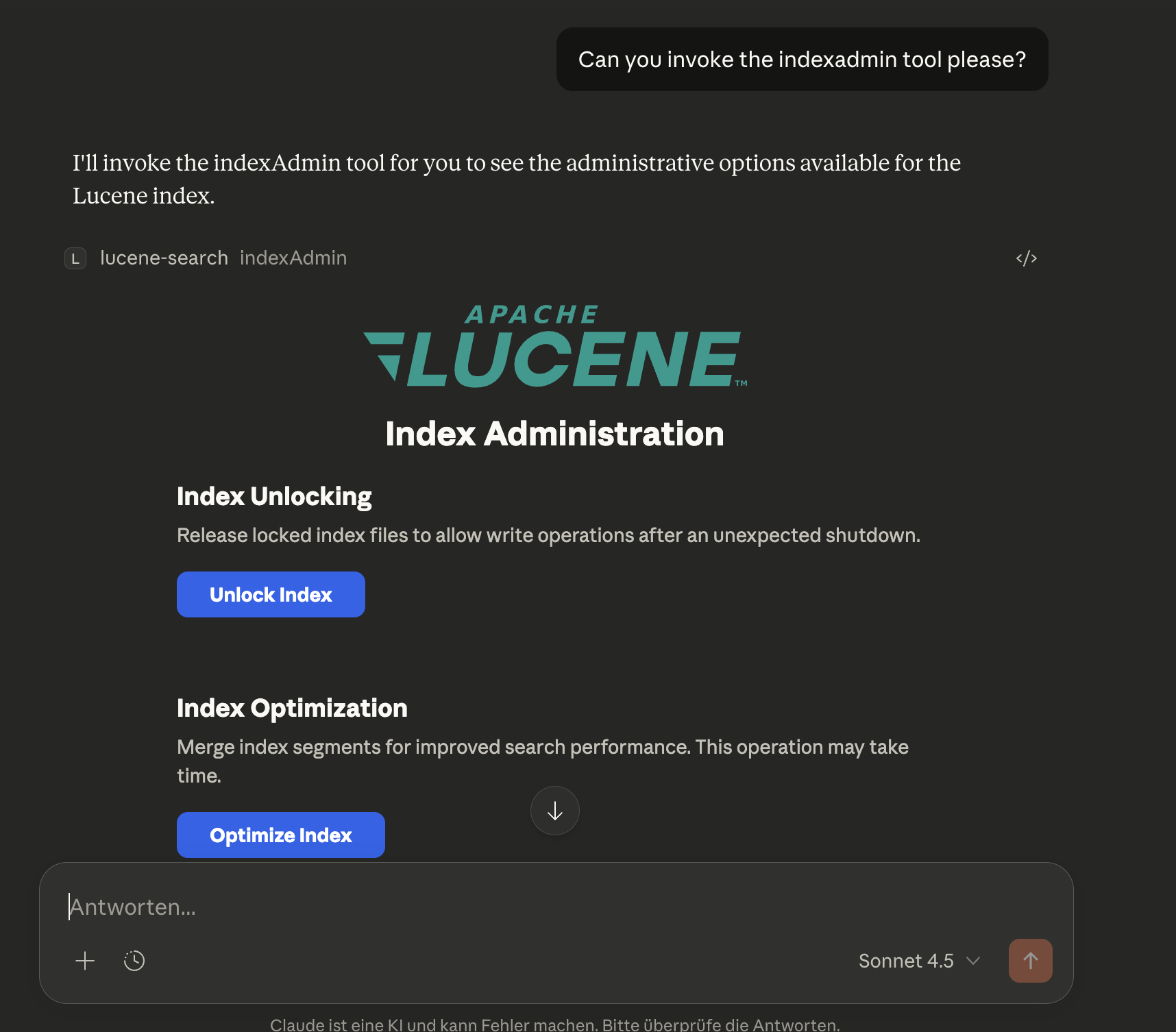
Available actions:
- Unlock Index -- Removes a stale `write.lock` file after an unclean shutdown (equivalent to calling `unlockIndex` with `confirm=true`)
- Optimize Index -- Merges index segments for improved search performance (equivalent to calling `optimizeIndex`)
- Purge Index -- Deletes all documents from the index (equivalent to calling `purgeIndex` with `confirm=true`)
Each action shows inline status feedback (success, error, or progress details) directly in the app UI.
Example:
Ask Claude: "Can you invoke the indexAdmin tool please?"`optimizeIndex`
Optimize the Lucene index by merging segments. This is a long-running operation that runs in the background.
Parameters:
- `maxSegments` (optional): Target number of segments after optimization (default: 1 for maximum optimization)
Returns:
- `success`: Boolean indicating the operation was started
- `operationId`: UUID to track the operation
- `targetSegments`: The target segment count
- `currentSegments`: The current segment count before optimization
- `message`: Status message
Behavior:
- Returns immediately after starting the background operation
- Use `getIndexAdminStatus` to poll for progress
- Cannot run while the crawler is actively crawling
- Only one admin operation can run at a time
Example:
Ask Claude: "Optimize the search index"
Ask Claude: "What's the status of the optimization?"
Performance Notes:
- Optimization improves search performance by reducing the number of segments
- Temporarily increases disk usage during the merge
- For large indices, this can take several minutes to hours
`purgeIndex`
Delete all documents from the Lucene index. This is a destructive, long-running operation that runs in the background.
Parameters:
- `confirm` (required): Must be set to `true` to proceed. This is a safety measure.
- `fullPurge` (optional): If `true`, also deletes index files and reinitializes (default: `false`)
Returns:
- `success`: Boolean indicating the operation was started
- `operationId`: UUID to track the operation
- `documentsDeleted`: Number of documents that will be deleted
- `fullPurge`: Whether a full purge was requested
- `message`: Status message
Behavior:
- Returns immediately after starting the background operation
- Use `getIndexAdminStatus` to poll for progress
- Only one admin operation can run at a time
Purge Modes:
- Standard purge (`fullPurge=false`): Deletes all documents but keeps index files. Disk space is reclaimed gradually during future merges.
- Full purge (`fullPurge=true`): Deletes all documents AND index files, then reinitializes an empty index. Disk space is reclaimed immediately.
Example:
Ask Claude: "Delete all documents from the index - I confirm this"
Ask Claude: "Purge the index completely and reclaim disk space - I confirm this"
Warning: This operation cannot be undone. All indexed documents will be permanently deleted. You will need to re-crawl directories to repopulate the index.
`unlockIndex`
Remove the `write.lock` file from the Lucene index directory. This is a dangerous recovery operation - only use if you are certain no other process is using the index.
Parameters:
- `confirm` (required): Must be set to `true` to proceed. This is a safety measure.
Returns:
- `success`: Boolean indicating operation success
- `message`: Confirmation message
- `lockFileExisted`: Boolean indicating if a lock file was present
- `lockFilePath`: Path to the lock file
When to use:
Use this tool when the server fails to start with a `LockObtainFailedException` after an unclean shutdown. See Troubleshooting for details.
Example:
Ask Claude: "Unlock the Lucene index - I confirm this is safe"Warning: Unlocking an index that is actively being written to by another process can cause data corruption. Only use this when you are certain the lock is stale.
`getIndexAdminStatus`
Get the status of long-running index administration operations (optimize, purge).
Parameters: None
Returns:
- `success`: Boolean indicating the status was retrieved
- `state`: Current state: `IDLE`, `OPTIMIZING`, `PURGING`, `COMPLETED`, or `FAILED`
- `operationId`: UUID of the current/last operation
- `progressPercent`: Progress percentage (0-100)
- `progressMessage`: Human-readable progress message
- `elapsedTimeMs`: Time elapsed since operation started (in milliseconds)
- `lastOperationResult`: Result message from the last completed operation
Example response (during optimization):
{
  "success": true,
  "state": "OPTIMIZING",
  "operationId": "a1b2c3d4-...",
  "progressPercent": 45,
  "progressMessage": "Merging segments...",
  "elapsedTimeMs": 12500,
  "lastOperationResult": null
}
Example response (idle after completion):
{
  "success": true,
  "state": "IDLE",
  "operationId": null,
  "progressPercent": null,
  "progressMessage": "No admin operation running",
  "elapsedTimeMs": null,
  "lastOperationResult": "Optimization completed successfully. Merged to 1 segment(s)."
}
Example:
Ask Claude: "What's the status of the index optimization?"
Ask Claude: "Is the purge operation complete?"
Tool Exposure Configuration
Control which MCP tools are exposed using two environment variables:
| Variable | Default | Description |
|---|---|---|
| `LUCENE_TOOLS_INCLUDE` | `*` (all tools) | Comma-separated tool names or group shorthands to expose |
| `LUCENE_TOOLS_EXCLUDE` | (empty) | Comma-separated tool names or group shorthands to hide; always wins over include |
Tool Groups
| Group | Tools |
|---|---|
| `search` | simpleSearch, extendedSearch |
| `semantic` | semanticSearch, profileSemanticSearch |
| `debug` | profileQuery |
| `info` | getIndexStats, listIndexedFields, getDocumentDetails |
| `observability` | suggestTerms, getTopTerms |
| `crawler` | startCrawl, getCrawlerStats, getCrawlerStatus, pauseCrawler, resumeCrawler, listCrawlableDirectories, addCrawlableDirectory, removeCrawlableDirectory |
| `admin` | optimizeIndex, purgeIndex, unlockIndex, getIndexAdminStatus, indexAdmin |
Individual tool names can be used in addition to group shorthands.
Examples
# Default — all tools (semantic tools require VECTOR_MODEL)
java -jar mcpluceneserver.jar

# Small LLM — search tools only
LUCENE_TOOLS_INCLUDE=search java -jar mcpluceneserver.jar

# Search + semantic search
LUCENE_TOOLS_INCLUDE=search,semantic VECTOR_MODEL=e5-base java -jar mcpluceneserver.jar

# All tools except destructive admin
LUCENE_TOOLS_EXCLUDE=purgeIndex,unlockIndex java -jar mcpluceneserver.jar

# All tools except entire admin group
LUCENE_TOOLS_EXCLUDE=admin java -jar mcpluceneserver.jar
Index Field Schema
When documents are indexed by the crawler, the following fields are automatically extracted and stored:
Content Fields
- `content`: Full text content of the document (analyzed, searchable)
- `content_reversed`: Reversed tokens of the content (analyzed with `ReverseUnicodeNormalizingAnalyzer`, not stored). Used internally for efficient leading wildcard queries -- not directly searchable by users.
- `content_lemma_de`: Lemmatized tokens using German OpenNLP lemmatizer (analyzed with `OpenNLPLemmatizingAnalyzer`, not stored). ALWAYS present for ALL documents regardless of detected language to enable mixed-language matching. Used internally for lemmatization-based search -- not directly searchable by users.
- `content_lemma_en`: Lemmatized tokens using English OpenNLP lemmatizer (analyzed with `OpenNLPLemmatizingAnalyzer`, not stored). ALWAYS present for ALL documents regardless of detected language to enable mixed-language matching. Used internally for lemmatization-based search -- not directly searchable by users.
- `content_translit_de`: German transliteration shadow field that maps umlaut digraphs (ae→ä, oe→ö, ue→ü) before standard Unicode normalization (analyzed with `GermanTransliteratingAnalyzer`, not stored). ALWAYS present for ALL documents. Enables ASCII digraph queries like "Mueller" to match umlaut-containing documents like "Müller". Used internally -- not directly searchable by users.
- `passages`: Array of highlighted passages returned in search results (see Search Response Format below)
File Information
- `file_path`: Full path to the file (unique ID)
- `file_name`: Name of the file
- `file_extension`: File extension (e.g., `pdf`, `docx`)
- `file_type`: MIME type (e.g., `application/pdf`)
- `file_size`: File size in bytes
Document Metadata
- `title`: Document title (extracted from metadata)
- `author`: Author name
- `creator`: Creator/application that created the document
- `subject`: Document subject
- `keywords`: Document keywords/tags
Language & Dates
- `language`: Auto-detected language code (e.g., `en`, `de`, `fr`)
- `created_date`: File creation timestamp
- `modified_date`: File modification timestamp
- `indexed_date`: When the document was indexed
Technical
- `content_hash`: SHA-256 hash for change detection
Search Response Format
Search results are optimized for MCP responses (search term highlighted in context...",
"score": 1.0,
"matchedTerms": ["search term"],
"termCoverage": 1.0,
"position": 0.12,
"source": "keyword"
},
{
"text": "...another occurrence of search in a later section...",
"score": 0.75,
"matchedTerms": ["search"],
"termCoverage": 0.5,
"position": 0.67,
"source": "keyword"
}
]
}
],
"totalHits": 42,
"page": 0,
"pageSize": 10,
"totalPages": 5,
"hasNextPage": true,
"hasPreviousPage": false,
"searchTimeMs": 12,
"facets": {
"language": [
{ "value": "en", "count": 25 },
{ "value": "de", "count": 12 },
{ "value": "fr", "count": 5 }
],
"file_extension": [
{ "value": "pdf", "count": 30 },
{ "value": "docx", "count": 8 },
{ "value": "xlsx", "count": 4 }
],
"file_type": [
{ "value": "application/pdf", "count": 30 },
{ "value": "application/vnd.openxmlformats-officedocument.wordprocessingml.document", "count": 8 }
],
"author": [
{ "value": "John Doe", "count": 15 },
{ "value": "Jane Smith", "count": 10 }
]
},
"_search": {
"query": "contract",
"filters": [],
"page": 0,
"pageSize": 10
},
"_actions": [
{
"type": "nextPage",
"tool": "simpleSearch",
"parameters": { "query": "contract", "filters": [], "page": 1, "pageSize": 10 }
},
{
"type": "drillDown",
"tool": "simpleSearch",
"parameters": { "query": "contract", "filters": [{ "field": "language", "operator": "eq", "value": "en" }], "page": 0, "pageSize": 10 },
"hits": 25
}
]
}
Each document in `documents[]` also carries its own `_actions` block:{
"score": 0.85,
"file_path": "/path/to/example.pdf",
"_actions": [
{
"type": "fetchContent",
"tool": "getDocumentDetails",
"parameters": { "filePath": "/path/to/example.pdf" }
}
]
}
**HATEOAS-Style `_actions` (LLM Chaining):**

Every search response includes two pre-computed action blocks that enable an LLM to chain tool calls without reasoning about parameter mapping:

- **`_search`** -- Captures the exact search state (query, filters, page, pageSize) used to produce this response. Useful for introspection and for constructing follow-up queries.

- **Response-level `_actions`** -- Contains ready-to-use tool calls for navigating the result set:

  | Action type | When present | Description |
  |---|---|---|
  | `prevPage` | page > 0 | Go to the previous result page. Pass `parameters` directly to the named `tool`. |
  | `nextPage` | hasNextPage = true | Go to the next result page. Pass `parameters` directly to the named `tool`. |
  | `drillDown` | facets available | Narrow results by adding a facet value as a filter. The `hits` field shows expected result count. Limited to the top 2 values per facet dimension; only values not already active as filters are included. |

- **Document-level `_actions`** -- Each document in `documents[]` includes:

  | Action type | Description |
  |---|---|
  | `fetchContent` | Fetch the full document text and metadata using `getDocumentDetails`. The `filePath` is pre-filled. |

To use an action, call the `tool` named in the action with the `parameters` map passed as-is — no transformation required.

**Key Features:**

- **Search Performance Metrics:** Every search response includes `searchTimeMs` showing the exact execution time in milliseconds, enabling performance monitoring and optimization.

- **Passages with Highlighting:** The full `content` field is NOT included in search results to keep response sizes manageable. Instead, each document contains a `passages` array with up to `max-passages` (default: 3) individually highlighted excerpts. Each passage is a separate sentence-level excerpt (not a single joined string), ordered by relevance (best first). Long passages are truncated to `max-passage-char-length` (default: 200) centred around the highlighted terms, trimming irrelevant leading/trailing text. Each passage includes:
  - `text` -- The highlighted excerpt with matched terms wrapped in `` tags.
  - `score` -- Normalised relevance score (0.0-1.0), derived from Lucene's BM25 passage scoring. The best passage scores 1.0; other passages are scored relative to the best.
  - `matchedTerms` -- The distinct query terms that appear in this passage (extracted from the `` tags). Useful for understanding which parts of a multi-term query a passage satisfies.
  - `termCoverage` -- The fraction of all query terms present in this passage (0.0-1.0). A value of 1.0 means every query term matched. LLMs can use this to prefer passages that address the full query.
  - `position` -- Location within the source document (0.0 = start, 1.0 = end), derived from the passage's character offset. Useful for citations or for understanding document structure.
  - `source` -- Indicates how this passage was produced: `"keyword"` means the BM25 highlighter found term matches in the indexed document text; `"semantic"` means the best-matching vector chunk was used as the snippet (relevant because the document was retrieved via vector similarity, even if the exact query words do not appear in the text).

- **Lucene Faceting:** The `facets` object uses **Lucene's SortedSetDocValues** for efficient faceted search. It shows actual facet values and document counts from the search results, not just available fields. Only facet dimensions that have values in the result set are returned.

- **Facet Dimensions:** The following fields are indexed as facets:
  - `language` - Detected document language (ISO 639-1 code)
  - `file_extension` - File extension (pdf, docx, etc.)
  - `file_type` - MIME type
  - `author` - Document author (multi-valued)

### Faceted Search Examples

Use facets to build drill-down queries and refine search results:
Filter by file type using facet values
filters: [{ field: "file_extension", value: "pdf" }]
Filter by language using facet values
filters: [{ field: "language", value: "de" }]
Filter by author using facet values
filters: [{ field: "author", value: "John Doe" }]
Combine search query with facet filter
query: "contract agreement"
filters: [{ field: "file_extension", value: "pdf" }]
**Facet-Driven Workflow:**

1. Perform initial search with broad query
2. Review `facets` in response to see available refinement options
3. Apply filters using facet values to narrow results
4. Iterate to drill down into specific subsets

## Usage Examples

### Example 1: Index Your Documents Folder

1. Edit `application.yaml`:
lucene:
crawler:
directories:
crawl-on-startup: true
2. Start the server:java -jar target/luceneserver-0.0.1-SNAPSHOT.jar
3. The crawler automatically starts and indexes all supported documents in your Documents folder.

### Example 2: Search with Filtering

Ask Claude:
Search for "machine learning" in PDF documents only
Claude will use:query: "machine learning"
filters: [{ field: "file_extension", value: "pdf" }]
### Example 3: Find Documents by Author

Ask Claude:
Find all documents written by John Doe
Claude will use:query: "*"
filters: [{ field: "author", value: "John Doe" }]
### Example 4: Monitor Crawler Progress

Ask Claude:
Show me the crawler statistics
Claude calls `getCrawlerStats()` and shows:
- Files processed: 1,234 / 5,000
- Throughput: 85 files/sec
- Indexed: 1,200 (98%)
- Failed: 34 (2%)

### Example 5: Manual Crawl with Full Reindex

Ask Claude:
Reindex all documents from scratch
Claude calls `startCrawl(fullReindex: true)`, which:
1. Clears the existing index
2. Re-crawls all configured directories
3. Indexes all documents fresh

### Example 6: Language-Specific Search

Ask Claude:
Find German documents about "Technologie"
Claude uses:query: "Technologie"
filters: [{ field: "language", value: "de" }]
### Example 7: Search with Passages

Search results include a `passages` array with highlighted excerpts and quality metadata:
{
"file_name": "report.pdf",
"passages": [
{
"text": "...discusses the impact of machine learning on modern software development. The study shows...",
"score": 1.0,
"matchedTerms": ["machine learning"],
"termCoverage": 1.0,
"position": 0.08,
"source": "keyword"
},
{
"text": "...machine learning algorithms were applied to the dataset in Section 4...",
"score": 0.75,
"matchedTerms": ["machine learning"],
"termCoverage": 1.0,
"position": 0.45,
"source": "keyword"
}
]
}
This allows you to see relevant excerpts without downloading the full document. The metadata fields help LLMs quickly identify the best passage: prefer passages with high `termCoverage` (covers more of the query), use `position` for document-structure context, and check `source` to understand whether the passage was found by keyword matching (`"keyword"`) or by vector similarity (`"semantic"`).

### Example 8: Managing Crawlable Directories at Runtime

Ask Claude to manage directories without editing configuration files:
"What directories are currently being crawled?"
Claude calls listCrawlableDirectories()
Response: Shows all configured directories and config file location
"Add /Users/yourname/Research as a crawlable directory"
Claude calls addCrawlableDirectory(path="/Users/yourname/Research")
Directory is added to ~/.mcplucene/config.yaml
"Add /Users/yourname/Projects and start crawling it now"
Claude calls addCrawlableDirectory(path="/Users/yourname/Projects", crawlNow=true)
Directory is added and crawl starts immediately
"Stop crawling /Users/yourname/Downloads"
Claude calls removeCrawlableDirectory(path="/Users/yourname/Downloads")
Directory is removed from config (indexed documents remain)
**Configuration Persistence:**

The directories you add via MCP tools are saved to `~/.mcplucene/config.yaml`:
lucene:
crawler:
directories:
This configuration persists across server restarts - no need to reconfigure each time.

**Environment Variable Override:**

If you set the `LUCENE_CRAWLER_DIRECTORIES` environment variable, it takes precedence:
{
"mcpServers": {
"lucene-search": {
"command": "java",
"args": ["-Dspring.profiles.active=deployed", "-jar", "/path/to/jar"],
"env": {
"LUCENE_CRAWLER_DIRECTORIES": "/path1,/path2"
}
}
}
}
When this is set, `addCrawlableDirectory` and `removeCrawlableDirectory` will return an error message indicating the environment override is active.

### Example 9: Working with Lexical Search (Synonyms and Variations)

> **Note:** When using this server through Claude or another AI assistant, synonym expansion happens automatically - the AI constructs OR queries for you based on your natural language request. The examples below show the underlying query syntax for reference or direct API usage.

Since the search engine performs **exact lexical matching** without automatic synonym expansion, you need to explicitly include synonyms and word variations in your query:

**Basic search (might miss relevant results):**
query: "car"
This will ONLY match documents containing the exact word "car", missing documents with "automobile", "vehicle", etc.

**Better: Include synonyms with OR:**
query: "(car OR automobile OR vehicle)"
**Best: Combine synonyms with wildcards for variations:**query: "(car* OR automobile* OR vehicle*)"
This matches: car, cars, automobile, automobiles, vehicle, vehicles, etc.

**Real-world example - Finding contracts:**
query: "(contract* OR agreement* OR deal*) AND (sign* OR execut* OR finali*)"
filters: [{ field: "file_extension", value: "pdf" }]
This will find documents containing variations like:
- "contract signed", "agreement executed", "deal finalized"
- "contracts signing", "agreements execute", "deals finalizing"

**Tip:** Use the `facets` in the search response to discover the exact terms used in your documents, then refine your query accordingly.

## Document Crawler Features

### Automatic Crawling

The crawler starts automatically on server startup (if `crawl-on-startup: true`) and:

1. **Discovers files** matching include patterns in configured directories
2. **Extracts content** using Apache Tika (supports 100+ file formats)
3. **Detects language** automatically for each document
4. **Extracts metadata** (author, title, dates, etc.)
5. **Indexes documents** in batches for optimal performance
6. **Monitors directories** for changes (create, modify, delete)

### Incremental Indexing (Reconciliation)

By default (`reconciliation-enabled: true`), every crawl that is **not** a full reindex performs an incremental pass first. This makes repeated crawls significantly faster because unchanged files are never re-processed.

**How it works:**

1. **Index snapshot** -- All `(file_path, modified_date)` pairs are read from the Lucene index.
2. **Filesystem snapshot** -- The configured directories are walked and the current `(file_path, mtime)` pairs are collected (no content extraction at this stage).
3. **Four-way diff** is computed:
   - **DELETE** -- paths in the index that no longer exist on disk (orphans).
   - **ADD** -- paths on disk that are not yet in the index.
   - **UPDATE** -- paths where the on-disk mtime is newer than the stored `modified_date`.
   - **SKIP** -- paths that are identical; these are never touched.
4. **Orphan deletions** are applied first (bulk delete via a single Lucene query).
5. Only ADD and UPDATE files are crawled, extracted, and indexed.
6. On successful completion, the crawl state (timestamp, document count, mode) is persisted to `~/.mcplucene/crawl-state.yaml`.

**Fallback behaviour:**
If reconciliation fails for any reason (I/O error reading the index, filesystem walk failure, etc.) the system automatically falls back to a full crawl. No data is lost and no manual intervention is required.

**Disabling incremental indexing:**
Set `reconciliation-enabled: false` in `application.yaml` to always perform a full crawl. Alternatively, pass `fullReindex: true` to `startCrawl` to force a single full crawl without changing the default.

**Persisted state file:**
~/.mcplucene/crawl-state.yaml
This file records the last successful crawl's completion time, document count, and mode. It is written only after a crawl completes successfully.

### Schema Version Management

The server tracks the index schema version to detect when the schema changes between software updates. This eliminates the need for manual reindexing after upgrades.

**How it works:**

1. Each release embeds a `SCHEMA_VERSION` constant that reflects the current index field schema.
2. The schema version is persisted in Lucene's commit metadata alongside the software version.
3. On startup, the server compares the stored schema version with the current one.
4. If they differ (or if a legacy index has no version), a full reindex is triggered automatically.

**What triggers a schema version bump:**
- Adding or removing indexed fields
- Changing field analyzers
- Modifying field indexing options (stored, term vectors, etc.)

**Checking version information:**
Use `getIndexStats` to see the current schema version, software version, and build timestamp.

### Real-time Monitoring

With directory watching enabled (`watch-enabled: true`):

- **New files** are automatically indexed when added
- **Modified files** are re-indexed with updated content
- **Deleted files** are removed from the index

### Performance Optimization

**Multi-threading:**
- Crawls multiple directories in parallel (configurable thread pool)
- Each directory is processed by a separate thread

**Batch Processing:**
- Documents are indexed in batches (default: 100 documents)
- Reduces I/O overhead and improves indexing speed

**NRT (Near Real-Time) Optimization:**
- Normal operation: 100ms refresh interval for fast search updates
- Bulk indexing (>1000 files): Automatically slows to 5s to reduce overhead
- Restores to 100ms after bulk operation completes

**Progress Notifications:**
- Timer-based: updates every 30 seconds (configurable via `progress-notification-interval-ms`)
- Shows throughput (files/sec, MB/sec), progress, and currently processing filenames
- Non-blocking: Appear in system notification area without interrupting workflow
  - **macOS**: Notifications appear in Notification Center (top-right corner)
  - **Windows**: Toast notifications in system tray area
  - **Linux**: Uses notify-send for desktop notifications

### Error Handling

- Failed files are logged but don't stop the crawl
- Statistics track successful vs. failed files
- Large documents are fully indexed (no truncation by default)
- Corrupted or inaccessible files are skipped gracefully

## Troubleshooting

### Where to find logs?

When running with the `deployed` profile, console logging is disabled to ensure clean STDIO communication with MCP clients. Instead, logs are written to files in:
~/.mcplucene/log/mcplucene.log
The log directory is `${user.home}/.mcplucene/log` by default (configured in `logback.xml`). Log files are automatically rotated:
- Maximum 10MB per file
- Up to 5 log files retained
- Total size capped at 50MB

**To view recent logs:**
View the current log file
cat ~/.mcplucene/log/mcplucene.log
Follow logs in real-time
tail -f ~/.mcplucene/log/mcplucene.log
View last 100 lines
tail -n 100 ~/.mcplucene/log/mcplucene.log
**When developing** (without the `deployed` profile), logs are written to the console instead of files.

### Schema version changes and automatic reindexing

The server now includes **automatic schema version management**. When you upgrade to a new version that changes the index schema (e.g., adds new fields, changes analyzers, or modifies field indexing options), the server detects the version mismatch on startup and automatically triggers a full reindex.

**What happens:**
1. On startup, the server compares the stored schema version with the current version
2. If they differ, a full reindex is triggered automatically
3. You'll see a log message: `Schema version changed — triggering full reindex`
4. The reindex runs in the background; you can check progress with `getCrawlerStats`

**Manual reindex:**
If you need to force a manual reindex for any reason, you can still trigger it:
Ask Claude: "Reindex all documents from scratch"
This calls `startCrawl(fullReindex: true)`, which clears the existing index and re-crawls all configured directories.

**Version information:**
Use `getIndexStats` to see the current schema version, software version, and build timestamp.

### Index lock file prevents startup (write.lock)

**Symptom:** The server fails to start with an error like `Lock held by another program` or `LockObtainFailedException`.

**Cause:** When the MCP server doesn't shut down cleanly (e.g., the process was forcefully killed, the system crashed, or Claude Desktop was terminated abruptly), Lucene may leave behind a `write.lock` file in the index directory. This lock file is used to prevent multiple processes from writing to the same index simultaneously. When it's left behind after an unclean shutdown, it blocks the server from starting because Lucene thinks another process is still using the index.

**Solution:** Delete the lock file manually:
Remove the write.lock file from the index directory
rm ~/.mcplucene/luceneindex/write.lock
After removing the lock file, the server should start normally.

**Prevention:** Try to shut down Claude Desktop gracefully when possible. If you need to force-quit, be aware that you may need to remove the lock file before the next startup.

**Note:** The default index path is `~/.mcplucene/luceneindex`. If you've configured a custom index path via `LUCENE_INDEX_PATH` or `application.yaml`, look for the `write.lock` file in that directory instead.

### Server shows as "running" but tools don't work

This usually indicates STDIO communication issues:

1. Ensure the `-Dspring.profiles.active=deployed` argument is present in the config
2. Check that no other output is being written to stdout
3. Verify the JAR path is an absolute path, not relative
4. If you modified the configuration, ensure the "deployed" profile settings are correct

### Claude Desktop doesn't show the server

1. Verify the JAR file path in the configuration is correct and absolute
2. Check that Java 25+ is installed: `java -version`
3. Validate the JSON syntax in the config file
4. Check Claude Desktop logs for error messages
5. Try running the JAR manually to check for startup errors:
java -jar /path/to/luceneserver-0.0.1-SNAPSHOT.jar
### Server fails to start

1. Ensure the Lucene index directory path is valid
2. Check that no other process is locking the index directory
3. Verify sufficient disk space for the index

### Empty search results

The index may be empty for several reasons:

1. **No directories configured**: Add directories to `application.yaml` under `lucene.crawler.directories`
2. **Crawler not started**: Use the `startCrawl` MCP tool or enable `crawl-on-startup: true`
3. **No matching files**: Check that your directories contain files matching the include patterns
4. **Files failed to index**: Check the logs for errors, use `getCrawlerStats` to see failed file count

### Crawler not indexing files

1. **Check directory paths**: Ensure paths in `application.yaml` are absolute and exist
2. **Verify file permissions**: The server needs read access to all files
3. **Check include patterns**: Files must match at least one include pattern
4. **Check exclude patterns**: Files must not match any exclude pattern
5. **Monitor crawler status**: Use `getCrawlerStatus` and `getCrawlerStats` MCP tools
6. **Check logs**: Look for parsing errors or I/O exceptions

### Out of memory errors during indexing

If you encounter OOM errors with very large documents:

1. **Set content limit**: Change `max-content-length` in `application.yaml` (e.g., `5242880` for 5MB)
2. **Increase JVM heap**: Add `-Xmx2g` to JVM arguments in Claude Desktop config
3. **Reduce thread pool**: Lower `thread-pool-size` to reduce concurrent processing
4. **Reduce batch size**: Lower `batch-size` to commit more frequently

### Slow indexing performance

1. **Increase thread pool**: Raise `thread-pool-size` (default: 4)
2. **Increase batch size**: Raise `batch-size` for fewer commits (default: 100)
3. **Disable language detection**: Set `detect-language: false` if not needed
4. **Disable metadata extraction**: Set `extract-metadata: false` if not needed
5. **Check disk I/O**: Slow disk can bottleneck indexing

## Security Considerations

**Untrusted Document Content**

The MCP Lucene Server indexes documents from crawled directories and returns their content (passages, metadata, full text) in MCP tool responses. This content is inherently untrusted — any document placed in a crawled directory can influence what the MCP client (LLM) sees in tool responses.

**Indirect Prompt Injection Risk**

This creates a potential for indirect prompt injection: a maliciously crafted document could contain text designed to manipulate an LLM that processes the search results. For example, a document might include instructions that appear as natural text but are intended to influence the LLM's behavior or responses.

**Recommendations**

- **MCP clients should treat all document-derived content in tool responses as untrusted data**
- The server adds a `contentNote` field to responses containing document content as a reminder
- Consider the trust level of crawled directories when configuring the server
- Be aware that indexed content can influence LLM behavior through search results

This is an inherent characteristic of systems that retrieve and present external content to language models.

## Configuration Options

> **Note:** The [Quick Start](#quick-start) above uses zero-configuration. This section covers advanced customization options.

The server can be configured via environment variables and `application.yaml`:

### Logging Profiles

The server supports two logging profiles (for backwards compatibility, uses the same system property as Spring Boot):

| Profile      | Usage                     | Logging Output          |
|--------------|---------------------------|-------------------------|
| **default**  | Development in IDE        | Console logging enabled |
| **deployed** | Production/Claude Desktop | File logging only       |

**Default profile (no profile specified):**
- Full logging enabled to console
- Suitable for debugging and development

**Deployed profile (`-Dspring.profiles.active=deployed`):**
- Console logging disabled (required for STDIO transport)
- File logging enabled (`~/.mcplucene/log/mcplucene.log`)
- Used when running under Claude Desktop or other MCP clients

### Transport Configuration

The server supports two transport types: **STDIO** (default) and **HTTP**. The transport is selected via the `mcp.transport` system property.

#### STDIO Transport (Default)

STDIO transport is the default and recommended mode for Claude Desktop integration. No additional configuration is required.

**Claude Desktop Configuration:**
{
"mcpServers": {
"lucene-search": {
"command": "java",
"args": [
"--enable-native-access=ALL-UNNAMED",
"-Xmx2g",
"-Dspring.profiles.active=deployed",
"-jar",
"/absolute/path/to/luceneserver-0.0.1-SNAPSHOT.jar"
]
}
}
}
#### HTTP Transport

HTTP transport enables remote access and integration with web-based MCP clients using the **MCP Streamable HTTP protocol (Spec 2025-03-26)**. To enable HTTP transport, set the `mcp.transport` system property to `http`.

**Starting with HTTP Transport:**
Minimal HTTP configuration (uses defaults: 0.0.0.0:8080/mcp/message)
java --enable-native-access=ALL-UNNAMED \
-Xmx2g \
-Dmcp.transport=http \
-jar luceneserver-0.0.1-SNAPSHOT.jar
**Custom HTTP configuration:**java --enable-native-access=ALL-UNNAMED \
-Xmx2g \
-Dmcp.transport=http \
-Dmcp.http.port=9000 \
-Dmcp.http.host=localhost \
-jar luceneserver-0.0.1-SNAPSHOT.jar
**HTTP Configuration Properties:**

| System Property     | Default        | Description                                 |
|---------------------|----------------|---------------------------------------------|
| `mcp.transport`     | `stdio`        | Transport type: `stdio` or `http`           |
| `mcp.http.host`     | `0.0.0.0`      | HTTP server bind address (HTTP mode only)   |
| `mcp.http.port`     | `8080`         | HTTP server port (HTTP mode only)           |
| `mcp.http.endpoint` | `/mcp/message` | MCP message endpoint path (HTTP mode only)* |

*The default `/mcp/message` is the standard MCP endpoint and typically does not need to be changed.

**Important Notes:**
- HTTP transport uses the **MCP Streamable HTTP protocol** with stateless async mode
- STDIO transport uses **stateful sync** mode (suitable for persistent connections)
- HTTP mode does **not** support HTTPS/TLS - use a reverse proxy (nginx, Caddy) for encryption
- For production use with HTTP, always place the server behind a reverse proxy with proper authentication
- The `deployed` profile is optional with HTTP (console logging won't interfere)

**Example: Running on a different port**
java -Dmcp.transport=http -Dmcp.http.port=9090 -jar luceneserver-0.0.1-SNAPSHOT.jar
**Example: Localhost only (more secure)**java -Dmcp.transport=http -Dmcp.http.host=127.0.0.1 -jar luceneserver-0.0.1-SNAPSHOT.jar
### Semantic Search Configuration

Semantic vector search is an optional feature activated by setting the `VECTOR_MODEL` environment variable.

**Enabling semantic search:**
java --enable-native-access=ALL-UNNAMED \
-Xmx4g \
-Dspring.profiles.active=deployed \
-jar luceneserver-0.0.1-SNAPSHOT.jar
// Code blockWith VECTOR_MODEL set in environment:
VECTOR_MODEL=e5-base java --enable-native-access=ALL-UNNAMED \
-Xmx4g \
-Dspring.profiles.active=deployed \
-jar luceneserver-0.0.1-SNAPSHOT.jar
| Environment Variable | Default | Description                                                                                                                   |
|----------------------|---------|-------------------------------------------------------------------------------------------------------------------------------|
| `VECTOR_MODEL`       | (none)  | Embedding model: `e5-base` (768 dims, faster) or `e5-large` (1024 dims, higher quality). Set to enable semantic search tools. |

See [SEMANTICSEARCH.md](SEMANTICSEARCH.md) for full architecture details, tuning guidance, and KNN scoring configuration.

### Note on Semantic Search and the Semantic Gap

Vector search is designed to close the **semantic gap**: finding documents about "automobile" when the user searches for "car", because the embedding model maps both concepts to nearby points in vector space.

**However, when using this server with an LLM (Claude, GPT, etc.), the situation changes fundamentally.**

An LLM already bridges the semantic gap as part of its reasoning process. Before calling the search tool, a well-prompted LLM can rewrite "find documents about cars" into an explicit OR query: `(car OR automobile OR vehicle OR sedan)`. This means the LLM handles synonym expansion and query reformulation — exactly the problem vector search is designed to solve.

**When semantic search adds genuine value:**
- Direct user-facing search UIs with no LLM in the loop
- Batch or automated pipelines without LLM query reformulation
- Queries involving domain-specific jargon where synonyms are not obvious
- Conceptual queries where the exact wording of relevant documents is unknown

**When semantic search adds marginal value (LLM-based use cases):**
- The LLM client expands queries with synonyms before calling the tool
- The LLM reformulates vague queries into precise Lucene expressions
- The search corpus uses consistent terminology that BM25 handles well

**Trade-offs to consider:**
- Embedding computation adds latency (~31ms/doc during indexing, ~5ms/query for e5-base)
- ONNX models require ~100-200MB of disk space and additional RAM
- Index complexity increases (parent documents + child chunk documents via Block Join)

### Environment Variables

| Environment Variable         | Default                               | Description                                                               |
|------------------------------|---------------------------------------|---------------------------------------------------------------------------|
| `LUCENE_INDEX_PATH`          | `${user.home}/.mcplucene/luceneindex` | Path to the Lucene index directory                                        |
| `LUCENE_CRAWLER_DIRECTORIES` | (none)                                | Comma-separated list of directories to crawl (overrides config file)      |
| `VECTOR_MODEL`               | (none)                                | Embedding model (`e5-base` or `e5-large`). Set to enable semantic search. |
| `LUCENE_TOOLS_INCLUDE`       | `*` (all)                             | Comma-separated tool names or group shorthands to expose                  |
| `LUCENE_TOOLS_EXCLUDE`       | (empty)                               | Comma-separated tool names or group shorthands to hide                    |

**Note on `LUCENE_CRAWLER_DIRECTORIES`:**
When this environment variable is set, it takes precedence over `~/.mcplucene/config.yaml` and `application.yaml`. The MCP configuration tools (`addCrawlableDirectory`, `removeCrawlableDirectory`) will refuse to modify configuration while this override is active. To use runtime configuration, remove this environment variable.

### Document Crawler Configuration

The crawler directories can be configured in three ways, with the following priority (highest to lowest):

1. **Environment Variable**: `LUCENE_CRAWLER_DIRECTORIES` (comma-separated paths)
2. **Runtime Configuration**: `~/.mcplucene/config.yaml` (managed via MCP tools)
3. **Application Default**: `src/main/resources/application.yaml`

#### Runtime Configuration via MCP Tools (Recommended)

The server provides MCP tools to manage crawlable directories at runtime without editing configuration files:

**`listCrawlableDirectories`** - List all configured directories
Ask Claude: "What directories are being crawled?"
**`addCrawlableDirectory`** - Add a new directory to crawlAsk Claude: "Add /Users/yourname/Documents as a crawlable directory"
Ask Claude: "Add /path/to/folder and start crawling it immediately"
**`removeCrawlableDirectory`** - Remove a directory from crawlingAsk Claude: "Stop crawling /Users/yourname/Downloads"
**Benefits of Runtime Configuration:**
- No need to rebuild the JAR or restart the server
- Configuration persists across restarts in `~/.mcplucene/config.yaml`
- Easy to distribute pre-built JARs
- Conversational interface via Claude

**Configuration File Location:**
~/.mcplucene/config.yaml
**Example config.yaml:**lucene:
crawler:
directories:
#### Static Configuration via application.yaml

Configure the document crawler in `src/main/resources/application.yaml`:
lucene:
index:
path: ${LUCENE_INDEX_PATH:./lucene-index}
crawler:
# Directories to crawl and index
directories:
# File patterns to include
include-patterns:
# File patterns to exclude
exclude-patterns:
# Performance settings
thread-pool-size: 4 # Parallel crawling threads
batch-size: 100 # Documents per batch
batch-timeout-ms: 5000 # Batch processing timeout
# Directory watching
watch-enabled: true # Monitor directories for changes
watch-poll-interval-ms: 2000 # Watch polling interval
# NRT optimization
bulk-index-threshold: 1000 # Files before NRT slowdown
slow-nrt-refresh-interval-ms: 5000 # NRT interval during bulk indexing
# Content extraction
max-content-length: -1 # -1 = unlimited, or max characters
extract-metadata: true # Extract author, title, etc.
detect-language: true # Auto-detect document language
# Auto-crawl
crawl-on-startup: true # Start crawling on server startup
# Progress notifications
progress-notification-files: 100 # Notify every N files
progress-notification-interval-ms: 30000 # Or every N milliseconds
# Incremental indexing
reconciliation-enabled: true # Skip unchanged files, remove orphans (default: true)
# Search passages
max-passages: 3 # Max highlighted passages per search result (default: 3)
max-passage-char-length: 200 # Max character length per passage; longer ones are truncated (default: 200, 0 = no limit)
**Supported File Formats:**
- PDF documents (`.pdf`)
- Microsoft Office: Word (`.doc`, `.docx`), Excel (`.xls`, `.xlsx`), PowerPoint (`.ppt`, `.pptx`)
- OpenOffice/LibreOffice: Writer (`.odt`), Calc (`.ods`), Impress (`.odp`)
- Plain text files (`.txt`)
- Email: Outlook (`.msg`), EML (`.eml`)
- Markup: Markdown (`.md`), reStructuredText (`.rst`), HTML (`.html`, `.htm`)
- Rich Text Format (`.rtf`)
- E-books: EPUB (`.epub`)

**Complete Configuration Example:**
lucene:
index:
path: /Users/yourname/lucene-index
crawler:
# Add your document directories here
directories:
# Include only these file types
include-patterns:
# Exclude these directories
exclude-patterns:
# Performance tuning
thread-pool-size: 8 # Use more threads for faster indexing
batch-size: 200 # Larger batches for better throughput
# Auto-start crawler
crawl-on-startup: true
# Real-time monitoring
watch-enabled: true
# No content limit (index full documents)
max-content-length: -1
## JDBC Metadata Enrichment

The server can enrich indexed documents with additional metadata loaded from a relational database at index time. This is useful when business metadata (e.g. customer IDs, project codes, tags) is stored in a database rather than in the files themselves.

### How It Works

1. For each document during crawling, the enricher executes a configurable SQL query.
2. The query result is a single row with a JSON column containing the metadata payload.
3. The JSON payload is parsed and typed fields are added to the Lucene document.
4. A background sync job re-indexes files when their DB metadata changes.

### Field Naming

All JDBC-sourced fields are prefixed with `dbmeta_` to avoid collisions with the base document schema.

| JSON field name | Lucene field name    |
|-----------------|----------------------|
| `customer_id`   | `dbmeta_customer_id` |
| `tags`          | `dbmeta_tags`        |
| `department`    | `dbmeta_department`  |

### JSON Metadata Format

The database query must return a column (configurable via `json.columnName`) containing JSON in this format:
{
"fields": [
{
"name": "customer_id",
"type": "keyword",
"value": "C-42",
"faceted": true
},
{
"name": "tags",
"type": "keyword",
"values": ["invoice", "2024", "urgent"],
"faceted": true
},
{
"name": "description",
"type": "text",
"value": "Some free-text description"
},
{
"name": "amount",
"type": "long",
"value": 9999,
"faceted": true
},
{
"name": "doc_date",
"type": "date",
"value": "2024-01-15T00:00:00Z"
}
]
}
**Field types:**

| Type      | Lucene storage          | Facetable | Notes                                             |
|-----------|-------------------------|-----------|---------------------------------------------------|
| `keyword` | StringField             | Yes       | Exact match; use for IDs, codes, categories       |
| `text`    | TextField               | No        | Analyzed fulltext; suitable for long descriptions |
| `int`     | IntPoint + StoredField  | Yes       | 32-bit integer; range queries supported           |
| `long`    | LongPoint + StoredField | Yes       | 64-bit integer; range queries supported           |
| `date`    | LongPoint + StoredField | No        | ISO-8601 string → epoch millis                    |

**Optional per-field flags:**

| Flag         | Default | Description                                              |
|--------------|---------|----------------------------------------------------------|
| `faceted`    | `false` | Expose as search facet (keyword/long only)               |
| `stored`     | `true`  | Store the value so it is retrievable from search results |
| `searchable` | `true`  | Index the field for querying                             |

### Configuration

Add the following section to `~/.mcplucene/config.yaml`:
lucene:
crawler:
directories:
metadata:
jdbc:
enabled: true
url: "jdbc:postgresql://localhost:5432/mydb"
username: "myuser"
password: "${DB_PASSWORD}" # env-var substitution supported
poolSize: 5
connectionTimeout: 30000 # ms
queryTimeout: 5000 # ms
query: >
SELECT metadata_json
FROM document_metadata
WHERE file_path = :file_path
parameters:
sourceField: file_path # Lucene field to use as query parameter
json:
columnName: metadata_json # Column in the result set containing the JSON
# Optional: background sync when DB metadata changes
sync:
enabled: true
intervalMinutes: 5
query: >
SELECT dbmeta_customer_id
FROM document_metadata
WHERE updated_at > :last_sync_timestamp
### Advanced Example: Building Metadata Dynamically from a Table (MySQL)

Metadata is often not stored as pre-built JSON but spread across normalized tables. MySQL's `JSON_OBJECT()` / `JSON_ARRAY()` / `JSON_ARRAYAGG()` functions let you assemble the metadata payload directly in the SQL query — no separate materialized view or ETL job required.

#### Scenario

Documents are freelancer profile PDFs. File names follow the pattern `.../ABC-1234_Profile.pdf`, where `ABC-1234` is a unique freelancer code. The relevant tables:
-- Master data
CREATE TABLE freelancer (
id BIGINT PRIMARY KEY,
code VARCHAR(20) UNIQUE, -- e.g. "ABC-1234"
salary_per_day DECIMAL(10, 2)
);
-- n:m tags
CREATE TABLE freelancer_tags (
freelancer_id BIGINT,
tag_id BIGINT
);
#### Configurationlucene:
metadata:
jdbc:
enabled: true
url: "jdbc:mysql://localhost:3306/mydb"
username: "myuser"
password: "${DB_PASSWORD}"
poolSize: 5
connectionTimeout: 30000
queryTimeout: 5000
query: |
SELECT JSON_OBJECT(
'fields', JSON_ARRAY(
JSON_OBJECT('name', 'daily_rate', 'type', 'long', 'value', f.salary_per_day_long, 'faceted', CAST(FALSE AS JSON)),
JSON_OBJECT('name', 'tags', 'type', 'long', 'values', (
SELECT JSON_ARRAYAGG(ft.tag_id)
FROM freelancer_tags ft
WHERE ft.freelancer_id = f.id
), 'faceted', CAST(FALSE AS JSON))
)
) as metadata_json
FROM
freelancer f
WHERE
f.code = REGEXP_SUBSTR(:file_path, '[A-Z]+-[0-9]+')
parameters:
sourceField: file_path # Lucene field to use as query parameter
json:
columnName: metadata_json # Column in the result set containing the JSON
#### How It Works Step by Step

**1. Parameter binding — the file path as a lookup key**

During crawling, the indexer stores the absolute file path in the Lucene field `file_path` (e.g. `/docs/profiles/ABC-1234_Profile.pdf`). Via `parameters.sourceField: file_path`, that value is passed as the named parameter `:file_path` to the SQL query.

**2. Extracting the freelancer code with a regex**

Because the full file path is passed to the database, the code must be extracted there. `REGEXP_SUBSTR(:file_path, '[A-Z]+-[0-9]+')` pulls `ABC-1234` out of `/docs/profiles/ABC-1234_Profile.pdf` and matches it against `freelancer.code`. The database needs no knowledge of directory structures — the regex runs entirely inside the DB engine.

**3. Assembling the JSON payload in SQL**

`JSON_OBJECT(...)` produces a JSON object. Inside it, a `JSON_ARRAY(...)` contains one element per metadata field:

- **`daily_rate`** (type `long`): a single scalar value from `f.salary_per_day_long`
- **`tags`** (type `long`, multi-value): an array produced by a correlated subquery — `JSON_ARRAYAGG(ft.tag_id)` aggregates all tag IDs for the freelancer into a JSON array

The query returns a single row with a single column `metadata_json`:
{
"fields": [
{ "name": "daily_rate", "type": "long", "value": 850, "faceted": false },
{ "name": "tags", "type": "long", "values": [12, 47, 103], "faceted": false }
]
}
**4. Processing by the indexer**

`JdbcMetadataEnricher` reads this JSON response and adds fields to the Lucene document:

- `dbmeta_daily_rate` → `LongPoint(850)` + `StoredField(850)` + `SortedNumericDocValuesField(850)` (searchable, retrievable, and **sortable**)
- `dbmeta_tags` → three `LongPoint` entries for values `12`, `47`, `103` (multi-valued — DocValues skipped, so not sortable)

Because `faceted: false`, no `SortedSetDocValuesFacetField` entries are created. The fields are available for targeted queries and range filters without adding overhead to the facet computation on every search request.

**Sorting by JDBC metadata fields:** Single-valued INT, LONG, and DATE fields automatically get a `SortedNumericDocValuesField`, and single-valued KEYWORD fields get a `SortedDocValuesField`. This makes them usable as `sortBy` values in search requests. Multi-valued fields skip DocValues (sorting on multi-valued fields is undefined). Use `getIndexStats` to see which `dbmeta_*` fields are currently registered as sortable via the `sortableFields` map.

**5. Querying at runtime**

After crawling, these fields can be used as filters in `extendedSearch`:
{
"query": "Java developer",
"filters": [
{ "field": "dbmeta_daily_rate", "operator": "range", "from": "500", "to": "1000" },
{ "field": "dbmeta_tags", "operator": "in", "values": ["47", "103"] }
]
}
#### Note on `CAST(FALSE AS JSON)`

MySQL has no native JSON boolean literal. `CAST(FALSE AS JSON)` produces the JSON value `false`, which `JsonMetadataParser` correctly interprets as `faceted: false`. Use `CAST(TRUE AS JSON)` for `faceted: true`.

---

### Advanced Example: Background Sync via Index Lookup (PostgreSQL)

#### Scenario

Same freelancer PDF setup as the enrichment example. When a freelancer's daily rate or tags change in the database, the server should automatically re-index the affected PDF — without the database needing to know file paths.

**Prerequisite:** The enrichment query stores `customer_id` as `dbmeta_customer_id` (type `keyword`) in the Lucene index, and the `document_metadata` table also has a `customer_id` column plus an `updated_at` timestamp.

#### Configuration
sync:
enabled: true
intervalMinutes: 5
query: >
SELECT customer_id AS dbmeta_customer_id
FROM document_metadata
WHERE updated_at > :last_sync_timestamp
#### How It Works Step by Step

**1. Timestamp filter**

The `:last_sync_timestamp` parameter is bound to the last successful sync time (persisted in `~/.mcplucene/metadata-sync-state.yaml`). On first run it defaults to `1970-01-01T00:00:00Z`, so the full table is scanned.

**2. Column name as Lucene field**

The result set has exactly one column. Its name — `dbmeta_customer_id` (set via `AS` alias) — is read from the JDBC `ResultSetMetaData`. This becomes the Lucene field the server will search against.

**3. TermQuery lookup**

For each row (e.g. value `C-42`), the server executes a Lucene `TermQuery` on `dbmeta_customer_id = "C-42"` restricted to parent documents. This finds every indexed file that was enriched with that customer ID.

**4. File path resolution**

`file_path` is extracted from each matching Lucene document. The index — not the database — is the source of truth for the physical location of the file.

**5. Re-index or delete**

If the file still exists on disk it is re-crawled, which triggers the enrichment query again so the Lucene document picks up the latest metadata from the database. If the file has been removed, its index entry is deleted.

**6. Timestamp advance**

After a successful run, the current time is saved as the new `lastSyncTimestamp`. The next sync only returns rows modified after this point.

#### Using a Numeric Join Key

If the join key is a numeric database ID rather than a string code, use the appropriate SQL integer type so that the server builds the correct Lucene point query:
sync:
enabled: true
intervalMinutes: 5
query: >
SELECT freelancer_id AS dbmeta_freelancer_id
FROM document_metadata
WHERE updated_at > :last_sync_timestamp
Here `freelancer_id` is a `BIGINT` column, so the server uses `LongPoint.newExactQuery("dbmeta_freelancer_id", …)`. The enrichment must have stored `freelancer_id` as a field of type `long` for the query to match.

| SQL column type        | Lucene query                | Must match enrichment type |
|------------------------|-----------------------------|----------------------------|
| `VARCHAR` / `CHAR`     | `TermQuery`                 | `keyword`                  |
| `INTEGER` / `SMALLINT` | `IntPoint.newExactQuery()`  | `int`                      |
| `BIGINT` / `NUMERIC`   | `LongPoint.newExactQuery()` | `long`                     |

---

### Supported Databases

| Database   | Driver dependency           | Notes                            |
|------------|-----------------------------|----------------------------------|
| PostgreSQL | included (optional runtime) | `jdbc:postgresql://...`          |
| MySQL      | included (optional runtime) | `jdbc:mysql://...`               |
| H2         | test scope only             | `jdbc:h2:...` (for tests)        |
| Any JDBC   | Add to classpath            | Set `driverClassName` explicitly |

### Facet Integration

Fields declared with `"faceted": true` are automatically registered as dynamic facet dimensions. They appear alongside the built-in facets (`language`, `file_extension`, `file_type`, `author`) in search results and can be used as filter values.

Multi-valued fields (using `"values": [...]`) are automatically configured as multi-valued facet dimensions.

### Background Sync

When `sync.enabled: true`, the server runs a background job every `intervalMinutes` minutes that:

1. Queries the database for records modified since the last sync (using `:last_sync_timestamp`).
2. Reads the result set — exactly one column, N rows. The **column name** is the Lucene field to search; the **column value** is the term to match.
3. Executes a Lucene query per row to find matching index documents, then extracts their `file_path`.
4. Re-indexes files that still exist on disk with the latest metadata.
5. Removes index entries for files that no longer exist.

The last sync timestamp is persisted in `~/.mcplucene/metadata-sync-state.yaml`.

**Supported column types:**

| SQL column type                  | Lucene query                | Compatible `dbmeta_` field type |
|----------------------------------|-----------------------------|---------------------------------|
| `VARCHAR`, `CHAR`, …             | `TermQuery`                 | `keyword`                       |
| `INTEGER`, `SMALLINT`, `TINYINT` | `IntPoint.newExactQuery()`  | `int`                           |
| `BIGINT`, `NUMERIC`, `DECIMAL`   | `LongPoint.newExactQuery()` | `long`                          |

The query type is inferred automatically from the JDBC column type — no extra configuration needed. The SQL column type must match the Lucene field type used during enrichment (`IntPoint` and `LongPoint` are separate field types). Analyzed `text` fields are not suitable as sync keys.

### Error Handling

The enricher follows a "skip and warn" resilience pattern:
- DB connection failures: document is indexed without enrichment, warning is logged.
- Query errors: same skip-and-warn behavior.
- Invalid JSON payloads: parsing errors are logged, field is skipped.
- NULL values: silently ignored per field.
- Field name collisions with base schema: error logged, field skipped.

## Development

### Running for Development

When developing and debugging in your IDE, run the server **without** the "deployed" profile to get full logging:

**In your IDE (IntelliJ, Eclipse, VS Code):**
Just run the main class directly - no profile needed
You'll see full console logging and debug output
java -jar target/luceneserver-0.0.1-SNAPSHOT.jar
This gives you:
- Complete logging output for debugging
- Configuration loaded from classpath and user config
- All debug information visible in console

**For production/Claude Desktop deployment:**
Use the deployed profile for clean STDIO
java --enable-native-access=ALL-UNNAMED -Xmx2g -Dspring.profiles.active=deployed -jar target/luceneserver-0.0.1-SNAPSHOT.jar
### Debugging with MCP Inspector

The [MCP Inspector](https://github.com/modelcontextprotocol/inspector) provides a visual debugging interface for testing MCP servers. Use it to inspect requests, responses, and debug tool behavior without needing a full MCP client like Claude Desktop.

**Run the server with the inspector for STDIO connect:**
npx @modelcontextprotocol/inspector java -jar --enable-native-access=ALL-UNNAMED -Xmx2g -Dspring.profiles.active=deployed -jar ./target/luceneserver-0.0.1-SNAPSHOT.jar
or in case of HTTP Streaming:npx @modelcontextprotocol/inspector http://localhost:9000/mcp/message --transport http
This opens a web-based UI where you can:
- Test all MCP tools interactively
- Inspect JSON request/response payloads
- Debug STDIO communication issues
- Verify tool parameters and return values

**Note:** The inspector requires the same JVM arguments as production deployment (`--enable-native-access=ALL-UNNAMED`, `-Dspring.profiles.active=deployed`) to ensure consistent behavior.

### Adding Documents to the Index

**Recommended approach:** Use the document crawler by configuring directories in `application.yaml`. The crawler automatically handles content extraction, metadata, and language detection.

**Programmatic approach:** For custom document types or direct indexing:
// Get the LuceneIndexService instance from your application
LuceneIndexService indexService = // ... from your application
public void addDocument(String title, String content) throws IOException {
Document doc = new Document();
doc.add(new TextField("title", title, Field.Store.YES));
doc.add(new TextField("content", content, Field.Store.YES));
doc.add(new StringField("file_path", "/custom/path", Field.Store.YES));
indexService.getIndexWriter().addDocument(doc);
indexService.getIndexWriter().commit();
}
For the full field schema, see the [Index Field Schema](#index-field-schema) section.Frequently asked questions
What is MCPLuceneServer?
MCPLuceneServer is MCP Lucene Server is a Model Context Protocol (MCP) server that exposes Apache Lucene's full-text search capabilities through a conversational interface. It allows AI assistants (like Claude) to help users search, index, and manage document collections without requiring technical knowledge of Lucene or search engines.
How do I install MCPLuceneServer?
Open the GitHub repository and follow its README. Most MCP servers are added to your client's MCP config, then called by your agent.
Is MCPLuceneServer open source?
Yes — it is hosted on GitHub at https://github.com/mirkosertic/MCPLuceneServer and has 5 stars.
Related MCP tools
 UI-TARS-desktop
The Open-Source Multimodal AI Agent Stack: Connecting Cutting-Edge AI Models and Agent Infra
 n8n-mcp
A MCP for Claude Desktop / Claude Code / Windsurf / Cursor to build n8n workflows for you
 firecrawl-mcp-server
🔥 Official Firecrawl MCP Server - Adds powerful web scraping and search to Cursor, Claude and any other LLM clients.
 mcp
mcpBrowser MCP is a Model Context Provider (MCP) server that allows AI applications to control your browser
 Windows-MCP
MCP Server for Computer Use in Windows
 XcodeBuildMCP
A Model Context Protocol (MCP) server and CLI that provides tools for agent use when working on iOS and macOS projects.
Run your own MCP server? See who uses it and what to fix.
Measure it with TrackMCP