MCP Android agent - This project provides an *MCP (Model Context Protocol)* server for automating Android devices using uiautomator2. It's designed to be easily plugged into AI agents like GitHub Copilot Chat, Claude, or Open Interpreter to control Android devices through natural language.
Documentation


MCP Android Agent
This project provides an MCP (Model Context Protocol) server for automating Android devices using uiautomator2. It's designed to be easily plugged into AI agents like GitHub Copilot Chat, Claude, or Open Interpreter to control Android devices through natural language.
Modular Architecture
The server has been refactored into a clean, modular architecture with tools organized by functionality:
mcp-android-server-python/
├── server.py                    # Main server (61 lines - clean & focused)
├── server_original_backup.py    # Backup of original monolithic version
└── tools/                       # 🆕 Modular tools package
    ├── __init__.py             # Central registration & imports
    ├── device_tools.py         # Device connection & status tools
    ├── app_tools.py            # Application management tools
    ├── screen_tools.py         # Screen control & unlock tools
    ├── input_tools.py          # User input simulation (click, swipe, text)
    ├── inspection_tools.py     # UI inspection & screenshots
    └── advanced_tools.py       # Advanced features (toast, activity wait)
Benefits of Modular Architecture
- Maintainability: Easy to add/modify/remove tools without touching main server
- Organization: Tools grouped logically by functionality
- Testing: Individual tool modules can be unit tested separately
- Reusability: Tool modules can be reused in other projects
- Scalability: New tool categories can be added as separate modules
- Clean Code: Main server reduced from 1321 lines to 61 lines
Quick Demo
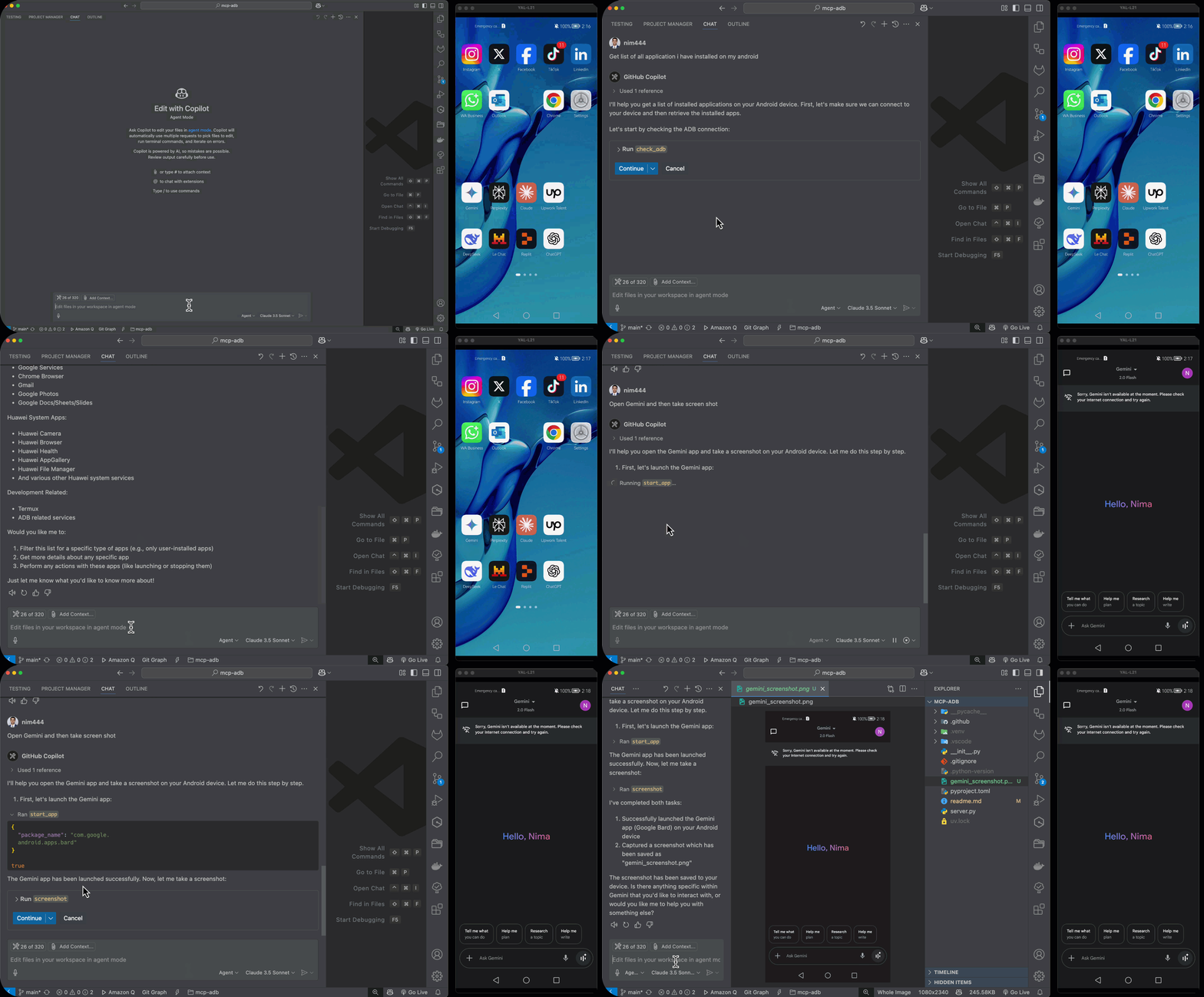
----
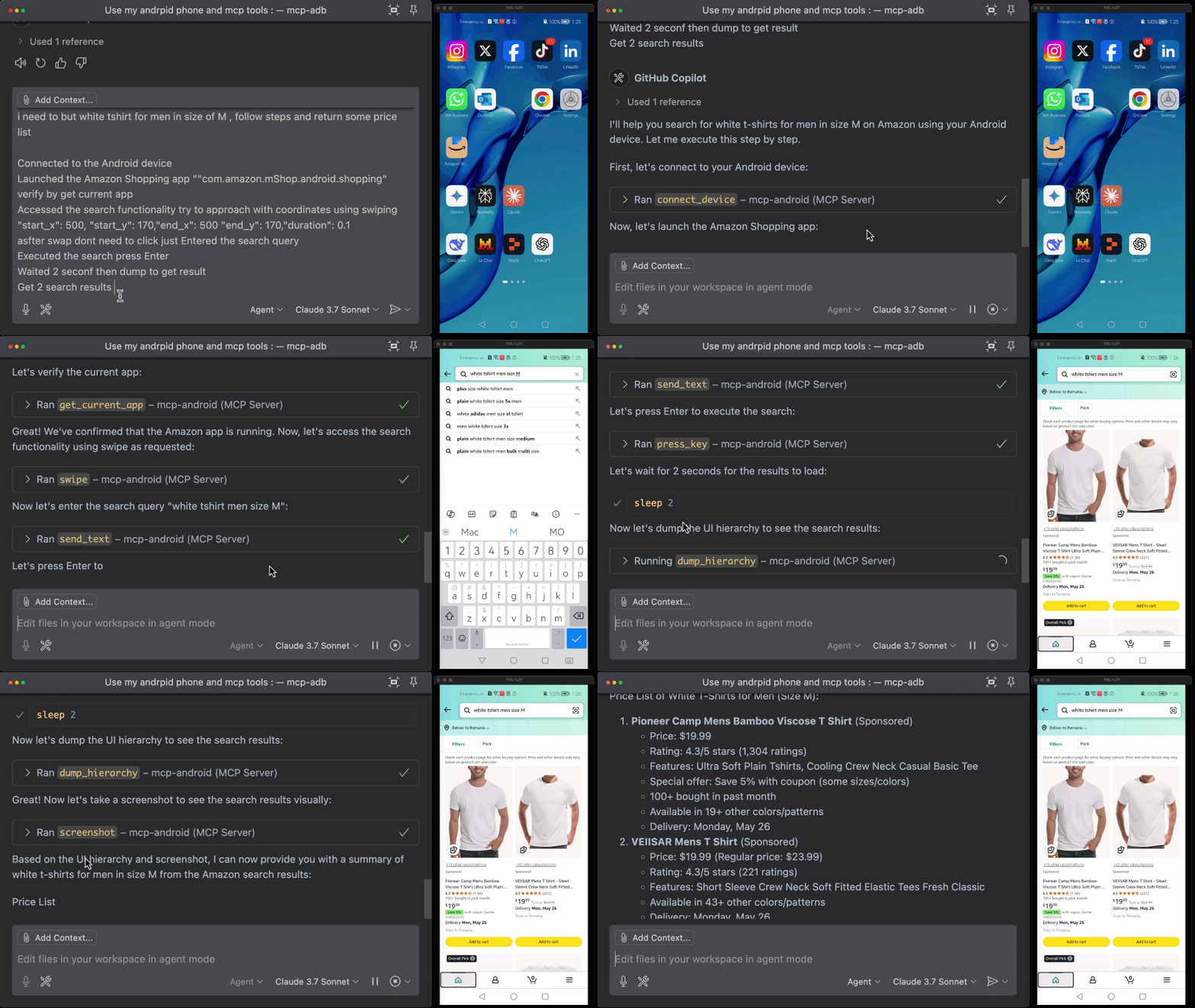
Requirements
- Python 3.13 or higher
- Android Debug Bridge (adb) installed and in PATH
- Connected Android device with USB debugging enabled
- uiautomator2 compatible Android device
Features
Device Management
- Smart Device Detection: Automatically finds and connects to available devices
- Comprehensive Device Info: Get serial, resolution, battery, WiFi IP, Android version
- ADB Diagnostics: Check ADB availability and connection status
- Health Monitoring: Built-in server health checks
Application Management
- App Discovery: List all installed applications (system + user apps)
- App Lifecycle Control: Start, stop, force-stop apps by package name
- App State Monitoring: Track current foreground app and activity
- Data Management: Clear app data/cache for testing
Screen & Display Control
- Screen Power Management: Turn screen on/off programmatically
- Smart Unlock: Automatic screen unlocking with standard methods
- Screen State Monitoring: Wait for screen activation (async support)
User Input Simulation
- Precision Interactions: Click by text, resource ID, or content description
- Advanced Gestures: Long click, swipe, drag operations
- Text Input: Smart text entry with optional field clearing
- Hardware Keys: Simulate home, back, menu, volume keys
UI Inspection & Debugging
- Element Analysis: Get detailed UI element properties and bounds
- Screen Capture: Take screenshots for debugging and documentation
- UI Hierarchy: Export complete screen structure as XML
- Smart Waiting: Wait for elements to appear with custom timeouts
- Scroll Detection: Auto-scroll to find elements in long lists
Advanced Capabilities
- Toast Detection: Capture system toast messages for verification
- Activity Monitoring: Wait for specific Android activities
- Background Operations: Async support for time-consuming operations
Use Cases
Perfect for:
- AI agents that need to interact with real devices
- Remote device control setups
- Automated QA tools
- Android bot frameworks
- UI testing and automation
- Device management and monitoring
Installation
1. Clone the repo
git clone https://github.com/nim444/mcp-android.git
cd mcp-android
2. Create and activate virtual environment
# Using uv (https://github.com/astral-sh/uv)
uv venv
source .venv/bin/activate  # On Windows: .venv\\Scripts\\activate
3. Install dependencies
uv pip installRunning the Server
The server supports two different transport modes depending on your use case:
Option 1: MCP stdio (For AI Agent Integration)
This is the standard mode for integrating with AI agents like Claude Desktop, VS Code, or other MCP clients.
# Edit server.py to use stdio mode (default commented out)
# Uncomment the stdio section and comment out http section

# Then run:
uv run python server.py
Option 2: Streamable HTTP (For Web/API Integration)
This mode runs the server as an HTTP API, useful for web applications, curl testing, or direct HTTP calls.
# Current default configuration - runs as HTTP server
uv run python server.py

# Server will be available at: http://localhost:8080
Switching Between Modes
Edit server.py and modify the if __name__ == "__main__": section:
For stdio mode (AI agents):
if __name__ == "__main__":
    mcp.run(
        transport="stdio",
        show_banner=False,
    )
For HTTP mode (Web API):
if __name__ == "__main__":
    mcp.run(
        transport="streamable-http",
        host="0.0.0.0",
        port=8080,
    )
Usage
For AI Agent Integration (Claude Desktop, VS Code, etc.)
An MCP client is needed to use this server. The Claude Desktop app is an example of an MCP client.
Important: For AI agent integration, make sure to configure the server in stdio mode (see "Option 1" above).
To use this server with Claude Desktop:
Locate your Claude Desktop configuration file
- Windows:
%APPDATA%\Claude\claude_desktop_config.json - macOS:
~/Library/Application Support/Claude/claude_desktop_config.json
Add the Android MCP server configuration to the mcpServers section
{
  "mcpServers": {
    "mcp-android": {
      "type": "stdio",
      "command": "bash",
      "args": [
        "-c",
        "cd /path/to/mcp-adb && source .venv/bin/activate && uv run python server.py"
      ]
    }
  }
}
Replace /path/to/mcp-adb with the absolute path to where you cloned this repository. For example: /Users/username/Projects/mcp-adb
Using with VS Code
You can also use this MCP server with VS Code's agent mode (requires VS Code 1.99 or newer). To set up:
1. Create a .vscode/mcp.json file in your workspace:
{
  "servers": {
    "mcp-android": {
      "type": "stdio",
      "command": "bash",
      "args": [
        "-c",
        "cd /path/to/mcp-adb && source .venv/bin/activate && uv run python server.py"
      ]
    }
  }
}
Replace /path/to/mcp-adb with the absolute path to where you cloned this repository.
After adding the configuration, you can manage the server using:
- Command Palette →
MCP: List Serversto view and manage configured servers - Command Palette →
MCP: Start Serverto start the server - The server's tools will be available in VS Code's agent mode chat
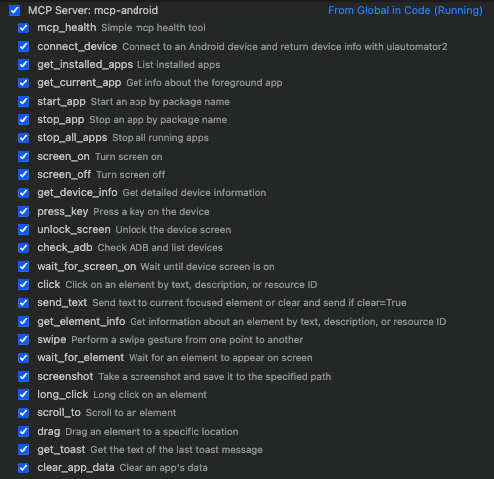
For HTTP API Integration (Direct API Calls)
When running in HTTP mode (Option 2), you can interact with the server directly via HTTP requests:
# Check if server is running
curl http://localhost:8080/

# List available tools (you'll need to implement proper tool discovery endpoints)
# This depends on your FastMCP version and configuration
Use Cases for HTTP Mode:
- Web applications with Android automation
- Testing tools that can't use stdio
- Direct API integration with other services
- Debugging and development with curl/Postman
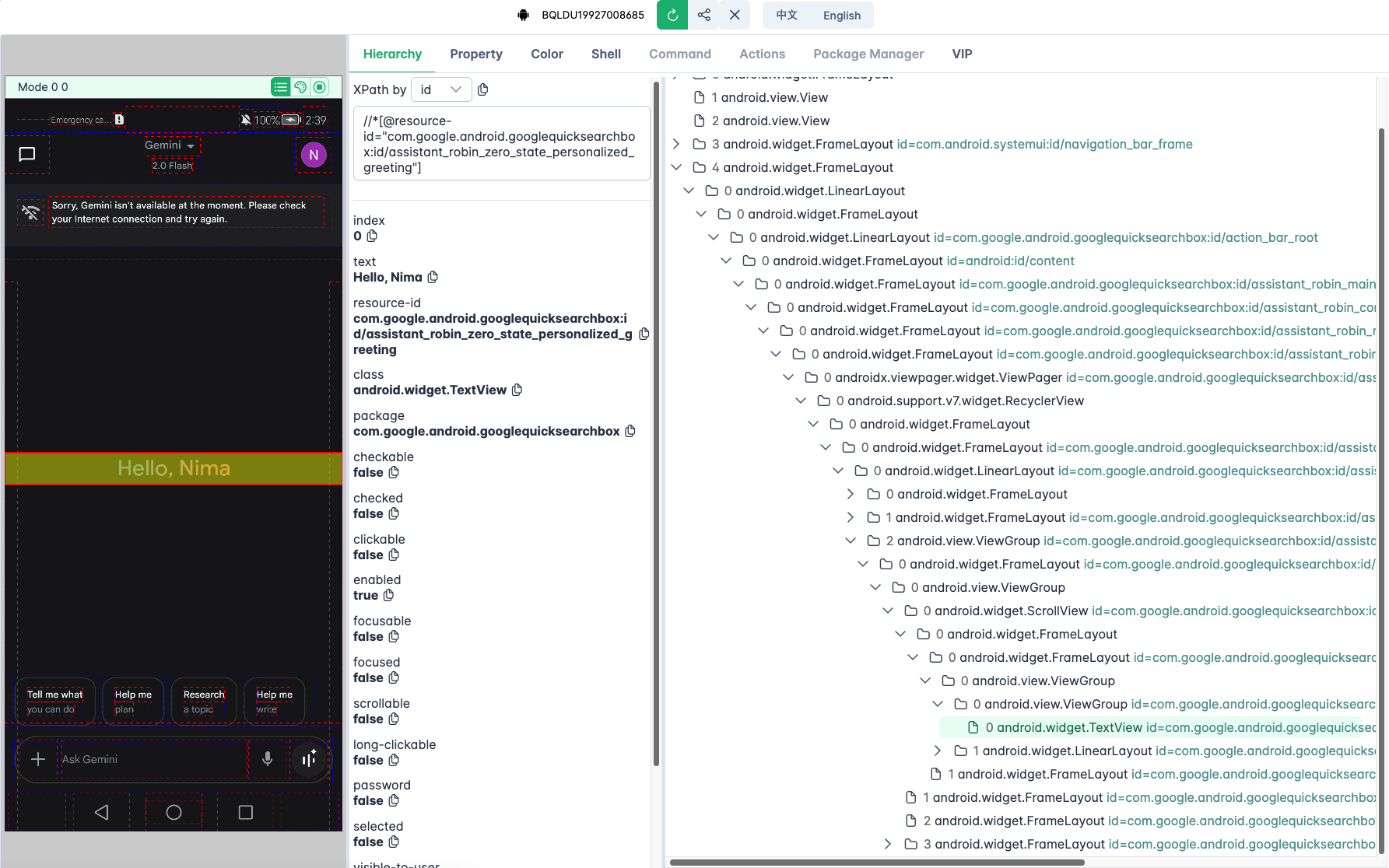
UI Inspector
The project includes support for uiauto.dev, a powerful UI inspection tool for viewing and analyzing your device's interface structure.
1. Install the UI inspector:
uv pip install uiautodev2. Start the inspector:
uiauto.dev3. Open your browser and navigate to
Available MCP Tools
Device Management Tools
| Tool Name | Description |
|---|---|
mcp_health | Check if the MCP server is running properly |
get_device_status | Get complete device status and readiness information |
connect_device | Connect to an Android device and get basic info |
get_device_info | Get detailed device info: serial, resolution, battery, etc. |
check_adb_and_list_devices | Check if ADB is installed and list connected devices |
Application Management Tools
| Tool Name | Description |
|---|---|
get_installed_apps | List all installed apps with version and package info |
get_current_app | Get info about the app currently in the foreground |
start_app | Start an app by its package name |
stop_app | Stop an app by its package name |
stop_all_apps | Stop all currently running apps |
clear_app_data | Clear user data/cache of a specified app |
Screen Control Tools
| Tool Name | Description |
|---|---|
screen_on | Turn on the screen |
screen_off | Turn off the screen |
unlock_screen | Unlock the screen (turn on and swipe if necessary) |
wait_for_screen_on | Wait asynchronously until the screen is turned on |
User Input Tools
| Tool Name | Description |
|---|---|
press_key | Simulate hardware key press (e.g. home, back, menu, etc.) |
click | Tap on an element by text, resourceId, or description |
long_click | Perform a long click on an element |
send_text | Input text into currently focused field (optionally clearing before) |
swipe | Swipe from one coordinate to another |
drag | Drag an element to a specific screen location |
Inspection Tools
| Tool Name | Description |
|---|---|
get_element_info | Get info on UI elements (text, bounds, clickable, etc.) |
wait_for_element | Wait for an element to appear on screen |
scroll_to | Scroll until a given element becomes visible |
screenshot | Take and save a screenshot from the device |
dump_hierarchy | Dump the UI hierarchy of the current screen as XML |
Advanced Tools
| Tool Name | Description |
|---|---|
get_toast | Get the last toast message shown on screen |
wait_activity | Wait until a specific activity appears |
---
License
This project is licensed under the MIT License - see the LICENSE file for details.
Similar MCP
Based on tags & features
Trending MCP
Most active this week