
rabbitmq-mcp-go
A Go implementation of Model Control Protocol (MCP) server for RabbitMQ integration
Documentation
RabbitMQ MCP Go
A Go implementation of Model Control Protocol (MCP) server for RabbitMQ integration.
This server provides an implementation for interacting with RabbitMQ via the MCP protocol, enabling LLM models to perform common RabbitMQ operations through a standardized interface.




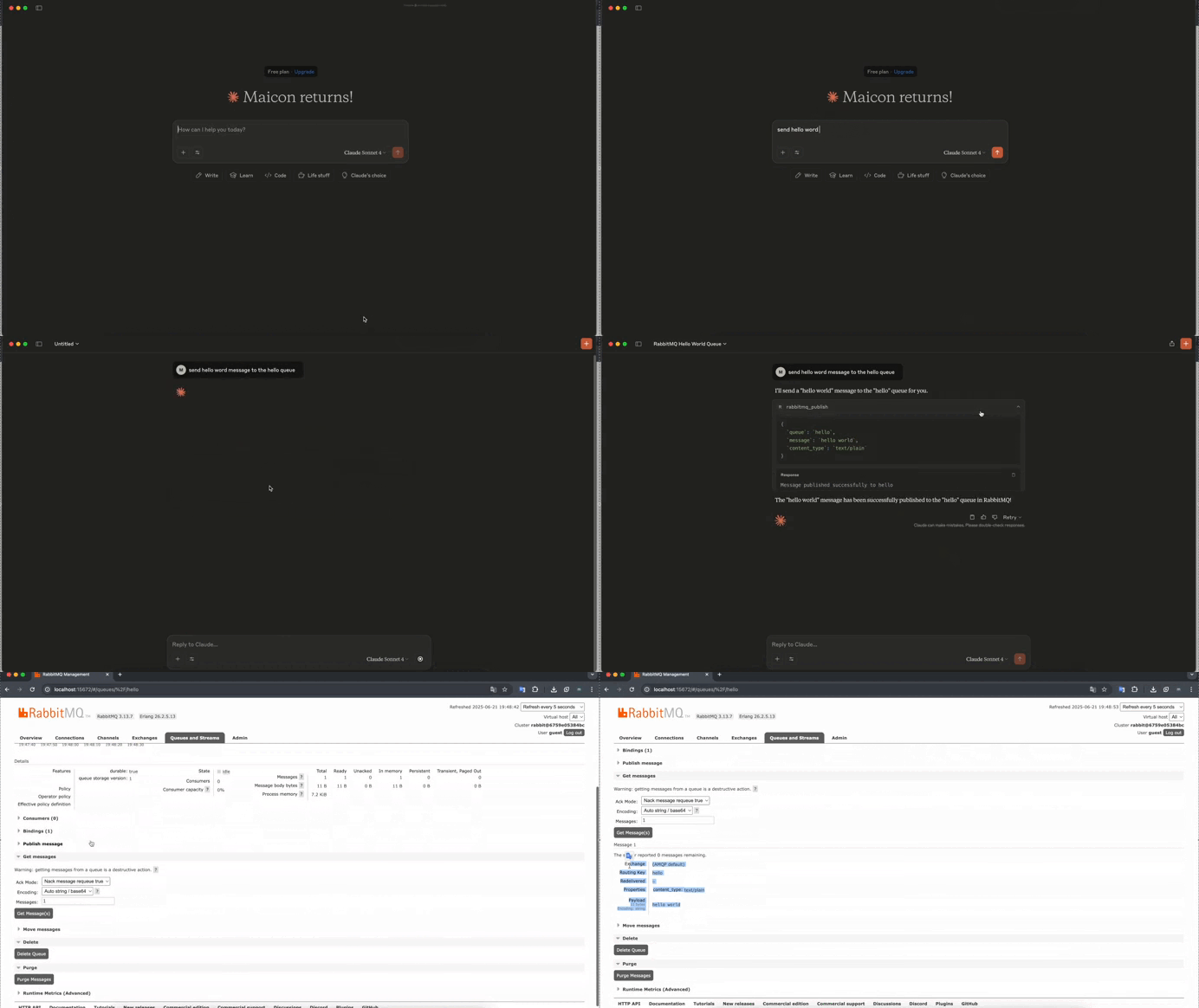
Overview
The RabbitMQ MCP Server bridges the gap between LLM models and RabbitMQ, allowing them to:
- Publish a message to a RabbitMQ queue or exchange
Project Structure
.
├── cmd/                    # Application entry points
├── internal/              # Private application code
│   ├── config/           # Configuration management
│   ├── tools/            # MCP tools implementations
│   ├── prompts/          # Prompt templates and configurations
│   └── resources/        # Shared resources and utilities
├── pkg/                   # Public library code
├── api/                   # API definitions and documentation
└── scripts/              # Build and utility scripts
Directory Overview
Internal Directory Structure
- tools/: Contains all MCP tool implementations. Each tool is a separate package that implements the MCP tool interface.
- prompts/: Stores prompt templates and configurations used by the MCP tools.
- resources/: Houses shared utilities, helper functions, and reusable components.
- config/: Manages application configuration.
Getting Started
1. Install Go 1.24.3:
asdf install golang 1.24.32. Clone the repository:
git clone https://github.com/yourusername/rabbitmq-mcp-go.git
cd rabbitmq-mcp-go
3. Install dependencies:
go mod download4. Build the project:
go build ./cmd/...MCP Client Integration
Basic Configuration
Add this configuration to your MCP client settings:
{
  "mcpServers": {
    "rabbitmq": {
      "command": "rabbitmq-mcp-server",
      "env": {
        "RABBITMQ_URL": "amqp://guest:guest@localhost:5672/"
      }
    }
  }
}
Cursor Integration
To use with Cursor, create or edit `~/.cursor/mcp.json`:
{
  "mcpServers": {
    "rabbitmq": {
      "command": "rabbitmq-mcp-server",
      "env": {
        "RABBITMQ_URL": "amqp://guest:guest@localhost:5672/"
      }
    }
  }
}
Claude Desktop Integration
To use with Claude Desktop, edit your configuration file:
- macOS: `~/Library/Application Support/Claude/claude_desktop_config.json`
- Windows: `%APPDATA%\Claude\claude_desktop_config.json`
{
  "mcpServers": {
    "rabbitmq": {
      "command": "rabbitmq-mcp-server",
      "env": {
        "RABBITMQ_URL": "amqp://guest:guest@localhost:5672/"
      }
    }
  }
}
Using the RabbitMQ Publish Tool
The publish tool allows you to send messages to RabbitMQ queues or exchanges through the MCP interface.
Tool Parameters
- `queue` (string, optional): Queue name to publish to
- `exchange` (string, optional): Exchange name to publish to
- `message` (string, required): Message content to publish
- `content_type` (string, optional): Content type of the message
- Supported values: "text/plain" (default), "application/json"
- `headers` (string, optional): Message headers in JSON format
Example Interactions
1. Publishing to a Queue:
>User: "Send a message 'Hello World' to the queue 'my_queue'"
AI Assistant will use the publish tool:
{
  "queue": "my_queue",
  "message": "Hello, World!",
  "content_type": "text/plain"
}
Response:
"Message published successfully to my_queue"2. Publishing JSON to an Exchange:
> User: "Publish order status update to the 'orders' exchange"
AI Assistant will use the publish tool:
{
  "exchange": "orders",
  "message": "{\"order_id\": \"12345\", \"status\": \"completed\"}",
  "content_type": "application/json"
}
Response:
"Message published successfully to orders"1. Publishing with Headers:
> User: "Send a high-priority message to the notifications queue"
AI Assistant will use the publish tool:
{
  "queue": "notifications",
  "message": "Important system update",
  "headers": "{\"priority\": \"high\", \"timestamp\": \"2024-03-20T12:00:00Z\"}"
}
Error Handling
The tool will return an error in the following cases:
- Neither queue nor exchange is specified
- Required message parameter is missing
- Invalid JSON format when content_type is "application/json"
- RabbitMQ connection or publishing errors
Development
To add a new MCP tool:
1. Create a new directory under `internal/tools/`
2. Implement the MCP tool interface
3. Register the tool in the main application
4. Add corresponding prompts in `internal/prompts/` if needed
5. Document the tool in the tools README
Contributing
Contributions are welcome! Please feel free to submit a Pull Request.
License
This project is licensed under the MIT License - see the LICENSE file for details.
Frequently asked questions
What is rabbitmq-mcp-go?
rabbitmq-mcp-go is A Go implementation of Model Control Protocol (MCP) server for RabbitMQ integration
How do I install rabbitmq-mcp-go?
Open the GitHub repository and follow its README. Most MCP servers are added to your client's MCP config, then called by your agent.
Is rabbitmq-mcp-go open source?
Yes — it is hosted on GitHub at https://github.com/maiconjobim/rabbitmq-mcp-go and has 2 stars.
Related MCP tools
 kubeshark
eBPF-powered network observability for Kubernetes. Indexes L4/L7 traffic with full K8s context, decrypts TLS without keys. Queryable by AI agents via MCP and humans via dashboard.
 go-whatsapp-web-multidevice
GOWA - WhatsApp REST API with support for UI, Multi Account, Webhooks, and MCP, and Chatwoot. Built with Golang for efficient memory use.
 radar
radarThe missing open-source Kubernetes UI with a built-in MCP server for AI agents. See what's broken, why, and what changed. Issues, Topology, event timeline, Helm, GitOps, live service traffic, and cluster audits - all in one Go binary.
 mcp-language-server
mcp-language-server gives MCP enabled clients access semantic tools like get definition, references, rename, and diagnostics.
 terraform-mcp-server
The Terraform MCP Server provides seamless integration with Terraform ecosystem, enabling advanced automation and interaction capabilities for Infrastructure as Code (IaC) development.
 matlab-mcp-server
Run MATLAB® using AI applications with the official MATLAB MCP Server from MathWorks®. This MCP server for MATLAB supports a wide range of coding agents like Claude Code® and Visual Studio® Code.
Run your own MCP server? See who uses it and what to fix.
Measure it with TrackMCP