
mcp-server-simulator-ios-idb
A Model Context Protocol (MCP) server that enables LLMs to interact with iOS simulators through natural language commands.
Documentation
📱 MCP Server for iOS Simulator
A Model Context Protocol (MCP) server that enables LLMs to interact with iOS simulators through natural language commands.
ℹ️ Overview
This MCP server provides a bridge between Large Language Models (LLMs) and iOS simulators, offering comprehensive control through natural language commands. Here's what it can do:
For detailed usage, see the Installation guide and Supported Commands sections. You can use this server either through direct MCP integration or as a standalone library.
Check out the Architecture section to understand how the components work together to enable natural language control of iOS simulators.
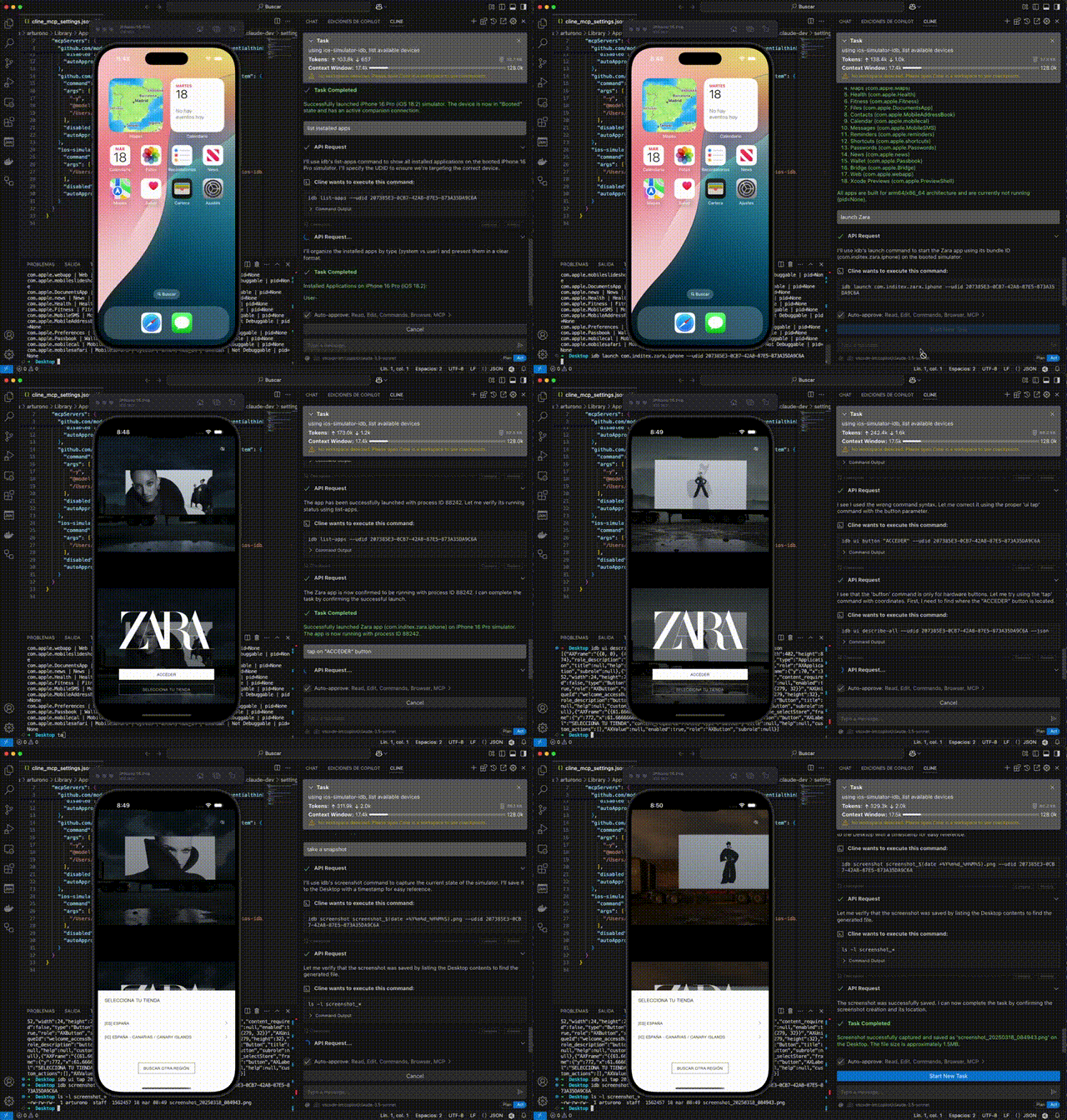
🎮 Simulator Control
- Create and manage simulator sessions
- Boot, shutdown, and monitor simulator states
- List available and running simulators
- Focus simulator windows
📱 Application Management
- Install and manage iOS applications
- Launch, terminate, and uninstall apps
- Monitor app states and verify installations
- Handle app permissions and configurations
🖱️ UI Interaction & Testing
- Interact with the simulator UI
- Execute tap, swipe, and button press actions
- Input text and key sequences
- Access accessibility elements for UI testing
- Record videos of UI interactions
🛠️ Development & Debugging
- Capture screenshots and system logs
- Debug applications in real-time
- Monitor and analyze crash logs
- Install dynamic libraries and manage app data
⚡ Advanced Features
- Additional functionality includes:
- Location simulation
- Media injection
- URL scheme handling
- Contact database management
- Keychain operations
For detailed usage, see the Installation guide and Supported Commands sections. You can use this server either through direct MCP integration or as a standalone library.
Check out the Architecture section to understand how the components work together to enable natural language control of iOS simulators.
📋 Requirements
- macOS: Required for iOS simulator support
- Node.js: v20.0.0 or higher
- Homebrew: Required for installing dependencies
- XCode: With iOS simulators installed
🚀 Installation
The easiest way to install this server is through Cline:
1. Simply ask Cline:
Add this mcp to cline https://github.com/InditexTech/mcp-server-simulator-ios-idb2. Cline will handle the installation process automatically, including dependency management and configuration.
Alternatively, you can install it manually:
# Clone the repository
git clone https://github.com/InditexTech/mcp-server-simulator-ios-idb.git
cd mcp-server-simulator-ios-idb

# Create and activate Python virtual environment
python3 -m venv venv
source venv/bin/activate  # On Unix/macOS

# Install dependencies
npm install

# Build the project
npm run build

# Start the project
npm start

# Run tests
npm test
The installation process will automatically:
1. Check if you're running macOS
2. Install idb-companion via Homebrew
3. Install fb-idb via pip in the virtual environment
Note: Make sure to keep the virtual environment activated while using the server. If you close your terminal and come back later, you'll need to reactivate the virtual environment with the `source venv/bin/activate` command before running `npm start`.
🔌 MCP Integration
To use this server with Claude or other LLM assistants:
1. Add the server to your MCP settings in Claude Desktop:
{
  "mcpServers": {
    "ios-simulator": {
      "command": "node",
      "args": ["/path/to/mcp-server-simulator-ios-idb/dist/index.js"],
      "env": {}
    }
  }
}
2. The LLM can now use natural language commands to control iOS simulators:
create a simulator session with iPhone 14
install app /path/to/my-app.ipa
launch app com.example.myapp
tap at 100, 200
take a screenshot
📚 Usage as a Library
You can also use this package as a library in your own projects:
🔰 Basic Usage
import { createMCPServer } from 'mcp-server-simulator-ios-idb';

async function main() {
  // Create an instance of the MCP server
  const { orchestrator } = createMCPServer();

  // Process natural language commands

  // Create a simulator session
  const sessionResult = await orchestrator.processInstruction('create session');
  console.log(`Session created: ${sessionResult.data}`);

  // Interact with the simulator
  await orchestrator.processInstruction('tap at 100, 200');

  // Capture a screenshot
  const screenshotResult = await orchestrator.processInstruction('take screenshot');
  console.log(`Screenshot saved at: ${screenshotResult.data}`);
}

main().catch(console.error);
🚀 Advanced Usage
You can also use the individual components directly:
import {
  IDBManager,
  NLParser,
  MCPOrchestrator,
  ParserToOrchestrator,
  OrchestratorToIDB
} from 'mcp-server-simulator-ios-idb';

// Create instances
const idbManager = new IDBManager();
const parser = new NLParser();
const orchestrator = new MCPOrchestrator(parser, idbManager);

// Use the components directly
const sessionId = await idbManager.createSimulatorSession({
  deviceName: 'iPhone 12',
  platformVersion: '15.0'
});

await idbManager.tap(sessionId, 100, 200);
🏗️ Project Structure
mcp-server-simulator-ios-idb/
├── src/                      # Source code
│   ├── adapters/             # Adapter components
│   ├── idb/                  # IDB manager implementation
│   ├── mcp/                  # MCP server implementation
│   ├── orchestrator/         # Command orchestrator
│   ├── parser/              # Natural language parser
│   └── index.ts             # Main entry point
├── types/                   # TypeScript type definitions
├── scripts/                 # Installation scripts
├── package.json            # Project configuration
└── tsconfig.json          # TypeScript configuration
🎯 Supported Commands
The NLParser supports the following natural language commands:
🎮 Simulator Management
| Command | Description | Example |
|---|---|---|
| Create session | Creates a new simulator session | "create session", "create simulator iPhone 12" |
| Terminate session | Terminates the current session | "terminate session", "close simulator" |
| List simulators | Lists available simulators | "list simulators", "show simulators" |
| List booted simulators | Lists running simulators | "list booted simulators", "show running simulators" |
| Boot simulator | Boots a simulator by UDID | "boot simulator 5A321B8F-4D85-4267-9F79-2F5C91D142C2" |
| Shutdown simulator | Shuts down a simulator | "shutdown simulator 5A321B8F-4D85-4267-9F79-2F5C91D142C2" |
| Focus simulator | Brings simulator window to front | "focus simulator", "bring simulator to front" |
| List simulator sessions | Lists active simulator sessions | "list simulator sessions", "show active sessions" |
📱 App Management
| Command | Description | Example |
|---|---|---|
| Install app | Installs an app on the simulator | "install app /path/to/app.ipa" |
| Launch app | Launches an app on the simulator | "launch app com.example.app" |
| Terminate app | Terminates a running app | "terminate app com.example.app" |
| Uninstall app | Uninstalls an app | "uninstall app com.example.app" |
| List apps | Lists installed applications | "list apps", "show installed apps" |
| Check if app installed | Checks if an app is installed | "is app com.example.app installed" |
🖱️ UI Interaction
| Command | Description | Example |
|---|---|---|
| Tap | Taps at specific coordinates | "tap at 100, 200" |
| Swipe | Performs a swipe gesture | "swipe from 100, 200 to 300, 400" |
| Press button | Presses a device button | "press button HOME", "press button SIRI" |
| Input text | Types text | "input text Hello World" |
| Press key | Presses a key by code | "press key 4" |
| Press key sequence | Presses a sequence of keys | "press key sequence 4 5 6" |
♿ Accessibility
| Command | Description | Example |
|---|---|---|
| Describe elements | Lists all accessibility elements | "describe all elements", "show accessibility elements" |
| Describe point | Describes element at coordinates | "describe point 100, 200", "what's at 150, 300" |
📸 Capture and Logs
| Command | Description | Example |
|---|---|---|
| Take screenshot | Captures a screenshot | "take screenshot", "capture screen" |
| Record video | Records screen activity | "record video /path/output.mp4" |
| Stop recording | Stops video recording | "stop recording", "stop video recording" |
| Get logs | Retrieves system or app logs | "get logs", "get logs for com.example.app" |
🐛 Debug
| Command | Description | Example |
|---|---|---|
| Start debug | Starts a debug session | "debug app com.example.app", "start debug com.example.app" |
| Stop debug | Stops a debug session | "stop debug", "terminate debug session" |
| Debug status | Gets debug session status | "debug status", "show debug info" |
💥 Crash Logs
| Command | Description | Example |
|---|---|---|
| List crash logs | Lists available crash logs | "list crash logs", "show crash logs" |
| Show crash log | Shows content of a crash log | "show crash log crash_2023-01-01" |
| Delete crash logs | Deletes crash logs | "delete crash logs", "clear crash logs" |
🔧 Additional Commands
| Command | Description | Example |
|---|---|---|
| Install dylib | Installs a dynamic library | "install dylib /path/to/library.dylib" |
| Open URL | Opens a URL in the simulator | "open url https://example.com" |
| Clear keychain | Clears the simulator's keychain | "clear keychain" |
| Set location | Sets the simulator's location | "set location 37.7749, -122.4194" |
| Add media | Adds media to the camera roll | "add media /path/to/image.jpg" |
| Approve permissions | Approves app permissions | "approve permissions com.example.app photos camera" |
| Update contacts | Updates contacts database | "update contacts /path/to/contacts.sqlite" |
The interface supports all commands available in the idb CLI tool, providing a comprehensive set of operations for iOS simulator automation.
🔍 Architecture
The server consists of three main components:
1. IDBManager: Low-level component that interacts directly with iOS simulators through idb.
2. NLParser: Component that interprets natural language instructions and converts them into structured commands.
3. MCPOrchestrator: Central component that coordinates interactions between the parser and the IDBManager.
These components are connected through adapters:
- ParserToOrchestrator: Converts parser results into orchestrator commands.
- OrchestratorToIDB: Translates orchestrator commands into IDBManager calls.
🔌 MCP Integration
To use this server with the Model Context Protocol:
1. Add the server to your MCP settings:
{
  "mcpServers": {
    "ios-simulator": {
      "command": "node",
      "args": ["/path/to/mcp-server-simulator-ios-idb/dist/index.js"],
      "env": {}
    }
  }
}
2. Connect to the server in your LLM application:
const result = await useMcpTool({
  serverName: "ios-simulator",
  toolName: "process-instruction",
  arguments: {
    instruction: "create simulator session"
  }
});
🙏 Acknowledgments
This project would not be possible without facebook/idb, which provides the underlying iOS simulator control capabilities. We extend our sincere gratitude to the Facebook/Meta team and all contributors to the idb project for creating and maintaining such a powerful and reliable tool.
📄 License
This tool is available as open source under the terms of the Apache-2.0.
Frequently asked questions
What is mcp-server-simulator-ios-idb?
mcp-server-simulator-ios-idb is A Model Context Protocol (MCP) server that enables LLMs to interact with iOS simulators through natural language commands.
How do I install mcp-server-simulator-ios-idb?
Open the GitHub repository and follow its README. Most MCP servers are added to your client's MCP config, then called by your agent.
Is mcp-server-simulator-ios-idb open source?
Yes — it is hosted on GitHub at https://github.com/InditexTech/mcp-server-simulator-ios-idb and has 272 stars.
Related MCP tools
 minecraft-mcp-server
A Minecraft MCP Server powered by Mineflayer API. It allows to control a Minecraft character in real-time, allowing AI assistants to build structures, explor...
 repomix
📦 Repomix is a powerful tool that packs your entire repository into a single, AI-friendly file. Perfect for when you need to feed your codebase to Large Lan...
 iterm-mcp
A Model Context Protocol server that executes commands in the current iTerm session - useful for REPL and CLI assistance
 claude-debugs-for-you
Enable any LLM (e.g. Claude) to interactively debug any language for you via MCP and a VS Code Extension TypeScript-based implementation.
 librechat
Enhanced ChatGPT Clone: Features Agents, MCP, DeepSeek, Anthropic, AWS, OpenAI, Responses API, Azure, Groq, o1, GPT-5, Mistral, OpenRouter, Vertex AI, Gemini...
 fastgpt
FastGPT is a knowledge-based platform built on the LLMs, offers a comprehensive suite of out-of-the-box capabilities such as data processing, RAG retrieval, ...
Run your own MCP server? See who uses it and what to fix.
Measure it with TrackMCP