
htmlradar
Open-source DocSend for HTML. Send a tracked link, see who read what, get pinged the moment they do.
Documentation
HTMLRadar
The open-source DocSend alternative for HTML files.
Read tracking for the decks, reports and proposals you now send as HTML.




**HTMLRadar is an open-source tool for sharing an HTML deck, brief, or proposal
as a tracked link, and seeing who opened it, which sections they read, and for
how long.** Not just that it was opened — dwell time, section by section.
htmlradar.com · free for 2 tracked links, $15/mo or
$150/yr for unlimited · or self-host the whole thing.
Using Claude? Add HTMLRadar as a connector by pasting one address —
`https://mcp.htmlradar.com/mcp`. Nothing to install and no API key to make first;
Issues and PRs · roadmap · changelog documents v1.2; latest published tag is v1.1.2.
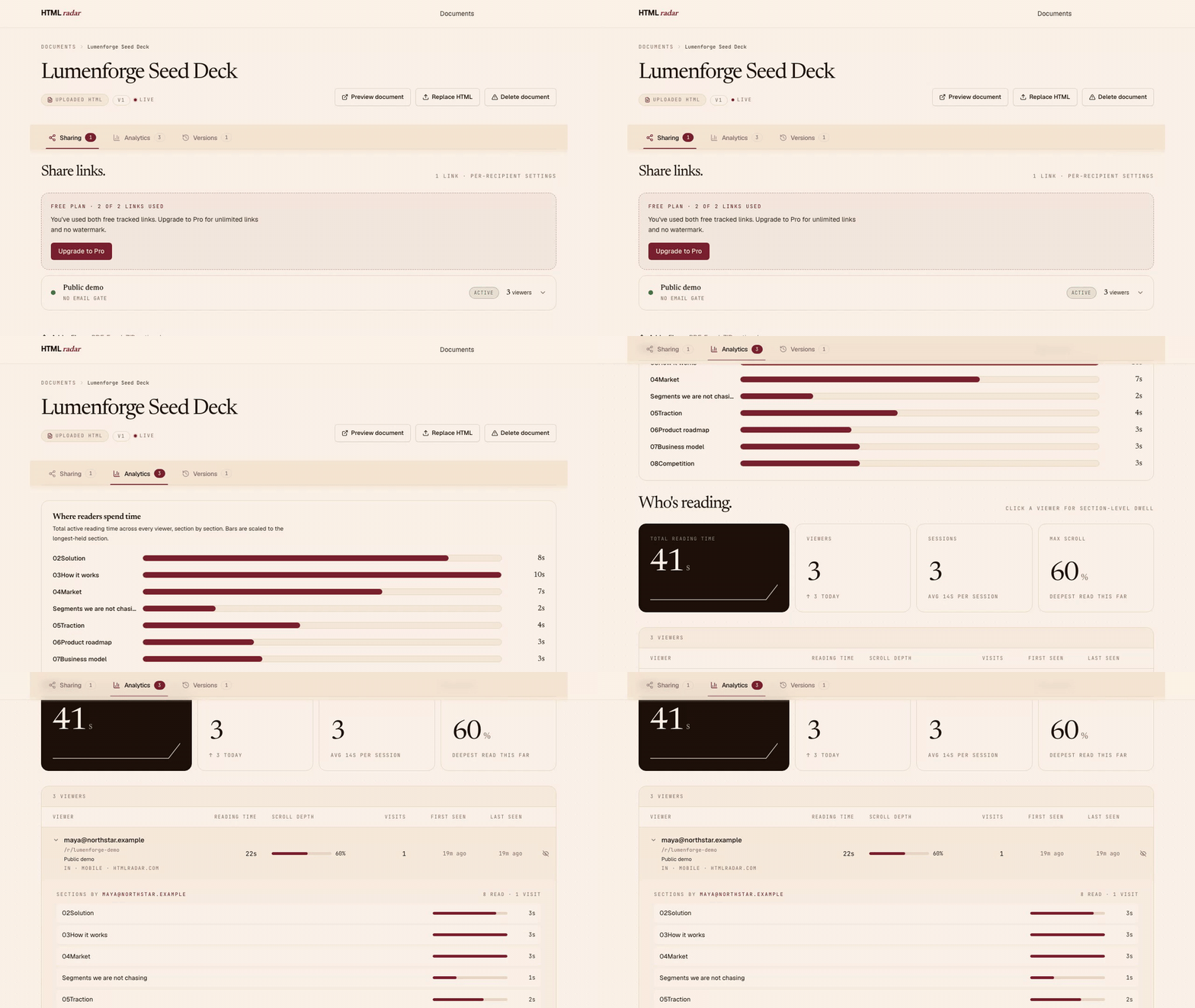
Walkthrough uses synthetic sample data in the real sender dashboard.
Why this exists
The documents that matter — decks, client reports, proposals, board updates —
are becoming HTML, because an HTML page can be interactive, reflows to whatever
screen opens it, and can be changed after it has been sent. A PDF you have sent
is fixed. More of them are written with AI tools now, and ChatGPT, Claude, v0,
Lovable and Anthropic Artifacts all produce HTML. The format is what makes these
documents better; who typed them is beside the point.
The tracking tooling never followed. DocSend and everything like it is built
around uploading a file and tracking that file. PDF was the print-era container.
HTMLRadar tracks the document people actually send now, and reports reading at
section level rather than a single "opened" flag.
What this is
Send-side analytics for HTML documents. Upload an HTML file (or paste a URL you already host), send a tracked link `htmlradar.page/r/{slug}`, see who opened it, which sections they dwelled on, and when they bounced. Section-level dwell, not "opened."
What it does
- Section-level dwell — on any HTML. At least half a section must stay visible for one continuous second before its dwell starts qualifying; the read signal fires after three qualified seconds. The tracker auto-detects sections from your HTML: explicit anchored headings → bare `h1/h2/h3` (slugged from text) → slide/page containers (`section`, `.slide`, `.page`) → paragraph buckets on plain prose. Dashboard tells you a recipient spent 2m 41s on §03 The Ask, 12s on Problem, and skipped Market sizing.
- Per-viewer dashboard, aggregated across every share. One row per person who actually opened the doc, with email + country + device + referrer + total time + scroll depth + visits + first/last seen. Updates live every 30 seconds while the tab is in focus.
- Per-recipient share links. One document, many shares. Each share carries its own email gate, password, expiry, revocation, and email-domain or per-email allow-list.
- Files alongside the deck. Attach PDFs, financial models, images, and ZIPs to any share. Recipients see a small corner pill that opens a side drawer; files are always available when present (the per-share "Lock the deck" toggle controls deck save/print only, never attachments). Every download is logged per viewer + per session + per filename.
- Version history. Replace the HTML after partner feedback. Every existing share keeps the same link and serves the new version on next open. The `v{n}` chip on the doc page is a popover with every upload's original local filename, byte size, and timestamp.
- Retroactive share access. Change a share's password, expiry, or allow-list without revoking. The proxy re-checks the allow-list on every request — removing an email kicks them out immediately on their next click, not their next browser session.
- Edit + preview without leaving the dashboard. Preview the doc as the recipient sees it before sending (short-lived HMAC token, no gate). Both "Preview document" and "Preview as you" open in a new tab so your dashboard stays where you left it.
- Branded first-open email. When a recipient creates their first real session, HTMLRadar requests an HTML notification — viewer email + doc title + a single "See the read →" CTA back to the dashboard. Tease, not report.
- Engaged-time, not tab-open time. Both per-section dwell and per-session active time apply a 5-second idle watchdog (keydown / scroll / touchstart, mousemove deliberately excluded). Same methodology as Chartbeat / Parse.ly engagement-time. A tab parked while the reader walked away stops counting after 5 seconds.
- Bot / accidental-tap filter. After the document loads, HTMLRadar waits through a 5-second warm-up before creating the session. If the recipient backgrounds the tab or bounces during that wait, there is no session, notification request, or inflated viewer count.
- Privacy-respecting. Recipient records contain an email when entered or a random browser ID, referrer, coarse device and location data, section dwell, scroll depth, and active time. HTMLRadar stores no raw IP address, keystrokes, mouse positions, DOM snapshots, or session replay. Recipients can opt out via `window.HTMLRadar.optOut()`.
What it deliberately is not
A sender-side analytics tool for one document at a time. Not a CMS, deck builder, static-site host, PDF viewer, or website analytics platform. You bring the HTML.
Architecture
Six packages, two storage backends. Three of the six are Cloudflare Workers, one is the Next.js app
on Cloudflare Pages, and two are libraries that ship as bundles.
htmlradar/
├── packages/
│   ├── tracker/      # 8.5 KB gzipped browser IIFE — embedded in the recipient's view
│   ├── proxy/        # Cloudflare Worker at htmlradar.page/r/{slug} — gates + HTML fetch + tracker inject + attachment serving
│   ├── app/          # Next.js 14 on Cloudflare Pages — sender's dashboard
│   ├── monitor/      # Cloudflare cron Worker — checks Supabase every 5 min, pages the founder on regressions, and answers the Telegram webhook
│   ├── connector/    # Cloudflare Worker at mcp.htmlradar.com — the remote MCP server, so Claude can be connected by pasting one address
│   └── mcp/          # stdio MCP server on npm — lets an agent publish HTML and read back who opened it
├── schema/           # Ordered idempotent SQL migrations — tables, RLS, SECURITY DEFINER RPCs, triggers
├── examples/         # Demo HTML for trying it locally
└── docs/             # Architecture, privacy, quickstart, self-hosting
Document HTML + attachment bytes live in Cloudflare R2. Everything else (sessions, sections, viewers, shares, attachments metadata, version history) lives in Supabase Postgres.
Recipient links live on a second domain, `htmlradar.page`, while the dashboard and the marketing site stay on `htmlradar.com`. A recipient document is HTML somebody else wrote, and serving it on the application's own domain would put a stranger's markup on the same origin as a signed-in session, and would let anyone who uploaded a convincing fake sign-in page have it served under our certificate and our reputation. A separate registrable domain removes both problems at once: the document's origin carries no application cookies, and if the content domain ever ends up on a phishing blocklist, the application domain does not. Links sent before the split still work — the worker answers `htmlradar.com/r/…` with a permanent redirect. Self-hosters choose their own two hosts, or run both roles on one; see `docs/self-hosting.md`.
The architecture decisions — why a Cloudflare Worker proxy, why hand-rolled PostgREST instead of `@supabase/supabase-js`, why per-session bearer tokens instead of HMAC, the engagement-time methodology, the retroactive allow-list — are in `docs/architecture.md`.
Stack
- Frontend: Next.js 14 (App Router, Server Components), Tailwind CSS, Newsreader + Geist (self-hosted via `next/font`)
- Backend: Supabase Postgres — RLS + SECURITY DEFINER RPCs + `pg_net` triggers for email
- Proxy: Cloudflare Worker, HTMLRewriter for tracker injection
- Remote MCP connector: Cloudflare Worker on `mcp.htmlradar.com`, OAuth on top of ordinary API keys, one KV namespace for grants and tokens
- Storage: Cloudflare R2 for uploaded HTML
- Auth: Supabase Auth (Google OAuth + magic-link)
- Email: Resend, invoked from Postgres via `pg_net`
- Payments: Polar.sh checkout link (Stripe Connect Express under the hood for Indian indie founders)
Core hosting runs on Cloudflare and Supabase. Resend is optional for notification email, and Polar handles billing for the hosted Pro plan.
Quick start — hosted
1. Sign in at htmlradar.com with Google or magic link.
2. Upload an HTML file or paste a URL.
3. Create a per-recipient share. Email gate / password / expiry / allow-list optional per share.
4. Send the tracked link.
5. Watch the dashboard. HTMLRadar requests a first-read email when the recipient creates their first real session.
Free tier: 2 tracked links lifetime across unlimited documents, 20 attachments per doc up to 25 MB each and 100 MB total per doc. Pro tier ($15/month, or $150/year — two months free): unlimited tracked links, your own link names (`htmlradar.page/r/acme-proposal` rather than a generated one), no "Powered by HTMLRadar" footer on the recipient view, priority support. Coming soon on Pro: custom domain on share URLs, dynamic per-viewer watermark, repeat-open alerts. What's next is on the public roadmap.
Quick start — self-host
You'll need:
- A Cloudflare account (Workers + R2 + Pages)
- A Supabase project (free tier is enough)
- A domain on Cloudflare DNS
- Node ≥20, PNPM ≥10
- A Resend account for outbound email (optional — without it, the first-read trigger writes a `skipped` row to `notifications_log` and the rest of the product still works)
Then:
git clone https://github.com/htmlradar/htmlradar
cd htmlradar
pnpm install
cp .env.example .env.local           # then fill it in, see the note below
pnpm typecheck && pnpm test          # sanity check
pnpm build                           # builds app, tracker and mcp — the three packages that have a build script
`pnpm build` needs two variables filled in before it will finish. Copying `.env.example` is not
enough on its own: several marketing pages are pre-rendered at build time and they create a Supabase
client while doing it, so `NEXT_PUBLIC_SUPABASE_URL` and `NEXT_PUBLIC_SUPABASE_ANON_KEY` have to hold
real values in `.env.local` first. Leave them blank and the build stops on `/`, `/pricing`,
`/privacy`, `/terms` and `/why` with `Your project's URL and Key are required to create a Supabase
client!`, which does not say which file it wanted. Everything else in `.env.example` can wait until
you deploy.
Schema setup: apply every numbered SQL file directly under `schema/`, in order, via the Supabase SQL
editor — and nothing in `schema/tests/`. There is no last file to stop at; the folder grows, so apply
whatever is in it, from `001` upwards, and add each new one as you pull it. The files in
`schema/tests/` are destructive test programs for a scratch database (they create auth users and
sample rows) and must never run against a real install. Each migration is idempotent
(`CREATE TABLE IF NOT EXISTS`, `CREATE OR REPLACE FUNCTION`, `DO $$ ... IF NOT EXISTS ... $$`), so
re-running any of them is safe, and so is re-running the whole chain.
Two Postgres extensions have to be available, and both are on every Supabase tier: `pgcrypto`, for
`gen_random_uuid` and the hashing the schema does, and `pg_net`, for the asynchronous HTTP call the
notification triggers make. `001_init.sql` creates both itself. A third, `pg_cron`, is optional:
migrations `044` and `045` use it to schedule the notification reconciler and the expired-handle
sweep, and where it is missing they log a notice, skip the scheduling and carry on, leaving both
functions callable by hand or by any scheduler you already run.
The five most recent migrations, as of this commit:
- `043_trust_layer_foundation.sql` — per-customer handles, the permanent registry of claimed names behind them, the per-share hostname the proxy routes on, and the private `share_lookup` view the proxy reads instead of three separate tables.
- `044_notification_reconciler.sql` — `reconcile_notification_sends()`, which finally moves a notification row off `queued` by joining it against `pg_net`'s own response table; scheduled every ten minutes where `pg_cron` exists.
- `045_connect_handles.sql` — the short-lived, single-use handoff from the signed-in consent page to the remote MCP connector. The table stores only a hash of the handle. Run it after `040`.
- `046_connector_grants.sql` — what the application knows about each remote-connector connection and what became of it, so a revocation whose OAuth clean-up failed is a row somebody can find.
- `047_radar_drafts.sql` — the drafted-reply queue and the reservation ledger that makes "one comment per thread, five a day" an enforced fact rather than an intention.
One migration wants editing before you run it: `032_comped_accounts.sql` carries a placeholder list
of internal addresses that are never billed. Put your own addresses in it, or none.
Resend secrets go in Supabase Vault (works on free tier — no `ALTER DATABASE SET` required):
select vault.create_secret('re_your_resend_api_key', 'resend_api_key');
select vault.create_secret('hello@yourdomain.com',  'resend_from');
Full guide with deployment commands in `docs/self-hosting.md`.
Use it from your agent
HTMLRadar ships an MCP server, so the agent that wrote the HTML can publish it as a tracked link —
and ask, the next day, whether anyone read it.
Claude Desktop and claude.ai — one address, no install
Settings → Connectors → Add custom connector, and paste:
https://mcp.htmlradar.com/mcpNothing to install and no API key to make first. The first time Claude reaches for a tool it shows a
Connect card; you sign in to HTMLRadar, choose read-only or read-and-publish, and the key is minted
for that connection. Revoke it any time under Connected apps in
Settings — access ends on the next tool call.
Every other client — run the package
Create an API key at htmlradar.com/settings under API keys,
then export it, so the key never becomes a command-line argument that lands in your shell history:
export HTMLRADAR_API_KEY=hr_live_xxxClaude Code
claude mcp add htmlradar -e HTMLRADAR_API_KEY=$HTMLRADAR_API_KEY -- npx -y htmlradar-mcpOr install the plugin, which wires up the same server and adds a skill that knows when to offer a
tracked link and when to stay quiet:
/plugin marketplace add htmlradar/htmlradar
/plugin install htmlradar@htmlradar
Cursor — put this in `.cursor/mcp.json` in your project, or `~/.cursor/mcp.json` to make it
global. Cursor expands `${env:NAME}` inside `env`, which keeps the key out of a file you might
commit:
{
  "mcpServers": {
    "htmlradar": {
      "command": "npx",
      "args": ["-y", "htmlradar-mcp"],
      "env": { "HTMLRADAR_API_KEY": "${env:HTMLRADAR_API_KEY}" }
    }
  }
}
There is a one-click Add to Cursor button on htmlradar.com/mcp. It
installs the server with a placeholder key, which you then replace with your own.
Codex CLI
codex mcp add htmlradar --env HTMLRADAR_API_KEY=$HTMLRADAR_API_KEY -- npx -y htmlradar-mcpSeven tools: `whoami`, `list_shares` and `get_share_activity` read; `share_html`, `create_share`,
`replace_document` and `revoke_share` write. Every option, the self-hosting variable and the privacy
notes are in `packages/mcp/README.md`. The connector at
`mcp.htmlradar.com` serves the same seven, imported from this package rather than copied — see
`packages/connector/README.md`.
If you modify the source and run a network service from it, AGPL-3.0 requires you to make your modifications available. See `LICENSE`.
Development
pnpm dev                              # runs app, monitor, proxy, connector, tracker in parallel (mcp has no dev script)
pnpm typecheck                        # tsc --noEmit across all six packages
pnpm lint                             # eslint + prettier
pnpm test                             # vitest across app, mcp, monitor, proxy, connector, tracker
Local URLs after `pnpm dev`:
- Web app: `http://localhost:3000`
- Proxy worker: `http://localhost:8787`
- Tracker bundle: `packages/tracker/dist/tracker.js` (after `pnpm --filter @htmlradar/tracker build`)
Tracker bundle size budget: ≤14 KB gzipped. Build will warn if you cross it.
Contributing
PRs welcome. DCO sign-off is required — just `git commit -s`. No CLA.
- Big features: open an issue first to discuss scope.
- Bug fixes + small improvements: PR directly.
- Style is enforced by `pnpm lint`. CI runs the full suite on every push.
See `CONTRIBUTING.md` for the full guide.
Security
Found a vulnerability? Email `security@htmlradar.com`. Please don't open a public issue. See `SECURITY.md` for the disclosure policy.
License
AGPL-3.0-or-later. See `LICENSE`.
Want to run a hosted service from a closed-source modified version, or embed the tracker in a closed-source product? A commercial license is available — see `COMMERCIAL-LICENSE.md`, or email `hello@htmlradar.com`.
Engineering deep-dive: htmlradar.com/blog/how-we-built-htmlradar
Frequently asked questions
What is htmlradar?
htmlradar is Open-source DocSend for HTML. Send a tracked link, see who read what, get pinged the moment they do.
How do I install htmlradar?
Open the GitHub repository and follow its README. Most MCP servers are added to your client's MCP config, then called by your agent.
Is htmlradar open source?
Yes — it is hosted on GitHub at https://github.com/htmlradar/htmlradar and has 1 stars.
Related MCP tools
 metamcp
MCP Aggregator, Orchestrator, Middleware, Gateway in one docker
 opentabs
Browser automation clicks buttons. OpenTabs calls APIs.
 next-devtools-mcp
Next.js Development for Coding Agent
 UI-TARS-desktop
The Open-Source Multimodal AI Agent Stack: Connecting Cutting-Edge AI Models and Agent Infra
 n8n-mcp
A MCP for Claude Desktop / Claude Code / Windsurf / Cursor to build n8n workflows for you
 inbox-zero
The world's best AI personal assistant for email. Open source app to help you reach inbox zero fast.
Run your own MCP server? See who uses it and what to fix.
Measure it with TrackMCP