
EventWhisper
A Windows Event Log MCP
Documentation
EventWhisper — A Windows Event Log MCP





EventWhisper exposes fast, scriptable access to Windows `.evtx` logs via an MCP (Model Context Protocol) server.
It’s pure Python (uses the `evtx` library), instead of a PowerShell wrapper and does not execute commands on the host — safer for incident response, digital forensics, and threat hunting.
The server exposes two primary tools:
- List EVTX files (optionally recursive) for any directory.
- Filter events to directly search for specific records.
Built specifically for IR/DFIR & hunting so you don’t need to look up Event IDs all day. Designed, developed, and tested on Windows with Claude — and usable from any MCP client.
Features
- Targeted filtering: time window, EventID(s), and case-insensitive keywords (include/exclude)
- Field projection: return only the dotted paths you need (huge output reduction)
- Input normalization: accepts flexible input formats so it still works if types/format aren’t perfect.
- MCP-ready: plugs into Claude Desktop (and other MCP clients)
Demo
https://github.com/user-attachments/assets/e1878c86-56f6-466b-bbc4-04d1edeeb36b
Requirements (Windows)
EventWhisper can be set up with Poetry, whether you run it inside Claude or standalone.
On Windows, make sure Poetry is on your `PATH`.
Install Poetry (PowerShell):
(Invoke-WebRequest -Uri https://install.python-poetry.org -UseBasicParsing).Content | py -Add Poetry to PATH (user install):
C:\Users\\AppData\Roaming\Python\ScriptsVerify:
poetry --versionInstall & Run
Primarily developed for use with Claude, but you can run the MCP server standalone and plug it into other LLMs.
Clone and install:
git clone https://github.com/hexastrike/eventwhisper
cd eventwhisper
poetry install
Run the MCP server:
poetry run python -m eventwhisper.mcp.server
# (or) plain Python if deps are installed globally:
python -m eventwhisper.mcp.server
Claude MCP configuration
Add this to Claude Desktop’s MCP config (e.g., `%AppData%\Claude\claude_desktop_config.json`):
{
  "mcpServers": {
    "EventWhisper": {
      "type": "stdio",
      "command": "poetry",
      "args": [
        "-C",
        "C:\\Path\\To\\eventwhisper",
        "run",
        "python",
        "-m",
        "eventwhisper.mcp.server"
      ],
      "env": { "PYTHONIOENCODING": "utf-8" }
    }
  }
}
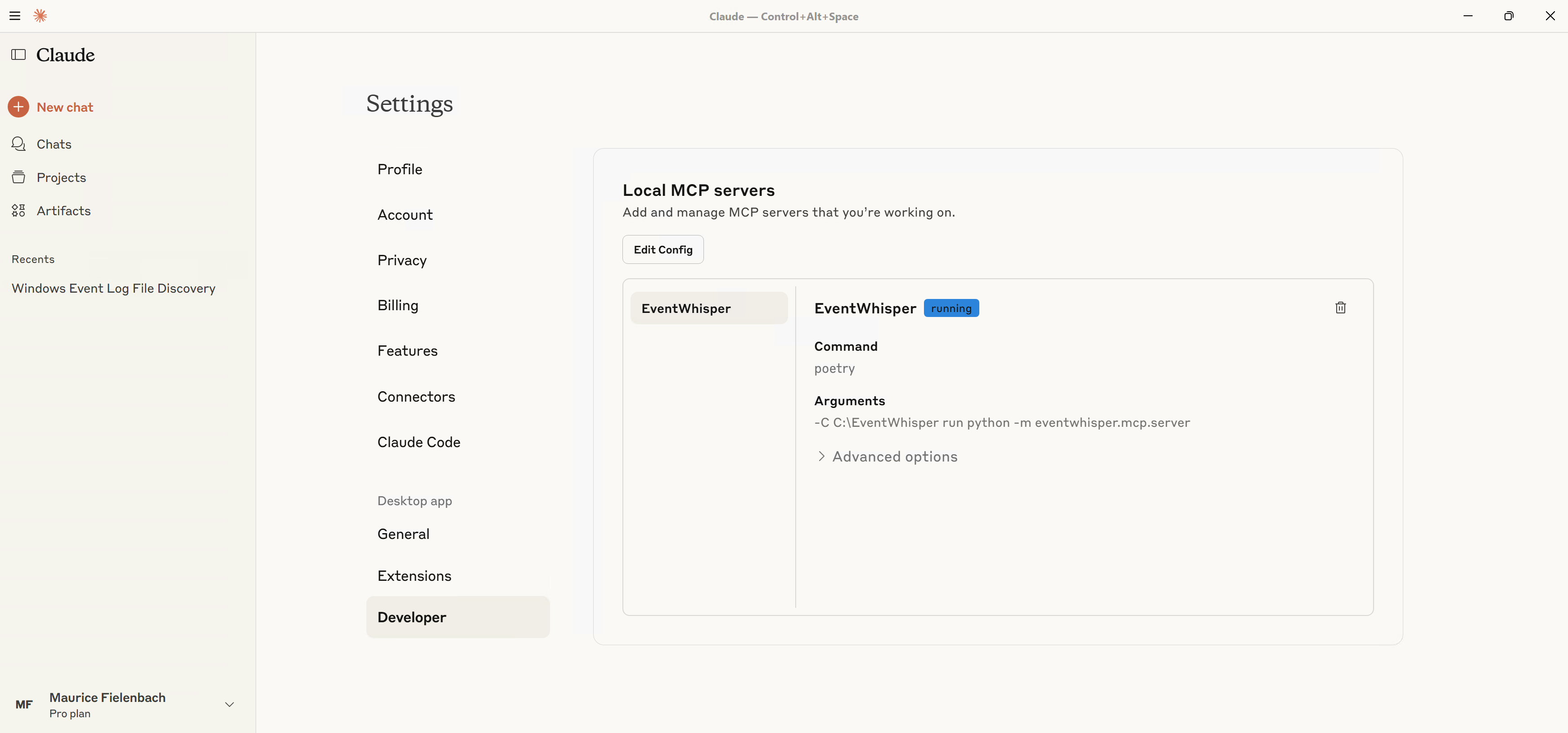
Open Settings → Developer to confirm EventWhisper is registered and “running”.
When prompted, allow the tool:
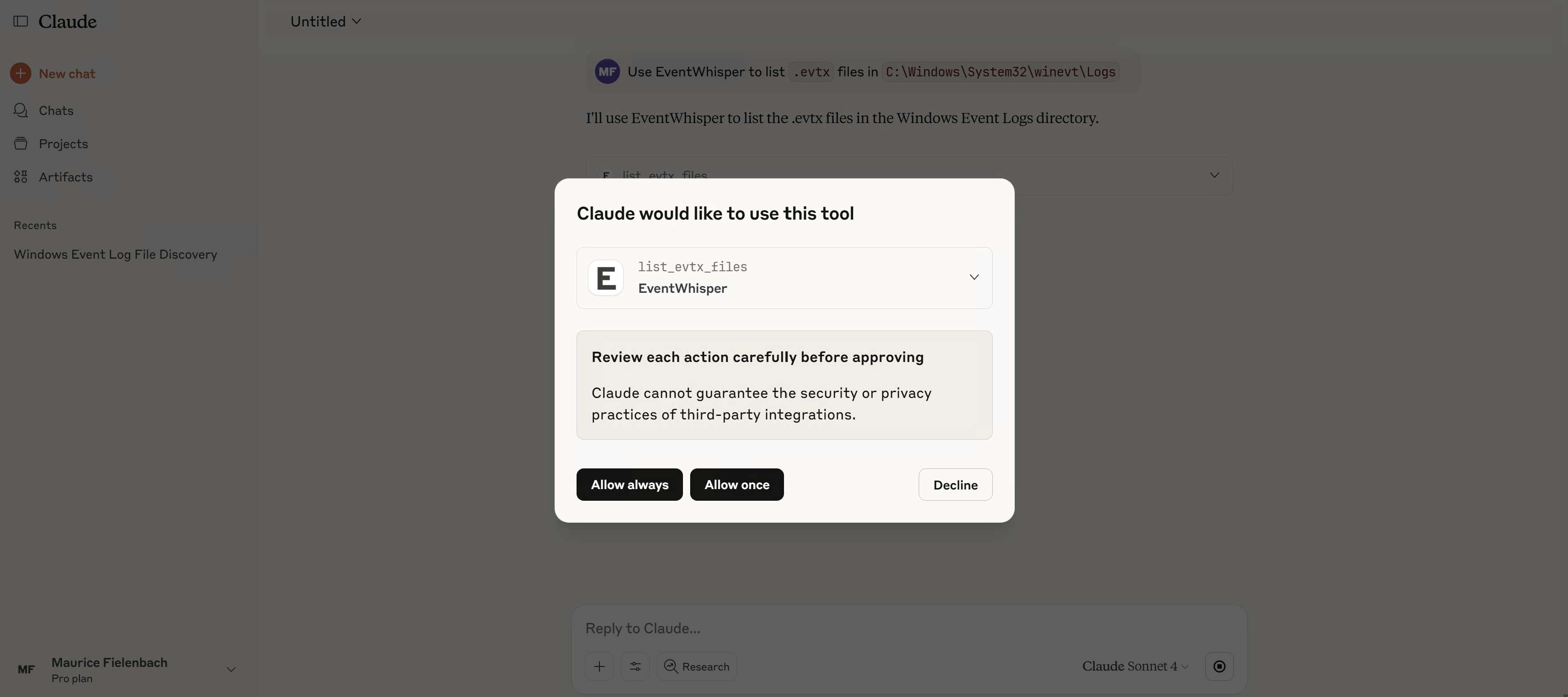
Try a first prompt:
> Use EventWhisper to list `.evtx` files in `C:\Windows\System32\winevt\Logs`.
Development
EventWhisper was written to be simple and maintainable. We use pytest for tests and ruff for linting/formatting.
Run everything locally (or via pre-commit):
poetry install
poetry run ruff format .
poetry run ruff check . --fix
poetry run pytest --cov=eventwhisper --cov-report=term-missing
# pre-commit on all files:
poetry run pre-commit run --all-files
# pre-push hooks (full tests + coverage):
poetry run pre-commit run --hook-stage push --all-files
When making pull requests, ensure all tests pass and coverage thresholds are met.
Every new utility or feature should include clear tests and follow PEP 8. Tests live in the `tests/` directory.
Core layout & API
Primary logic lives in `eventwhisper/evtxio/evtxio.py` — EVTX iteration/filtering/projection.
The core server function is `get_events_from_evtx()` (a wrapper around the iterator `iter_events_from_evtx()`):
def get_events_from_evtx(
    provider: str | Path,
    start: datetime | str | None = None,
    end: datetime | str | None = None,
    results_limit: int | str | None = RESULTS_LIMIT,
    event_ids: int | str | Sequence[int] | Sequence[str] | None = None,
    contains: str | Sequence[str] | None = None,
    not_contains: str | Sequence[str] | None = None,
    fields: str | Sequence[str] | None = None,
) -> list[str]:
Constants live in `eventwhisper/utils/config.py` and include both:
- `RESULTS_LIMIT` — max number of events returned (LLMs have token/char caps).
- `SCAN_LIMIT` — max events scanned to keep responses fast on huge logs.
Example Python usage
# example.py
from __future__ import annotations
from datetime import datetime, timezone
from eventwhisper.evtxio.evtxio import get_events_from_evtx

# 1) First matching event from Security log
print(get_events_from_evtx(r"C:\Windows\System32\winevt\Logs\Security.evtx", results_limit=1))

# 2) Filter by keywords and project fields
events = get_events_from_evtx(
    r"C:\Windows\System32\winevt\Logs\Security.evtx",
    contains=["powershell", "Invoke-"],
    fields=["Event.System.EventID", "Event.EventData.Image", "Event.EventData.CommandLine"],
    results_limit=5,
)
for e in events:
    print(e)

# 3) Time-bounded query (UTC)
start = datetime(2025, 1, 1, tzinfo=timezone.utc)
end = datetime(2025, 1, 31, 23, 59, 59, tzinfo=timezone.utc)
print(len(get_events_from_evtx(r"C:\Windows\System32\winevt\Logs\Security.evtx", start=start, end=end)))
Run it with `poetry run python example.py`.
Troubleshooting
- Big logs: results are capped by `RESULTS_LIMIT` and scanning is bounded to keep responses fast. If your MCP client doesn’t realize results are capped, run a second, narrower query.
- “Blocked” files: if you downloaded `.evtx` from the Internet, right-click → Properties → Unblock.
- Paths: in Python, prefer raw strings for Windows paths, e.g., `r"C:\path\file.evtx"`.
- README video: GitHub doesn’t render ``; use a thumbnail → MP4 link (see Demo section).
Roadmap
- Faster scanning for very large `.evtx` files
- Better normalization for malformed/corrupted EVTX
- Convenience utilities (e.g., quick overview: counts, unique EventIDs, time range)
- Optional paging / multi-query strategies for huge datasets
License
Distributed under the GPLv3. See LICENSE.
Frequently asked questions
What is EventWhisper?
EventWhisper is A Windows Event Log MCP
How do I install EventWhisper?
Open the GitHub repository and follow its README. Most MCP servers are added to your client's MCP config, then called by your agent.
Is EventWhisper open source?
Yes — it is hosted on GitHub at https://github.com/hexastrike/eventwhisper and has 38 stars.
Related MCP tools
 cognee
Cognee is the open-source AI memory platform for agents. Give your AI agents persistent long-term memory across sessions with a self-hosted knowledge graph engine.
 sqlglot
Python SQL Parser and Transpiler
 mcp-obsidian
MCP server that interacts with Obsidian via the Obsidian rest API community plugin
 vexa
vexaOpen-source meeting transcription API for Google Meet, Microsoft Teams & Zoom. Auto-join bots, real-time WebSocket transcripts, MCP server for AI agents. Self-host or use hosted SaaS.
 cocoindex-code
A super light-weight embedded code search engine CLI (AST based) that just works - improves speed and efficiency for coding agent 🌟 Star if you like it!
 MiniMax-MCP
Official MiniMax Model Context Protocol (MCP) server that enables interaction with powerful Text to Speech, image generation and video generation APIs.
Run your own MCP server? See who uses it and what to fix.
Measure it with TrackMCP