
mcp-korea-tourism-api
Model Context Protocol (MCP) server that provides tools for accessing the Korea Tourism API
Documentation
Korea Tourism API MCP Server ✈️




Unlock the wonders of South Korean tourism directly within your AI assistant! This project provides a Model Context Protocol (MCP) server powered by the official Korea Tourism Organization (KTO) API. Equip your AI with the ability to discover vibrant festivals, serene temples, delicious restaurants, comfortable accommodations, and much more across Korea.
Links:
- PyPI Package: https://pypi.org/project/mcp-korea-tourism-api/
- GitHub Repository: https://github.com/harimkang/mcp-korea-tourism-api
- Releases: https://github.com/harimkang/mcp-korea-tourism-api/releases
✨ Features
- Comprehensive Search: Find tourist spots, cultural sites, events, food, lodging, and shopping via keywords, area, or location.
- Rich Details: Access descriptions, operating hours, admission fees, photos, addresses, and contact information.
- Location-Aware: Discover attractions near specific GPS coordinates.
- Timely Information: Find festivals and events based on date ranges.
- Multilingual Support: Get information in various languages supported by the KTO API (including English).
- Supported Languages: English, Japanese, Simplified Chinese, Traditional Chinese, Russian, Spanese, German, French
- Efficient & Resilient:
- Response Caching: Uses time-to-live (TTL) caching to store results and reduce redundant API calls, improving speed.
- Rate Limiting: Respects API usage limits to prevent errors.
- Automatic Retries: Automatically retries requests in case of temporary network or server issues.
- MCP Standard: Seamlessly integrates with AI assistants supporting the Model Context Protocol.
⚠️ Prerequisites
Before you begin, you must obtain an API key from the Korea Tourism Organization (KTO) Data Portal.
1. Visit the KTO Data Portal (or the specific portal for the tourism API if available).
2. Register and request an API key for the "TourAPI" services (you might need to look for services providing information like `areaBasedList`, `searchKeyword`, `detailCommon`, etc.).
3. Keep your Service Key (API Key) safe. It will be required during installation or runtime.
> You need to apply for the API below to make a request for each language.
>
> - English: https://www.data.go.kr/data/15101753/openapi.do
> - Japanese: https://www.data.go.kr/data/15101760/openapi.do
> - Simplified Chinese: https://www.data.go.kr/data/15101764/openapi.do
> - Traditional Chinese: https://www.data.go.kr/data/15101769/openapi.do
> - Russian: https://www.data.go.kr/data/15101831/openapi.do
> - Spanese: https://www.data.go.kr/data/15101811/openapi.do
> - German: https://www.data.go.kr/data/15101805/openapi.do
> - French: https://www.data.go.kr/data/15101808/openapi.do
🚀 Installation & Running
You can run this MCP server using either `uv` (a fast Python package installer and runner) or `Docker`.
Installing via Smithery
To install Korea Tourism API MCP Server for Claude Desktop automatically via Smithery:
npx -y @smithery/cli install @harimkang/mcp-korea-tourism-api --client claudeOption 1: Using `uv` (Recommended for local development)
1. Clone the repository:
git clone https://github.com/harimkang/mcp-korea-tourism-api.git
    cd mcp-korea-tourism-api
2. Set the API Key Environment Variable:
Replace `"YOUR_KTO_API_KEY"` with the actual key you obtained.
# On macOS/Linux
    export KOREA_TOURISM_API_KEY="YOUR_KTO_API_KEY"

    # On Windows (Command Prompt)
    # set KOREA_TOURISM_API_KEY="YOUR_KTO_API_KEY"

    # On Windows (PowerShell)
    # $env:KOREA_TOURISM_API_KEY="YOUR_KTO_API_KEY"
_Note: For persistent storage, add this line to your shell's configuration file (e.g., `.zshrc`, `.bashrc`, or use system environment variable settings)._
3. Install dependencies and run the server:
This command uses `uv` to install dependencies based on `uv.lock` (if available) or `pyproject.toml` and then runs the server module.
# Install Dependency with uv
    uv sync

    # Default: stdio transport (for MCP clients)
    uv run -m mcp_tourism.server

    # HTTP transport for web applications
    uv run -m mcp_tourism.server --transport streamable-http --host 127.0.0.1 --port 8000

    # SSE transport for real-time applications
    uv run -m mcp_tourism.server --transport sse --host 127.0.0.1 --port 8080

    # Using environment variables
    export MCP_TRANSPORT=streamable-http
    export MCP_HOST=0.0.0.0
    export MCP_PORT=3000
    uv run -m mcp_tourism.server
The server will start and listen for MCP requests via the specified transport protocol.
Option 2: Using Docker (Recommended for isolated environment/deployment)
1. Clone the repository:
git clone https://github.com/harimkang/mcp-korea-tourism-api.git
    cd mcp-korea-tourism-api
2. Build the Docker Image:
You can build the image with different transport configurations:
# Default build (stdio transport)
    docker build -t mcp-korea-tourism-api .

    # Build with HTTP transport configuration
    docker build -t mcp-korea-tourism-api \
      --build-arg MCP_TRANSPORT=streamable-http \
      --build-arg MCP_HOST=0.0.0.0 \
      --build-arg MCP_PORT=8000 \
      --build-arg MCP_PATH=/mcp \
      --build-arg MCP_LOG_LEVEL=INFO \
      .

    # Build with SSE transport configuration
    docker build -t mcp-korea-tourism-api \
      --build-arg MCP_TRANSPORT=sse \
      --build-arg MCP_HOST=0.0.0.0 \
      --build-arg MCP_PORT=8080 \
      .
3. Run the Docker Container:
You can run the container with different transport configurations:
docker run --rm -it \
        -e KOREA_TOURISM_API_KEY="YOUR_KTO_API_KEY" \
mcp-korea-tourism-api# Using runtime environment variables
docker run --rm -p 8000:8000 \
-e KOREA_TOURISM_API_KEY="YOUR_KTO_API_KEY" \
-e MCP_TRANSPORT=streamable-http \
-e MCP_HOST=0.0.0.0 \
-e MCP_PORT=8000 \
mcp-korea-tourism-api
# Check health: curl http://localhost:8000/healthdocker run --rm -p 8080:8080 \
-e KOREA_TOURISM_API_KEY="YOUR_KTO_API_KEY" \
-e MCP_TRANSPORT=sse \
-e MCP_HOST=0.0.0.0 \
-e MCP_PORT=8080 \
mcp-korea-tourism-api# Copy and configure environment variables
cp docker.env.example .env
# Edit .env file with your API key and preferred settings
# Run with HTTP transport (default profile)
docker-compose up mcp-tourism-http
# Run with SSE transport
docker-compose --profile sse up mcp-tourism-sse
# Run development setup with debug logging
docker-compose --profile dev up mcp-tourism-dev🔧 Transport Configuration
The Korea Tourism API MCP Server supports multiple transport protocols to accommodate different use cases:
Available Transports
1. `stdio` (Default): Standard input/output transport for direct MCP client integration
2. `streamable-http`: HTTP-based transport for web applications
3. `sse`: Server-Sent Events transport for real-time applications
Configuration Options
You can configure the server using command line arguments or environment variables:
| Setting | CLI Argument | Environment Variable | Default | Description |
|---|---|---|---|---|
| Transport | `--transport` | `MCP_TRANSPORT` | `stdio` | Transport protocol to use |
| Host | `--host` | `MCP_HOST` | `127.0.0.1` | Host address for HTTP transports |
| Port | `--port` | `MCP_PORT` | `8000` | Port for HTTP transports |
| Path | `--path` | `MCP_PATH` | `/mcp` | Path for HTTP endpoints |
| Log Level | `--log-level` | `MCP_LOG_LEVEL` | `INFO` | Logging level |
Command Line Examples
# Get help for all available options
python -m mcp_tourism.server --help

# Run with HTTP transport on custom port
python -m mcp_tourism.server --transport streamable-http --port 3000 --log-level DEBUG

# Run with SSE transport
python -m mcp_tourism.server --transport sse --host 0.0.0.0 --port 8080
Environment Variable Examples
# Set environment variables
export MCP_TRANSPORT=streamable-http
export MCP_HOST=0.0.0.0
export MCP_PORT=8000
export MCP_LOG_LEVEL=INFO
export KOREA_TOURISM_API_KEY="your_api_key_here"

# Run the server
python -m mcp_tourism.server
Health Check
For HTTP and SSE transports, a health check endpoint is available at `/health`:
# Check server health
curl http://localhost:8000/health

# Example response
{
  "status": "healthy",
  "service": "Korea Tourism API MCP Server",
  "transport": "streamable-http",
  "timestamp": 1640995200.0
}
🛠️ Integrating with Cursor
To use this MCP server within Cursor:
1. Ensure the Docker container is runnable: Follow the Docker installation steps above to build the image (`mcp-korea-tourism-api`). You don't need to manually run the container; Cursor will do that.
2. Locate your `mcp.json` file: This file configures MCP tools for Cursor. You can usually find it via Cursor's settings or potentially in a path like `~/.cursor/mcp.json` or similar.
3. Add or Update the MCP Configuration: Add the following JSON object to the list within your `mcp.json` file. If you already have an entry for this tool, update its `command`. Replace `"YOUR_KTO_API_KEY"` with your actual key.
{
      "mcpServers": {
        "korea-tourism": {
          "command": "docker",
          "args": [
            "run",
            "--rm",
            "-i",
            "-e",
            "KOREA_TOURISM_API_KEY=YOUR_KTO_API_KEY",
            "mcp-korea-tourism-api"
          ]
        }
      }
    }
OR Use uv [local directory]
{
      "mcpServers": {
        "korea-tourism": {
          "command": "uv",
          "args": [
            "--directory",
            "{LOCAL_PATH}/mcp-korea-tourism-api",
            "run",
            "-m",
            "mcp_tourism.server"
          ],
          "env": {
            "KOREA_TOURISM_API_KEY": "YOUR_KTO_API_KEY"
          }
        }
      }
    }
4. Save `mcp.json`.
5. Restart Cursor or Reload MCP Tools: Cursor should now detect the tool and use Docker to run it when needed.
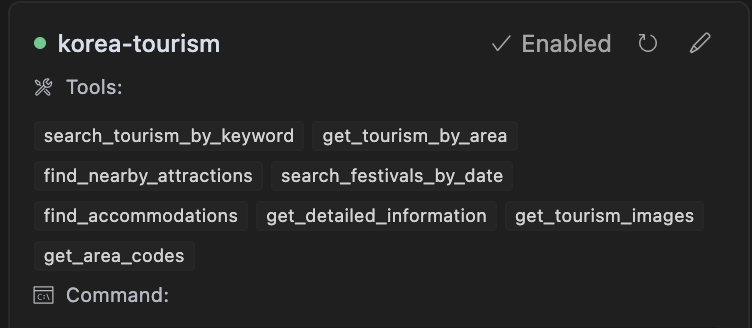
🛠️ MCP Tools Provided
This server exposes the following tools for AI assistants:
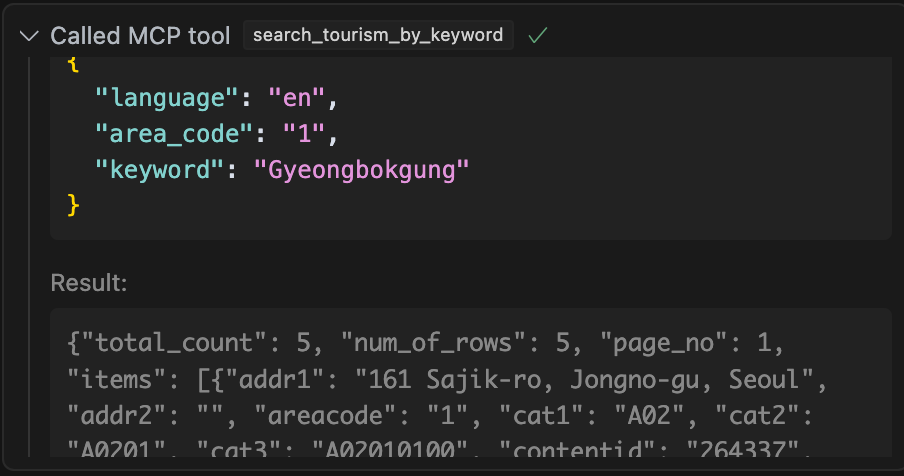
1. `search_tourism_by_keyword`: Search for tourism information using keywords (e.g., "Gyeongbokgung", "Bibimbap"). Filter by content type, area code.
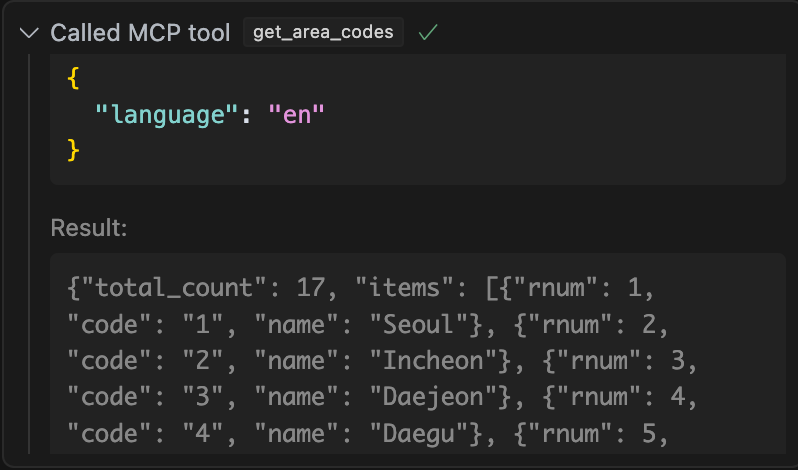
2. `get_tourism_by_area`: Browse tourism information by geographic area codes (e.g., Seoul='1'). Filter by content type, district code.

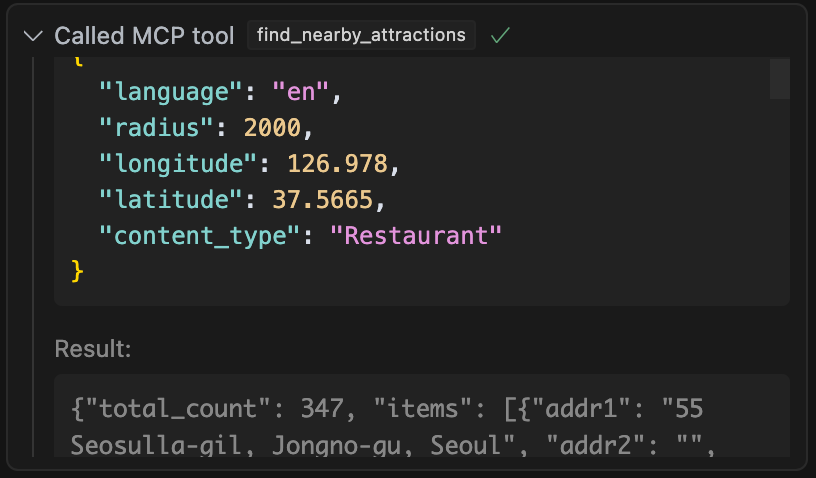
3. `find_nearby_attractions`: Discover tourism spots near specific GPS coordinates (longitude, latitude). Filter by radius and content type.
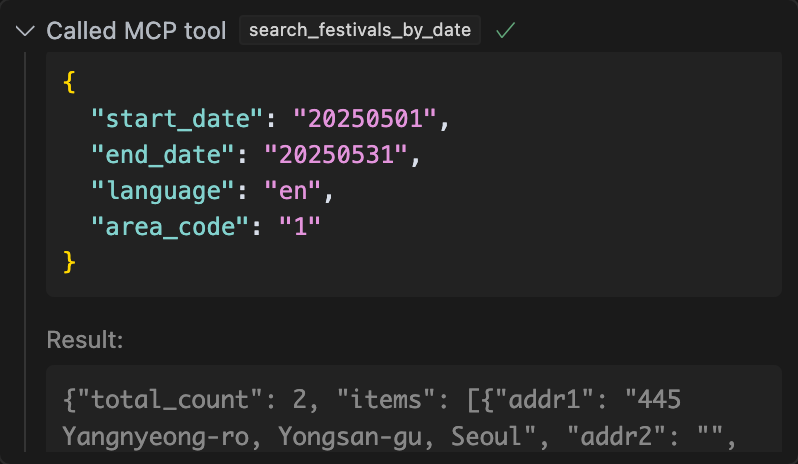
4. `search_festivals_by_date`: Find festivals occurring within a specified date range (YYYYMMDD). Filter by area code.
5. `find_accommodations`: Search for hotels, guesthouses, etc. Filter by area and district code.
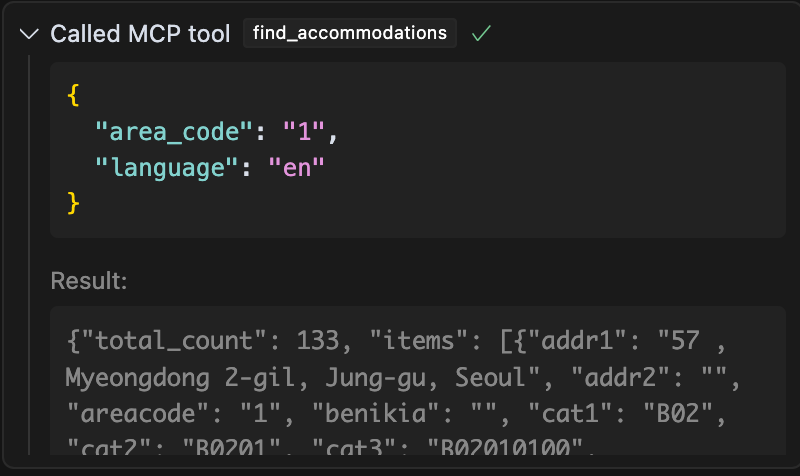
6. `get_detailed_information`: Retrieve comprehensive details (overview, usage time, parking, etc.) for a specific item using its Content ID. Filter by content type.

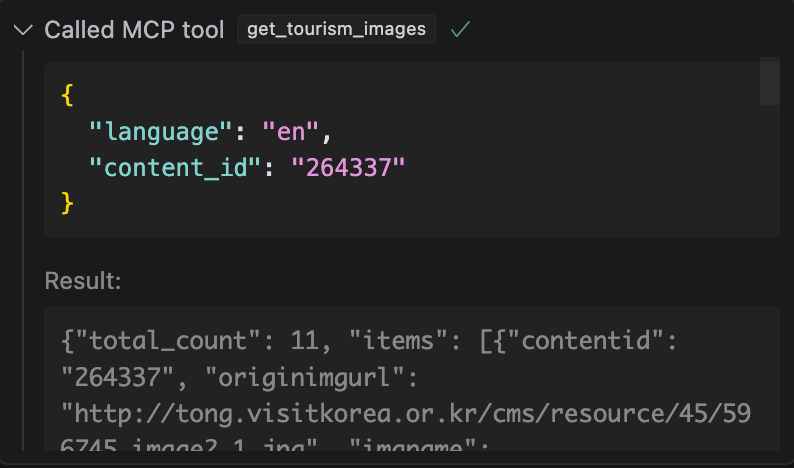
7. `get_tourism_images`: Get image URLs associated with a specific tourism item using its Content ID.
8. `get_area_codes`: Retrieve area codes (for cities/provinces) and optionally sub-area (district) codes.
⚙️ Requirements (for `uv` method)
- Python 3.12+
- `uv` installed (`pip install uv`)
Example Usage
An AI assistant integrated with this MCP could handle queries like:
- "Find restaurants near Myeongdong station."
- "Show me pictures of Bulguksa Temple."
- "Are there any festivals in Busan next month?"
- "Tell me more about Gyeongbokgung Palace, content ID 264337."
Frequently asked questions
What is mcp-korea-tourism-api?
mcp-korea-tourism-api is Model Context Protocol (MCP) server that provides tools for accessing the Korea Tourism API
How do I install mcp-korea-tourism-api?
Open the GitHub repository and follow its README. Most MCP servers are added to your client's MCP config, then called by your agent.
Is mcp-korea-tourism-api open source?
Yes — it is hosted on GitHub at https://github.com/harimkang/mcp-korea-tourism-api and has 7 stars.
Related MCP tools
 mcp
mcpAWS MCP Servers — helping you get the most out of AWS, wherever you use MCP. Python-based implementation. Trusted by 6900+ developers.
 mcpo
mcpoA simple, secure MCP-to-OpenAPI proxy server Python-based implementation. Trusted by 3500+ developers. Trusted by 3500+ developers.
 mcp-obsidian
MCP server that interacts with Obsidian via the Obsidian rest API community plugin Python-based implementation. Trusted by 2300+ developers.
 mcp-cli
Default Configuration: MCP CLI defaults to using Ollama with the gpt-oss reasoning model for local, privacy-focused operation without requiring API keys.
 minimax-mcp
Official MiniMax Model Context Protocol (MCP) server that enables interaction with powerful Text to Speech, image generation and video generation APIs.
 mcp-mem0
MCP server for long term agent memory with Mem0. Also useful as a template to get you started building your own MCP server with Python!
Run your own MCP server? See who uses it and what to fix.
Measure it with TrackMCP