
mcp
Fastest Way to Debug your Next.js & Node.js Production Apps
Documentation
@return-0/mcp-server
MCP (Model Context Protocol) server for return0 - a tool for debugging production applications in real-time.
About return0
return0 enables developers to debug production Node.js applications in real-time. It allows you to monitor and troubleshoot your applications by connecting to live variables, observing execution flow, and understanding runtime behavior directly within the Cursor IDE. This is especially powerful for debugging production applications built with Next.js and deployed on platforms like Vercel, where traditional debugging methods can be challenging.
- Website: getreturn0.com
- Live Demo: getreturn0.com/livedemo
- Documentation: getreturn0.com/docs
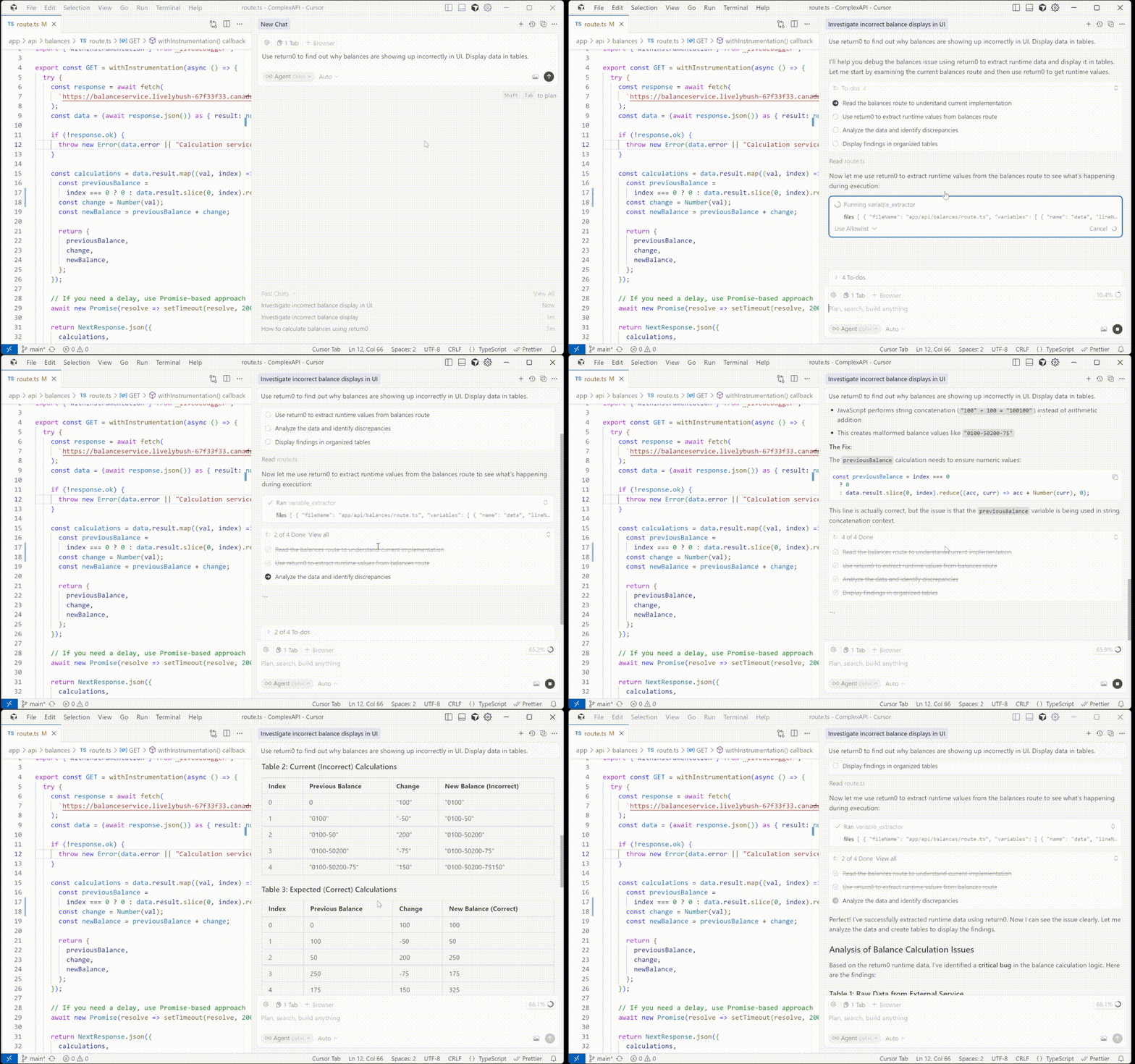
Configuration in Cursor
To use this MCP server with Cursor IDE, you need to configure it in your Cursor settings. First, you'll need to get your return0 API key.
Getting Your API Key
To get your return0 API key, visit the return0 documentation. The documentation will guide you through the process of obtaining your API key.
Once you have your API key, you can configure the MCP server in one of two ways:
Option 1: One-Click Installation
Click the button below to automatically install and configure the return0 MCP server in Cursor:

This will automatically configure the MCP server. Note: You'll need to add your return0 API key to the configuration after installation. See the Getting Your API Key section above for instructions on obtaining your API key, and the manual configuration section below for details on how to add it.
Option 2: Manual Configuration
If you prefer to configure manually, follow these steps in Cursor IDE:
1. Open Cursor IDE
2. Go to Settings (or Preferences on macOS):
3. In the settings search bar, type "MCP" or "Model Context Protocol"
4. Click on MCP Servers or navigate to the MCP configuration section
5. Click Add Server or the + button to add a new MCP server
6. Enter the following configuration:
7. Click Save or Apply to save the configuration
The configuration should look like this in your `mcp.json` file:
{
  "mcpServers": {
    "return0": {
      "command": "npx",
      "args": ["-y", "@return-0/mcp-server"],
      "env": {
        "RETURN0_API_KEY": "your-api-key-here"
      }
    }
  }
}
Note: Replace `"your-api-key-here"` with your actual return0 API key. If you don't have an API key yet, see the Getting Your API Key section above for instructions, or you can use `"demo"` for testing purposes. The MCP server will be automatically installed via npx when Cursor starts.
Tools
This MCP server provides a `variable_extractor` tool that can be used by MCP-compatible clients.
Tool: `variable_extractor`
Extracts the runtime value, type, and timestamp of variables from production code.
Input Schema:
{
  files: Array
  }>
}
Example:
{
  "files": [
    {
      "fileName": "C:\\Users\\username\\project\\src\\app\\api\\route.ts",
      "variables": [
        {
          "name": "userData",
          "lineNumber": 42
        }
      ]
    }
  ]
}
How It Works
1. The MCP server receives requests to extract runtime variable values from production code
2. It reads the source files from the local filesystem
3. Uses TypeScript AST analysis to correct line numbers for accurate variable location
4. Connects to the running production application to retrieve live variable values
5. Returns the corrected variable extraction data with real-time runtime values, types, and timestamps
License
See LICENSE file for details.
Author
return0
Links
Frequently asked questions
What is mcp?
mcp is Fastest Way to Debug your Next.js & Node.js Production Apps
How do I install mcp?
Open the GitHub repository and follow its README. Most MCP servers are added to your client's MCP config, then called by your agent.
Is mcp open source?
Yes — it is hosted on GitHub at https://github.com/getreturn0/mcp and has 1 stars.
Related MCP tools
 mastra
The TypeScript AI agent framework. ⚡ Assistants, RAG, observability. Supports any LLM: GPT-4, Claude, Gemini, Llama. Built for the Model Context Protocol to enh
 nhost
nhostThe Open Source Firebase Alternative with GraphQL.
 repomix
📦 Repomix is a powerful tool that packs your entire repository into a single, AI-friendly file. Perfect for when you need to feed your codebase to Large Lan...
 Figma-Context-MCP
MCP server to provide Figma layout information to AI coding agents like Cursor
 wigolo
The go-to web for your AI coding agent — local-first search, fetch, crawl & research over MCP. No API keys, no cloud, $0/query. Public beta.
 claude-context
Code search MCP for Claude Code. Make entire codebase the context for any coding agent. TypeScript-based implementation. Trusted by 4100+ developers.
Run your own MCP server? See who uses it and what to fix.
Measure it with TrackMCP