
mcp-web-search-tool
An MCP server providing real-time web search capabilities to any AI model.
Documentation
MCP Web Search Tool
An MCP server that gives an assistant live web search, full-page reading, and source citations. Stdio transport, pluggable providers, no scraper dependencies.


Quick start · Tools · Configuration · Clients · Security · Changelog
Overview
Five tools: `web_search`, `news_search`, `image_search`, `fetch_url`, `list_providers`. Search returns ranked summaries with stable ids; `fetch_url` reads the page behind any id. Brave Search is the primary provider; DuckDuckGo runs without a key as a fallback.
Requirements
| Node.js | `>= 20.18` (uses native `fetch`) |
|---|---|
| npm | `>= 10` |
| Brave Search API key | optional. Without it, DuckDuckGo handles `web_search`. `news_search` and `image_search` require a key. |
Quick start
git clone https://github.com/gabrimatic/mcp-web-search-tool.git
cd mcp-web-search-tool
npm install
cp .env.example .env   # edit BRAVE_API_KEY if you have one
npm run build
npm start
Run with Docker:
docker build -t mcp-web-search .
docker run --rm -i -e BRAVE_API_KEY mcp-web-search
For Claude Desktop, Claude Code, Codex, VS Code, Cursor, or Windsurf integration, see `MCP_CLIENTS.md`.
Tools
Each tool returns two content blocks: a Markdown rendering for the model and a fenced JSON block with the structured payload. Errors come back as `isError: true` content with an actionable message; only unknown-tool calls throw a protocol error.
`web_search`
Live web search. Use first for current, source-backed answers.
| Parameter | Type | Description |
|---|---|---|
| `search_term` | string, required | Query string. |
| `provider` | enum | `"brave search"` or `"duckduckgo"`. Defaults to Brave when a key is set, otherwise DuckDuckGo. |
| `count` | int (1–20) | Number of results. Default 10. |
| `offset` | int | Pagination offset (web only). |
| `cursor` | string | Opaque cursor from a previous response. |
| `freshness` | string | `pd` (24h), `pw` (week), `pm` (month), `py` (year), or `YYYY-MM-DDtoYYYY-MM-DD`. |
| `country` | string | ISO country code. |
| `search_lang` | string | UI language, e.g. `en`. |
| `safesearch` | enum | `off`, `moderate`, `strict`. |
| `include_domains` | string[] | Restrict results to these hosts. |
| `exclude_domains` | string[] | Drop results from these hosts (hostname-suffix match). |
`news_search`
Recent news with source name and publish date. Brave only.
`image_search`
Image results with thumbnails. Brave only.
`fetch_url`
Reads a search result or arbitrary `http(s)` URL. Pass a result id from a previous search (preferred) or a full URL.
| Parameter | Type | Description |
|---|---|---|
| `id_or_url` | string | A result id (e.g. `r_a1b2c3d4e5f6`) or a full `http(s)` URL. |
| `url` | string | Deprecated alias for `id_or_url`. |
| `max_chars` | int (200–200 000) | Soft cap on returned characters. Default 8000. |
| `cursor` | string | Cursor from a previous response to continue reading. |
Returns the page title, readable text (scripts, styles, nav, footer, and aside stripped), the first 25 outbound links, HTTP status, content-type, byte length, and a `nextCursor` when truncated.
Refuses non-`http(s)` schemes and any host that resolves to a private, loopback, link-local, multicast, or IPv4-mapped IPv6 private address. Details: `SECURITY.md`.
`list_providers`
Returns the registered providers and the current default. Call this once if you are unsure whether `news_search` or `image_search` are available in this session.
Configuration
All configuration is environment-driven. Reference: `.env.example`.
| Variable | Default | Purpose |
|---|---|---|
| `BRAVE_API_KEY` | empty | Brave Search API key. When unset, DuckDuckGo is used. |
| `MAX_RESULTS` | `10` | Default result count (clamped 1–50). |
| `REQUEST_TIMEOUT` | `10000` | Per-request timeout in ms (1 000–60 000). |
| `DEFAULT_PROVIDER` | auto | Force a specific provider (e.g. `duckduckgo`). |
| `ALLOW_KEYLESS` | `true` | When `false`, the server refuses to start without `BRAVE_API_KEY`. |
| `CACHE_MAX_ENTRIES` / `CACHE_TTL_MS` | `256` / `300000` | Search cache. |
| `FETCH_CACHE_MAX` / `FETCH_CACHE_TTL_MS` | `128` / `600000` | URL-fetch cache. |
| `FETCH_TIMEOUT_MS` / `FETCH_MAX_BYTES` | `15000` / `2000000` | Per-request budget for `fetch_url`. |
Project layout
src/
├── index.ts                    MCP server: tool registry, dispatch, rendering
├── config.ts                   env loader, validation, defaults
├── providers/
│   ├── SearchProvider.ts       abstract contract and shared types
│   ├── SearchProviderFactory   registry and default selection
│   ├── BraveSearchProvider     web/news/images via Brave API
│   └── DuckDuckGoProvider      keyless HTML-lite fallback
├── services/
│   ├── SearchService.ts        provider dispatch, LRU+TTL cache
│   └── FetchService.ts         safe URL fetch, readable extraction
└── utils/
    ├── http.ts                 native fetch, retry/backoff/timeout
    ├── html.ts                 zero-dep HTML to text + links
    ├── cache.ts                LRU+TTL cache
    └── ids.ts                  stable result-id minting and resolution
tests/                          vitest suite
Add a provider
import { SearchProvider, SearchResponse, SearchOptions } from './SearchProvider.js';

export class MyProvider extends SearchProvider {
  getName() { return 'My Provider'; }
  override requiresApiKey() { return true; }
  async search(query: string, _opts: SearchOptions = {}): Promise {
    const out = this.emptyResponse(query, 'web');
    out.results = mapped; // shape: SearchResult[]
    return out;
  }
}
Register it in `SearchProviderFactory.setupDefaults`. Result ids are minted automatically when you call `mintResultId(url)` on each entry.
Development
npm run dev          # tsx watch mode
npm test             # vitest (23 tests)
npm run lint
npm run format
npm run build
CI runs on Node 20, 22, and 24, plus a Docker image build. Tests cover the LRU+TTL cache, HTML extractor, DuckDuckGo parser, search-service caching, HTTP retry/backoff, SSRF guard, domain match, and the result-id resolver.
Example prompts
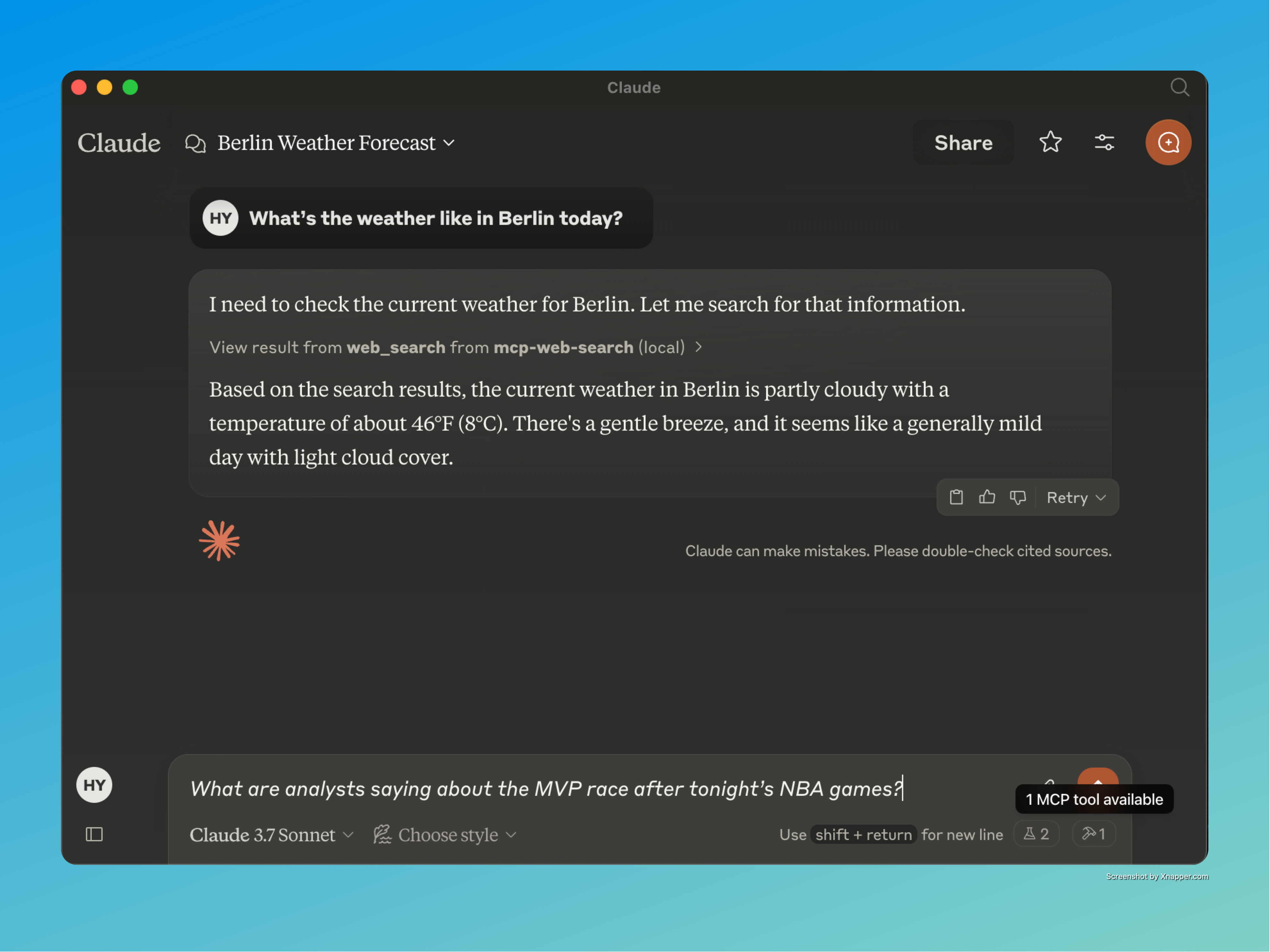
- _"What are analysts saying about the MVP race after tonight's NBA games?"_
- _"Summarise the top three results for `RAG benchmarks 2025` and pull the abstract from the first paper."_
- _"Find images of the Webb telescope's latest deep field, then open the NASA page and quote the caption."_
- _"What's the weather in Berlin right now?"_
License
Developer
© All rights reserved.
YouTube Video
A short demo of MCP Web Search Tool with Claude:
Claude + MCP Web Search – Live Demo
Medium Article
Background on the project and how it works:
Deep Dive into MCP Web Search Tool
Support
Frequently asked questions
What is mcp-web-search-tool?
mcp-web-search-tool is An MCP server providing real-time web search capabilities to any AI model.
How do I install mcp-web-search-tool?
Open the GitHub repository and follow its README. Most MCP servers are added to your client's MCP config, then called by your agent.
Is mcp-web-search-tool open source?
Yes — it is hosted on GitHub at https://github.com/gabrimatic/mcp-web-search-tool and has 16 stars.
Related MCP tools
 wigolo
The go-to web for your AI coding agent — local-first search, fetch, crawl & research over MCP. No API keys, no cloud, $0/query. Public beta.
 tuui
tuuiA desktop MCP client designed as a tool unitary utility integration, accelerating AI adoption through the Model Context Protocol (MCP) and enabling cross-vendor LLM API orchestration.
 octocode
Code research platform for AI agents; find, understand, and prove context across your code and all of GitHub, in a fraction of the tokens. One toolset, MCP or CLI
 UI-TARS-desktop
The Open-Source Multimodal AI Agent Stack: Connecting Cutting-Edge AI Models and Agent Infra
 mcp
mcpBrowser MCP is a Model Context Provider (MCP) server that allows AI applications to control your browser
 XcodeBuildMCP
A Model Context Protocol (MCP) server and CLI that provides tools for agent use when working on iOS and macOS projects.
Run your own MCP server? See who uses it and what to fix.
Measure it with TrackMCP