
telegram-bot-templates
Ready-to-use Telegram bot templates + MCP server — build Telegram bots with Claude Code, Codex, or Cursor. By FlowCastle.
Documentation
Telegram bot templates + MCP server for AI bot development
Ready-to-use Telegram bot templates and an MCP server — build, edit, and deploy Telegram bots from Claude Code, Codex, Cursor, or any MCP-capable AI agent. No SDK boilerplate: describe the bot, and your agent assembles the flow.
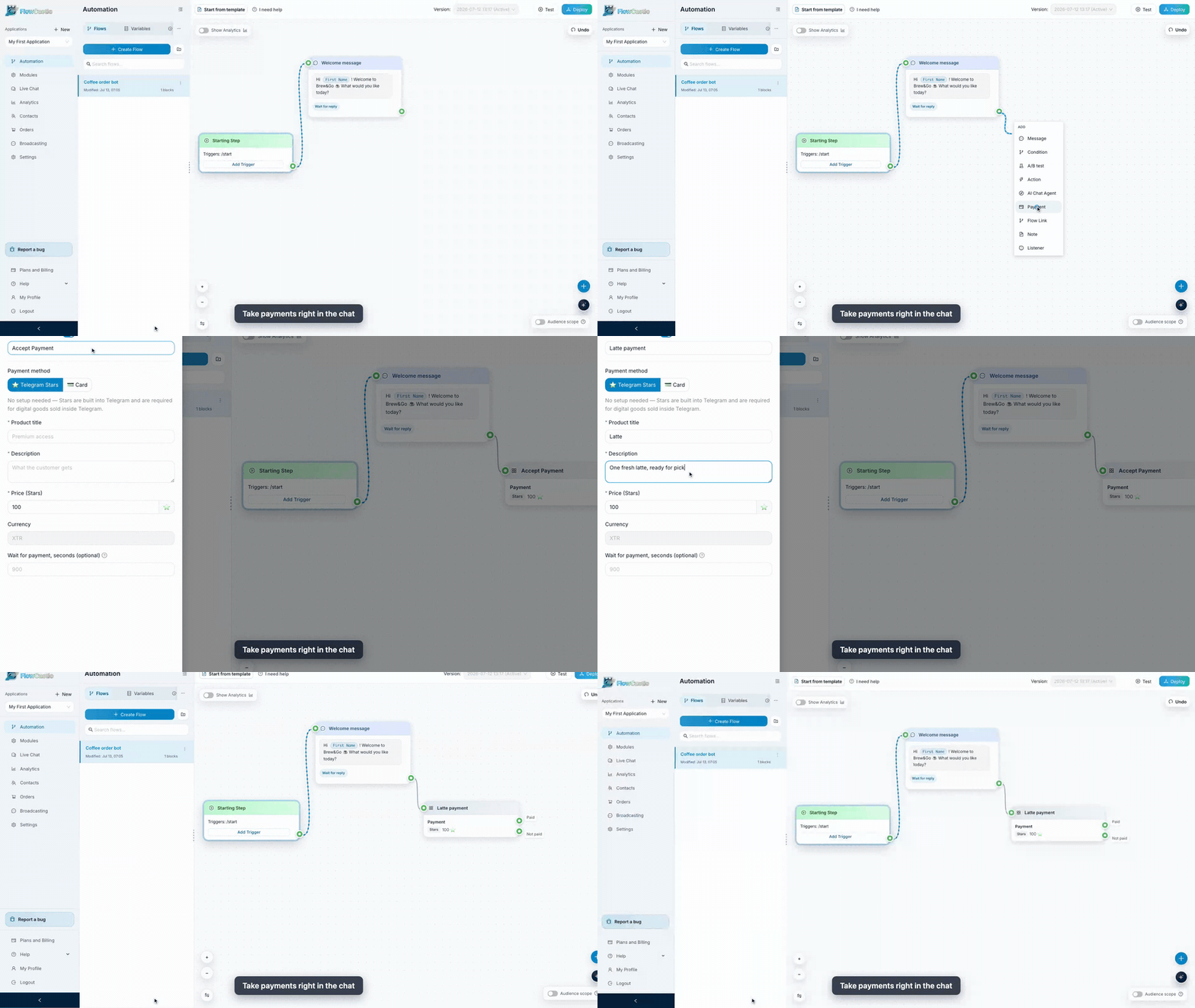
FlowCastle is a visual workflow builder for Telegram bots and web chat: flows, triggers, conditions, AI steps, payments (Stripe / YooKassa / Telegram Stars), broadcasts, drip sequences, and integrations (Gmail, Google Sheets, Notion, OpenAI, …) — with a REST API and an MCP server, so bot development works straight from your AI coding agent. Every block an agent creates through MCP is the same block you can drag, wire, and edit visually.
This repo is for developers. It contains:
| Path | What it is |
|---|---|
| `templates/` | 23 production bot templates as JSON — the same source that powers the template gallery and the MCP `get_flow_example` tool |
| `mcp/` | MCP server reference: endpoint, auth, all 16 tools, and a snapshot of the flow-action schema used by `apply_actions` |
Build a bot from your AI agent (MCP)
FlowCastle exposes an MCP server over Streamable HTTP:
POST https://api.flowcastle.ai/api/mcp
Authorization: Bearer    # starts with app_
Get a key: sign up → create an application → API page → MCP tab.
Claude Code
export FLOWCASTLE_MCP_TOKEN=''

claude mcp add --transport http flowcastle https://api.flowcastle.ai/api/mcp \
  --header "Authorization: Bearer $FLOWCASTLE_MCP_TOKEN"
Codex
codex mcp add flowcastle \
  --url https://api.flowcastle.ai/api/mcp \
  --bearer-token-env-var FLOWCASTLE_MCP_TOKEN
Cursor / any MCP client (JSON config)
{
  "mcpServers": {
    "flowcastle": {
      "type": "http",
      "url": "https://api.flowcastle.ai/api/mcp",
      "headers": {
        "Authorization": "Bearer "
      }
    }
  }
}
Then just ask your agent things like:
> *"Look at my FlowCastle workspace and add a lead-qualification flow: greet on /start, ask three button questions, save answers to contact variables, and notify me."*
The agent reads your workspace with `get_workspace_summary` / `get_flow_context`, drafts a batch of flow-builder actions, checks it with `validate_actions`, and applies it with `apply_actions`. See `mcp/README.md` for the full tool reference.
Templates
Each JSON file in `templates/` is a complete bot: metadata (title, summary, use-cases, suggested variables, required modules) plus a `schemaExample.actions` array — an ordered batch of `create_flow` / `create_block` / `create_link` / `create_variable` operations in the exact format `apply_actions` accepts.
Three ways to use them:
1. One-click install from the gallery: flowcastle.ai/templates
2. Via MCP — ask your agent to `search_flow_examples` / `get_flow_example` and apply one (optionally customized) to your workspace
3. As reference — study how real flows wire triggers, conditions, wait-for-reply steps, payments, and AI blocks
Full index and format description: `templates/README.md`.
REST Public API
Application-scoped REST API for contacts, contact variables, goal events, flow sends, and broadcasts:
- Base URL: `https://api.flowcastle.ai/api/public/v1`
- Interactive docs (Swagger): https://api.flowcastle.ai/api/public/docs
- OpenAPI spec: https://api.flowcastle.ai/api/public/openapi.json
Auth uses the same `app_…` application key (`Authorization: Bearer` or `X-API-Key`).
Guides
Step-by-step builds on the FlowCastle blog:
- Build a Lead Bot in Telegram in 10 Minutes
- Build an AI Support Bot for Telegram
- I Replaced My Morning Apps With One Telegram Bot
Links
- Product: https://flowcastle.ai
- Dashboard: https://dashboard.flowcastle.ai
- Template gallery: https://flowcastle.ai/templates
- API docs: https://api.flowcastle.ai/api/public/docs
Contributing
Found a bug in a template, or built a flow worth sharing? Open an issue or PR — templates are plain JSON, and `validate_actions` (via MCP) will tell you if a batch is well-formed.
License
The contents of this repository are licensed under the MIT License.
Frequently asked questions
What is telegram-bot-templates?
telegram-bot-templates is Ready-to-use Telegram bot templates + MCP server — build Telegram bots with Claude Code, Codex, or Cursor. By FlowCastle.
How do I install telegram-bot-templates?
Open the GitHub repository and follow its README. Most MCP servers are added to your client's MCP config, then called by your agent.
Is telegram-bot-templates open source?
Yes — it is hosted on GitHub at https://github.com/FlowCastle/telegram-bot-templates and has 2 stars.
Related MCP tools
 radar
radarThe missing open-source Kubernetes UI with a built-in MCP server for AI agents. See what's broken, why, and what changed. Issues, Topology, event timeline, Helm, GitOps, live service traffic, and cluster audits - all in one Go binary.
 MCPJungle
One place to manage & connect to all your MCP servers
 atlassian-mcp-server
Official remote MCP server for Atlassian. Securely connect Jira, Confluence, Jira Service Management, Bitbucket, and Compass to Claude, ChatGPT, Cursor, VS Code, and other AI tools using OAuth 2.1 or API tokens.
 projectmem
Open-source coding agent memory. Records issues, attempts, fixes and decisions, then warns your agent before it repeats an approach that already failed. Native MCP server for Claude Code, Cursor, Antigravity and Codex. 100% local, no cloud, no telemetry. MIT.
 activepieces
AI Agents & MCPs & AI Workflow Automation • (~400 MCP servers for AI agents) • AI Automation / AI Agent with MCPs • AI Workflows & AI Agents • MCPs for AI Ag...
 firecrawl-mcp-server
🔥 Official Firecrawl MCP Server - Adds powerful web scraping and search to Cursor, Claude and any other LLM clients.
Run your own MCP server? See who uses it and what to fix.
Measure it with TrackMCP