
mcp-adguard-home
MCP Server for AdGuard Home
Documentation
🛡️ AdGuard Home MCP
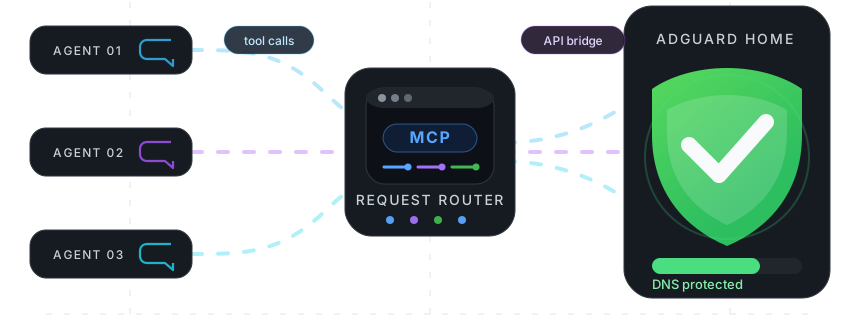
A Model Context Protocol (MCP) server for AdGuard Home. Manage DNS rewrite records, filtering rules, and filter lists via AI agents.


📦 Installation
npm i -g @fcannizzaro/mcp-adguard-home⚙️ Credentials
For the CLI, run:
adguard-cli loginThis prompts for your AdGuard Home URL, username, and password, then saves them to `~/.config/mcp-adguard-home/config.json`. Saved credentials are loaded automatically on start. If no saved credentials are available, the package falls back to these environment variables:
| Variable | Description |
|---|---|
| `ADGUARD_URL` | Base URL of your AdGuard Home instance (e.g. `http://192.168.1.1`) |
| `ADGUARD_USERNAME` | AdGuard Home username |
| `ADGUARD_PASSWORD` | AdGuard Home password |
🚀 Configuration
Claude Desktop
Edit `~/Library/Application Support/Claude/claude_desktop_config.json` (macOS) or `%APPDATA%\Claude\claude_desktop_config.json` (Windows):
{
	"mcpServers": {
		"adguard-home": {
			"command": "npx",
			"args": ["-y", "@fcannizzaro/mcp-adguard-home"],
			"env": {
				"ADGUARD_URL": "http://192.168.1.1",
				"ADGUARD_USERNAME": "admin",
				"ADGUARD_PASSWORD": "your-password"
			}
		}
	}
}
Cursor
Edit `.cursor/mcp.json` in your project root (or `~/.cursor/mcp.json` globally):
{
	"mcpServers": {
		"adguard-home": {
			"command": "npx",
			"args": ["-y", "@fcannizzaro/mcp-adguard-home"],
			"env": {
				"ADGUARD_URL": "http://192.168.1.1",
				"ADGUARD_USERNAME": "admin",
				"ADGUARD_PASSWORD": "your-password"
			}
		}
	}
}
VS Code
Edit `.vscode/mcp.json` in your project root:
{
	"servers": {
		"adguard-home": {
			"type": "stdio",
			"command": "npx",
			"args": ["-y", "@fcannizzaro/mcp-adguard-home"],
			"env": {
				"ADGUARD_URL": "http://192.168.1.1",
				"ADGUARD_USERNAME": "admin",
				"ADGUARD_PASSWORD": "your-password"
			}
		}
	}
}
Windsurf
Edit `~/.codeium/windsurf/mcp_config.json`:
{
	"mcpServers": {
		"adguard-home": {
			"command": "npx",
			"args": ["-y", "@fcannizzaro/mcp-adguard-home"],
			"env": {
				"ADGUARD_URL": "http://192.168.1.1",
				"ADGUARD_USERNAME": "admin",
				"ADGUARD_PASSWORD": "your-password"
			}
		}
	}
}
Claude Code CLI
claude mcp add adguard-home \
  -e ADGUARD_URL=http://192.168.1.1 \
  -e ADGUARD_USERNAME=admin \
  -e ADGUARD_PASSWORD=your-password \
  -- npx -y @fcannizzaro/mcp-adguard-home
🧰 Available Tools
The package also installs a regular CLI for agents or scripts that do not use MCP:
adguard-cli login
adguard-cli list_rewrite_dns_records
adguard-cli add_rewrite_dns_record --domain example.test --ip 192.168.1.10
adguard-cli manage_dns_filtering_rules --domains ads.example --allowed false
CLI arguments can also be passed as a JSON object:
adguard-cli add_rewrite_dns_record '{"domain":"example.test","ip":"192.168.1.10"}'DNS Rewrite Records
| Tool | Description | Parameters |
|---|---|---|
| `list_rewrite_dns_records` | List all DNS rewrite records | — |
| `add_rewrite_dns_record` | Add a DNS rewrite record | `domain: string`, `ip: string` |
| `remove_rewrite_dns_record` | Remove a DNS rewrite record | `domain: string`, `ip: string` |
DNS Filtering Rules
| Tool | Description | Parameters |
|---|---|---|
| `list_dns_filtering_rules` | List all custom DNS filtering rules | — |
| `manage_dns_filtering_rules` | Block or allow domains | `domains: string[]`, `allowed: boolean` |
| `remove_rdns_filtering_rules` | Remove custom filtering rules | `domains: string[]` |
Filter Lists
| Tool | Description | Parameters |
|---|---|---|
| `list_filter_lists` | List all configured filter lists | — |
| `toggle_filter_list` | Enable or disable a filter list | `id: number`, `enabled: boolean` |
| `refresh_filter_lists` | Force update of all filter lists | — |
📄 License
Licensed under the MIT License.
Frequently asked questions
What is mcp-adguard-home?
mcp-adguard-home is MCP Server for AdGuard Home
How do I install mcp-adguard-home?
Open the GitHub repository and follow its README. Most MCP servers are added to your client's MCP config, then called by your agent.
Is mcp-adguard-home open source?
Yes — it is hosted on GitHub at https://github.com/fcannizzaro/mcp-adguard-home and has 1 stars.
Related MCP tools
 playwright-mcp
Playwright MCP server TypeScript-based implementation. Trusted by 22000+ developers. Trusted by 22000+ developers. Trusted by 22000+ developers.
 notion-mcp-server
Official Notion MCP Server TypeScript-based implementation. Trusted by 3400+ developers. Trusted by 3400+ developers. Trusted by 3400+ developers.
 mcpso
mcpsoDirectory for Awesome MCP Servers TypeScript-based implementation. Trusted by 1900+ developers. Trusted by 1900+ developers.
 unla
unla🧩 MCP Gateway - A lightweight gateway service that instantly transforms existing MCP Servers and APIs into MCP servers with zero code changes.
 metamcp
MCP Aggregator, Orchestrator, Middleware, Gateway in one docker TypeScript-based implementation. Trusted by 1400+ developers.
 mcp-server-kubernetes
MCP Server for kubernetes management commands TypeScript-based implementation. Trusted by 1100+ developers. Trusted by 1100+ developers.
Run your own MCP server? See who uses it and what to fix.
Measure it with TrackMCP