
mcp-hfspace
MCP Server to Use HuggingFace spaces, easy configuration and Claude Desktop mode. TypeScript-based implementation.
Documentation
mcp-hfspace MCP Server 🤗
> [!TIP]
>
> You can access and configure Hugging Face MCP services directly at https://hf.co/mcp, including Gradio spaces.
>
> This project has been superceded by the official Hugging Face MCP Server and Gradio MCP Endpoints.
>
> Alternatively you can run hf-mcp-server locally as a STDIO Server, or with robust support for SSE, Streaming HTTP and Streaming HTTP JSON Mode. This also runs a local UI for selecting tools and endpoints and supports `ToolListChangedNotifications` too.
hf.co/mcp
mcp-hfspace
Read the introduction here llmindset.co.uk/resources/mcp-hfspace/
Connect to Hugging Face Spaces with minimal setup needed - simply add your spaces and go!
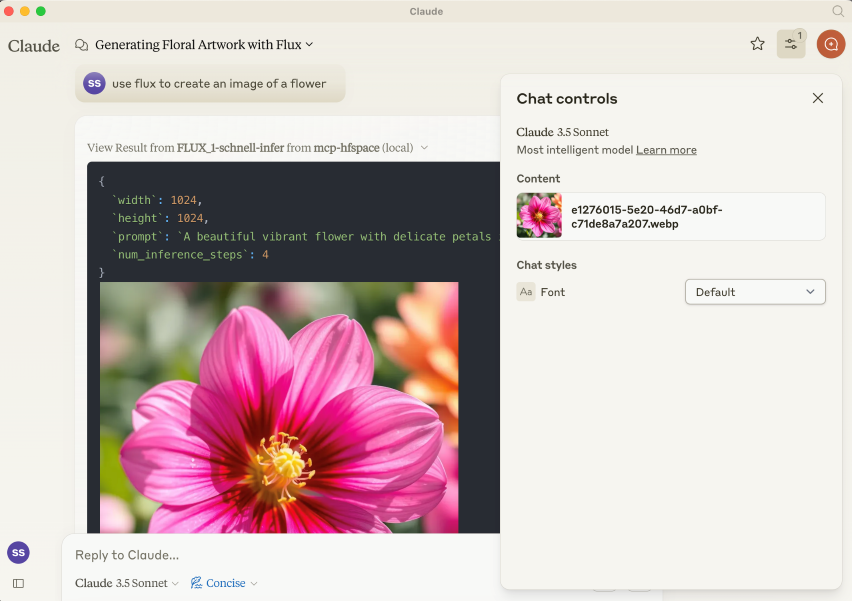
By default, it connects to `black-forest-labs/FLUX.1-schnell` providing Image Generation capabilities to Claude Desktop.
Gradio MCP Support
> [!TIP]
> Gradio 5.28 now has integrated MCP Support via SSE: https://huggingface.co/blog/gradio-mcp. Check out whether your target Space is MCP Enabled!
Installation
NPM Package is `@llmindset/mcp-hfspace`.
Install a recent version of NodeJS for your platform, then add the following to the `mcpServers` section of your `claude_desktop_config.json` file:
"mcp-hfspace": {
      "command": "npx",
      "args": [
        "-y",
        "@llmindset/mcp-hfspace"
      ]
    }
Please make sure you are using Claude Desktop 0.78 or greater.
This will get you started with an Image Generator.
Basic setup
Supply a list of HuggingFace spaces in the arguments. mcp-hfspace will find the most appropriate endpoint and automatically configure it for usage. An example `claude_desktop_config.json` is supplied below.
By default the current working directory is used for file upload/download. On Windows this is a read/write folder at `\users\\AppData\Roaming\Claude\ `Text Output: david bowie`
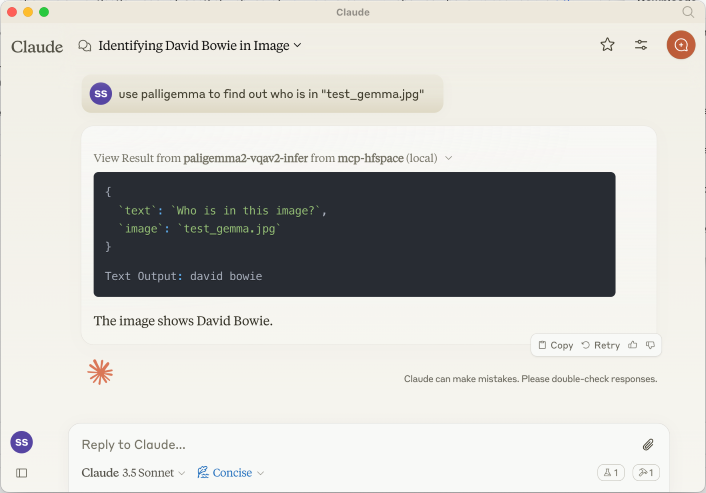
_If you are uploading something to Claude's context use the Paperclip Attachment button, otherwise specify the filename for the Server to send directly._
We can also supply a URL. For example : `use paligemma to detect humans in https://e3.365dm.com/24/12/1600x900/skynews-taylor-swift-eras-tour_6771083.jpg?20241209000914` -> `One person is detected in the image - Taylor Swift on stage.`
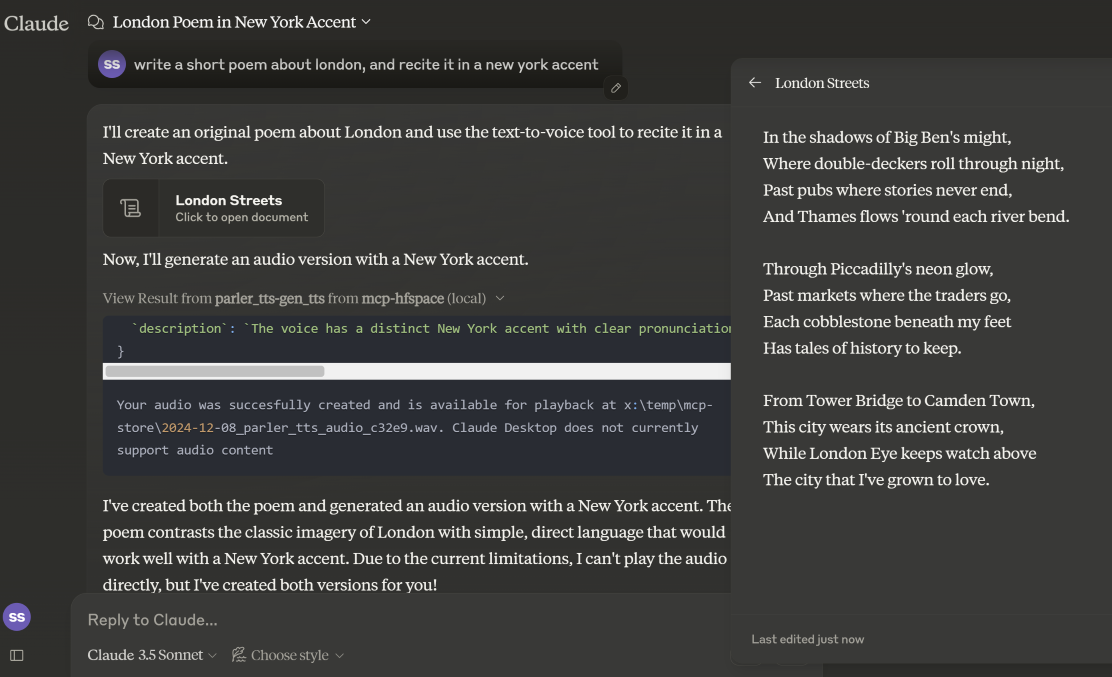
Example 3 - Text-to-Speech (Download Audio)
In _Claude Desktop Mode_, the audio file is saved in the WORK_DIR, and Claude is notified of the creation. If not in desktop mode, the file is returned as a base64 encoded resource to the Client (useful if it supports embedded Audio attachments).
Example 4 - Speech-to-Text (Upload Audio)
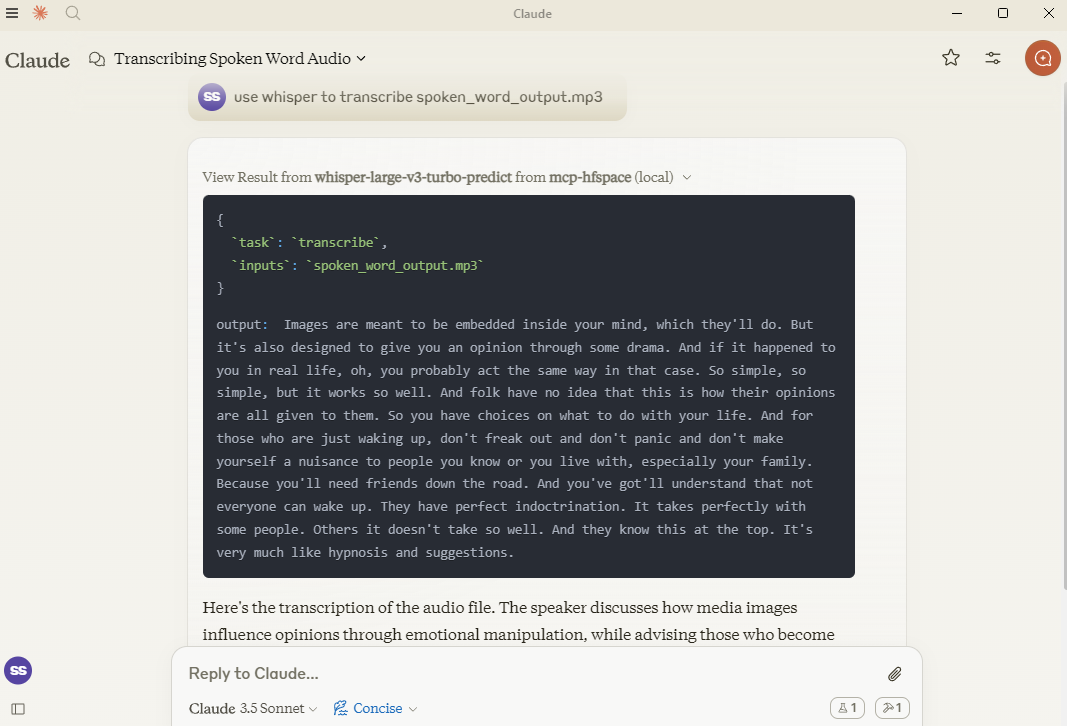
Here, we use `hf-audio/whisper-large-v3-turbo` to transcribe some audio, and make it available to Claude.
Example 5 - Image-to-Image
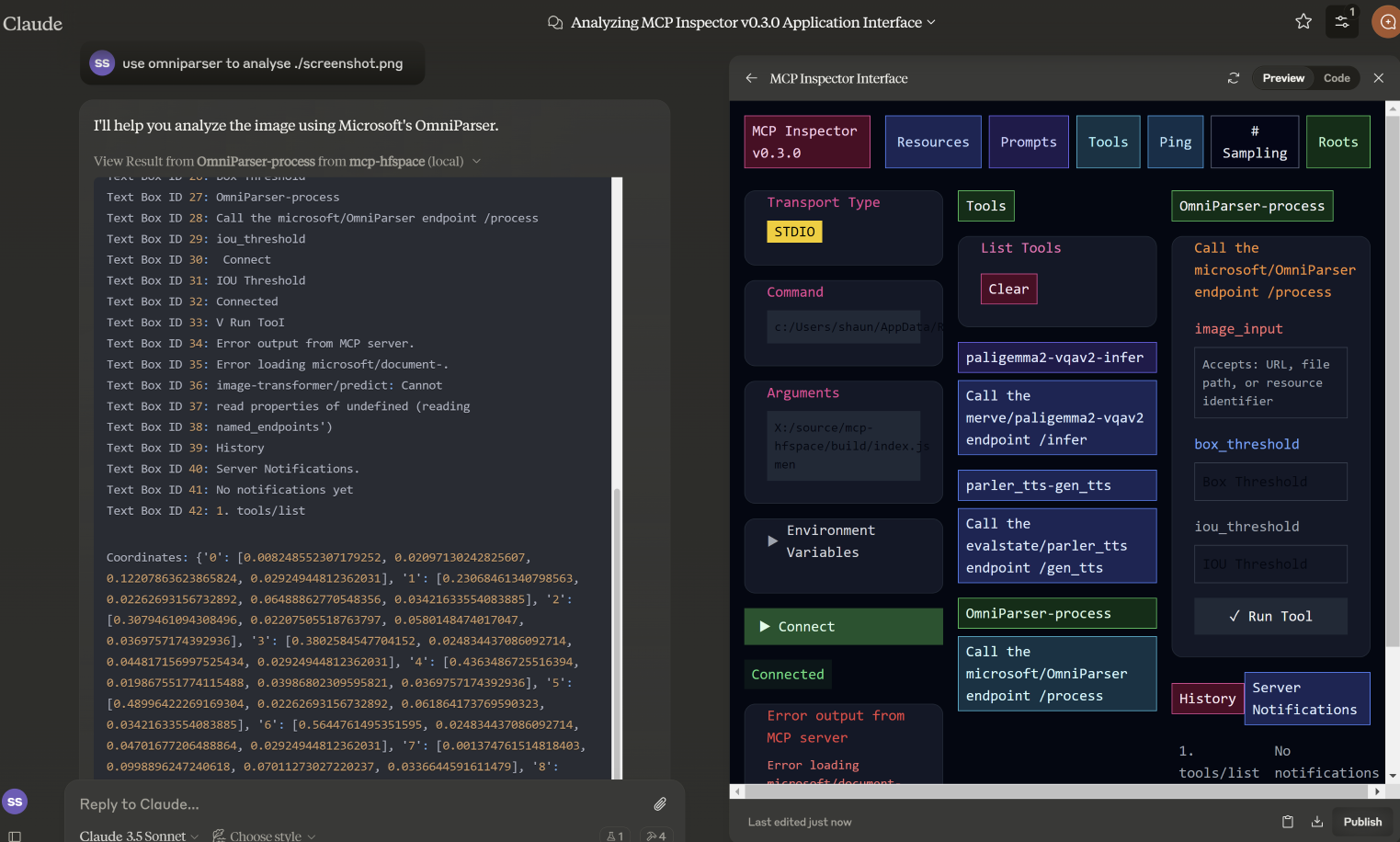
In this example, we specify the filename for `microsoft/OmniParser` to use, and get returned an annotated Image and 2 separate pieces of text: descriptions and coordinates. The prompt used was `use omniparser to analyse ./screenshot.png` and `use the analysis to produce an artifact that reproduces that screen`. `DawnC/Pawmatch` is also good at this.
Example 6 - Chat
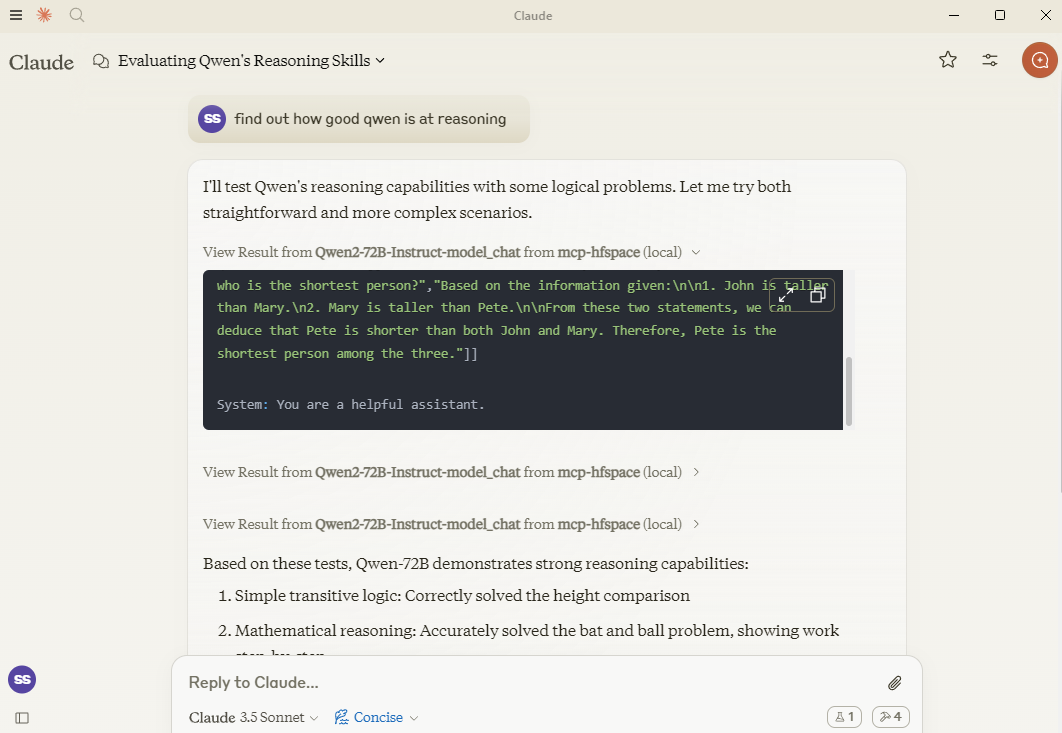
In this example, Claude sets a number of reasoning puzzles for Qwen, and asks follow-up questions for clarification.
Specifying API Endpoint
If you need, you can specify a specific API Endpoint by adding it to the spacename. So rather than passing in `Qwen/Qwen2.5-72B-Instruct` you would use `Qwen/Qwen2.5-72B-Instruct/model_chat`.
Claude Desktop Mode
This can be disabled with the option --desktop-mode=false or the environment variable CLAUDE_DESKTOP_MODE=false. In this case, content as returned as an embedded Base64 encoded Resource.
Recommended Spaces
Some recommended spaces to try:
Image Generation
- shuttleai/shuttle-3.1-aesthetic
- black-forest-labs/FLUX.1-schnell
- yanze/PuLID-FLUX
- gokaygokay/Inspyrenet-Rembg (Background Removal)
- diyism/Datou1111-shou_xin - Beautiful Pencil Drawings
Chat
- Qwen/Qwen2.5-72B-Instruct
- prithivMLmods/Mistral-7B-Instruct-v0.3
Text-to-speech / Audio Generation
- fantaxy/Sound-AI-SFX
- parler-tts/parler_tts
Speech-to-text
- hf-audio/whisper-large-v3-turbo
- (the openai models use unnamed parameters so will not work)
Text-to-music
- haoheliu/audioldm2-text2audio-text2music
Vision Tasks
- microsoft/OmniParser
- merve/paligemma2-vqav2
- merve/paligemma-doc
- DawnC/PawMatchAI
- DawnC/PawMatchAI/on_find_match_click - for interactive dog recommendations
Other Features
Prompts
Prompts for each Space are generated, and provide an opportunity to input. Bear in mind that often Spaces aren't configured with particularly helpful labels etc. Claude is actually very good at figuring this out, and the Tool description is quite rich (but not visible in Claude Desktop).
Resources
A list of files in the WORK_DIR is returned, and as a convenience returns the name as "Use the file..." text. If you want to add something to Claude's context, use the paperclip - otherwise specify the filename for the MCP Server. Claude does not support transmitting resources from within Context.
Private Spaces
Private Spaces are supported with a HuggingFace token. The Token is used to download and save generated content.
Using Claude Desktop
To use with Claude Desktop, add the server config:
On MacOS: `~/Library/Application Support/Claude/claude_desktop_config.json`
On Windows: `%APPDATA%/Claude/claude_desktop_config.json`
{
  "mcpServers": {
    "mcp-hfspace": {
      "command": "npx"
      "args": [
        "-y",
        "@llmindset/mcp-hfspace",
        "--work-dir=~/mcp-files/ or x:/temp/mcp-files/",
        "--HF_TOKEN=HF_{optional token}"
        "Qwen/Qwen2-72B-Instruct",
        "black-forest-labs/FLUX.1-schnell",
        "space/example/specific-endpint"
        (... and so on)
        ]
    }
  }
}
Known Issues and Limitations
mcp-hfspace
- Endpoints with unnamed parameters are unsupported for the moment.
- Full translation from some complex Python types to suitable MCP formats.
Claude Desktop
- Claude Desktop 0.75 doesn't seem to respond to errors from the MCP Server, timing out instead. For persistent issues, use the MCP Inspector to get a better look at diagnosing what's going wrong. If something suddenly stops working, it's probably due to exhausting your HuggingFace ZeroGPU quota - try again after a short period, or set up your own Space for hosting.
- Claude Desktop seems to use a hard timeout value of 60s, and doesn't appear to use Progress Notifications to manage UX or keep-alive. If you are using ZeroGPU spaces, large/heavy jobs may timeout. Check the WORK_DIR for results though; the MCP Server will still capture and save the result if it was produced.
- Claude Desktops reporting of Server Status, logging etc. isn't great - use @modelcontextprotocol/inspector to help diagnose issues.
HuggingFace Spaces
- If ZeroGPU quotas or queues are too long, try duplicating the space. If your job takes less than sixty seconds, you can usually change the function decorator `@spaces.GPU(duration=20)` in `app.py` to request less quota when running the job.
- Passing HF_TOKEN will make ZeroGPU quotas apply to your (Pro) HF account
- If you have a private space, and dedicated hardware your HF_TOKEN will give you direct access to that - no quota's apply. I recommend this if you are using for any kind of Production task.
Third Party MCP Services
Frequently asked questions
What is mcp-hfspace?
mcp-hfspace is MCP Server to Use HuggingFace spaces, easy configuration and Claude Desktop mode. TypeScript-based implementation.
How do I install mcp-hfspace?
Open the GitHub repository and follow its README. Most MCP servers are added to your client's MCP config, then called by your agent.
Is mcp-hfspace open source?
Yes — it is hosted on GitHub at https://github.com/evalstate/mcp-hfspace and has 365 stars.
Related MCP tools
 docs-mcp-server
Enhance Your AI Coding Assistant for the Model Context Protocol. Enhance AI assistants with powerful integrations. TypeScript-based implementation.
 HyperChat
HyperChat is a Chat client that strives for openness, utilizing APIs from various LLMs to achieve the best Chat experience, as well as implementing productiv...
 agent-kit
AgentKit: Build multi-agent networks in TypeScript with deterministic routing and rich tooling via MCP. Trusted by 600+ developers.
 fetch-mcp
A flexible HTTP fetching Model Context Protocol server. TypeScript-based implementation. Trusted by 600+ developers. Trusted by 600+ developers.
 workers-mcp
Talk to a Cloudflare Worker from Claude Desktop! for the Model Context Protocol. Enhance AI assistants with powerful integrations. TypeScript-based implementati
 apple-docs-mcp
MCP server for Apple Developer Documentation - Search iOS/macOS/SwiftUI/UIKit docs, WWDC videos, Swift/Objective-C APIs & code examples in Claude, Cursor & A...
Run your own MCP server? See who uses it and what to fix.
Measure it with TrackMCP