Documentation
Doctranslate.io MCP Server


Overview
Doctranslate.io MCP Server is a Model Context Protocol (MCP) server that provides document translation, text translation, and slide creation services through API. The server supports multilingual translation, text translation with formatting options, slide creation from documents, and translation history management.
Features
- 🔄 Document Translation - Multilingual document translation with tone and domain options
- 📝 Text Translation - Translate text with multiple formatting options
- 📄 Slide Creation - Create presentation slides from documents with custom templates
- 📊 History Management - Translation history tracking with filtering
System Requirements
- Python >= 3.10
- pip (Python package manager)
- Docker & Docker Compose (optional)
Quick Start
Installation
1. Clone repository:
git clone https://github.com/thinkprompt/doctranslateio-mcp.git
cd doctranslate-mcp-server
2. Create virtual environment:
python -m venv venv
source venv/bin/activate  # Linux/Mac
# or
venv\Scripts\activate  # Windows
3. Install dependencies:
pip install -r requirements.txtRunning the Application
Direct execution:
python main.pyWith uvicorn:
uvicorn main:server --host 0.0.0.0 --port 8000 --reloadWith Docker:
docker-compose up -dServer will run at: http://localhost:8000
🚀 Quickstart with Cursor
To use DocTranslate MCP Server with Cursor, follow these steps:
Step 1: Configure MCP Tool in Cursor Settings
1. Open Cursor Settings and find Tools and Intergrations
2. Click at Add a custom MCP Server
Step 2: Paste the config
Using Headers
{
  "mcpServers": {
    "doctranslate-mcp-server": {
      "url": "http://mcp.doctranslate.io/mcp",
      "type": "streamable-http",
      "headers": {
        "api_key": "YOUR_API_KEY"
      }
    }
  }
}
Using Query Parameter
{
  "mcpServers": {
    "doctranslate-mcp-server": {
      "url": "http://mcp.doctranslate.io/mcp?api_key=YOUR_API_KEY",
      "type": "streamable-http"
    }
  }
}
🚀 Quickstart with Claude Desktop
Setting up MCP Server for Claude Desktop
To use DocTranslate MCP Server with Claude Desktop, follow these steps:
Step 1: Configure stdio in main.py
Change from streamable-http to stdio in main.py file to be compatible with Claude Desktop.
Step 2: Configure claude_desktop_config.json
1. Open Claude Desktop
2. Go to Claude > Settings > Developer > Edit Config
3. Edit the claude_desktop_config.json file to include the following configuration:
{
  "mcpServers": {
    "mcp-server-doctranslate": {
      "command": "path to your python environment",
      "args": ["path to your folder\\main.py"]
    }
  }
}
Example configurations:
On Windows:
{
  "mcpServers": {
    "mcp-server-doctranslate": {
      "command": "C:\\Users\\YourUsername\\doctranslate-mcp\\venv\\Scripts\\python.exe",
      "args": ["C:\\Users\\YourUsername\\doctranslate-mcp\\main.py"]
    }
  }
}
On Linux/Mac:
{
  "mcpServers": {
    "mcp-server-doctranslate": {
      "command": "/home/username/doctranslate-mcp/venv/bin/python",
      "args": ["/home/username/doctranslate-mcp/main.py"]
    }
  }
}
Step 3: Restart Claude Desktop
After saving the configuration, restart Claude Desktop to apply the changes.
More Information
For detailed information about setting up MCP servers, please refer to:
- Official Website: https://modelcontextprotocol.io/quickstart/user
🚀 Quickstart with Python Code
Using the MCP Client Programmatically
You can also use the DocTranslate MCP Server programmatically with Python code:
Installation
pip install langchain_mcp_adaptersBasic Usage
from langchain_mcp_adapters.client import MultiServerMCPClient
import asyncio

# Initialize MCP client
client = MultiServerMCPClient(
    {
        "doctranslate": {
            "transport": "streamable_http",
            "url": "http://ip_address:port/mcp",
            "headers": {
              "api_key": "YOUR_API_KEY"
            }
        },
    }
)

# Get available tools asynchronously
tools = asyncio.run(client.get_tools())
print("Available tools:", tools)
Available Tools
The MCP Server provides the following tools:
- **
mcp_doctranslate_translate_text** - Translate text with various options - **
mcp_doctranslate_translate_document** - Translate documents (PDF, DOCX, PPTX, etc.) - **
mcp_doctranslate_get_translation_result** - Get translation task results - **
mcp_doctranslate_convert_to_pptx** - Convert documents to PowerPoint format - **
mcp_doctranslate_get_user_history** - Get user's translation history
Authentication & Configuration
How to Create API Key
To get started with DocTranslate MCP Server, you need to create an API key by following these steps:
Step 1: Visit doctranslate.io/manage-api-key
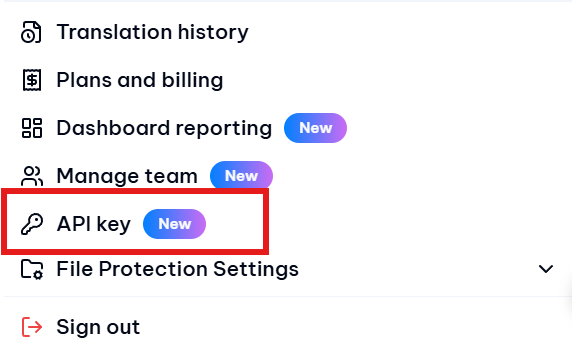
Notice: To generate an API key on Doctranslate, you must be the owner or an administrator of a Team Subscription plan !!!
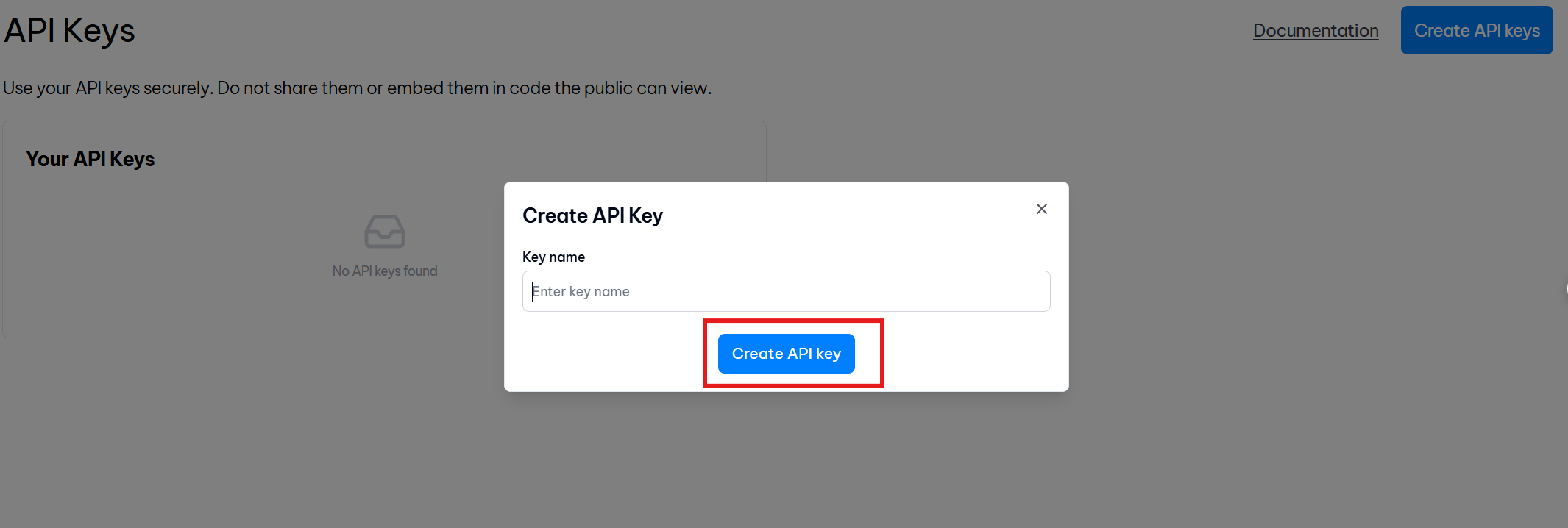
Step 2: Click "Create API Key" button
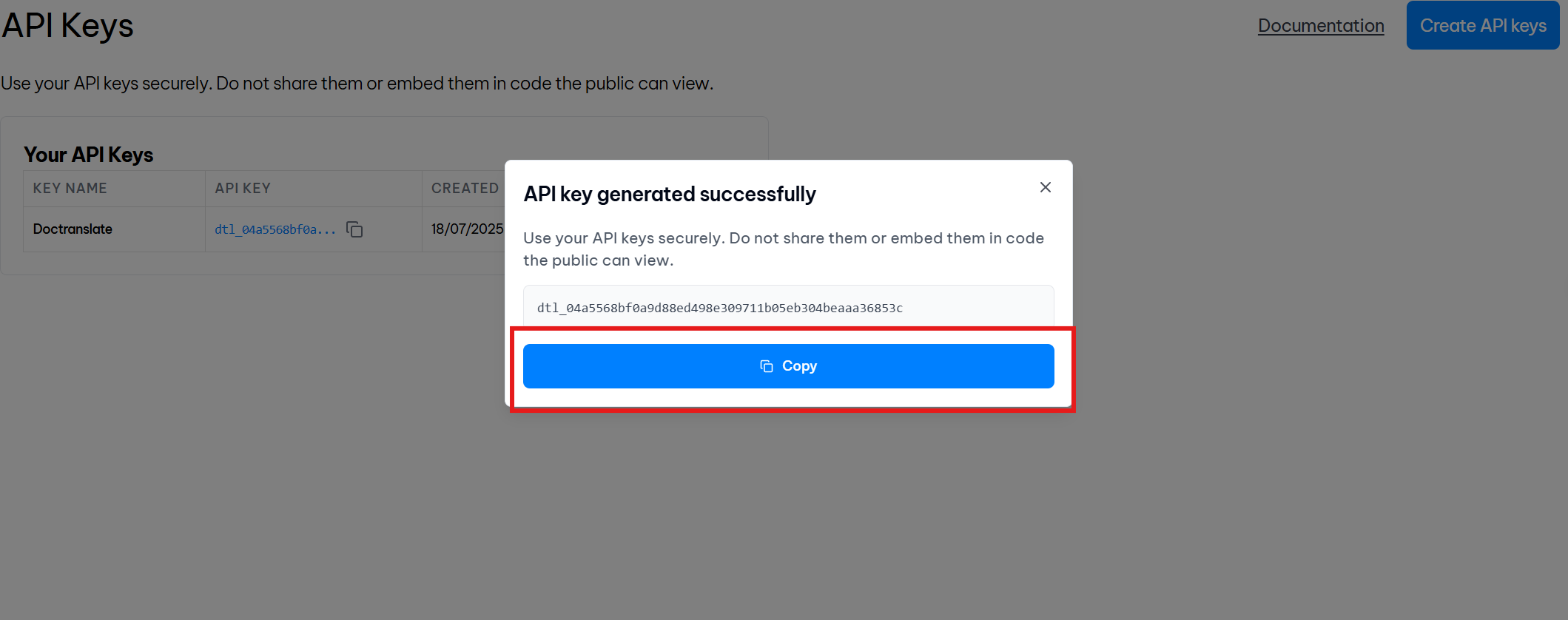
Step 3: Copy the generated API Key for use in your configuration
Authentication Methods
The MCP Server supports two authentication methods:
1. Headers Authentication - Pass API key in request headers
2. Query Parameter Authentication - Pass API key as URL parameter
Both methods provide secure access to the translation services.
Production Domain
If you want to use our hosted MCP service, replace the local URL with our production domain:
Production URL: http://mcp.doctranslate.io
Documentation
For detailed API documentation and implementation guides:
- Official Documentation: https://developer.doctranslate.io/document-translation-api/translation-api/api-v3
- Interactive API Docs: https://api-doc.doctranslate.io/
Project Structure
doctranslate-mcp-server/
├── src/
│   └── agents/tools/
│       ├── doctranslate.py
│       └── reader.py
├── scripts/
│   └── client/
│       └── client.py
├── docs/
│   └── doctranslate.io.md
├── main.py
├── requirements.txt
├── Dockerfile
├── docker-compose.yml
└── README.md
Client Connection
Client Connection Example
# Run client connection test
python scripts/client/client.py
License
This project is licensed under the MIT License.
Copyright (c) 2025 Doctranslate.io
Permission is hereby granted, free of charge, to any person obtaining a copy of this software and associated documentation files (the "Software"), to deal in the Software without restriction, including without limitation the rights to use, copy, modify, merge, publish, distribute, sublicense, and/or sell copies of the Software, and to permit persons to whom the Software is furnished to do so, subject to the following conditions:
The above copyright notice and this permission notice shall be included in all copies or substantial portions of the Software.
THE SOFTWARE IS PROVIDED "AS IS", WITHOUT WARRANTY OF ANY KIND, EXPRESS OR IMPLIED, INCLUDING BUT NOT LIMITED TO THE WARRANTIES OF MERCHANTABILITY, FITNESS FOR A PARTICULAR PURPOSE AND NONINFRINGEMENT. IN NO EVENT SHALL THE AUTHORS OR COPYRIGHT HOLDERS BE LIABLE FOR ANY CLAIM, DAMAGES OR OTHER LIABILITY, WHETHER IN AN ACTION OF CONTRACT, TORT OR OTHERWISE, ARISING FROM, OUT OF OR IN CONNECTION WITH THE SOFTWARE OR THE USE OR OTHER DEALINGS IN THE SOFTWARE.
Authors
- Doctranslate.io Team
Contact
- Email: support@doctranslate.io
- GitHub Issues: Create new issue
---
⭐ If this project is helpful, please give us a star!
Similar MCP
Based on tags & features
Trending MCP
Most active this week