
ctxray
See how you really use AI — X-ray your AI coding sessions locally
Documentation
ctxray
See how you really use AI.
X-ray your AI coding sessions across Claude Code, Cursor, ChatGPT, and 6 more tools. Discover your patterns, find wasted tokens, catch leaked secrets — all locally, nothing leaves your machine.





Quick start
pip install ctxray

ctxray scan                    # discover prompts from your AI tools
ctxray wrapped                 # your AI coding persona + shareable card
ctxray insights                # your patterns vs research-optimal
ctxray privacy                 # what sensitive data you've exposed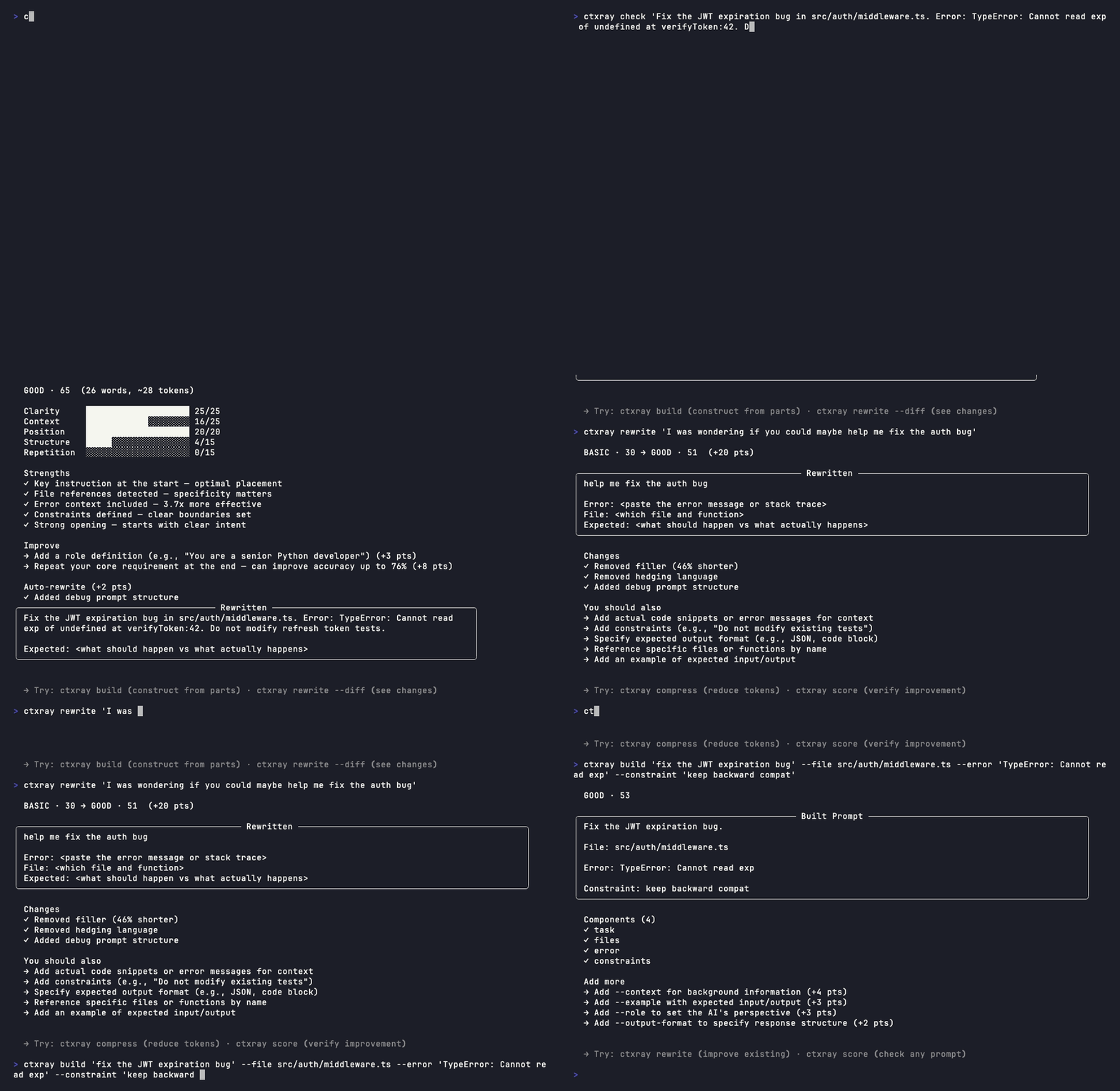
Works in your pipeline
Drop ctxray into your CI as a prompt quality gate. No LLM, no API key, no network —
More screenshots
`ctxray rewrite` — rule-based prompt improvement
`ctxray build` — assemble prompts from components
What a bad prompt looks like
All commands
Discover your patterns
| Command | Description |
|---|---|
| `ctxray wrapped` | AI coding persona + shareable card |
| `ctxray insights` | Personal patterns vs research-optimal benchmarks |
| `ctxray tools` | Cross-tool comparison — how your Claude Code / Cursor / ChatGPT habits differ |
| `ctxray sessions` | Session quality scores with frustration signal detection |
| `ctxray agent` | Agent workflow analysis — error loops, tool patterns, efficiency |
| `ctxray repetition` | Cross-session repetition detection — spot recurring prompts |
| `ctxray patterns` | Personal prompt weaknesses — recurring gaps by task type |
| `ctxray distill` | Extract important turns from conversations with 6-signal scoring |
| `ctxray projects` | Per-project quality breakdown |
| `ctxray style` | Prompting fingerprint with `--trends` for evolution tracking |
| `ctxray privacy` | See what data you sent where — file paths, errors, PII exposure |
Optimize your prompts
| Command | Description |
|---|---|
| `ctxray check "prompt"` | Full diagnostic — score + lint + rewrite + threshold pass/fail |
| `ctxray score "prompt"` | Research-backed 0-100 scoring with 30+ features |
| `ctxray score "prompt" --model claude` | Model-specific scoring — Claude, GPT, or Gemini adjustments |
| `ctxray rewrite "prompt"` | Rule-based improvement — filler removal, restructuring, hedging cleanup |
| `ctxray build "task"` | Build prompts from components — task, context, files, errors, constraints |
| `ctxray compress "prompt"` | 4-layer prompt compression (40-60% token savings typical) |
| `ctxray compare "a" "b"` | Side-by-side prompt analysis (or `--best-worst` for auto-selection) |
| `ctxray lint` | Configurable linter with CI/GitHub Action support |
Manage
| Command | Description | ||
|---|---|---|---|
| `ctxray` | Instant dashboard — prompts, sessions, avg score, top categories | ||
| `ctxray scan` | Auto-discover prompts from 9 AI tools | ||
| `ctxray report` | Full analytics: hot phrases, clusters, patterns (`--html` for dashboard) | ||
| `ctxray digest` | Weekly summary comparing current vs previous period | ||
| `ctxray template save\ | list\ | use` | Save and reuse your best prompts |
| `ctxray distill --export` | Recover context when a session runs out — paste into new session | ||
| `ctxray init` | Generate `.ctxray.toml` config for your project |
Supported AI tools
| Tool | Format | Auto-discovered by `scan` |
|---|---|---|
| Claude Code | JSONL | Yes |
| Codex CLI | JSONL | Yes |
| Cursor | .vscdb | Yes |
| Aider | Markdown | Yes |
| Gemini CLI | JSON | Yes |
| Cline (VS Code) | JSON | Yes |
| OpenClaw / OpenCode | JSON | Yes |
| ChatGPT | JSON | Via `ctxray import` |
| Claude.ai | JSON/ZIP | Via `ctxray import` |
Installation
pip install ctxray              # core (all features, zero config)
pip install ctxray[chinese]     # + Chinese prompt analysis (jieba)
pip install ctxray[mcp]         # + MCP server for Claude Code / Continue.dev / Zed
Auto-scan after every session
ctxray install-hook # adds post-session hook to Claude CodeBrowser extension
Capture prompts from ChatGPT, Claude.ai, and Gemini directly in your browser. Live quality badge shows prompt tier as you type — click "Rewrite & Apply" to improve and replace the text directly in the input box.
1. Install the extension from Chrome Web Store or Firefox Add-ons
2. Connect to the CLI: `ctxray install-extension`
3. Verify: `ctxray extension-status`
Captured prompts sync locally via Native Messaging — nothing leaves your machine.
CI integration
GitHub Action
# .github/workflows/prompt-lint.yml
name: Prompt Quality
on: pull_request

jobs:
  lint:
    runs-on: ubuntu-latest
    permissions:
      pull-requests: write
    steps:
      - uses: actions/checkout@v4
      - uses: ctxray/ctxray@main
        with:
          score-threshold: 43     # experimentally validated (below = 83% failure rate)
          model: claude           # optional: model-specific rules
          strict: true
          comment-on-pr: true
pre-commit
# .pre-commit-config.yaml
repos:
  - repo: https://github.com/ctxray/ctxray
    rev: v3.0.0
    hooks:
      - id: ctxray-lint-score     # quality threshold gate (score >= 43)
      # - id: ctxray-lint-claude  # Claude-specific rules + threshold
      # - id: ctxray-lint-gpt    # GPT-specific rules + threshold
Direct CLI
ctxray lint --score-threshold 43  # exit 1 below experimentally validated threshold
ctxray lint --score-threshold 50  # or set your own bar
ctxray lint --model claude        # model-specific lint rules
ctxray lint --strict              # exit 1 on warnings
ctxray lint --json                # machine-readable output
Project configuration
ctxray init # generates .ctxray.toml with all rules documented# .ctxray.toml (or [tool.ctxray.lint] in pyproject.toml)
[lint]
score-threshold = 43 # experimentally validated quality threshold
model = "claude" # model-specific rules (claude/gpt/gemini)
[lint.rules]
min-length = 20
short-prompt = 40
vague-prompt = true
debug-needs-reference = truePrompt Science — research foundation
Prompt Science
Scoring is calibrated against 10 peer-reviewed papers covering 30+ features across 5 dimensions:
| Dimension | What it measures | Key papers |
|---|---|---|
| Structure | Markdown, code blocks, explicit constraints | Prompt Report (2406.06608) |
| Context | File paths, error messages, I/O specs, edge cases | Zi+ (2508.03678), Google (2512.14982) |
| Position | Instruction placement relative to context | Stanford (2307.03172), Veseli+ (2508.07479), Chowdhury (2603.10123) |
| Repetition | Redundancy that degrades model attention | Google (2512.14982) |
| Clarity | Readability, sentence length, ambiguity | SPELL (EMNLP 2023), PEEM (2603.10477) |
Cross-validated findings that inform our engine:
- Position bias is architectural — present at initialization, not learned. Front-loading instructions is effective for prompts under 50% of context window (3 papers agree)
- Moderate compression improves output — rule-based filler removal doesn't just save tokens, it enhances LLM performance (2505.00019)
- Prompt quality is independently measurable — prompt-only scoring predicts output quality without seeing the response (ACL 2025, 2503.10084)
- Quality threshold at score ~43 — our own experiment (30 prompts, 5 tiers, 2 models) found a step function: below 43, 83% failure rate; above 43, 94% success (Pearson r=0.56, Spearman ρ=0.64)
- Format preferences are model-dependent — XML benefits Claude, Markdown benefits GPT, but having *any* structure matters more than the specific format (PromptBridge 2512.01420)
Model-specific scoring (`--model claude/gpt/gemini`) applies research-backed adjustments for each model's known preferences and sensitivities.
All analysis runs locally in
How it works — architecture
How it works
Data sources:
 ┌──────────┐ ┌──────────┐ ┌──────────┐ ┌──────────┐ ┌──────────┐
 │Claude Code│ │  Cursor  │ │  Aider   │ │ ChatGPT  │ │ 5 more.. │
 └─────┬────┘ └─────┬────┘ └─────┬────┘ └─────┬────┘ └─────┬────┘
       └─────────────┴───────────┴─────────────┴─────────────┘
                                 │
                    scan -> dedup -> store -> analyze
                                 │
              ┌──────────────────┼──────────────────┐
              v                  v                  v
        ┌──────────┐     ┌──────────────┐    ┌──────────┐
        │ insights │     │  patterns    │    │ sessions │
        │ wrapped  │     │  repetition  │    │ projects │
        │ style    │     │  privacy     │    │ agent    │
        └──────────┘     └──────────────┘    └──────────┘
Key design decisions:
- Pure rules, no LLM — scoring and rewriting use regex + TF-IDF + research heuristics. Deterministic, private,
Conversation Distillation
Conversation Distillation
`ctxray distill` scores every turn in a conversation using 6 signals:
- Position — first/last turns carry framing and conclusions
- Length — substantial turns contain more information
- Tool trigger — turns that cause tool calls are action-driving
- Error recovery — turns that follow errors show problem-solving
- Semantic shift — topic changes mark conversation boundaries
- Uniqueness — novel phrasing vs repetitive follow-ups
Session type (debugging, feature-dev, exploration, refactoring) is auto-detected and signal weights adapt accordingly.
Why ctxray?
After Promptfoo joined OpenAI and Humanloop joined Anthropic, ctxray is the independent, open-source alternative for understanding your AI interactions.
- 100% local — your prompts never leave your machine
- No LLM required — pure rule-based analysis, Previously published as `reprompt-cli`. Same tool, new name, clean namespace.
Privacy
- All analysis runs locally. No prompts leave your machine.
- `ctxray privacy` shows exactly what you've sent to which AI tool.
- Optional telemetry sends only anonymous feature vectors — never prompt text.
- Open source: audit exactly what's collected.
Links
- PyPI: ctxray
- Chrome Extension: Chrome Web Store
- Firefox Add-on: Firefox Add-ons
- Changelog: CHANGELOG.md
Contributing
See CONTRIBUTING.md for development setup and guidelines.
License
MIT
Frequently asked questions
What is ctxray?
ctxray is See how you really use AI — X-ray your AI coding sessions locally
How do I install ctxray?
Open the GitHub repository and follow its README. Most MCP servers are added to your client's MCP config, then called by your agent.
Is ctxray open source?
Yes — it is hosted on GitHub at https://github.com/ctxray/ctxray and has 46 stars.
Related MCP tools
 projectmem
Open-source coding agent memory. Records issues, attempts, fixes and decisions, then warns your agent before it repeats an approach that already failed. Native MCP server for Claude Code, Cursor, Antigravity and Codex. 100% local, no cloud, no telemetry. MIT.
 jcodemunch-mcp
Cut AI token costs 95%+ on code exploration. The leading MCP server for precise, symbol-level GitHub code retrieval via tree-sitter AST. Works with Claude Code, Cursor & any MCP client. 313B+ tokens saved.
 codesight
Universal AI context generator. Saves thousands of tokens per conversation in Claude Code, Cursor, Copilot, Codex, and more.
 Unity-MCP
AI Skills, MCP Tools, and CLI for Unity Engine. Full AI develop and test loop. Use cli for quick setup. Efficient token usage, advanced tools. Any C# method may be turned into a tool by a single line. Works with Claude Code, Gemini, Copilot, Cursor and any other absolutely for free.
 mcp-context-forge
An AI Gateway, registry, and proxy that sits in front of any MCP, A2A, or REST/gRPC APIs, exposing a unified endpoint with centralized discovery, guardrails and management. Optimizes Agent & Tool calling, and supports plugins.
 google_workspace_mcp
Control Gmail, Google Calendar, Docs, Sheets, Slides, Chat, Forms, Tasks, Search & Drive with AI - Comprehensive Google Workspace MCP Server & CLI Tool
Run your own MCP server? See who uses it and what to fix.
Measure it with TrackMCP