
docs-mcp
CometChat docs search + implementation bundles: add chat, voice, video & moderation to your app through your AI coding agent.
Documentation
CometChat's first-party MCP server. Connect Claude, Cursor, Windsurf, VS Code Copilot, Codex, or any other Model Context Protocol–compatible agent and integrate CometChat into your app from natural-language prompts.
Ask the agent: *"add a chat tab where users can DM each other"* — it reads CometChat's documentation, picks the right components for your stack, and writes the integration code.
Read-only. No account, no API key, no authentication required.
Demo
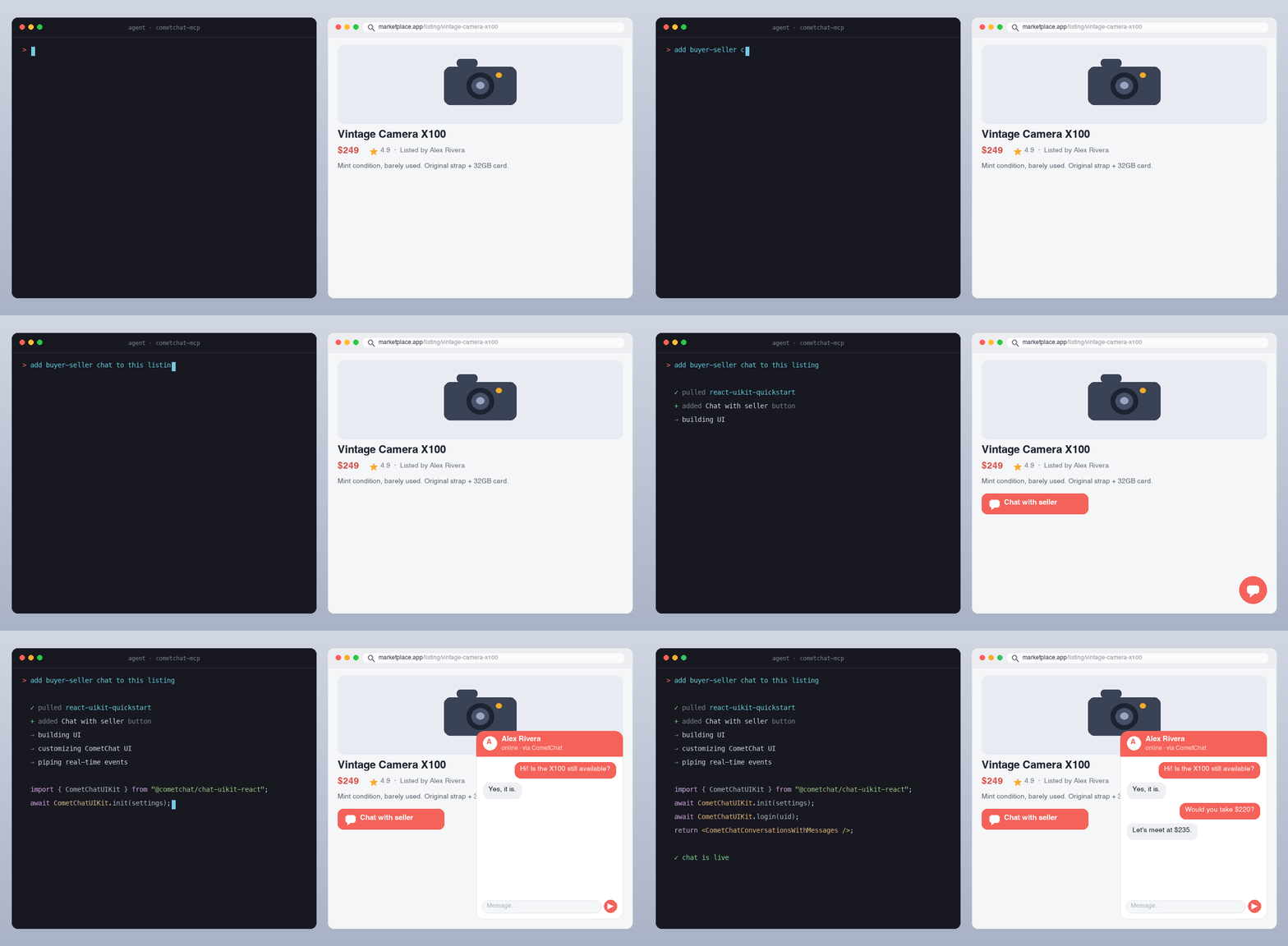
*An AI agent reading CometChat's docs and writing a working chat integration from a single prompt.*
Quick install
| Agent | How to add |
|---|---|
| Claude.ai / Claude Desktop | Settings → Connectors → Add custom connector → URL: `https://mcp.cometchat.com/mcp` |
| Cursor | `Cmd+Shift+P` → Open MCP settings → Add custom MCP → paste config below |
| Windsurf | Plugins (hammer icon) → Manage plugins → View raw config → paste config below |
| VS Code (Copilot Agent) | `Cmd+Shift+P` → MCP: Add MCP Server → URL: `https://mcp.cometchat.com/mcp`, Transport: HTTP |
| Claude Code (CLI) | `claude mcp add --transport http cometchat https://mcp.cometchat.com/mcp` |
| Smithery | `npx -y smithery mcp add cometchat/docs-mcp` |
| Codex CLI | `codex plugin marketplace add cometchat/docs-mcp` |
Config snippet (Cursor / Windsurf / generic MCP clients)
{
  "mcpServers": {
    "cometchat": {
      "url": "https://mcp.cometchat.com/mcp"
    }
  }
}
Usage
After connecting, prompt your agent with any of these:
- *"How do I install the React UI Kit in my Vite project?"*
- *"Walk me through multi-tenant chat for a Next.js SaaS where workspaces are isolated."*
- *"Show me how to add presence indicators and typing dots to my iOS conversation list."*
- *"Set up content moderation so banned words are blocked before delivery."*
- *"Build a no-code chat widget for my Webflow site."*
- *"What's the rate limit for sending messages, and what error code do I get when I hit it?"*
The agent reads CometChat's documentation, pulls the relevant implementation bundle, and writes the integration code into your project.
Tools
- `search_cometchat_docs` — Search across SDK guides, UI Kit references, REST API documentation, and OpenAPI specs. Returns ranked snippets with titles + direct links. Optional `version` filter.
- `fetch_cometchat_doc_page` — Fetch the full content of any documentation page as markdown by URL or relative path.
- `get_cometchat_implementation_bundle` — Return a curated implementation bundle for a named scenario — prerequisites, install commands, configuration, working code.
- `list_cometchat_bundles` — List every available implementation bundle (identifier, title, framework, last-verified date) for discovery.
All four carry `readOnlyHint: true`, a `title` annotation, and a declared `outputSchema` with structured results. Names are ≤ 64 characters. Descriptions describe contracts only — no behavioral instructions to the agent, no cross-tool routing, no marketing language.
Resources
| URI | Purpose |
|---|---|
| `cometchat://skills/overview` | Agent orientation skill — Product summary, decision guidance, workflow, common gotchas, verification checklist |
| `cometchat://bundles/react-uikit-quickstart` | React UI Kit install + init + login + chat surface |
| `cometchat://bundles/react-native-uikit-quickstart` | React Native UI Kit with navigation and chat screen |
| `cometchat://bundles/flutter-uikit-quickstart` | Flutter UI Kit install + init + basic chat |
| `cometchat://bundles/ios-uikit-quickstart` | iOS UI Kit (SwiftUI) install + chat view |
| `cometchat://bundles/android-uikit-quickstart` | Android UI Kit (Jetpack Compose) install + chat screen |
| `cometchat://bundles/js-sdk-messaging-basics` | Vanilla JS SDK — send/receive text and media messages |
| `cometchat://bundles/widget-embed` | No-code widget embed for HTML, Squarespace, Webflow, Wix, WordPress, Shopify |
| `cometchat://bundles/moderation-setup` | AI moderation rules, image moderation, webhooks |
| `cometchat://bundles/multi-tenant-chat` | Multi-tenant SaaS chat — tenant isolation, server-issued Auth Tokens |
| `cometchat://bundles/presence-and-typing` | Online presence, typing indicators, read receipts |
How it works
1. You prompt your agent in natural language.
2. The agent reads the orientation skill (`cometchat://skills/overview`) to understand which tool/bundle fits your request.
3. For top scenarios, the agent pulls a curated implementation bundle — ready-to-run code with prerequisites, install commands, configuration, and working examples.
4. For long-tail questions, the agent searches CometChat's docs and reads specific reference pages.
5. The agent writes the code into your project, using the bundle as the source of truth and your project structure as the constraint.
CometChat in 30 seconds
CometChat is a real-time communications platform for adding chat, voice, and video calling to web and mobile apps. Used in production across SaaS, marketplaces, gaming, healthcare, education, and creator platforms.
- Free tier: first 100 monthly active users, no credit card required.
- SDKs: JavaScript, React Native, iOS, Android, Flutter.
- UI Kits: React, React Native, iOS, Android, Flutter, Angular, Vue.
- No-code: chat widget for any HTML site.
- Sign up: `app.cometchat.com` — you'll need an App ID, Auth Key, and Region to build with the code the agent writes.
Server identity
| Field | Value |
|---|---|
| Display name | CometChat Docs |
| Version | 0.1.6 |
| Protocol | MCP `2025-06-18` |
| Transport | Streamable HTTP (with SSE) |
| Authentication | None (public docs only) |
| Capabilities | `tools`, `resources` |
| Health endpoint | `GET https://mcp.cometchat.com/health` |
Architecture
Your agent (Claude / Cursor / Windsurf / …)
        ↓ MCP over Streamable HTTP
        ↓
  mcp.cometchat.com/mcp  (this server)
        ↓
  ├── search_cometchat_docs     → SQLite FTS5 index of cometchat/docs
  ├── fetch_cometchat_doc_page  → cometchat.com/docs/*.md (first-party)
└── get_cometchat_implementation_bundle → bundled markdown recipes- Stateless server, single universal endpoint, no user-specific state.
- Search index rebuilds from `github.com/cometchat/docs` on every push to that repo's `main` branch.
- Implementation bundles carry a `last_verified` date and are re-checked against live SDK versions quarterly.
Local development
# Clone the docs repo (used to build the search index)
git clone --depth 1 https://github.com/cometchat/docs.git ../cometchat-docs-repo

# Install + build the FTS index + run the server
npm install
DOCS_REPO=../cometchat-docs-repo npm run build:index
npm run dev

# Run the test suite (36 tests across validation, truncation, bundles, tools, resources, fetch)
npm test
The server listens on `http://0.0.0.0:3000` by default. Health probe at `GET /health`, MCP endpoint at `POST /mcp`.
Inspect with the MCP Inspector
npx @modelcontextprotocol/inspector
# add server: http://localhost:3000/mcp
You should see all 4 tools with `readOnlyHint: true` and all 11 resources.
Repo layout
docs-mcp/
├── src/
│   ├── server.ts                  # MCP server entry, transport, tool dispatch
│   ├── tools/{search,fetch,bundle}.ts
│   ├── search/sqlite.ts           # SQLite FTS5 client
│   ├── bundles/loader.ts          # markdown bundle store
│   ├── resources/registry.ts      # skill + bundle resources
│   └── lib/{errors,truncate,validation,logger}.ts
├── scripts/build-index.ts         # builds SQLite FTS5 index from cometchat/docs
├── bundles/                       # 10 curated implementation bundles
├── skills/overview.md             # agent orientation skill
├── tests/                         # vitest suite
├── .claude-plugin/
│   ├── plugin.json                # Claude Code plugin manifest
│   └── marketplace.json           # Claude Code marketplace manifest
├── .codex-plugin/plugin.json      # Codex plugin manifest
├── .cursor-plugin/plugin.json     # Cursor Marketplace manifest
├── .mcp.json                      # MCP config (Claude Code auto-discovery)
├── mcp.json                       # Open Plugins standard manifest
└── assets/logo.svg                # CometChat logo
Configuration
| Env var | Default | Notes |
|---|---|---|
| `PORT` | `3000` | HTTP port |
| `HOST` | `0.0.0.0` | Bind host |
| `DOCS_BASE_URL` | `https://www.cometchat.com/docs` | Used for URLs in responses + the `.md` fetch fallback |
| `INDEX_PATH` | `./data/index.sqlite` | SQLite FTS5 index location. Server still boots if missing; search returns `backend_unavailable` and `/health` is `503`. |
| `BUNDLES_DIR` | `./bundles` | Markdown bundles directory |
| `SKILLS_DIR` | `./skills` | Orientation skill (`overview.md`) directory |
| `FETCH_TIMEOUT_MS` | `5000` | Per-fetch HTTP timeout |
| `LOG_LEVEL` | `info` | `debug` / `info` / `warn` / `error` |
| `NODE_ENV` | `development` | `production` makes bundle loading strict — a malformed bundle aborts boot instead of being skipped |
| `ALLOWED_HOSTS` | `:,localhost:,127.0.0.1:` | Comma-separated `Host` header allowlist for DNS-rebinding protection |
| `ALLOWED_ORIGINS` | _unset_ | Comma-separated CORS origin allowlist |
| `DNS_REBINDING_PROTECTION` | `true` | Set `false` only if an upstream already validates `Host` |
| `RATE_LIMIT_ENABLED` | `true` | Set `false` to disable per-IP rate limiting on `/mcp` |
| `RATE_LIMIT_MAX` | `120` | Max requests per window per IP |
| `RATE_LIMIT_WINDOW_MS` | `60000` | Rate-limit window in ms |
| `INDEX_AUTO_REFRESH` | `false` | Set `true` to rebuild the search index in-container when `cometchat/docs` changes. Requires `git` in the image and a writable `INDEX_WORK_DIR`. |
| `INDEX_POLL_INTERVAL_MS` | `600000` | How often to check the docs repo for a new commit (a `git ls-remote`, ~1s) |
| `INDEX_WORK_DIR` | `./data/generations` | Where rebuilt index generations are written (tmpfs in production) |
| `INDEX_KEEP_GENERATIONS` | `2` | Previous index generations retained on disk for instant fallback |
| `INDEX_MIN_PAGES` | `2000` | Absolute floor: a candidate index with fewer pages is rejected |
| `INDEX_MAX_DROP_RATIO` | `0.2` | Relative floor: reject a candidate losing more than this fraction of the served page count |
| `DOCS_REPO_URL` | `https://github.com/cometchat/docs.git` | Public docs repo; cloned anonymously, no credentials |
| `DOCS_REF` | `main` | Branch to follow |
| `DOCS_COMMIT_PIN` | _unset_ | Freeze on one commit and stop following `HEAD` (incident escape hatch) |
| `POSTHOG_KEY` | _unset_ | PostHog project API key. Unset = usage analytics fully disabled (no-op) |
| `POSTHOG_HOST` | `https://us.i.posthog.com` | PostHog instance host |
| `ANALYTICS_SALT` | _unset_ | Required when `POSTHOG_KEY` is set (analytics stays off without it). Salts client fingerprints/IP hashes; rotating it resets all fingerprints |
Deployment
See `DEPLOY.md` for container build, environment, and platform notes.
Marketplaces
The same server URL is listed across multiple agent marketplaces:
| Marketplace | Listing |
|---|---|
| Smithery | `smithery.ai/servers/cometchat/docs-mcp` |
| Glama | `glama.ai/mcp/servers/cometchat/docs-mcp` |
| Cursor Marketplace | `cursor.com/marketplace` |
| Cursor Directory | `cursor.directory` |
| Anthropic Connector Directory | `claude.com/connectors` |
| Codex Marketplace | `codex-marketplace.com` |
Support
- Issues / feedback: open an issue in this repo.
- CometChat support: `support@cometchat.com`.
- Live MCP status: `curl https://mcp.cometchat.com/health` returns `{"status":"ok"}` when healthy.
Contributing
PRs welcome — especially:
- New implementation bundles for under-served scenarios (drop a markdown file in `bundles/` with the required frontmatter).
- Bundle refreshes when SDK versions change (`last_verified` date in the bundle's frontmatter triggers a CI warning if older than 6 months).
- Tool improvements behind the existing read-only contract.
Out of scope today:
- Tools that write to a customer's CometChat app (separate authenticated connector, on the roadmap).
- Mixed read/write tools (Anthropic auto-rejection rule).
Privacy
The CometChat MCP server is read-only and requires no account, API key, or authentication. It serves only CometChat's public documentation and does not request, store, or transmit your code, prompts, or personal data. Standard request metadata (such as IP address) may be processed transiently for rate limiting and abuse prevention.
For full details, see CometChat's privacy policy: `cometchat.com/legal-privacy-policy`.
License
Apache-2.0. See LICENSE.
Frequently asked questions
What is docs-mcp?
docs-mcp is CometChat docs search + implementation bundles: add chat, voice, video & moderation to your app through your AI coding agent.
How do I install docs-mcp?
Open the GitHub repository and follow its README. Most MCP servers are added to your client's MCP config, then called by your agent.
Is docs-mcp open source?
Yes — it is hosted on GitHub at https://github.com/cometchat/docs-mcp and has 73 stars.
Related MCP tools
 projectmem
Open-source coding agent memory. Records issues, attempts, fixes and decisions, then warns your agent before it repeats an approach that already failed. Native MCP server for Claude Code, Cursor, Antigravity and Codex. 100% local, no cloud, no telemetry. MIT.
 memorix
Open-source cross-agent memory layer for coding agents via MCP. Compatible with Claude Code, Codex, Cursor, Windsurf, Gemini CLI, Antigravity, OpenClaw, Hermes Agent, Oh-my-Pi, Pi, Copilot, Kiro, OpenCode, and Trae.
 jcodemunch-mcp
Cut AI token costs 95%+ on code exploration. The leading MCP server for precise, symbol-level GitHub code retrieval via tree-sitter AST. Works with Claude Code, Cursor & any MCP client. 313B+ tokens saved.
 agent-device
Mobile app automation and verification for AI coding agents. CLI, MCP server, and typed Node.js API for iOS, Android, HarmonyOS, TV, web, macOS, and Linux.
 codesight
Universal AI context generator. Saves thousands of tokens per conversation in Claude Code, Cursor, Copilot, Codex, and more.
 octocode
Code research platform for AI agents; find, understand, and prove context across your code and all of GitHub, in a fraction of the tokens. One toolset, MCP or CLI
Run your own MCP server? See who uses it and what to fix.
Measure it with TrackMCP