MCP server with Whatsapp integration (Twilio) to remote approve Claude Code tool use
Documentation
Claude MCP Approval Server
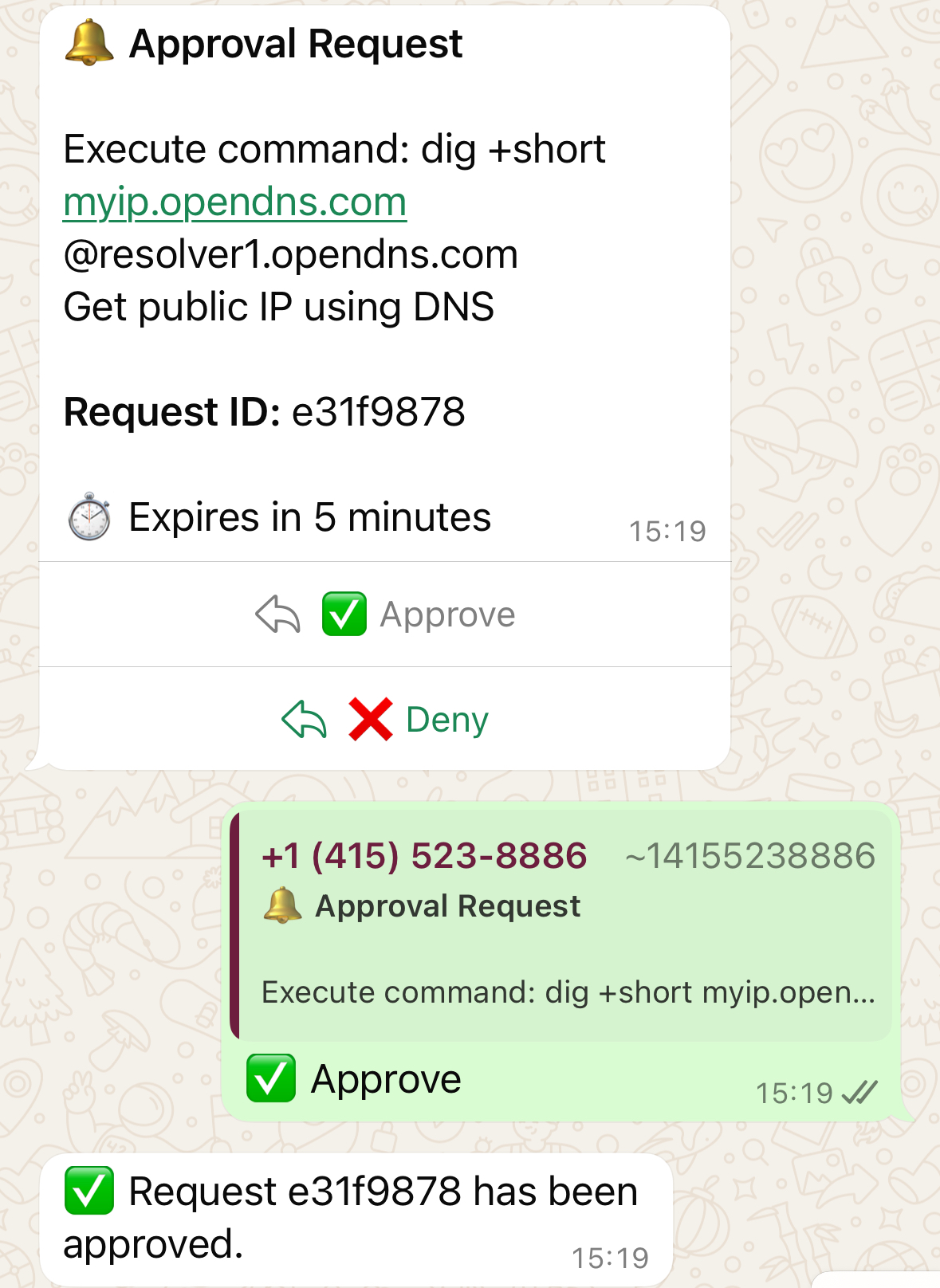
A Model Context Protocol (MCP) server that provides approval prompts via WhatsApp before executing potentially sensitive commands. Built with FastMCP and Twilio.
Features
- 🔐 Permission Prompts: Intercepts tool executions and requests approval via WhatsApp
- 📱 WhatsApp Integration: Uses Twilio to send approval requests with quick-reply buttons
- ⚡ FastMCP: Built on FastMCP for easy integration with Claude
- 🎯 Smart Formatting: Formats commands and reasons in a readable way
- ⏱️ Auto-expiry: Requests expire after 5 minutes for security
- 💾 Database Tracking: SQLite database to track approval requests
Setup Instructions
1. Install Dependencies
uv install2. Set Up Twilio Account
1. Sign up to Twilio at https://www.twilio.com
2. Try WhatsApp messaging - Go to https://console.twilio.com/us1/develop/sms/try-it-out/whatsapp-learn and follow the setup guide to:
- Join the WhatsApp Sandbox by sending a message to the Twilio number
- Test sending/receiving messages from your device
- Note your sandbox WhatsApp number (e.g.,
whatsapp:+14155238886)
3. Get Twilio Credentials
1. Get your Account SID from the Twilio Console dashboard
2. Generate an Auth Token at https://console.twilio.com/us1/account/keys-credentials/api-keys
- Click "Create API Key"
- Note the SID and Secret (this is your Auth Token)
4. Configure Environment
cp .env.example .envEdit .env with your credentials:
TWILIO_ACCOUNT_SID=your_account_sid_here
TWILIO_AUTH_TOKEN=your_auth_token_here
TWILIO_WHATSAPP_FROM=whatsapp:+14155238886  # Your sandbox number
APPROVAL_PHONE=+1234567890  # YOUR phone number (without whatsapp: prefix)
SERVER_PORT=8000 # Optional: Server port (defaults to 8000)Important: Replace +1234567890 with your actual phone number that you used to join the WhatsApp sandbox. This is where approval requests will be sent.
5. Create WhatsApp Template
python setup_template.pyThis automatically creates the Twilio template and updates your .env file with the template SID.
6. Expose the Server
Expose your local server using ngrok or Tailscale:
Option A: ngrok
ngrok http 8000 # Replace 8000 with your SERVER_PORT if differentOption B: Tailscale
tailscale funnel --bg 8000 # Replace 8000 with your SERVER_PORT if differentNote your public URL (e.g., https://abc123.ngrok.io or https://hostname.tail12345.ts.net)
7. Configure Twilio Webhook
1. Go back to the Try WhatsApp page: https://console.twilio.com/us1/develop/sms/try-it-out/whatsapp-learn
2. Click Sandbox Settings
3. Set both webhook URLs to: https://your-public-url/twilio-webhook
- When a message comes in:
https://your-public-url/twilio-webhook - Status callback URL:
https://your-public-url/twilio-webhook
8. Start the Approval Server
Important: Start the server BEFORE running Claude!
uv run approval_server.pyThe server should show:
- ✅ Twilio configured
- 🌐 Server endpoints listed
- Webhook URL ready
9. Run Claude with Permission Prompts
claude --mcp-config mcp-servers.json \
       --mcp-debug \
       --permission-prompt-tool mcp__approval-server__permissions__approve \
       --verbose \
       --debug \
       --output-format stream-json \
       -p "your prompt here"
10. Approve/Deny from Anywhere! 🎉
When Claude tries to execute a command, you'll receive a WhatsApp message with ✅ Approve and ❌ Deny buttons. Tap to respond from anywhere in the world!
Important Caveats
⚠️ Network Access: The -p (prompt) mode has no network access
⚠️ Interactive Mode: Non-interactive mode (without -p) does not use the --permission-prompt-tool
MCP Configuration
The MCP configuration is in mcp-servers.json.
Replace 8000 with your SERVER_PORT if you're using a different port.
How It Works
1. Tool Interception: When Claude tries to execute a tool, the permissions__approve function is called first
2. WhatsApp Notification: An approval request is sent to your WhatsApp with formatted command details
3. User Response: You can approve or deny using the quick-reply buttons
4. Execution: Based on your response, Claude either proceeds or stops
Message Format
Bash commands:
🔔 Approval Request

Execute command: `ls -la /etc`
*Reason:* List system configuration files

*Request ID:* abc123

⏱️ Expires in 5 minutes
Other tools:
🔔 Approval Request

*Tool:* WebFetch
  • url: https://example.com
  • prompt: Extract title

*Request ID:* abc123

⏱️ Expires in 5 minutes
Customizing the Template
To modify the WhatsApp message format or buttons:
1. Edit template_config.json
2. Run python setup_template.py to create a new template
3. The script will update your .env file with the new SID
Security & Features
- ⏱️ Auto-expiry: Requests expire after 5 minutes
- 🔒 Phone verification: Only responses from your configured phone number are accepted
- 📊 Audit trail: Database stores request history for tracking
- 🔐 E2E encryption: WhatsApp messages use end-to-end encryption
- 🌍 Global access: Approve/deny from anywhere with WhatsApp
Credits
https://github.com/mmarcen/test_permission-prompt-tool for providing a working example of using an MCP server with permission prompt tool.
Similar MCP
Based on tags & features
Trending MCP
Most active this week