
npm-search-mcp-server
MCP server for searching npm packages
Documentation
npm-search MCP Server
A Model Context Protocol server that allows you to search for npm packages by calling the `npm search` command.
Features:
- Search npm packages using the `npm search` command
- Supports both stdio and HTTP (streamable-http) transport modes
- HTTP mode automatically enabled when `PORT` environment variable is set
- Structured logging with Pino
- Graceful shutdown handling
- Health check endpoint (`/health`)
- Session management for HTTP transport
Available Tools
- `search_npm_packages` - Search for npm packages.
- Required arguments:
- `query` (string): The search query.
- Required arguments:
Installation
Installing via Smithery
To install npm-search for Claude Desktop automatically via Smithery:
npx -y @smithery/cli install npm-search-mcp-server --client claudeUsing NPM (recommended)
Alternatively you can install `npm-search-mcp-server` via npm:
npm install -g npm-search-mcp-serverAfter installation, you can run it as a command using:
npm-search-mcp-serverUsing uv
When using `uv` no specific installation is needed. We will
use `uvx` to directly run *npm-search-mcp-server*.
Configuration
Configure for Claude.app
Add to your Claude settings:
Using npm installation
"mcpServers": {
  "npm-search": {
    "command": "npx",
    "args": ["-y", "npm-search-mcp-server"]
  }
}
Using uvx
"mcpServers": {
  "npm-search": {
    "command": "uvx",
    "args": ["npm-search-mcp-server"]
  }
}
Configure for Zed
Add to your Zed settings.json:
Using npm installation
"context_servers": {
  "npm-search-mcp-server": {
    "command": "npx",
    "args": ["-y", "npm-search-mcp-server"]
  }
},
Using uvx
"context_servers": [
  "npm-search-mcp-server": {
    "command": "uvx",
    "args": ["npm-search-mcp-server"]
  }
],
Example Interactions
1. Search for npm packages:
{
  "name": "search_npm_packages",
  "arguments": {
    "query": "express"
  }
}
Response:
{
  "results": [
    {
      "name": "express",
      "description": "Fast, unopinionated, minimalist web framework",
      "version": "4.17.1",
      "author": "TJ Holowaychuk",
      "license": "MIT"
    },
    ...
  ]
}
Debugging
You can use the MCP inspector to debug the server. For uvx installations:
npx @modelcontextprotocol/inspector npx -y npm-search-mcp-serverOr if you've installed the package in a specific directory or are developing on it:
cd path/to/servers/src/npm-search
npx @modelcontextprotocol/inspector uv run npm-search-mcp-server
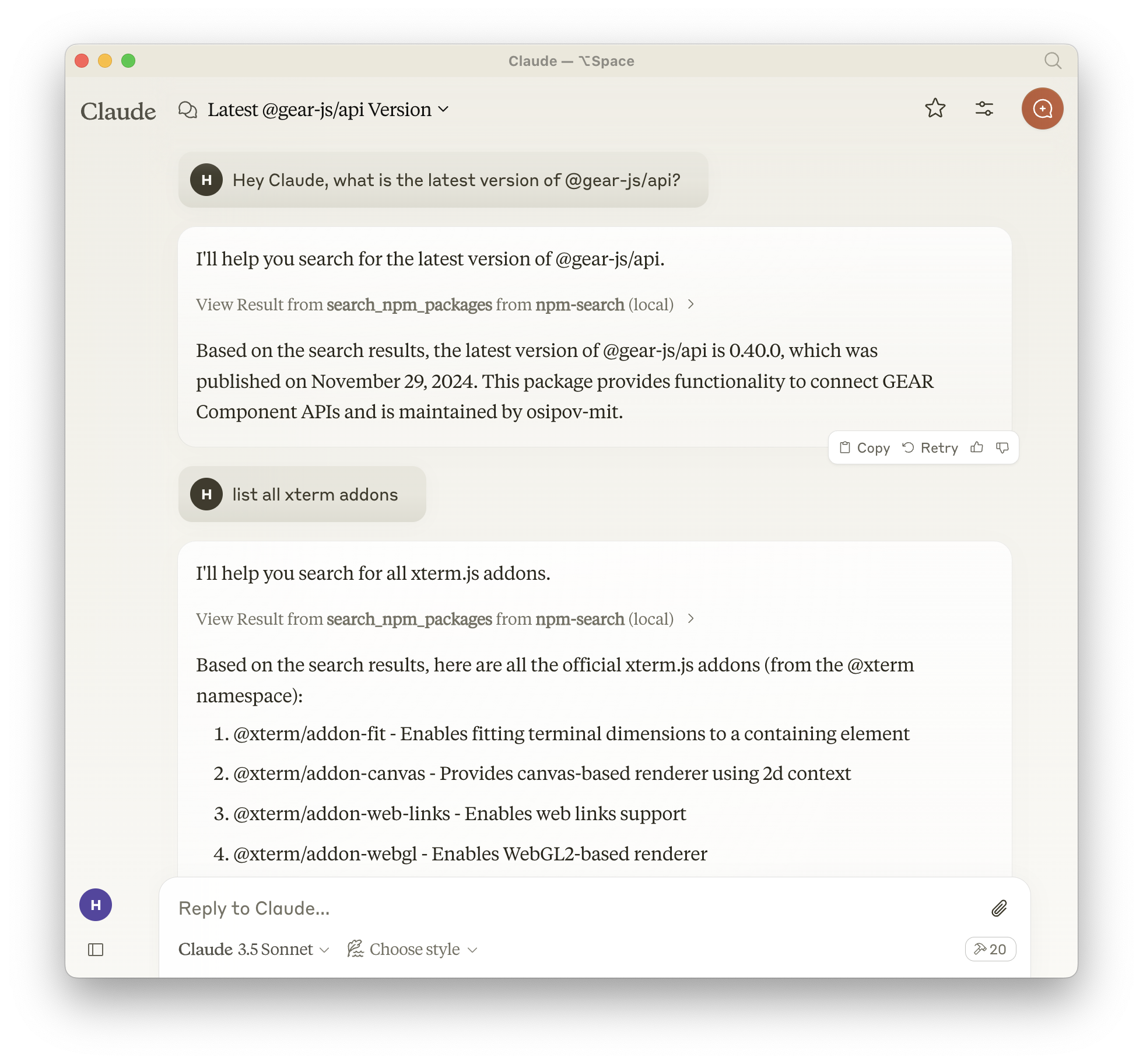
Examples of Questions for Claude
1. "Search for express package on npm"
2. "Find packages related to react"
3. "Show me npm packages for web development"
Docker
The server can be run in a Docker container with HTTP transport support:
# Build the image
docker build -t mcp/npm-search .

# Run the container (default port 3009)
docker run -p 3009:3009 mcp/npm-search

# Run with custom port via environment variable
docker run -p 3009:3009 -e PORT=3009 mcp/npm-search
The Docker image uses HTTP transport when the `PORT` environment variable is set. The server exposes:
- `POST /mcp` - Main MCP endpoint for tool calls and session initialization
- `GET /mcp` - SSE stream endpoint for streaming responses (requires session ID)
- `DELETE /mcp` - Session termination endpoint
- `GET /health` - Health check endpoint with service status and active session count
For Docker Compose integration:
services:
  npm-search-mcp:
    build: .
    ports:
      - "3009:3009"
    environment:
      PORT: 3009
Contributing
We encourage contributions to help expand and improve npm-search-mcp-server. Whether you want to add new npm-related tools, enhance existing functionality, or improve documentation, your input is valuable.
For examples of other MCP servers and implementation patterns, see:
https://github.com/modelcontextprotocol/servers
Pull requests are welcome! Feel free to contribute new ideas, bug fixes, or enhancements to make npm-search-mcp-server even more powerful and useful.
License
npm-search-mcp-server is licensed under the MIT License. This means you are free to use, modify, and distribute the software, subject to the terms and conditions of the MIT License. For more details, please see the LICENSE file in the project repository.
Frequently asked questions
What is npm-search-mcp-server?
npm-search-mcp-server is MCP server for searching npm packages
How do I install npm-search-mcp-server?
Open the GitHub repository and follow its README. Most MCP servers are added to your client's MCP config, then called by your agent.
Is npm-search-mcp-server open source?
Yes — it is hosted on GitHub at https://github.com/btwiuse/npm-search-mcp-server and has 14 stars.
Related MCP tools
 firecrawl-mcp-server
🔥 Official Firecrawl MCP Server - Adds powerful web scraping and search to Cursor, Claude and any other LLM clients. JavaScript-based implementation.
 linear-mcp-server
A server that integrates Linear's project management system with the Model Context Protocol (MCP) to allow LLMs to interact with Linear.
 mcp-bridge
A middleware to provide an openAI compatible endpoint that can call MCP tools Python-based implementation. Trusted by 800+ developers.
 cursor-talk-to-figma-mcp
CTTF: MCP integration between Cursor and Figma, allowing Cursor Agentic AI to communicate with Figma for reading designs and modifying them programmatically.
 mcp-jetbrains
A model context protocol server to work with JetBrains IDEs: IntelliJ, PyCharm, WebStorm, etc. Also, works with Android Studio
 fastapi_mcp
Expose your FastAPI endpoints as Model Context Protocol (MCP) tools, with Auth! Python-based implementation. Trusted by 11000+ developers.
Run your own MCP server? See who uses it and what to fix.
Measure it with TrackMCP