
mcp-summarization-functions
Provides summarised output from various actions that could otherwise eat up tokens and cause crashes for AI agents
Documentation
Overview
A powerful MCP server that provides intelligent summarization capabilities through a clean, extensible architecture. Built with modern TypeScript and designed for seamless integration with AI workflows.
Installation
Installing via Smithery
To install Summarization Functions for Claude Desktop automatically via Smithery:
npx -y @smithery/cli install mcp-summarization-functions --client claudenpm i mcp-summarization-functionsAI Agent Integration
This MCP server was primarily developed to enhance the performance and reliability of AI agents like Roo Cline and Cline. It addresses a critical challenge in AI agent operations: context window management.
Context Window Optimization
AI agents frequently encounter situations where their context window gets rapidly filled with large outputs from:
- Command execution results
- File content readings
- Directory listings
- API responses
- Error messages and stack traces
This server helps maintain efficient context usage by:
1. Providing concise, relevant summaries instead of full content
2. Storing full content for reference when needed
3. Offering focused analysis based on specific needs (security, API surface, etc.)
4. Supporting multiple output formats for optimal context utilization
Benefits for AI Agents
- Reduced Failure Rates: By preventing context window overflow
- Improved Response Quality: Through focused, relevant summaries
- Enhanced Efficiency: By maintaining important context while reducing noise
- Better Resource Management: Through intelligent content caching and retrieval
- Flexible Integration: Supporting multiple AI providers and configuration options
Recommended AI Agent Prompt
When integrating with AI agents, include the following in your agent's instructions:
# CONTEXT MANAGEMENT

You have access to summarization functions through the MCP server. These functions are NOT optional - you MUST use them for ALL potentially large outputs to prevent context overflow:

MANDATORY SUMMARIZATION:
- You MUST ALWAYS use summarization functions for:
    - ANY first time file reading operations (unless you are CERTAIN its small and you are going to edit it)
    - ALL command execution outputs
    - EVERY directory analysis
    - ANY API responses or error logs
    - ANY output that could be large

NEVER attempt to process raw output directly - ALWAYS use the appropriate summarization function:
• For commands: summarize_command
• For files: summarize_files
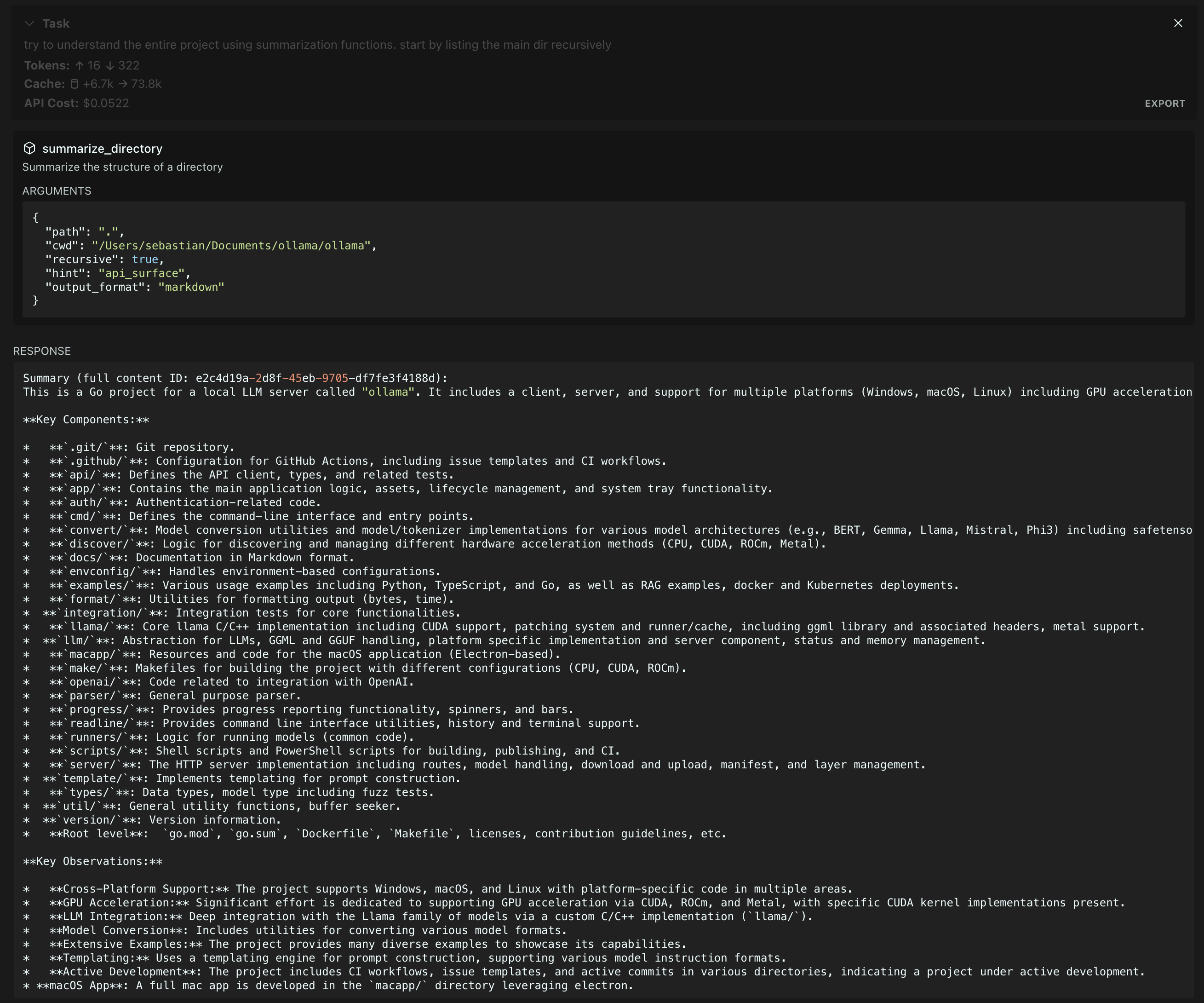
• For directories: summarize_directory
• For other text: summarize_text

ALWAYS utilize available features:
• Specify hints for focused analysis
• Choose appropriate output formats
• Use content IDs to access full details only when absolutely necessary

There is NO NEED to process perfect or complete output. Summarized content is ALWAYS preferred over raw data. When in doubt, use summarization.
Summarization in action on the Ollama repository (Gemini 2.0 Flash summarization, Claude 3.5 agent)
Features
- Command Output Summarization
Execute commands and get concise summaries of their output
- File Content Analysis
Summarize single or multiple files while maintaining technical accuracy
- Directory Structure Understanding
Get clear overviews of complex directory structures
- Flexible Model Support
Use models from different providers
- AI Agent Context Optimization
Prevent context window overflow and improve AI agent performance through intelligent summarization
Configuration
The server supports multiple AI providers through environment variables:
Required Environment Variables
- `PROVIDER`: AI provider to use. Supported values:
- `ANTHROPIC` - Claude models from Anthropic
- `OPENAI` - GPT models from OpenAI
- `OPENAI-COMPATIBLE` - OpenAI-compatible APIs (e.g. Azure)
- `GOOGLE` - Gemini models from Google
- `API_KEY`: API key for the selected provider
Optional Environment Variables
- `MODEL_ID`: Specific model to use (defaults to provider's standard model)
- `PROVIDER_BASE_URL`: Custom API endpoint for OpenAI-compatible providers
- `MAX_TOKENS`: Maximum tokens for model responses (default: 1024)
- `SUMMARIZATION_CHAR_THRESHOLD`: Character count threshold for when to summarize (default: 512)
- `SUMMARIZATION_CACHE_MAX_AGE`: Cache duration in milliseconds (default: 3600000 - 1 hour)
- `MCP_WORKING_DIR` - fallback directory for trying to find files with relative paths from
Example Configurations
# Anthropic Configuration
PROVIDER=ANTHROPIC
API_KEY=your-anthropic-key
MODEL_ID=claude-3-5-sonnet-20241022

# OpenAI Configuration
PROVIDER=OPENAI
API_KEY=your-openai-key
MODEL_ID=gpt-4-turbo-preview

# Azure OpenAI Configuration
PROVIDER=OPENAI-COMPATIBLE
API_KEY=your-azure-key
PROVIDER_BASE_URL=https://your-resource.openai.azure.com
MODEL_ID=your-deployment-name

# Google Configuration
PROVIDER=GOOGLE
API_KEY=your-google-key
MODEL_ID=gemini-2.0-flash-exp
Usage
Add the server to your MCP configuration file:
{
		"mcpServers": {
				"MUST_USE_summarization": {
						"command": "node",
						"args": ["path/to/summarization-functions/build/index.js"],
						"env": {
								"PROVIDER": "ANTHROPIC",
								"API_KEY": "your-api-key",
								"MODEL_ID": "claude-3-5-sonnet-20241022",
                "MCP_WORKING_DIR": "default_working_directory"
						}
				}
		}
}
Available Functions
The server provides the following summarization tools:
`summarize_command`
Execute and summarize command output.
{
  // Required
  command: string,    // Command to execute
  cwd: string,       // Working directory for command execution

  // Optional
  hint?: string,      // Focus area: "security_analysis" | "api_surface" | "error_handling" | "dependencies" | "type_definitions"
  output_format?: string  // Format: "text" | "json" | "markdown" | "outline" (default: "text")
}
`summarize_files`
Summarize file contents.
{
  // Required
  paths: string[],    // Array of file paths to summarize (relative to cwd)
  cwd: string,       // Working directory for resolving file paths

  // Optional
  hint?: string,      // Focus area: "security_analysis" | "api_surface" | "error_handling" | "dependencies" | "type_definitions"
  output_format?: string  // Format: "text" | "json" | "markdown" | "outline" (default: "text")
}
`summarize_directory`
Get directory structure overview.
{
  // Required
  path: string,       // Directory path to summarize (relative to cwd)
  cwd: string,       // Working directory for resolving directory path

  // Optional
  recursive?: boolean,  // Whether to include subdirectories. Safe for deep directories
  hint?: string,       // Focus area: "security_analysis" | "api_surface" | "error_handling" | "dependencies" | "type_definitions"
  output_format?: string   // Format: "text" | "json" | "markdown" | "outline" (default: "text")
}
`summarize_text`
Summarize arbitrary text content.
{
  // Required
  content: string,    // Text content to summarize
  type: string,       // Type of content (e.g., "log output", "API response")

  // Optional
  hint?: string,      // Focus area: "security_analysis" | "api_surface" | "error_handling" | "dependencies" | "type_definitions"
  output_format?: string  // Format: "text" | "json" | "markdown" | "outline" (default: "text")
}
`get_full_content`
Retrieve the full content for a given summary ID.
{
  // Required
  id: string         // ID of the stored content
}
Running evals
The evals package loads an mcp client that then runs the index.ts file, so there is no need to rebuild between tests. You can load environment variables by prefixing the npx command. Full documentation can be found here.
OPENAI_API_KEY=your-key npx mcp-eval src/evals/evals.ts src/server/mcp-server.tsLicense
MIT
Frequently asked questions
What is mcp-summarization-functions?
mcp-summarization-functions is Provides summarised output from various actions that could otherwise eat up tokens and cause crashes for AI agents
How do I install mcp-summarization-functions?
Open the GitHub repository and follow its README. Most MCP servers are added to your client's MCP config, then called by your agent.
Is mcp-summarization-functions open source?
Yes — it is hosted on GitHub at https://github.com/Braffolk/mcp-summarization-functions and has 36 stars.
Related MCP tools
 memory-bank-mcp
A Model Context Protocol (MCP) server implementation for remote memory bank management, inspired by Cline Memory Bank. TypeScript-based implementation.
 obsidian-mcp-tools
Add Obsidian integrations like semantic search and custom Templater prompts to Claude or any MCP client. TypeScript-based implementation.
 activepieces
AI Agents & MCPs & AI Workflow Automation • (~400 MCP servers for AI agents) • AI Automation / AI Agent with MCPs • AI Workflows & AI Agents • MCPs for AI Ag...
 mcp-use
Mcp-use is the easiest way to interact with mcp servers with custom agents TypeScript-based implementation. Trusted by 8100+ developers.
 5ire
5ire5ire is a cross-platform desktop AI assistant, MCP client. It compatible with major service providers, supports local knowledge base and tools via model co...
 mcp-server-chart
🤖 A visualization mcp contains 25+ visual charts using @antvis. Using for chart generation and data analysis. TypeScript-based implementation.
Run your own MCP server? See who uses it and what to fix.
Measure it with TrackMCP