
armor-crypto-mcp
The MCP server for interacting with Blockchain, Swaps, Strategic Planning and more. Python-based implementation.
Documentation
Armor Crypto MCP
*Alpha Test version 0.1.24*
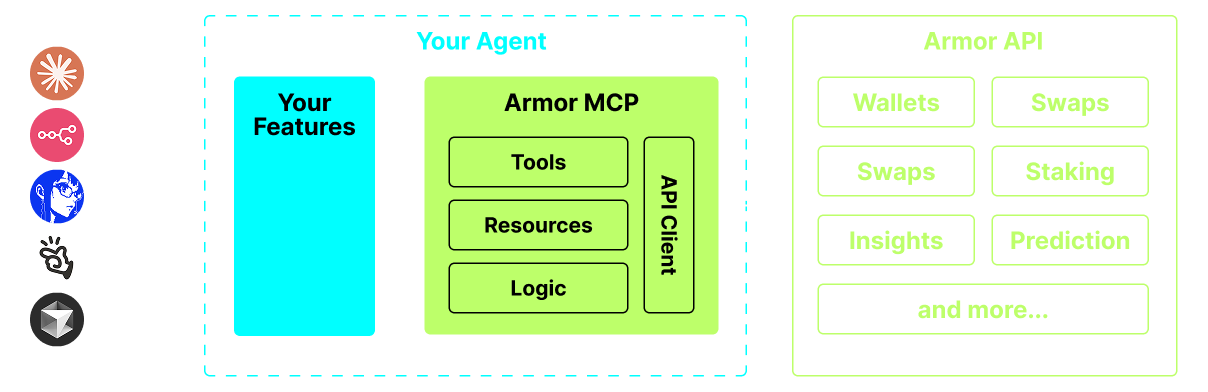
A single source for integrating AI Agents with the Crypto ecosystem. This includes Wallet creation and management, swaps, transfers, event-based trades like DCA, stop loss and take profit, and much more. The Armor MCP supports Solana in Alpha and, when in beta, will support more than a dozen blockchains, including Ethereum. Base, Avalanche, Bitcoin, Sui, Berachain, megaETH, Optimism, Ton, BNB, and Arbitrum, among others. Using Armor's MCP you can bring all of crypto into your AI Agent with unified logic and a complete set of tools.
Features
🧠 AI Native
📙 Wallet Management
🔃 Swaps
🌈 Specialized trades (DCA, Stop Loss etc.)
⛓️ Multi-chain
↔️ Cross-chain transations
🥩 Staking
🤖 Fast intergration to Agentic frameworks
👫 Social Sentiment
🔮 Prediction
Requirements
1. Make sure you have python installed
2. Install `uv`
*Linux / Windows*
pip install uv*Mac*
brew install uv3. Claude Desktop or your AI Agent will run the MCP
See Usage & Configuration for details.
Alpha Testing
We are currently in pre-alpha, and we are testing the capabilities of various agents and agentic frameworks like Claude Desktop, Cline, Cursor, n8n, etc.
Current Features & Tools
- Wallet Management
- Swap & Trades
- Staking and Unstaking
- Token Search and Trending Tokens
- Statistical Calculator for accurate Analysis
- Supports Solana blockchain
Coming Soon
- More Blockchain Support
- Minting
- Armor Agents as a Tool (or A2A)
MCP Setup
Currently you need to have the Armor NFT to get an API Key.
Get it here
Usage & Configuration
To use the Armor MCP with your agent, you need the following configuration, replace `` with your API key:
{
  "mcpServers": {
    "armor-crypto-mcp": {
      "command": "uvx",
      "args": ["armor-crypto-mcp@latest", "--version"],
      "env": {
        "ARMOR_API_KEY": ""
      }
    }
  }
}
Use in Claude Desktop
1. Must have Developer Mode enabled
2. Open Claude Desktop's File Menu top left of the window.
3. Go to File > Settings
4. Under Developer, click Edit Configuration
5. In the config file, insert the `armor-wallet-mcp` section from above
6. Make sure to replace the placeholder with your API key
7. Save the file and start a new Chat in Claude Desktop
Use in Cline
1. Click on the `MCP Servers` button in the Cline tab in VSCode on the left panel
2. Scroll to the bottom of the left panel and click on `Configure MCP Servers`
3. In the config file, insert `armor-wallet-mcp` section from above
4. Make sure to replace the placeholder with your API key
5. Save the file, click `Done` under the `MCP Servers` tab and start chatting with Cline
Use in n8n
1. Open the n8n app
2. Bottom-left of screen click `...` next to your username and click `Settings`
3. On the left panel, click `Community nodes` and then `Install a Community Node` button
4. In the search field for `npm Package Name` type in *mcp*
5. Install `MCP Nodes`
6. Add any MCP node, for example: `List Tools`
7. In the MCP Client `Parameters` tab, click `Select Credential` and click `Create new credential`
8. Under `Command` enter `uvx`
9. Under `Arguments` enter `armor-crypto-mcp`
10. Under `Environments` enter `ARMOR_API_KEY=eyJhbGciOiJIUzI1NiIsIn...` paste the full API Key value after the `=`
11. Back in the `Parameters` tab you can choose the MCP `Operation` for that Node
Using Armor MCP
Once you have setup the Armor MCP here are some prompts you can use to get started
Frequently asked questions
What is armor-crypto-mcp?
armor-crypto-mcp is The MCP server for interacting with Blockchain, Swaps, Strategic Planning and more. Python-based implementation.
How do I install armor-crypto-mcp?
Open the GitHub repository and follow its README. Most MCP servers are added to your client's MCP config, then called by your agent.
Is armor-crypto-mcp open source?
Yes — it is hosted on GitHub at https://github.com/armorwallet/armor-crypto-mcp and has 184 stars.
Related MCP tools
 mcp-agent
Build effective agents using Model Context Protocol and simple workflow patterns Python-based implementation. Trusted by 7600+ developers.
 aci
aciACI.dev is the open source tool-calling platform that hooks up 600+ tools into any agentic IDE or custom AI agent through direct function calling or a unifie...
 mcp-client-for-ollama
A text-based user interface (TUI) client for interacting with MCP servers using Ollama. Features include multi-server, dynamic model switching, streaming res...
 mem0
mem0Universal memory layer for AI Agents; Announcing OpenMemory MCP - local and secure memory management. Python-based implementation.
 chatgpt-on-wechat
基于大模型搭建的聊天机器人,同时支持 微信公众号、企业微信应用、飞书、钉钉 等接入,可选择ChatGPT/Claude/DeepSeek/文心一言/讯飞星火/通义千问/ Gemini/GLM-4/Kimi/LinkAI,能处理文本、语音和图片,访问操作系统和互联网,支持基于自有知识库进行定制企业智能客服。
 gpt-researcher
An LLM agent that conducts deep research (local and web) on any given topic and generates a long report with citations. Built for the Model Context Protocol to
Run your own MCP server? See who uses it and what to fix.
Measure it with TrackMCP