
cli
Git-native context engineering CLI and MCP server for AI coding agents. Keep specs, ADRs, rules, plans, and project knowledge in Git.
Documentation
Archcore CLI — Git-Native Context for AI Coding Agents
.
Alt text should carry the tagline: "Archcore — git-native context for AI coding agents" -->




Archcore is a git-native context layer for AI coding agents.
The CLI keeps specs, architecture decisions, rules, plans, and project knowledge in `.archcore/`, versioned with your code, and serves the relevant context to coding agents through MCP and session hooks.
It ships as a CLI and a local stdio MCP server, so any MCP-compatible coding agent can read and write your project context through standard tools. Use it for persistent project context across Claude Code, Cursor, Codex CLI, GitHub Copilot, Gemini CLI, OpenCode, Roo Code, and Cline.
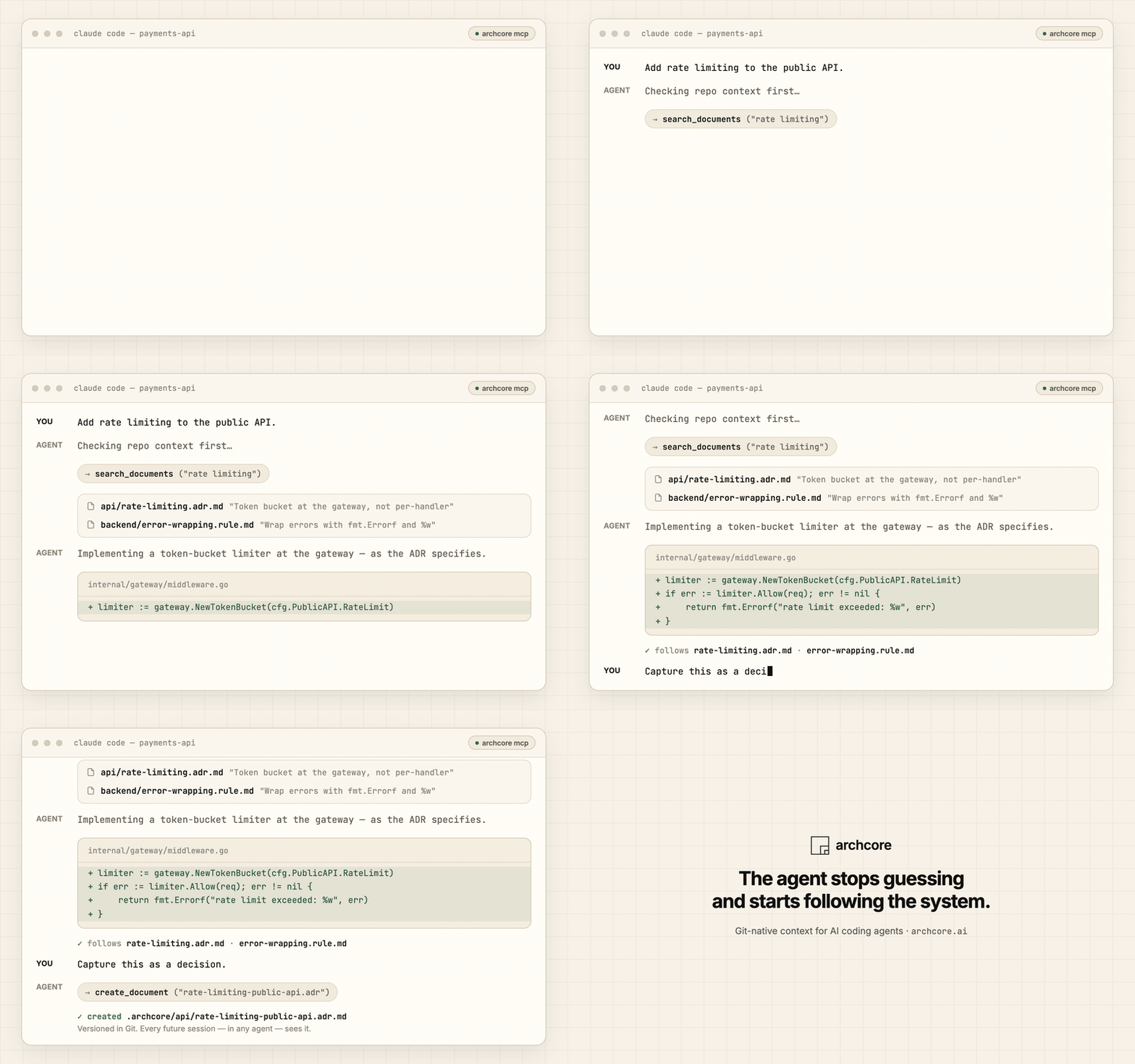
See it work
That context came from `.archcore/` — typed Markdown documents versioned in Git, served to any agent through MCP tools and session hooks.
What changes
❌ Without Archcore
Every session starts from zero. The agent:
- guesses your architecture and breaks your conventions
- duplicates logic that already exists
- re-litigates decisions your team already made
- needs the same context re-explained in every chat
✅ With Archcore
Your decisions, rules, and conventions live in Git as structured context. The agent:
- loads the applicable decisions and rules at session start
- puts code where your architecture says it belongs
- respects the ADRs, specs, and rules already in the repo
- records new decisions as durable context — reviewable in PRs, portable across agents
> The agent stops guessing and starts following the system.
Get started in 60 seconds
curl -fsSL https://archcore.ai/install.sh | bash    # macOS / Linux
cd your-project && archcore init
`archcore init` scaffolds `.archcore/`, detects your coding agents, and wires up hooks and MCP for them.
Then open your agent and say:
> _"We're using PostgreSQL for primary storage. Record this decision."_
Done — there is now a structured ADR in `.archcore/` that every future session, in any agent, will see.
On Windows: `irm https://archcore.ai/install.ps1 | iex`. For WSL, `go install`, and building from source, see Install methods below or the full install guide.
Works with your agent
The CLI is itself a local stdio MCP server — one integration surface for every MCP-compatible agent. Hooks add session-start context where the agent supports them.
| Agent | Hooks | MCP |
|---|---|---|
| Claude Code | yes | yes |
| Cursor | yes | yes |
| Gemini CLI | yes | yes |
| GitHub Copilot | yes | yes |
| OpenCode | — | yes |
| Codex CLI | — | yes |
| Roo Code | — | yes |
| Cline | — | manual |
`archcore init` configures detected agents automatically. To wire one up by hand:
archcore mcp install --agent cursor      # write MCP config for a specific agent
archcore hooks install                   # install session-start hooks for detected agents
claude mcp add --transport stdio archcore -- archcore mcp   # or add the server manually
How it works
1. Initialize — `archcore init` creates `.archcore/` and installs agent integrations.
2. Capture — decisions, rules, plans, and guides are stored as typed Markdown documents with YAML frontmatter.
3. Reuse — agents read, create, update, and link documents through MCP tools while they work; hooks load context at session start.
4. Keep it in Git — review context changes like code, evolve them over time, keep them portable across tools.
.archcore/
├── settings.json
├── auth/
│   ├── jwt-strategy.adr.md
│   └── auth-redesign.prd.md
├── backend/
│   └── error-wrapping.rule.md
├── incidents/
│   └── connection-pool-exhaustion.cpat.md
└── notifications/
    └── notifications-implementation.plan.md
The structure is free-form — organize by domain, feature, or team. A document's type lives in its filename (`slug.type.md`): 19 types across three layers — knowledge (ADRs, rules, specs, guides), vision (PRDs, plans, ideas, requirements tracks), and experience (incident patterns, recurring tasks). This repo's own `.archcore/` is a working example.
Ask your agent
> _"Before I touch the auth module, what decisions and rules apply here?"_
Loads the ADRs and rules tied to that area before the agent edits a single line.
> _"We have a convention: always wrap errors with fmt.Errorf and %w. Make this a rule."_
Creates `backend/error-wrapping.rule.md` with imperative guidance, rationale, and good/bad examples.
> _"Last week we had a connection-pool exhaustion incident. Document it so we don't repeat it."_
Creates `incidents/connection-pool-exhaustion.cpat.md` with root-cause analysis and prevention steps.
How it compares
| If you rely on… | The gap | What Archcore does instead |
|---|---|---|
| Nothing | The agent re-learns your repo every session and re-litigates settled decisions | Loads decisions, rules, and conventions at session start — in any agent |
| Flat instruction files (`CLAUDE.md`, `.cursorrules`) | One growing wall of text — no types, no links, no lifecycle, copy-pasted per tool | Typed documents, a relation graph, a draft → accepted lifecycle, one setup for every agent |
| Memory tools (claude-mem, Mem0) | Remember _what you did_ — volatile, opaque, vendor-bound | Stores _how the system is built and what was decided_ — versioned in Git, owned by you |
| Methodology kits (BMAD, Spec Kit, Agent OS) | Prescribe a process, often as a one-shot handoff | Stores the artifacts — a living context graph that evolves with the codebase |
| RAG / a bigger context window | Retrieves what the code _says_, not what was _decided and why_ | Keeps decisions and rationale explicit and selective — the agent loads what applies, not everything |
Not for — chat memory, a prompt library, or a one-shot spec-to-code generator. Archcore is a repo truth layer for coding agents, not a methodology kit.
Reference
What ships in the box: 19 document types, 4 relation types, 10 MCP tools, hook integrations for 4 agents and MCP integrations for 8.
Document types — 19 types across vision, knowledge, and experience
Knowledge
| Type | Full Name | Description |
|---|---|---|
| `adr` | Architecture Decision Record | Captures a finalized technical decision with context, alternatives, and consequences |
| `rfc` | Request for Comments | Proposes a significant change open for team review and feedback |
| `rule` | Rule | Coding or process standard with imperative guidance and examples |
| `guide` | Guide | Step-by-step instructions for completing a specific task |
| `doc` | Document | Reference documentation, registries, and descriptive material |
| `spec` | Specification | Normative behavior contract for a boundary or feature/subsystem others rely on |
Vision
| Type | Full Name | Description |
|---|---|---|
| `prd` | Product Requirements Document | Goals, user stories, acceptance criteria, and success metrics |
| `idea` | Idea | Lightweight capture of a product or technical idea for future exploration |
| `plan` | Plan | Phased task list with acceptance criteria and dependencies |
| `rnd` | Research | Time-boxed investigation that answers a question blocking a decision |
Two additional requirements tracks for teams that need structured discovery or formal decomposition:
Sources track (MRD → BRD → URD) — captures _where_ requirements come from:
| Type | Full Name | Description |
|---|---|---|
| `mrd` | Market Requirements Document | Market landscape, TAM/SAM/SOM, competitive analysis, and market needs |
| `brd` | Business Requirements Document | Business objectives, stakeholders, ROI, and business rules |
| `urd` | User Requirements Document | User personas, journeys, usability requirements, and acceptance criteria |
ISO/IEC/IEEE 29148:2018 track (BRS → StRS → SyRS → SRS) — captures _how_ requirements decompose:
| Type | Full Name | Description |
|---|---|---|
| `brs` | Business Requirements Specification | Mission, goals, objectives, and business operational concept |
| `strs` | Stakeholder Requirements Specification | Stakeholder needs, operational concept, and user requirements |
| `syrs` | System Requirements Specification | System functions, interfaces, performance, and design constraints |
| `srs` | Software Requirements Specification | Software functions, external interfaces, and detailed behavioral specs |
Use PRD for most projects; add the sources track for structured requirement discovery, and ISO 29148 for formal traceability in regulated or complex multi-team systems. Mix freely.
Experience
| Type | Full Name | Description |
|---|---|---|
| `task-type` | Task Type | Reusable checklist and workflow for a recurring task |
| `cpat` | Code Change Pattern | Root-cause analysis of a bug or incident with prevention steps |
Each document is a Markdown file with YAML frontmatter:
---
title: "Use PostgreSQL for Primary Storage"
status: draft
tags: [database, infrastructure]
---

## Context

...
Valid statuses: `draft`, `accepted`, `rejected`. Tags are optional and free-form.
MCP tools and relations
MCP tools
10 tools: `init_project`, `list_documents`, `get_document`, `search_documents`, `create_document`, `update_document`, `remove_document`, `add_relation`, `remove_relation`, `list_relations`. The server also works in an empty repo — agents can bootstrap `.archcore/` themselves via `init_project`.
Relations
Documents link with directed relations: `related` (general association), `implements` (source implements what target specifies), `extends` (source builds upon target), `depends_on` (source requires target). Managed by the agent through MCP tools.
Local MCP server
`archcore mcp` serves documents from the current directory over stdio. Pass `--project /path/to/repo` (or set `ARCHCORE_PROJECT_ROOT`) when the server is launched from a directory that isn't your workspace — for example, by an editor integration.
Commands
| Command | Description |
|---|---|
| `archcore init` | Initialize `.archcore/` directory interactively |
| `archcore doctor` | Check your archcore setup and fix issues |
| `archcore status` | Check `.archcore/` structure and document health |
| `archcore config` | View or modify settings |
| `archcore hooks install` | Install hooks for detected AI agents |
| `archcore mcp` | Run the MCP stdio server |
| `archcore mcp install` | Install MCP config for detected agents |
| `archcore instructions` | Manage the Archcore hint in instruction files |
| `archcore plugin` | Install, update, or report the Archcore plugin |
| `archcore update` | Update Archcore to the latest version |
`archcore update` checks GitHub Releases, downloads the newer version, verifies the SHA-256 checksum, and atomically replaces the binary. It then updates the Archcore plugin on each host that already has it installed, and prints the command to run for a host whose CLI it cannot reach.
`archcore plugin` manages that plugin directly on Claude Code, Cursor, Codex CLI, and GitHub Copilot. `archcore init` installs it for the hosts you select there.
Updating & telemetry
Unattended update
From v0.8.0 the CLI also updates itself with nobody watching. `archcore mcp` — the server your agent starts — runs the same check in the background, at most once every 24 hours per machine, and replaces the binary only with a release published by this project, after running the downloaded binary once to prove it starts. The running process is never restarted or interrupted; a new version takes effect the next time the binary launches. Builds you compile yourself, forks, and CI runners never self-update.
No variable and no `.archcore/settings.json` key disables this. If a machine must not update itself, install the binary into a directory its user cannot write — a root-owned location — and every attempt stops before it downloads anything.
Update analytics
A release build sends one event per update attempt: the versions it moved between, your OS and CPU architecture, whether the run looked like CI, whether you typed the command or the background check ran it, and which step failed when one did. It never sends an error message, a path, a user name, a hostname, or anything about your repository. Set `DO_NOT_TRACK=1` or `ARCHCORE_TELEMETRY_OPTOUT=1` to send nothing at all. Both variables govern analytics only — neither stops the CLI from updating itself. Full detail: archcore.ai/privacy.
Install methods
macOS / Linux
curl -fsSL https://archcore.ai/install.sh | bashWindows
irm https://archcore.ai/install.ps1 | iexInstalls `archcore.exe` under `%LOCALAPPDATA%\Programs\archcore` and adds it to your user `PATH`. Open a new PowerShell window after install.
Windows (WSL)
Install WSL, then run the macOS/Linux script inside it.
Go install
go install github.com/archcore-ai/cli@latestFrom source
git clone https://github.com/archcore-ai/cli.git
cd cli
go build -o archcore .
Supported platforms: macOS, Linux, Windows — amd64 and arm64.
For environment variables (`ARCHCORE_VERSION`, `ARCHCORE_INSTALL_DIR`, `GITHUB_TOKEN`) and PATH troubleshooting, see the full install guide.
Configuration
Settings live in `.archcore/settings.json`, created by `archcore init`.
| Field | Description | Values |
|---|---|---|
| `sync` | Sync mode. Cloud and on-prem are coming soon. | `none` (local only), `cloud`, `on-prem` |
| `language` | Document language. Helps the agent generate documentation in the right language. | String, defaults to `en` |
archcore config                    # show all settings
archcore config get           # get a specific value
archcore config set    # set a value
Ecosystem
- **Archcore Plugin** — using Claude Code or Cursor? The plugin pairs with the CLI: same engine, plus skills, intent commands, and guardrails. One product, two entry points — the CLI on its own covers every other agent.
- **docs.archcore.ai** — full documentation.
- **`.archcore/` in this repo** — a living example: the CLI is built with its own context layer.
Development
Requires Go 1.25+.
go build -o archcore .   # build
go test ./...            # run all tests
Links & license
- Documentation: docs.archcore.ai
- Website: archcore.ai
- Plugin (Claude Code, Cursor): github.com/archcore-ai/plugin
- Issues: github.com/archcore-ai/cli/issues
- License: Apache 2.0
Frequently asked questions
What is cli?
cli is Git-native context engineering CLI and MCP server for AI coding agents. Keep specs, ADRs, rules, plans, and project knowledge in Git.
How do I install cli?
Open the GitHub repository and follow its README. Most MCP servers are added to your client's MCP config, then called by your agent.
Is cli open source?
Yes — it is hosted on GitHub at https://github.com/archcore-ai/cli and has 63 stars.
Related MCP tools
 projectmem
Open-source coding agent memory. Records issues, attempts, fixes and decisions, then warns your agent before it repeats an approach that already failed. Native MCP server for Claude Code, Cursor, Antigravity and Codex. 100% local, no cloud, no telemetry. MIT.
 jcodemunch-mcp
Cut AI token costs 95%+ on code exploration. The leading MCP server for precise, symbol-level GitHub code retrieval via tree-sitter AST. Works with Claude Code, Cursor & any MCP client. 313B+ tokens saved.
 memorix
Open-source cross-agent memory layer for coding agents via MCP. Compatible with Claude Code, Codex, Cursor, Windsurf, Gemini CLI, Antigravity, OpenClaw, Hermes Agent, Oh-my-Pi, Pi, Copilot, Kiro, OpenCode, and Trae.
 atlassian-mcp-server
Official remote MCP server for Atlassian. Securely connect Jira, Confluence, Jira Service Management, Bitbucket, and Compass to Claude, ChatGPT, Cursor, VS Code, and other AI tools using OAuth 2.1 or API tokens.
 radar
radarThe missing open-source Kubernetes UI with a built-in MCP server for AI agents. See what's broken, why, and what changed. Issues, Topology, event timeline, Helm, GitOps, live service traffic, and cluster audits - all in one Go binary.
 MCPJungle
One place to manage & connect to all your MCP servers
Run your own MCP server? See who uses it and what to fix.
Measure it with TrackMCP