
opencode-mcp
An MCP (Model Context Protocol) server that lets Claude/Codex/Cursor drive an OpenCode instance and delegate work to its subagents — so orchestrator models like Opus/Fable/GPT5.6 Sol can hand off tasks to the other models OpenCode exposes.
Documentation
opencode-mcp



An MCP (Model Context Protocol) server that lets any MCP host — Claude Code, Codex, Cursor, etc. — drive an OpenCode instance and delegate work to its subagents — so orchestrator models like Opus or Fable can hand off tasks to the other models OpenCode exposes.
Quick install
Requires Node.js 18+ and **OpenCode** installed and configured (`opencode` must be on your `PATH`, with at least one provider/model set up) — this server spawns and drives OpenCode instances.
For Claude Code:
claude mcp add opencode -- npx -y mcp-server-opencodeFor Codex:
codex mcp add opencode -- npx -y mcp-server-opencodeSee Installation for manual config, and from-source options.
Tools
| Tool | Description |
|---|---|
| `opencode_start_server` | Start (or attach to) an OpenCode server instance |
| `opencode_stop_server` | Stop a running OpenCode server instance |
| `opencode_list_agents` | List agents/models available on a server instance |
| `opencode_start_task` | Delegate a task to an agent by starting a new session and prompt (optional `agent` / `model` override) |
| `opencode_continue_task` | Send a follow-up prompt to an existing task's session for iterative back-and-forth with the subagent |
| `opencode_cancel_task` | Abort a running delegated task by cancelling its session |
| `opencode_get_task_status` | Poll the status of a delegated task (`pending` / `running` / `completed` / `failed`); optional `include_progress` adds a partial output snippet and the currently running tool while it's still running |
| `opencode_get_task_result` | Fetch the final result of a completed task |
| `opencode_wait_for_task` | Long-poll one or more delegated tasks until they finish (`mode: "all"` or `"any"`) or the timeout elapses; optional `include_progress` enriches any still-unfinished tasks in the final result with a partial output snippet and the currently running tool |
| Prompt | Description |
|---|---|
| `delegate_task` | Guides the host through delegating one or more tasks to OpenCode agents (start/wait/result workflow), including a model selection guide that maps each OpenCode model tier to the task difficulty it should handle |
How it works
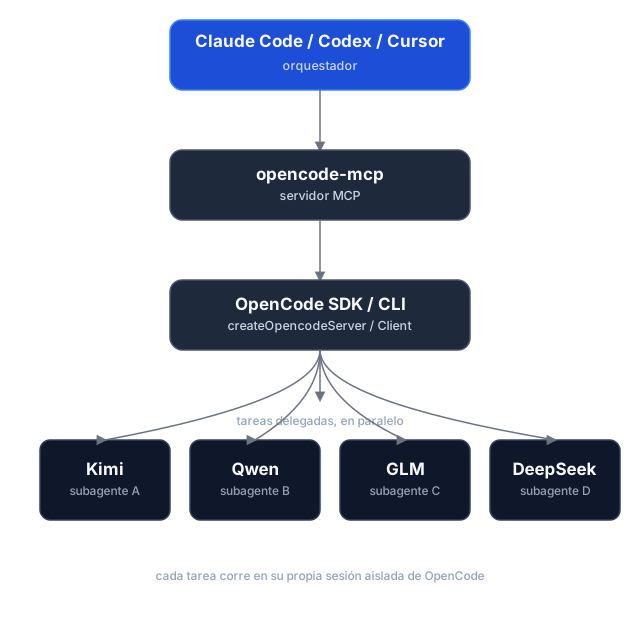
Task delegation is asynchronous: starting a task returns immediately with a `task_id` instead of blocking until the subagent finishes. This lets Claude Code fire multiple `opencode_start_task` calls in parallel — each one opens an isolated OpenCode `Session` — without hitting MCP client timeouts on long-running work. Status and results are fetched separately via polling.
Installation
Prerequisites
- Node.js 18+
- **OpenCode** installed and configured (`opencode` must be on your `PATH`, with at least one provider/model set up) — this server spawns and drives OpenCode instances.
Option 1 — npm (recommended)
The package is published as `mcp-server-opencode`. No cloning or building needed — point your MCP host at `npx`:
For Claude Code, one command does it:
claude mcp add opencode -- npx -y mcp-server-opencodeOr manually
{
  "mcpServers": {
    "opencode": {
      "command": "npx",
      "args": ["-y", "mcp-server-opencode"]
    }
  }
}
For Codex, add the server to `~/.codex/config.toml`:
[mcp_servers.opencode]
command = "npx"
args = ["-y", "mcp-server-opencode"]
Or install it globally and use the binary directly:
npm install -g mcp-server-opencode{
"mcpServers": {
"opencode": {
"command": "opencode-mcp"
}
}
}Option 2 — from source
git clone https://github.com/alejandro-technology/opencode-mcp.git
cd opencode-mcp
pnpm install
pnpm build
Then point your MCP host at the built entrypoint:
{
  "mcpServers": {
    "opencode": {
      "command": "node",
      "args": ["/path/to/opencode-mcp/build/src/index.js"]
    }
  }
}
Restart your MCP host after editing the config; the `opencode_*` tools should appear in its tool list.
Configuration
`MCP_TOOL_TIMEOUT`
`opencode_wait_for_task` accepts a `timeout_ms` input, but it's clamped to a server-side maximum so a single call can't block the MCP connection indefinitely. That maximum defaults to 300000 ms (5 minutes) and is configurable via `MCP_TOOL_TIMEOUT`.
`MCP_TOOL_TIMEOUT` can be set two ways:
- Environment variable — set it in the MCP server config:
{
    "mcpServers": {
      "opencode": {
        "command": "node",
        "args": ["/path/to/opencode-mcp/build/src/index.js"],
        "env": { "MCP_TOOL_TIMEOUT": "1200000" }
      }
    }
}- CLI argument — pass `MCP_TOOL_TIMEOUT=` as an extra arg to the server process:
{
    "mcpServers": {
      "opencode": {
        "command": "node",
        "args": [
          "/path/to/opencode-mcp/build/src/index.js",
          "MCP_TOOL_TIMEOUT=1200000"
        ]
      }
    }
  }
If both are present, the environment variable takes precedence over the CLI argument. Invalid or non-numeric values fall back to the 300000 ms default.
Development
Project structure
src/
├── index.ts                   # MCP server entrypoint (stdio transport, shutdown handlers)
└── modules/
    ├── tools/                 # One file per MCP tool, registered in index.ts
    ├── prompts/               # One file per MCP prompt, registered in index.ts
    └── shared/                # Cross-tool infrastructure
        ├── server-registry.ts   # Tracks running OpenCode servers; killAllServers() on shutdown
        ├── task-registry.ts     # Maps task_id → OpenCode server + session
        ├── opencode-client.ts   # Builds SDK clients from the registries
        ├── config.ts            # MCP_TOOL_TIMEOUT resolution (env var / CLI arg)
        └── mcp-result.ts        # jsonResult / jsonError MCP output helpers
Each module ships with a `*.test.ts` Vitest suite under the parallel `tests/` tree mirroring `src/`.
Getting started
pnpm install
pnpm dev     # runs the server through the MCP Inspector (tsx, no build needed)
Other scripts:
pnpm test           # vitest run
pnpm test:coverage  # vitest run --coverage
pnpm lint           # biome check
pnpm lint:write     # biome check --write
pnpm build # clean tsc build to ./build (also the typecheck)Frequently asked questions
What is opencode-mcp?
opencode-mcp is An MCP (Model Context Protocol) server that lets Claude/Codex/Cursor drive an OpenCode instance and delegate work to its subagents — so orchestrator models like Opus/Fable/GPT5.6 Sol can hand off tasks to the other models OpenCode exposes.
How do I install opencode-mcp?
Open the GitHub repository and follow its README. Most MCP servers are added to your client's MCP config, then called by your agent.
Is opencode-mcp open source?
Yes — it is hosted on GitHub at https://github.com/alejandro-technology/opencode-mcp and has 2 stars.
Related MCP tools
 opentabs
Browser automation clicks buttons. OpenTabs calls APIs.
 memorix
Open-source cross-agent memory layer for coding agents via MCP. Compatible with Claude Code, Codex, Cursor, Windsurf, Gemini CLI, Antigravity, OpenClaw, Hermes Agent, Oh-my-Pi, Pi, Copilot, Kiro, OpenCode, and Trae.
 UI-TARS-desktop
The Open-Source Multimodal AI Agent Stack: Connecting Cutting-Edge AI Models and Agent Infra
 n8n-mcp
A MCP for Claude Desktop / Claude Code / Windsurf / Cursor to build n8n workflows for you
 mcp
mcpBrowser MCP is a Model Context Provider (MCP) server that allows AI applications to control your browser
 XcodeBuildMCP
A Model Context Protocol (MCP) server and CLI that provides tools for agent use when working on iOS and macOS projects.
Run your own MCP server? See who uses it and what to fix.
Measure it with TrackMCP