
alfresco-mcp-poc
Alfresco MPC (Model Context Protocol) PoC
Documentation
Alfresco MCP Proof of Concept (PoC)
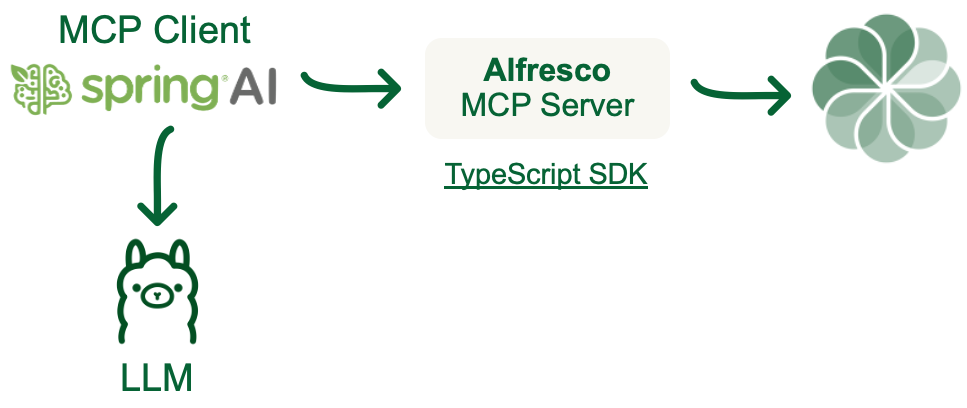
This repository contains a Proof of Concept (PoC) for integrating Alfresco as a Model Context Protocol server. The project demonstrates how to connect Alfresco capabilities to AI using standard client-server applications.
Project Structure
The repository is structured as follows:
- `alfresco/`: Contains a Docker Compose setup for a standard Alfresco deployment. This must be run before the MCP integration.
- `alfresco-mcp-client/`: A Java-based client application for interacting with the MCP server using Spring AI
- `alfresco-mcp-server/`: A Node.js-based server application for handling MCP requests using TypeScript SDK
Prerequisites
Before running the project, ensure you have the following installed:
- Docker (version 20.10.0 or higher)
- Docker Compose (version 1.29.0 or higher)
- Java Development Kit (JDK) 17 or higher (for the client application)
- Node.js (version 18 or higher) and npm (for the server application)
- Git (for cloning the repository)
Getting Started
Step 1: Clone the Repository
Clone the repository to your local machine:
git clone https://github.com/aborroy/alfresco-mcp-poc.git
cd alfresco-mcp-poc
Step 2: Run the Alfresco Docker Compose
Navigate to the `alfresco/` directory and start the Alfresco deployment using Docker Compose:
cd alfresco
docker-compose up --build --force-recreate
This will start the Alfresco Content Services stack, including the repository, Share, and other required services. Wait for all services to initialize completely.
Step 3: Verify Alfresco Deployment
Once the services are up, you can access the Alfresco Share interface at:
- Alfresco Share: http://localhost:8080/share
- Alfresco Repository: http://localhost:8080/alfresco
Use the default credentials (`admin` / `admin`) to log in.
Step 4: Set Up and Run the MCP Client
Start the Ollama server locally:
ollama serveNavigate to the `alfresco-mcp-client/` directory and follow the instructions in its `README.md` to set up and run the MCP client:
cd ../alfresco-mcp-client
mvn clean package
java -jar target/alfresco-mcp-client-0.8.0.jar
Customization
You can customize the Alfresco deployment by modifying the `docker-compose.yml` file in the `alfresco/` directory. Additionally, the MCP server and client components can be configured to suit your specific use case.
Contributing
Contributions to this project are welcome! Please open an issue or submit a pull request with your proposed changes.
Frequently asked questions
What is alfresco-mcp-poc?
alfresco-mcp-poc is Alfresco MPC (Model Context Protocol) PoC
How do I install alfresco-mcp-poc?
Open the GitHub repository and follow its README. Most MCP servers are added to your client's MCP config, then called by your agent.
Is alfresco-mcp-poc open source?
Yes — it is hosted on GitHub at https://github.com/aborroy/alfresco-mcp-poc and has 5 stars.
Related MCP tools
 openhands
🙌 OpenHands: Code Less, Make More for the Model Context Protocol. Enhance AI assistants with powerful integrations. Python-based implementation.
 anything-llm
The all-in-one Desktop & Docker AI application with built-in RAG, AI agents, No-code agent builder, MCP compatibility, and more.
 mem0
mem0Universal memory layer for AI Agents; Announcing OpenMemory MCP - local and secure memory management. Python-based implementation.
 chatgpt-on-wechat
基于大模型搭建的聊天机器人,同时支持 微信公众号、企业微信应用、飞书、钉钉 等接入,可选择ChatGPT/Claude/DeepSeek/文心一言/讯飞星火/通义千问/ Gemini/GLM-4/Kimi/LinkAI,能处理文本、语音和图片,访问操作系统和互联网,支持基于自有知识库进行定制企业智能客服。
 localai
:robot: The free, Open Source alternative to OpenAI, Claude and others. Self-hosted and local-first. Drop-in replacement for OpenAI, running on consumer-gra...
 cherry-studio
🍒 Cherry Studio is a desktop client that supports for multiple LLM providers. Built for the Model Context Protocol to enhance AI capabilities.
Run your own MCP server? See who uses it and what to fix.
Measure it with TrackMCP