A mcp server that bridges the Model Context Protocol (MCP) with the Agent-to-Agent (A2A) protocol, enabling MCP-compatible AI assistants (like Claude) to sea...
Documentation
A2A MCP Server

A mcp server that bridges the Model Context Protocol (MCP) with the Agent-to-Agent (A2A) protocol, enabling MCP-compatible AI assistants (like Claude) to seamlessly interact with A2A agents.
Overview
This project serves as an integration layer between two cutting-edge AI agent protocols:
- Model Context Protocol (MCP): Developed by Anthropic, MCP allows AI assistants to connect to external tools and data sources. It standardizes how AI applications and large language models connect to external resources in a secure, composable way.
- Agent-to-Agent Protocol (A2A): Developed by Google, A2A enables communication and interoperability between different AI agents through a standardized JSON-RPC interface.
By bridging these protocols, this server allows MCP clients (like Claude) to discover, register, communicate with, and manage tasks on A2A agents through a unified interface.
Demo
1, Run The Currency Agent in A2A Sample
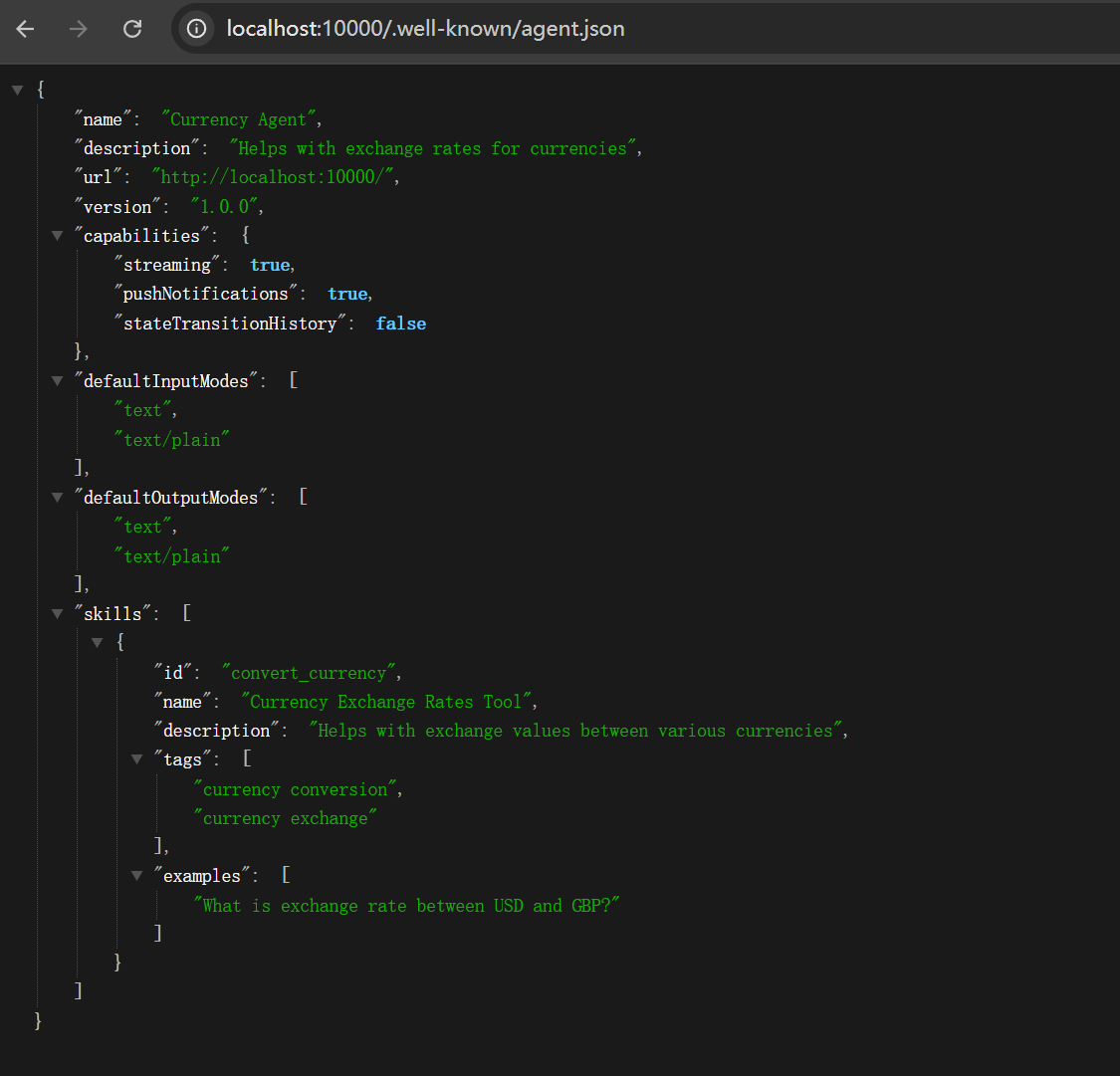
also support cloud deployed Agent
2, Use Claude to Register the Currency Agent
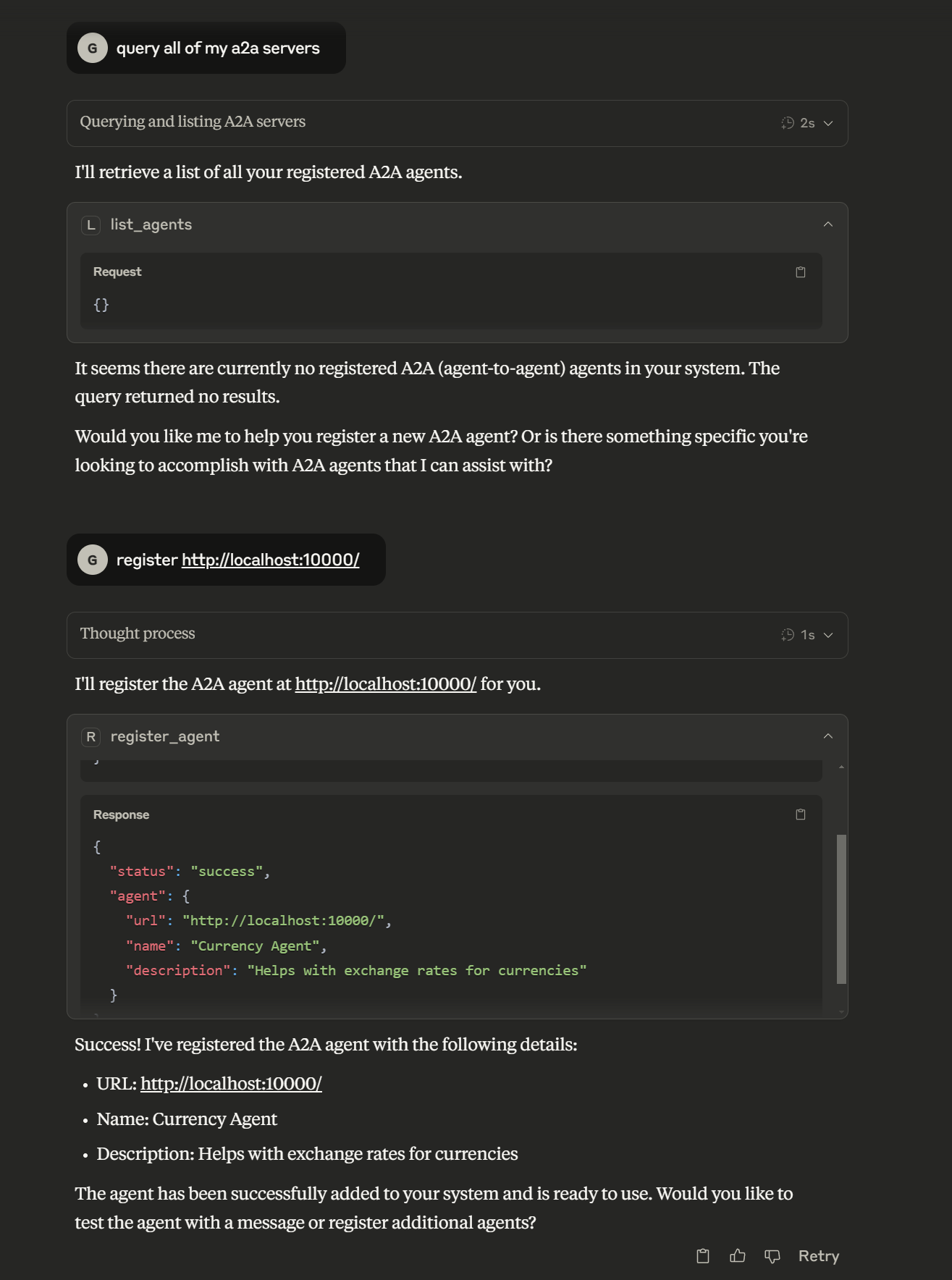
3, Use Claude to Send a task to the Currency Agent and get the result
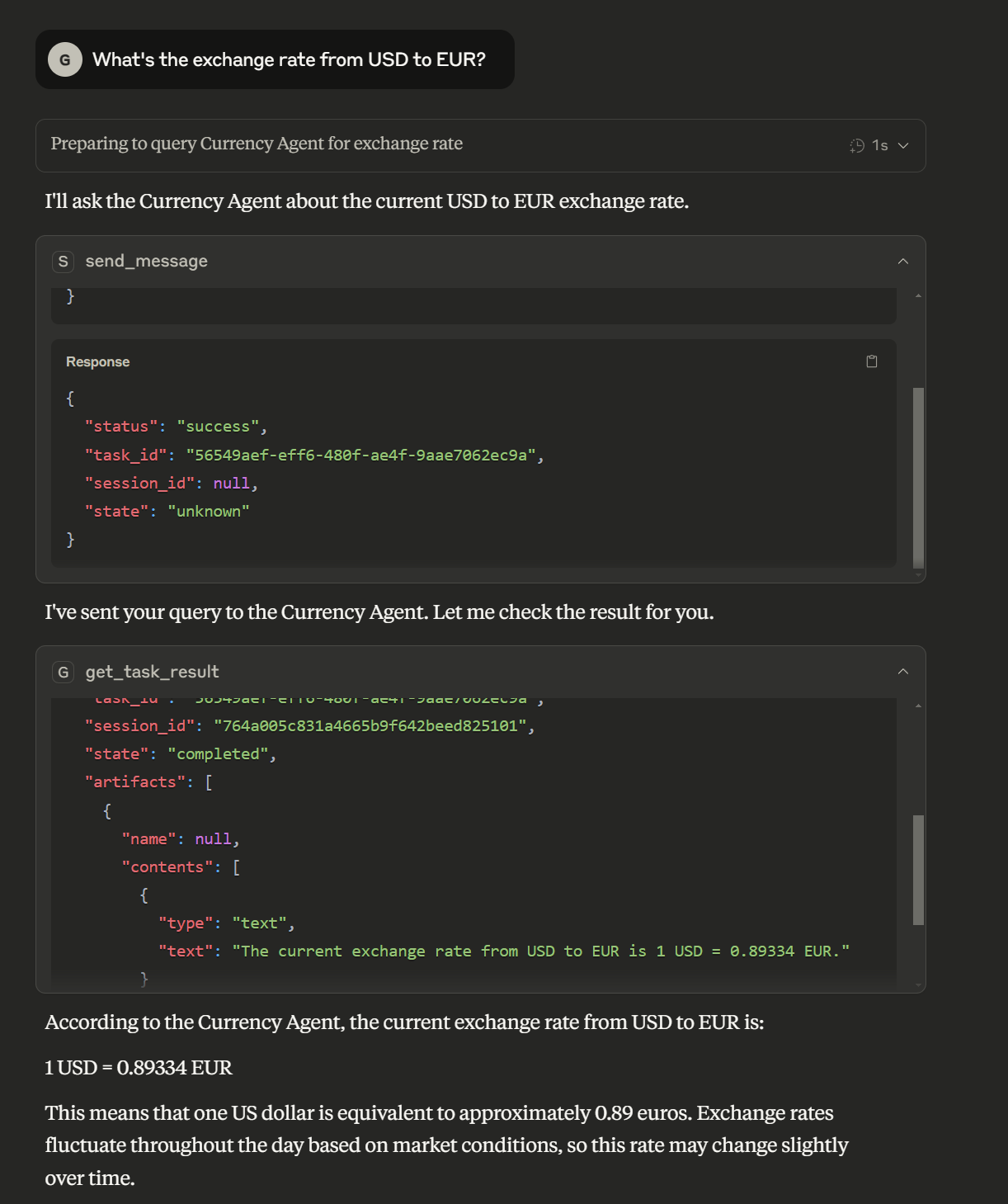
Features
- Agent Management
- Register A2A agents with the bridge server
- List all registered agents
- Unregister agents when no longer needed
- Communication
- Send messages to A2A agents and receive responses
- Stream responses from A2A agents in real-time
- Task Management
- Track which A2A agent handles which task
- Retrieve task results using task IDs
- Cancel running tasks
- Transport Support
- Multiple transport types: stdio, streamable-http, SSE
- Configure transport type using MCP_TRANSPORT environment variable
Installation
Installing via Smithery
To install A2A Bridge Server for Claude Desktop automatically via Smithery:
npx -y @smithery/cli install @GongRzhe/A2A-MCP-Server --client claudeOption 1: Install from PyPI
pip install a2a-mcp-serverOption 2: Local Installation
1. Clone the repository:
git clone https://github.com/GongRzhe/A2A-MCP-Server.git
   cd A2A-MCP-Server
2. Set up a virtual environment:
python -m venv .venv
   source .venv/bin/activate  # On Windows: .venv\Scripts\activate
3. Install dependencies:
pip install -r requirements.txtConfiguration
Environment Variables
Configure how the MCP server runs using these environment variables:
# Transport type: stdio, streamable-http, or sse
export MCP_TRANSPORT="streamable-http"

# Host for the MCP server
export MCP_HOST="0.0.0.0"

# Port for the MCP server (when using HTTP transports)
export MCP_PORT="8000"

# Path for the MCP server endpoint (when using HTTP transports)
export MCP_PATH="/mcp"

# Path for SSE endpoint (when using SSE transport)
export MCP_SSE_PATH="/sse"

# Enable debug logging
export MCP_DEBUG="true"
Transport Types
The A2A MCP Server supports multiple transport types:
1. stdio (default): Uses standard input/output for communication
- Ideal for command-line usage and testing
- No HTTP server is started
- Required for Claude Desktop
2. streamable-http (recommended for web clients): HTTP transport with streaming support
- Recommended for production deployments
- Starts an HTTP server to handle MCP requests
- Enables streaming of large responses
3. sse: Server-Sent Events transport
- Provides real-time event streaming
- Useful for real-time updates
To specify the transport type:
# Using environment variable
export MCP_TRANSPORT="streamable-http"
uvx a2a-mcp-server

# Or directly in the command
MCP_TRANSPORT=streamable-http uvx a2a-mcp-server
Running the Server
From Command Line
# Using default settings (stdio transport)
uvx a2a-mcp-server

# Using HTTP transport on specific host and port
MCP_TRANSPORT=streamable-http MCP_HOST=127.0.0.1 MCP_PORT=8080 uvx a2a-mcp-server
Configuring in Claude Desktop
Claude Desktop allows you to configure MCP servers in the claude_desktop_config.json file. This file is typically located at:
- Windows:
%APPDATA%\Claude\claude_desktop_config.json - macOS:
~/Library/Application Support/Claude/claude_desktop_config.json - Linux:
~/.config/Claude/claude_desktop_config.json
Method 1: PyPI Installation (Recommended)
Add the following to the mcpServers section of your claude_desktop_config.json:
"a2a": {
  "command": "uvx",
  "args": [
    "a2a-mcp-server"
  ]
}
Note that for Claude Desktop, you must use "MCP_TRANSPORT": "stdio" since Claude requires stdio communication with MCP servers.
Method 2: Local Installation
If you've cloned the repository and want to run the server from your local installation:
"a2a": {
  "command": "C:\\path\\to\\python.exe",
  "args": [
    "C:\\path\\to\\A2A-MCP-Server\\a2a_mcp_server.py"
  ],
  "env": {
    "MCP_TRANSPORT": "stdio",
    "PYTHONPATH": "C:\\path\\to\\A2A-MCP-Server"
  }
}
Replace C:\\path\\to\\ with the actual paths on your system.
Using the Config Creator
This repository includes a config_creator.py script to help you generate the configuration:
# If using local installation
python config_creator.py
The script will:
- Automatically detect Python, script, and repository paths when possible
- Configure stdio transport which is required for Claude Desktop
- Let you add any additional environment variables if needed
- Create or update your Claude Desktop configuration file
Complete Example
Here's an example of a complete claude_desktop_config.json file with the A2A-MCP-Server configured:
{
  "mcpServers": {
    "a2a": {
      "command": "uvx",
      "args": [
        "a2a-mcp-server"
      ]
    }
  }
}
Using with MCP Clients
Claude
Claude can use A2A agents through the MCP tools provided by this server. Here's how to set it up:
1. For Claude Web: Start the MCP server with the streamable-http transport:
MCP_TRANSPORT=streamable-http MCP_HOST=127.0.0.1 MCP_PORT=8000 uvx a2a-mcp-server2. For Claude Web: In Claude web interface, enable the MCP URL connection in your Tools menu.
- Use the URL:
http://127.0.0.1:8000/mcp
3. For Claude Desktop: Add the configuration to your claude_desktop_config.json file as described above. The easiest way is to use the provided config_creator.py script which will automatically detect paths and create the proper configuration.
4. In Claude, you can now use the following functions:
Register an A2A agent:
I need to register a new agent. Can you help me with that?
   (Agent URL: http://localhost:41242)
Send message to an agent:
Ask the agent at http://localhost:41242 what it can do.Retrieve task results:
Can you get the results for task ID: 550e8400-e29b-41d4-a716-446655440000?Cursor IDE
Cursor IDE can connect to MCP servers to add tools to its AI assistant:
1. Run your A2A MCP server with the streamable-http transport:
MCP_TRANSPORT=streamable-http MCP_HOST=127.0.0.1 MCP_PORT=8000 uvx a2a-mcp-server2. In Cursor IDE, go to Settings > AI > MCP Servers
- Add a new MCP Server with URL:
http://127.0.0.1:8000/mcp - Enable the server
3. Now you can use the A2A tools from within Cursor's AI assistant.
Windsurf Browser
Windsurf is a browser with built-in MCP support:
1. Run your A2A MCP server with the streamable-http transport:
MCP_TRANSPORT=streamable-http MCP_HOST=127.0.0.1 MCP_PORT=8000 uvx a2a-mcp-server2. In Windsurf browser, go to Settings > MCP Connections
- Add a new MCP connection with URL:
http://127.0.0.1:8000/mcp - Enable the connection
3. You can now use A2A tools from within Windsurf's AI assistant.
Available MCP Tools
The server exposes the following MCP tools for integration with LLMs like Claude:
Agent Management
- register_agent: Register an A2A agent with the bridge server
{
    "name": "register_agent",
    "arguments": {
      "url": "http://localhost:41242"
    }
}- list_agents: Get a list of all registered agents
{
    "name": "list_agents",
    "arguments": {}
}- unregister_agent: Remove an A2A agent from the bridge server
{
    "name": "unregister_agent",
    "arguments": {
      "url": "http://localhost:41242"
    }
  }
Message Processing
- send_message: Send a message to an agent and get a task_id for the response
{
    "name": "send_message",
    "arguments": {
      "agent_url": "http://localhost:41242",
      "message": "What's the exchange rate from USD to EUR?",
      "session_id": "optional-session-id"
    }
}- send_message_stream: Send a message and stream the response
{
    "name": "send_message_stream",
    "arguments": {
      "agent_url": "http://localhost:41242",
      "message": "Tell me a story about AI agents.",
      "session_id": "optional-session-id"
    }
  }
Task Management
- get_task_result: Retrieve a task's result using its ID
{
    "name": "get_task_result",
    "arguments": {
      "task_id": "b30f3297-e7ab-4dd9-8ff1-877bd7cfb6b1",
      "history_length": null
    }
}- cancel_task: Cancel a running task
{
    "name": "cancel_task",
    "arguments": {
      "task_id": "b30f3297-e7ab-4dd9-8ff1-877bd7cfb6b1"
    }
  }
Usage Examples
Basic Workflow
1. Client registers an A2A agent
   ↓
2. Client sends a message to the agent (gets task_id)
   ↓
3. Client retrieves the task result using task_id
Example with Claude as the MCP Client
User: Register an agent at http://localhost:41242

Claude uses: register_agent(url="http://localhost:41242")
Claude: Successfully registered agent: ReimbursementAgent

User: Ask the agent what it can do

Claude uses: send_message(agent_url="http://localhost:41242", message="What can you do?")
Claude: I've sent your message. Here's the task_id: b30f3297-e7ab-4dd9-8ff1-877bd7cfb6b1

User: Get the answer to my question

Claude uses: get_task_result(task_id="b30f3297-e7ab-4dd9-8ff1-877bd7cfb6b1")
Claude: The agent replied: "I can help you process reimbursement requests. Just tell me what you need to be reimbursed for, including the date, amount, and purpose."
Architecture
The A2A MCP server consists of several key components:
1. FastMCP Server: Exposes tools to MCP clients
2. A2A Client: Communicates with registered A2A agents
3. Task Manager: Handles task forwarding and management
4. Agent Card Fetcher: Retrieves information about A2A agents
Communication Flow
MCP Client → FastMCP Server → A2A Client → A2A Agent
                   ↑                ↓
                   └──── Response ──┘
Task ID Management
When sending a message to an A2A agent, the server:
1. Generates a unique task_id
2. Maps this ID to the agent's URL in the task_agent_mapping dictionary
3. Returns the task_id to the MCP client
4. Uses this mapping to route task retrieval and cancellation requests
Error Handling
The server provides detailed error messages for common issues:
- Agent not registered
- Task ID not found
- Connection errors to agents
- Parsing errors in responses
Troubleshooting
Agent Registration Issues
If an agent can't be registered:
- Verify the agent URL is correct and accessible
- Check if the agent has a proper agent card at
/.well-known/agent.json
Message Delivery Problems
If messages aren't being delivered:
- Ensure the agent is registered (use
list_agents) - Verify the agent is running and accessible
Task Result Retrieval Issues
If you can't retrieve a task result:
- Make sure you're using the correct task_id
- Check if too much time has passed (some agents might discard old tasks)
Transport Issues
If you have issues with a specific transport type:
- stdio issues: Ensure input/output streams are not redirected or modified
- streamable-http issues: Check if the port is available and not blocked by a firewall
- sse issues: Verify the client supports Server-Sent Events
Claude Desktop Configuration Issues
If Claude Desktop isn't starting your A2A-MCP-Server:
- Check that the paths in your
claude_desktop_config.jsonare correct - Verify that Python is in your PATH if using
"command": "python" - For local installation, ensure the PYTHONPATH is correct
- Make sure
MCP_TRANSPORTis set to"stdio"in theenvsection - Try running the command manually to see if it works outside of Claude
- Use the
config_creator.pyscript for automatic path detection and configuration
Development
Adding New Tool Methods
To add new capabilities to the server, add methods decorated with @mcp.tool() in the a2a_mcp_server.py file.
Custom Task Manager
The server uses a custom A2AServerTaskManager class that extends InMemoryTaskManager. You can customize its behavior by modifying this class.
Project Structure
a2a-mcp-server/
├── a2a_mcp_server.py      # Main server implementation
├── common/                # A2A protocol code (from google/A2A)
│   ├── client/            # A2A client implementation
│   ├── server/            # A2A server implementation
│   ├── types.py           # Common type definitions
│   └── utils/             # Utility functions
├── config_creator.py      # Script to help create Claude Desktop configuration
├── .gitignore             # Git ignore file
├── pyproject.toml         # Project metadata and dependencies
├── README.md              # This file
└── requirements.txt       # Project dependencies
License
This project is licensed under the Apache License, Version 2.0 - see the LICENSE file for details.
The code in the common/ directory is from the Google A2A project and is also licensed under the Apache License, Version 2.0.
Acknowledgments
- Anthropic for the Model Context Protocol
- Google for the Agent-to-Agent Protocol
- Contributors to the FastMCP library
Similar MCP
Based on tags & features
Trending MCP
Most active this week