
MCPNotes
A simple note-taking MCP server for recording and managing notes with AI models.
Documentation
📝 MCP Notes
✨ Overview
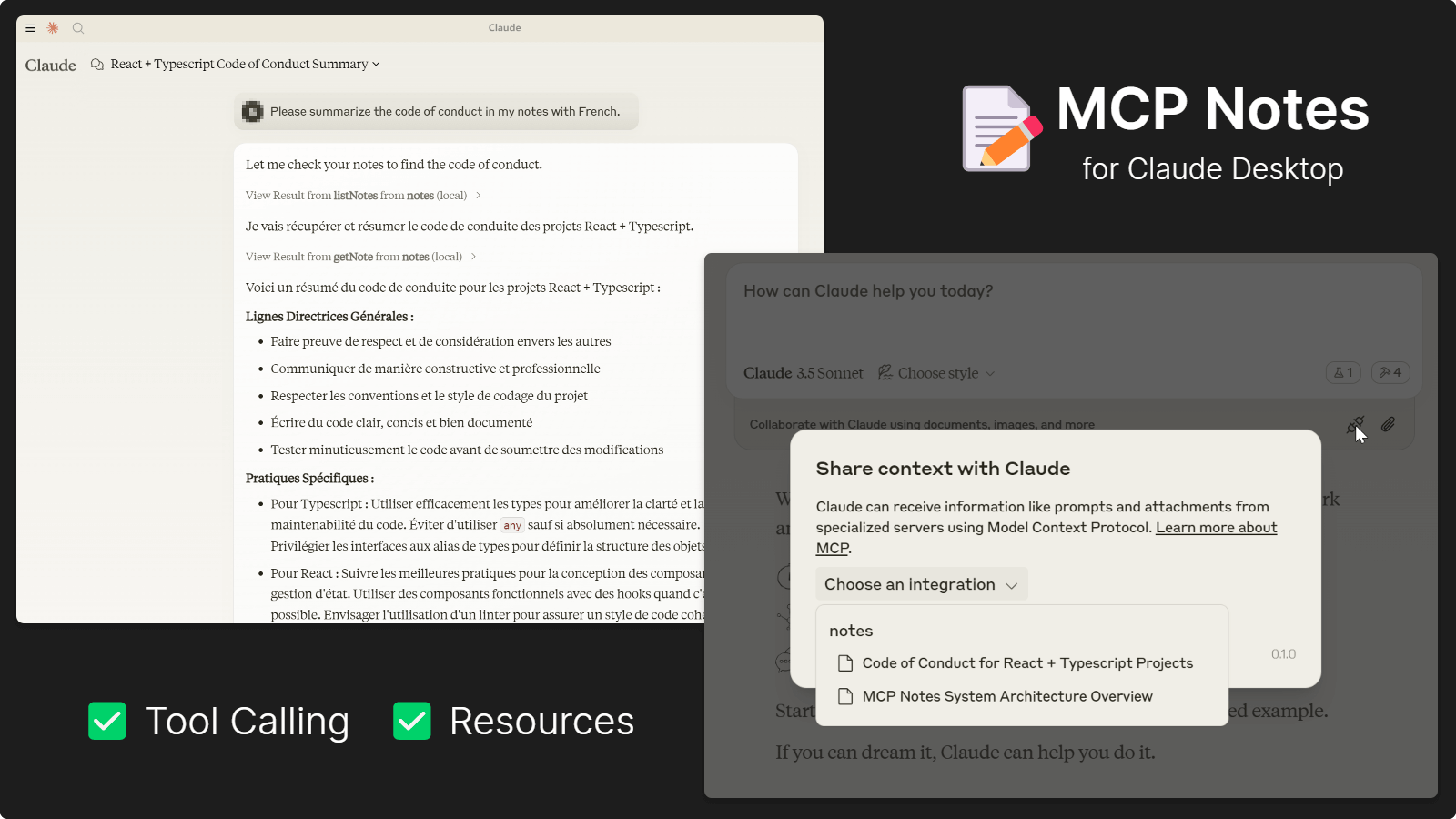
MCP Notes Server is a simple note-taking application built on top of the MCP protocol. Its purpose is to enable users to record and view complex notes and tasks while utilizing AI models, such as recording personal thoughts, notes, inspirations, and insights. It does not rely on creating project files, allowing users to record any content without making it public within the project.
This project includes two servers: a Node.js server using the Model Context Protocol (MCP) for AI-driven note management and a web server providing a user-friendly interface for manual interaction with your notes.
Note: This project requires DynamoDB for note storage. You'll need an AWS account to use it. AWS offers a generous free tier for DynamoDB, making it suitable for frequent personal use at no cost.
🎯 Core Features
- 🖥️ Dual Server Architecture: MCP server for AI-driven note management and Web server for the user interface
- 🤖 AI-Powered Note Taking: Record thoughts, insights, and tasks through AI interactions
- 🗂️ Comprehensive Note Management: Create, list, retrieve, update, and delete notes via AI or web interface
- 📋 Reliable Storage: Secure and efficient note storage with AWS DynamoDB
- 🔐 Flexible Authentication: Support for AWS credentials via connection strings or environment variables
- 📝 Project-Independent: Store personal notes without affecting project files or structure
🤖 Model Support
You can use any model that supports function calls as long as your client supports MCP. The following models have been tested and confirmed to work:
- Claude 3.5 Series
- Gemini 1.5 and 2.0 Series
- GPT-4 Series
- Mistral Large
- Grok-2
- DeepSeek Chat
🛠️ Installation
Recommended
Run directly with `npx` or `bunx`, see examples below.
Alternative
1. Ensure Node.js is installed on your system.
2. Clone this repository and install dependencies with: `npm install`
3. Configure Claude Desktop or any other tools as shown below
⚙️ Credential Configuration
Connection String
dynamodb://:@/> Example: `dynamodb://AKIAXXXXXXXX:SKXXXXXXXX@us-east-1/mcp-notes`
Environment Variables
1. Export `AWS_ACCESS_KEY_ID` and `AWS_SECRET_ACCESS_KEY`.
2. Supply connection information without credentials in the URI: `dynamodb://us-east-1/mcp-notes`
🤖 Integration with Tools
Claude Desktop
Add this snippet to `claude_desktop_config.json`:
{
  "mcpServers": {
    "mcp-notes": {
      "command": "npx",
      "args": [
        "-y",
        "-p",
        "mcp-notes",
        "mcp-notes-server",
        "--dynamodb",
        "dynamodb://access_key:secret_key@region/table"
      ]
    }
  }
}
or file on local disks:
{
  "mcpServers": {
    "mcp-notes": {
      "command": "node",
      "args": [
        "file://path/to/notes-mcp-server.js",
        "--dynamodb",
        "dynamodb://access_key:secret_key@region/table"
      ]
    }
  }
}
Cody
> Note: Currently, Cody has limited MCP server support.
> It only allows one server connection and cannot make tool calls. You'll need to use the web interface to create and manage notes and then reference them in AI chat conversations.
Add this snippet to your VS Code settings:
{
  "openctx.providers": {
    "https://openctx.org/npm/@openctx/provider-modelcontextprotocol": {
      "nodeCommand": "node",
      "mcp.provider.uri": "file://path/to/notes-mcp-server.js",
      "mcp.provider.args": [
        "--dynamodb",
        "dynamodb://access_key:secret_key@region/table"
      ]
    }
  }
}
alternatively, use with `npx` (not guaranteed to work):
{
  "openctx.providers": {
    "https://openctx.org/npm/@openctx/provider-modelcontextprotocol": {
      "nodeCommand": "node",
      "mcp.provider.uri": "file:///usr/local/bin/npx",
      "mcp.provider.args": [
        "-y",
        "-p",
        "mcp-notes",
        "mcp-notes-server",
        "--dynamodb",
        "dynamodb://access_key:secret_key@region/table"
      ]
    }
  }
}
Cline
Add this snippet to `cline_mcp_settings.json`:
> You will find a "MCP Server" icon next to the "New Task" button, and then there is an "Edit MCP Settings" button to open this file.
{
  "mcpServers": {
    "mcp-notes": {
      "command": "npx",
      "args": [
        "-y",
        "-p",
        "mcp-notes",
        "mcp-notes-server",
        "--dynamodb",
        "dynamodb://access_key:secret_key@region/table"
      ]
    }
  }
}
🚀 Running Web Servers
The web server provides a user-friendly interface for managing your notes. You can launch web interfaces to manage your notes, add new notes for AI, or modify parts of AI-generated notes.
npx -p mcp-notes mcp-notes-web-server --dynamodb "dynamodb://access_key:secret_key@region/table"bun src/notes-web-server.ts --dynamodb "dynamodb://access_key:secret_key@region/table"> Alternatively, compile with `npm run build` and run `node dist/notes-mcp-server.js` or `node dist/notes-web-server.js`
Then navigate to `http://localhost:3100` in your browser to view notes.
🔧 Available MCP Tools
listNotes
- Input: `{ tags?: string[] }`
- Output: Array of all notes, optionally filtered by tags.
getNote
- Input: `{ id: string }`
- Output: A single note object matching the given ID, or a "not found" message if no match exists.
writeNote
- Input: `{ id: string, title: string, summary: string, tags: string[], content: string }`
- Output: A success confirmation message.
deleteNote
- Input: `{ id: string }`
- Output: Deletion confirmation message 🚮.
📝 Data Structure
Notes are stored using the following structure:
- `id`: A unique identifier for the note. It should be descriptive, with a random number suffix, like "meeting-notes-1362".
- `title`: The title of the note.
- `summary`: A short summary of the note's content.
- `tags`: An array of tags associated with the note (e.g., ["meeting", "project-x"]).
- `content`: The main content of the note.
📸 Screenshots
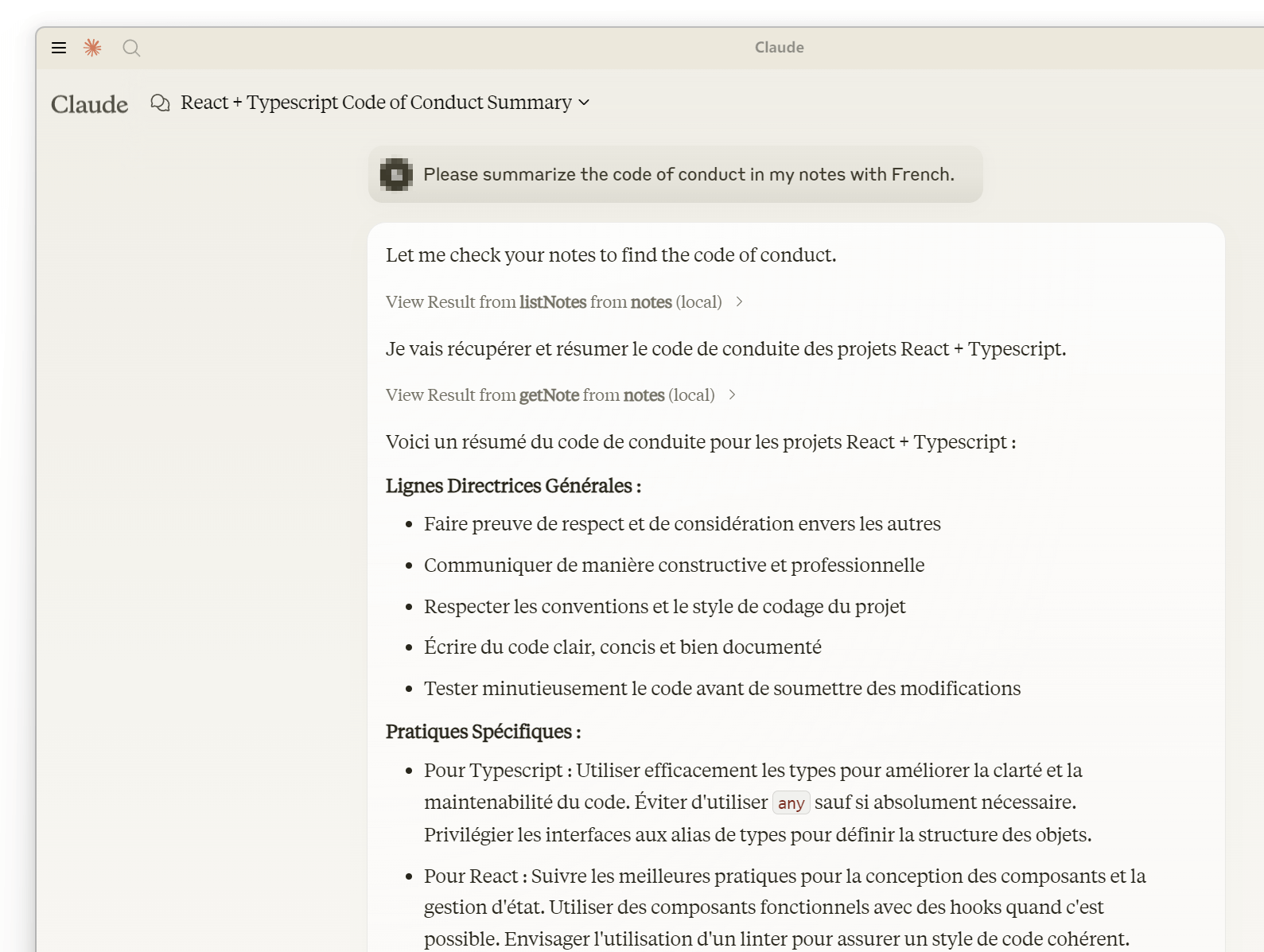
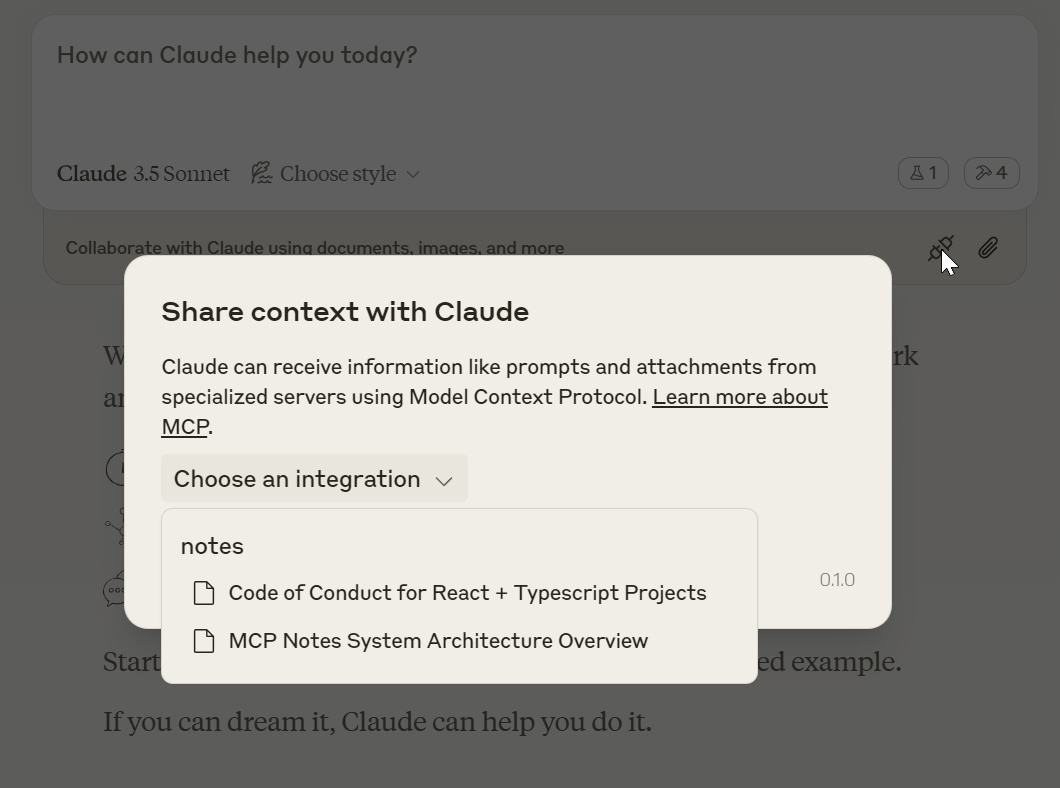
Claude Desktop
✅ Full functionality
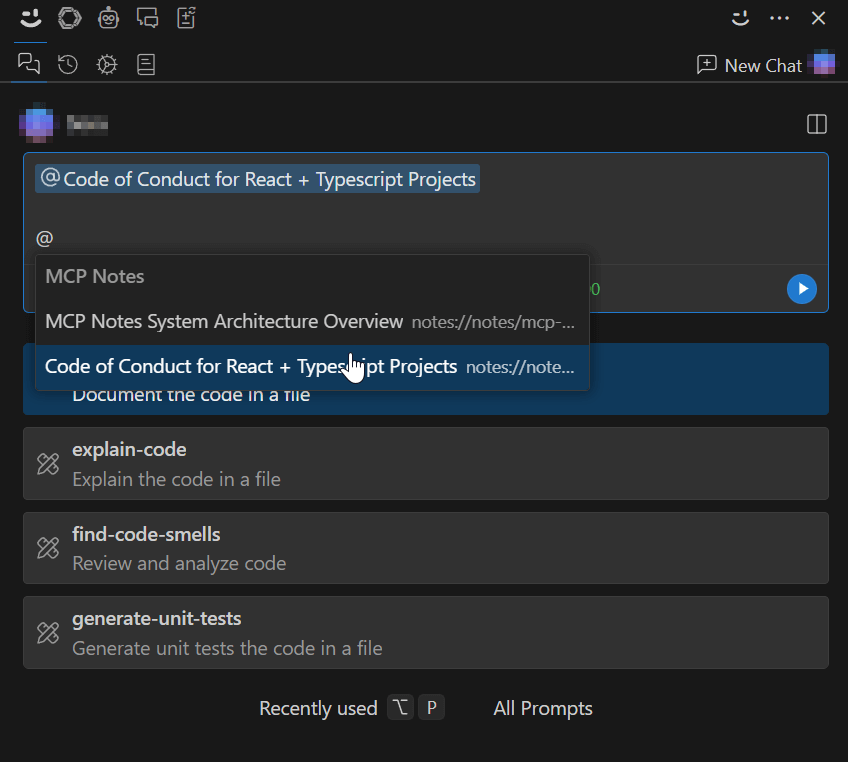
Cody
✅ Mention Notes via Resource
❎ Tool calls are not supported
Cline
✅ Full functionality with Tool Calls
❓ Resources don't seem to work; help wanted.
Frequently asked questions
What is MCPNotes?
MCPNotes is A simple note-taking MCP server for recording and managing notes with AI models.
How do I install MCPNotes?
Open the GitHub repository and follow its README. Most MCP servers are added to your client's MCP config, then called by your agent.
Is MCPNotes open source?
Yes — it is hosted on GitHub at https://github.com/9Ninety/MCPNotes and has 36 stars.
Related MCP tools
 wigolo
The go-to web for your AI coding agent — local-first search, fetch, crawl & research over MCP. No API keys, no cloud, $0/query. Public beta.
 gemini-mcp-tool
MCP server that enables AI assistants to interact with Google Gemini CLI, leveraging Gemini's massive token window for large file analysis and codebase understanding
 tuui
tuuiA desktop MCP client designed as a tool unitary utility integration, accelerating AI adoption through the Model Context Protocol (MCP) and enabling cross-vendor LLM API orchestration.
 Unity-MCP
AI Skills, MCP Tools, and CLI for Unity Engine. Full AI develop and test loop. Use cli for quick setup. Efficient token usage, advanced tools. Any C# method may be turned into a tool by a single line. Works with Claude Code, Gemini, Copilot, Cursor and any other absolutely for free.
 atlassian-mcp-server
Official remote MCP server for Atlassian. Securely connect Jira, Confluence, Jira Service Management, Bitbucket, and Compass to Claude, ChatGPT, Cursor, VS Code, and other AI tools using OAuth 2.1 or API tokens.
 repomix
📦 Repomix is a powerful tool that packs your entire repository into a single, AI-friendly file. Perfect for when you need to feed your codebase to Large Lan...
Run your own MCP server? See who uses it and what to fix.
Measure it with TrackMCP