Track MCP LogoTrack MCP

The world's largest repository of Model Context Protocol servers. Discover, explore, and submit MCP tools.

Product

  • Categories
  • Top MCP
  • New & Updated
  • Submit MCP

Company

  • About

Legal

  • Privacy Policy
  • Terms of Service
  • Cookie Policy

© 2026 TrackMCP. All rights reserved.

Built with ❤️ by Krishna Goyal

    Y Cli

    A Tiny Terminal Chat App for AI Models with MCP Client Support Python-based implementation.

    189 stars
    Python
    Updated Oct 19, 2025

    Table of Contents

    • Demo
    • Context
    • Always-on
    • Orchestration
    • Capabilities
    • Install / Run
    • Deploy (AWS)
    • Minimal config keys
    • Blog Post

    Table of Contents

    • Demo
    • Context
    • Always-on
    • Orchestration
    • Capabilities
    • Install / Run
    • Deploy (AWS)
    • Minimal config keys
    • Blog Post

    Documentation

    y-agent

    A personal AI agent system built on top of coding agents.

    Renamed from y-cli. y-cli wrapped model APIs; y-agent wraps coding agents.

    Demo
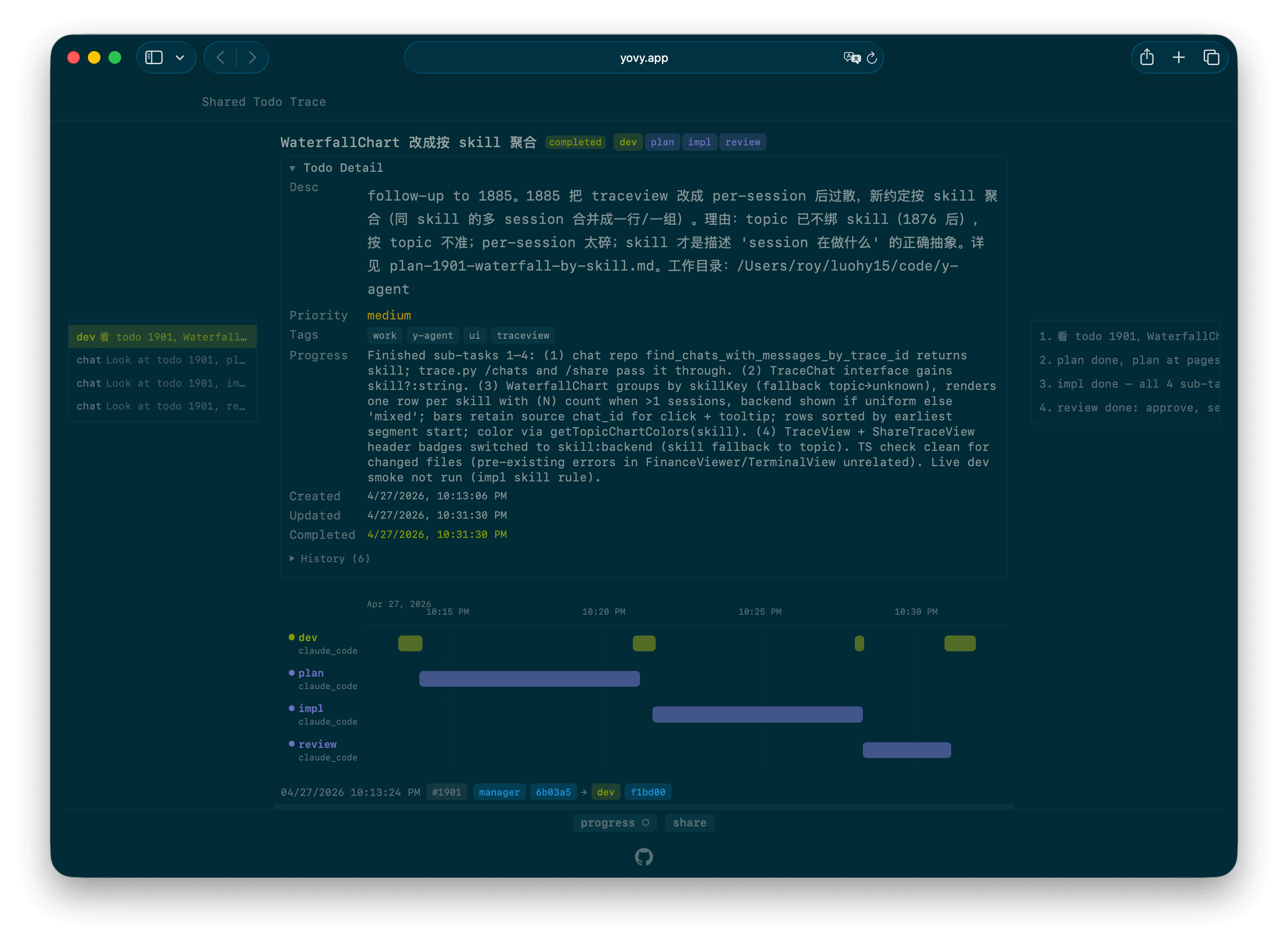
    y-agent TraceView

    A real trace: https://yovy.app/t/6fc5c4

    ---

    Coding agents like Claude Code / Codex are great for code, but code is only part of my daily life. I also have ledgers, calendars, todos, notes, emails. I want the agent to handle those too.

    Three things came up while extending a coding agent into a personal agent system:

    1. How to give the agent context

    2. How to keep the agent always-on

    3. How to orchestrate multiple agents

    Context

    Same data for me and for the agent. Files go through read / write / edit. Anything I'd reach for a GUI to do, the agent reaches for a CLI — it's already happy in Bash. Rule: whatever I can do in the GUI, the agent can do via CLI. The underlying file or DB row is the same.

    Always-on

    I don't want to carry a laptop or open a terminal to use it. Coding agents run on a remote VM (EC2) inside tmux; a tail process parses their output into the database, so the web UI can chat with them directly. A Telegram bot covers mobile input. EC2 auto-hibernates when idle, so cost is near zero when nothing is running.

    Orchestration

    One session usually can't handle the whole thing — requests have to be routed to the right session. Claude Code ships sub-agents, but I wanted that layer outside, so sub-agent chats stay in my own DB and I can steer them mid-run.

    code
    user        ┌──────────────────┐
       input ────► │  skill: manager  │   dispatch only,
            │     └────────┬──────────┘   no execution
            │              │   y chat --skill dev -m "..."
            │              ▼
            │     ┌──────────────────┐
            ├───► │  skill: dev      │   coordinator,
            │     │                  │   runs lower-level skill sessions
            │     └──┬──────┬──────┬─┘
            │        │      │      │   y chat --skill {plan,impl,review}
            │        ▼      ▼      ▼
            │     ┌──────┐ ┌──────┐ ┌────────┐
            └───► │ plan │ │ impl │ │ review │   anonymous, ephemeral;
                  └──────┘ └──────┘ └────────┘   skill loaded per dispatch

    A trace_id (= todo_id when the task is tracked) threads the whole tree, so TraceView renders the chain as a waterfall.

    Capabilities

    A running deployment ships these out of the box:

    • Todo — full-stack CRUD, kanban, pagination, pin, search, history.
    • Note — structured notes with content_key file pointers and JSON front-matter; Journals + Pages panels.
    • Entity (knowledge graph) — link notes and RSS feeds to people, projects, or any concept.
    • Calendar — timezone-aware events, current-time ticker.
    • Reminder — time-based reminders delivered via Telegram, optionally attached to a todo or event.
    • Link archive — Chrome bookmark sync; Twitter / X, Bilibili, WeChat article download; in-app markdown preview.
    • RSS — feed subscription with a two-stage scrape pipeline; per-item content on S3.
    • Finance — beancount balance sheet, income statement, portfolio tracker.
    • Email — Gmail sync for lightweight inbox review.
    • Trace + Share — every cross-skill call chain has a waterfall TraceView, shareable as a public page (optionally with password).
    • Dev worktrees — y dev CLI + web panel to create/remove worktrees per task, auto-commit, dynamic merge target.
    • Telegram bot — webhook with secret verification, forum topic routing, markdown → HTML conversion.
    • Web terminal — shell access scoped to the current VM / work_dir.
    • Git panel — file-level status, diff viewer, per-file discard.
    • File viewer / editor — syntax highlighting, line numbers, unsaved-edits preview, click-to-open relative links.

    Install / Run

    UV workspace. Needs Python 3.11+, Node 20+, the UV package manager, and an AWS account for the deployed version. Local dev runs entirely on your machine.

    bash
    # Install the CLI (wires the workspace into a tool venv)
    uv tool install --force -e ./cli
    
    # Configure
    mkdir -p ~/.y-agent
    $EDITOR ~/.y-agent/config.toml        # see "Minimal config keys" below
    
    # Init schema (once)
    cd admin && uv run python -c "from handler import lambda_handler; lambda_handler({'action':'init_db'}, None)"
    
    # Dev API server (port 8001)
    cd api && uv run uvicorn api.app:app --reload --port 8001
    
    # Dev web (port 5174+, auto-selects next free port per worktree)
    cd web && npm install && npm run dev
    
    # Dev worker (Celery filesystem broker)
    cd worker && uv run celery -A worker.celery_app worker --loglevel=info

    Deploy (AWS)

    bash
    ./scripts/deploy.sh          # SAM build + deploy backend (Lambda + SQS + EventBridge)
    ./scripts/deploy-web.sh      # Vite build + S3 sync + CloudFront invalidation
    
    # Branch previews
    ./scripts/deploy-preview.sh
    ./scripts/list-previews.sh
    ./scripts/delete-preview.sh

    Minimal config keys

    KeyPurpose
    DATABASE_URLPostgreSQL connection string
    JWT_SECRET_KEYHS256 signing key for auth
    SQS_QUEUE_URLChat task queue (dev: Celery filesystem broker instead)
    TELEGRAM_BOT_TOKEN, TELEGRAM_WEBHOOK_SECRETTelegram bot surface
    GOOGLE_CLIENT_IDGoogle Sign-In
    Y_AGENT_S3_BUCKETLink + RSS content storage
    Y_AGENT_TIMEZONEIANA tz for calendar/journal/display
    FETCHER_URLOptional upstream fetcher for link downloads

    Blog Post

    Longer write-up, design rationale, and comparisons: full blog post.

    Similar MCP

    Based on tags & features

    • VI

      Video Editing Mcp

      Python·
      218
    • DA

      Davinci Resolve Mcp

      Python·
      327
    • PL

      Playwright Plus Python Mcp

      Python·
      154
    • AW

      Aws Mcp Server

      Python·
      165

    Trending MCP

    Most active this week

    • PL

      Playwright Mcp

      TypeScript·
      22.1k
    • SE

      Serena

      Python·
      14.5k
    • MC

      Mcp Playwright

      TypeScript·
      4.9k
    • MC

      Mcp Server Cloudflare

      TypeScript·
      3.0k
    View All MCP Servers

    Similar MCP

    Based on tags & features

    • VI

      Video Editing Mcp

      Python·
      218
    • DA

      Davinci Resolve Mcp

      Python·
      327
    • PL

      Playwright Plus Python Mcp

      Python·
      154
    • AW

      Aws Mcp Server

      Python·
      165

    Trending MCP

    Most active this week

    • PL

      Playwright Mcp

      TypeScript·
      22.1k
    • SE

      Serena

      Python·
      14.5k
    • MC

      Mcp Playwright

      TypeScript·
      4.9k
    • MC

      Mcp Server Cloudflare

      TypeScript·
      3.0k