Track MCP LogoTrack MCP

The world's largest repository of Model Context Protocol servers. Discover, explore, and submit MCP tools.

Product

  • Categories
  • Top MCP
  • New & Updated
  • Submit MCP

Company

  • About

Legal

  • Privacy Policy
  • Terms of Service
  • Cookie Policy

© 2026 TrackMCP. All rights reserved.

Built with ❤️ by Krishna Goyal

    Vscode Mcp

    75 stars
    TypeScript
    Updated Oct 15, 2025

    Table of Contents

    • Project Structure
    • Quick Start
    • Configuration
    • Goose Desktop Setup
    • Claude Desktop Setup
    • Available Tools
    • create_diff
    • open_file
    • open_project
    • check_extension_status
    • get_extension_port
    • list_available_projects
    • License

    Table of Contents

    • Project Structure
    • Quick Start
    • Configuration
    • Goose Desktop Setup
    • Claude Desktop Setup
    • Available Tools
    • create_diff
    • open_file
    • open_project
    • check_extension_status
    • get_extension_port
    • list_available_projects
    • License

    Documentation

    VSCode MCP

    This monorepo contains the VSCode MCP Server and its companion VSCode Extension, which together enable AI agents and assistants, like Goose or Claude, to interact with VSCode through the Model Context Protocol.

    Project Structure

    code
    vscode-mcp/
    ├── server/    # MCP server implementation
    └── extension/ # VS Code extension

    Quick Start

    1. Install the MCP Server

    bash
    npx vscode-mcp-server install

    2. Install the MCP Extension

    MCP Extension

    Configuration

    Goose Desktop Setup
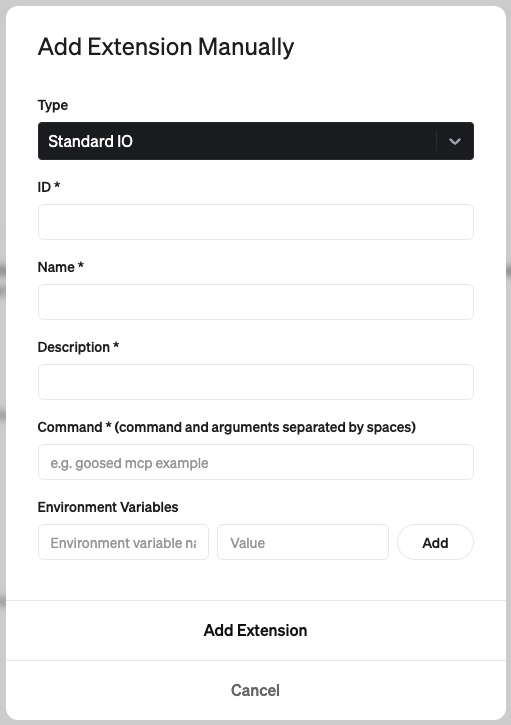
    Goose Settings

    • ID: code-mcp
    • Name: VS Code
    • Description: Allows interaction with VS Code through the Model Context Protocol
    • Command: npx vscode-mcp-server

    Claude Desktop Setup

    Add this to your Claude Desktop config file (~/Library/Application Support/Claude/claude_desktop_config.json):

    json
    {
      "mcpServers": {
        "vscode-mcp-server": {
          "command": "npx",
          "args": ["vscode-mcp-server"],
          "env": {}
        }
      }
    }

    Available Tools

    The Code MCP server provides the following tools for AI agents to interact with VS Code:

    create_diff

    Creates and shows a diff for modifying existing files:

    • Shows changes preview before applying
    • Requires user approval
    • Only works with existing files

    open_file

    Opens files in the VS Code editor:

    • Used for viewing new or modified files

    open_project

    Opens a project folder in VS Code:

    • Sets up working directory for AI agent

    check_extension_status

    Checks if extension is installed and responding

    get_extension_port

    Gets the port number for VS Code MCP Extension

    list_available_projects

    Shows projects from port registry file

    License

    This project is licensed under the Apache License 2.0 - see the LICENSE file for details.

    Copyright 2025 Block, Inc.

    This product includes software developed at Block, Inc.

    Similar MCP

    Based on tags & features

    • OP

      Openai Gpt Image Mcp

      TypeScript·
      75
    • MC

      Mcgravity

      TypeScript·
      71
    • PL

      Pluggedin Mcp Proxy

      TypeScript·
      97
    • MC

      Mcp Open Library

      TypeScript·
      42

    Trending MCP

    Most active this week

    • PL

      Playwright Mcp

      TypeScript·
      22.1k
    • SE

      Serena

      Python·
      14.5k
    • MC

      Mcp Playwright

      TypeScript·
      4.9k
    • MC

      Mcp Server Cloudflare

      TypeScript·
      3.0k
    View All MCP Servers

    Similar MCP

    Based on tags & features

    • OP

      Openai Gpt Image Mcp

      TypeScript·
      75
    • MC

      Mcgravity

      TypeScript·
      71
    • PL

      Pluggedin Mcp Proxy

      TypeScript·
      97
    • MC

      Mcp Open Library

      TypeScript·
      42

    Trending MCP

    Most active this week

    • PL

      Playwright Mcp

      TypeScript·
      22.1k
    • SE

      Serena

      Python·
      14.5k
    • MC

      Mcp Playwright

      TypeScript·
      4.9k
    • MC

      Mcp Server Cloudflare

      TypeScript·
      3.0k