MCP server of OpenDigger
Documentation
OpenDigger MCP Server
A Model Context Protocol (MCP) server for OpenDigger enabling advanced repository analytics and insights through tools and prompts.
Quick Start
# Setup
git clone https://github.com/X-lab2017/open-digger-mcp-server.git

# (Optional) Ensure you're on the master branch
git checkout master

cd open-digger-mcp-server && cd mcp-server
npm install
npm run build

# Start server
npm start
[!IMPORTANT]
Don't forget to configure Cursor (update path in .cursor/mcp.json)
Expected output:
OpenDigger MCP Server running (on stdio)...[!IMPORTANT]
If you are using Cursor AI IDE, you should see the MCP server (**
open-digger-mcp) toast in the bottom-left corner. You should _enable**_ it, & now you can start using the tools and prompts provided by the MCP server. To verify, open Cursor Settings and check the MCP Servers section → you should seeopen-digger-mcplisted there.
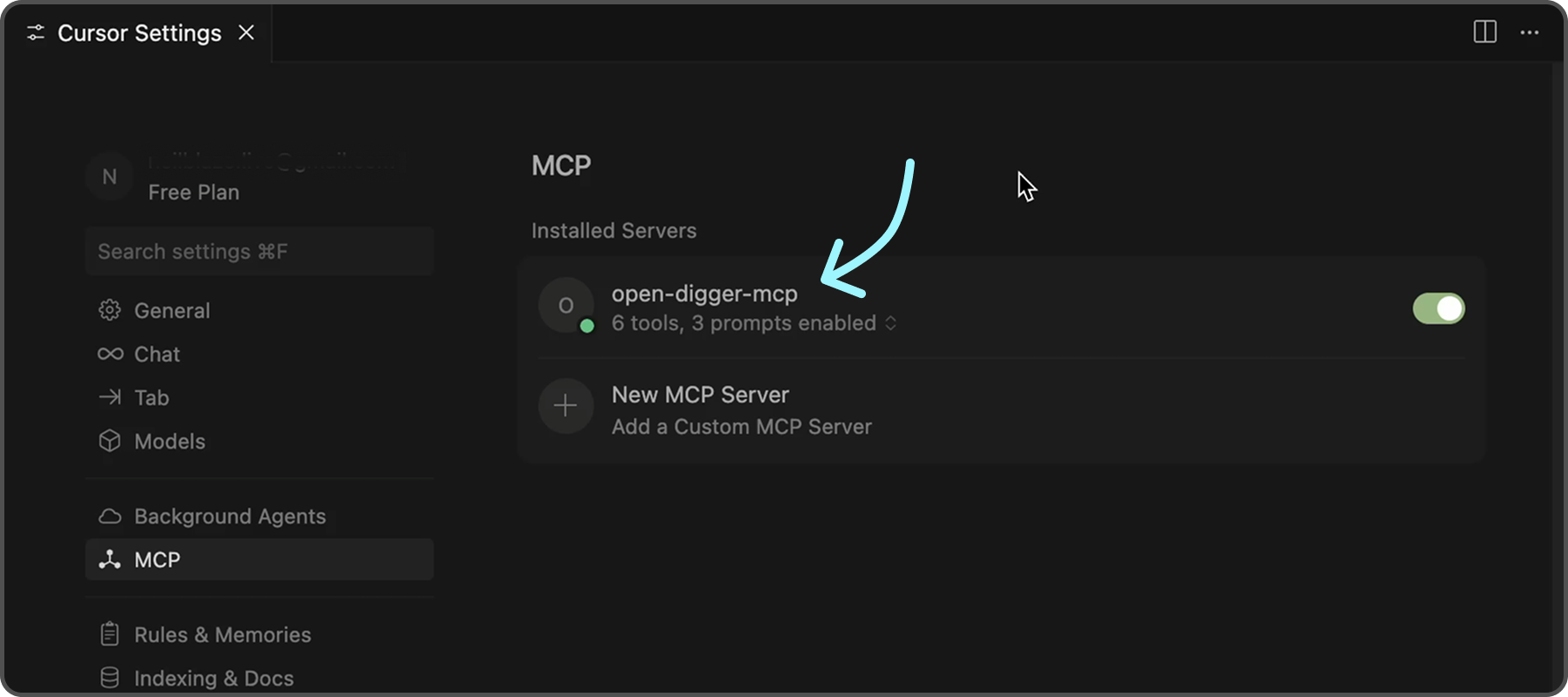
To further confirm that the server is functioning correctly, you can check the following indicators in Cursor:
- ✅ Green dot next to "open-digger-mcp" title
- ✅ "6 tools" displayed in server status
- ✅ "3 prompts" displayed in server status
- ✅ No error messages or red indicators
[!TIP]
Please refer to [
Installation.md](./INSTALLATION.md) for detailed installation instructions and configuration options for different IDEs.
---
Features
Tools (6 Available)
| No. | Tool | Description | |
|---|---|---|---|
| 1 | **get_open_digger_metric** | Fetch single repository metrics | |
| 2 | **get_open_digger_metrics_batch** | Batch operations for multiple metrics | |
| 3 | **compare_repositories** | Multi-repository comparative analysis | |
| 4 | **analyze_trends** | Growth trend analysis over time periods | |
| 5 | **get_ecosystem_insights** | Ecosystem analytics & insights | |
| 6 | **server_health** | System diagnostics and health monitoring (Beta) | d |
Prompts (3 Available)
1. **repo_health_analysis** - Comprehensive repository health reports
2. **repo_comparison** - Competitive repository analysis
3. **developer_insights** - Developer activity and contribution analysis
Metrics
- Core Metrics:
openrank,stars,forks,contributors,participants,issues_new,issues_closed,pull_requests,commits,activity
- Extended Metrics:
technical_fork,bus_factor,releases,inactive_contributors,maintainer_count,community_activity
- Additional Metrics:
change_requests,pull_requests_accepted,pull_requests_merged,issue_comments,issue_response_time,code_change_lines,developer_network
---
💡 Usage Examples
💠 Repository Comparison
Compare microsoft/vscode and facebook/react using the compare_repositories tool💠 Health Analysis
Generate a health report for microsoft/vscode using the repo_health_analysis prompt💠 Trend Analysis
Analyze the growth trends for contributors in microsoft/vscode over 2 years---
Server Status Check
After starting the server, verify it's working:
# In a new terminal
echo '{"jsonrpc":"2.0","id":1,"method":"tools/list","params":{}}' | node dist/index.js
Expected response should list all 6 tools.
Configuration
Environment Variables (.env)
# Cache configuration (recommended)
CACHE_TTL_SECONDS=300

# Optional SSE server
SSE_PORT=3001
SSE_HOST=127.0.0.1
Cursor MCP (.cursor/mcp.json)
{
  "mcpServers": {
    "open-digger": {
      "command": "node",
      "args": ["/full/path/to/dist/index.js"],
      "cwd": "/full/path/to/project",
      "env": {
        "CACHE_TTL_SECONDS": "300"
      }
    }
  }
}
[!TIP]
Replace
/full/path/to/open-digger-mcp-serverwith your actual project directory path. Usepwdto get the current directory path.
Development
npm run watch           # Development mode
npm run build           # Compile TypeScript
npm run clean           # Clean build files
npm run sse:test        # Test SSE server
[!TIP]
Beside Cursor, you can also use other MCP clients like VS Code, Claude Chat, or the official MCP Inspector.
Troubleshooting
Common Issues
Server not appearing in Cursor:
1. Verify absolute paths in .cursor/mcp.json
2. Restart Cursor completely (Cmd+Q / Alt+F4)
3. Check MCP Settings section for error messages
Permission errors:
chmod +x dist/index.jsBuild errors:
npm run clean
npm install
npm run build
Cache issues:
# Clear npm cache
npm cache clean --force

# Rebuild
npm run clean && npm run build
---
Contributing
1. Fork the repository
2. Create your feature branch (git checkout -b feature/amazing-feature)
3. Commit changes (git commit -m 'Add amazing feature')
4. Push to branch (git push origin feature/amazing-feature)
5. Open a Pull Request
License
Apache-2.0 License - see LICENSE file for details.
Similar MCP
Based on tags & features
Trending MCP
Most active this week