MCP Server with TMDB
Documentation
TMDB MCP Server
An MCP server for The Movie Database (TMDB) API. It provides movie and TV search, streaming availability, cast and crew details, and recommendations for assistants such as Codex and Claude Desktop.
For the architecture split between the reusable MCP server and higher-level feature workflows, see USERGUIDE.md.
Tools
Movie Discovery
- get_weekend_watchlist — Ranked weekend shortlist by mood, country, language, runtime, rating, and services
- plan_watch_party — Group movie-night plan with a primary pick, backup, wildcard, party-fit reasons, provider availability, and avoided-title filtering
- build_franchise_watch_order — Franchise/universe guide with release order, suggested order, total runtime, and provider-aware notes
- build_collection_gap_plan — Franchise completion plan with watched/missing entries, remaining runtime, provider availability, and completion path
- recommend_from_taste_profile — Recommendations from liked/disliked titles with provider-aware scoring, match reasons, and cautions
- build_release_calendar_watchlist — Release-window watchlist with upcoming movies, provider-ready picks, broad-room baselines, and watch-later scoring
- search_movies — Search by title/keywords → titles, IDs, ratings, overviews
- get_trending — Top 10 trending movies (
timeWindow: "day" | "week") - get_weekly_trending_by_language — Weekly trending movies grouped by original language into English, Hindi, and Telugu
- search_by_genre — Movies by genre name, optional year filter
- advanced_search — Filter by genre, year, min rating, sort, language
- search_by_keyword — Find movies by theme/keyword (e.g. "zombie", "heist")
Movie Details
- get_movie_details — Full details: cast, crew, runtime, genres, reviews (by
movieId) - compare_movies — Side-by-side comparison for 2-5 movie IDs with ratings, runtime, cast, director, providers, and best-fit notes
- get_recommendations — Top 5 recommendations based on a movie ID
- get_similar_movies — Similar movies via TMDB's similarity algorithm
- get_watch_providers — Streaming/rental/purchase availability by country (default: IN)
- find_where_to_watch — Search 1-5 movie titles and return streaming/rental/purchase availability with preferred-service matches
TV Shows
- search_tv_shows — Search TV series by title
- get_trending_tv — Top 10 trending TV shows (
timeWindow: "day" | "week")
People
- search_person — Find actors, directors, crew by name → ID + known works
- get_person_details — Full bio + filmography (movies + TV) by
personId - build_person_watch_path — Actor/director watch path with best-rated, available-now, recent, and starter picks
Resources
tmdb:///movie/— Full movie details in JSON (title, cast, director, reviews, poster URL)
Quick Start
1. Get a TMDB API key at themoviedb.org → Account Settings → API
2. Clone, install, and build:
git clone https://github.com/Laksh-star/mcp-server-tmdb.git
   cd mcp-server-tmdb
   npm install
3. Create a local env file and add your TMDB key:
cp .env.example .env4. Install the local Codex and Claude Desktop integration:
npm run install:local5. Restart Codex or Claude Desktop if already open.
6. Verify with a prompt like:
What movies are trending this week?In Codex, a fresh session should show TMDB in the plugin list and expose the mcp__tmdb__ namespace.
Tool Surface Smoke
Use this smoke test after adding or merging tools. It verifies the expected MCP tool contract and calls the main workflow tools: compare_movies, find_where_to_watch, get_weekend_watchlist, plan_watch_party, build_franchise_watch_order, build_collection_gap_plan, recommend_from_taste_profile, and build_person_watch_path.
Local stdio MCP:
npm run build
set -a && source ./.env && set +a && npm run smoke:tools
Cloudflare-hosted MCP:
TMDB_MCP_ACCESS_TOKEN= node scripts/tool-surface-smoke.mjs --mcp-url https://tmdb-mcp..workers.dev/mcpThe script writes a compact verification artifact to:
examples/tool-surface-smoke.mdTo avoid tool bloat, prefer adding workflow tools that combine multiple TMDB calls into a useful user decision. Keep raw endpoint-style tools only when they are broadly reusable primitives.
Weekly Trending Language Demo
This repo includes a small shareable demo that calls the MCP tool get_weekly_trending_by_language, which fetches live TMDB weekly trending movies and groups the current first page by TMDB original_language.
Run it against the local stdio MCP server:
npm run build
set -a && source ./.env && set +a && npm run demo:weekly-trending
After deploying this version of the Worker, run the same demo against a remote MCP endpoint:
TMDB_MCP_ACCESS_TOKEN= node scripts/weekly-trending-languages.mjs --mcp-url https://tmdb-mcp..workers.dev/mcpIf the deployment is intentionally authless for personal testing, omit TMDB_MCP_ACCESS_TOKEN.
Weekly Streaming Radar
This repo also includes a script-first weekly radar. It chains existing MCP tools into a Markdown artifact with movie trends, TV trends, language momentum, action-ready picks, family-safe picks, and a taste-profile probe.
Local stdio MCP:
npm run build
set -a && source ./.env && set +a && npm run demo:weekly-radar -- --country US
Cloudflare-hosted MCP:
TMDB_MCP_ACCESS_TOKEN= node scripts/weekly-streaming-radar.mjs --mcp-url https://tmdb-mcp..workers.dev/mcp --country USThe script writes:
examples/weekly-streaming-radar.mdRelease Calendar Watchlist
The release calendar is available as the MCP tool build_release_calendar_watchlist. The demo script calls that tool and writes a Markdown artifact for release-window scanning, watch-later candidates, provider-ready picks, and broad-room baselines.
Local stdio MCP:
npm run build
set -a && source ./.env && set +a && npm run demo:release-calendar -- --country US --days 90
Cloudflare-hosted MCP:
TMDB_MCP_ACCESS_TOKEN= node scripts/release-calendar-watchlist.mjs --mcp-url https://tmdb-mcp..workers.dev/mcp --country US --days 90The script writes:
examples/release-calendar-watchlist.mdProvider Change Monitor
The provider monitor is script-first because it needs persisted state. It calls find_where_to_watch, compares the current provider list against a JSON snapshot, and writes a Markdown delta report showing new, removed, unchanged, and missing provider availability.
Local stdio MCP:
npm run build
set -a && source ./.env && set +a && npm run demo:provider-monitor -- --country US --titles "The Matrix,Inception" --services "Netflix,Prime Video"
Cloudflare-hosted MCP:
TMDB_MCP_ACCESS_TOKEN= node scripts/provider-change-monitor.mjs --mcp-url https://tmdb-mcp..workers.dev/mcp --country US --titles "The Matrix,Inception" --services "Netflix,Prime Video"The script writes:
examples/provider-change-monitor.md
examples/provider-change-snapshot.json
Collection Gap Finder
The collection gap finder script now calls the promoted MCP tool build_collection_gap_plan and writes a repeatable Markdown completion report with watched entries, missing entries, remaining runtime, provider availability, and a shortest completion path.
Local stdio MCP:
npm run build
set -a && source ./.env && set +a && npm run demo:collection-gaps -- --franchise "The Matrix" --watched "The Matrix" --country US --services "Netflix,Prime Video"
Cloudflare-hosted MCP:
TMDB_MCP_ACCESS_TOKEN= node scripts/collection-gap-finder.mjs --mcp-url https://tmdb-mcp..workers.dev/mcp --franchise "The Matrix" --watched "The Matrix" --country US --services "Netflix,Prime Video"The script writes:
examples/collection-gap-finder.mdRemote MCP on Cloudflare Workers
This repo can also run as a remote MCP server on Cloudflare Workers. The remote server exposes the same TMDB tools at /mcp over Streamable HTTP, so Claude, Cowork, Claude Desktop connectors, and other remote-MCP clients can connect to a public URL.
The existing local stdio server remains unchanged for Codex and local Claude Desktop use. The Cloudflare entrypoint is src/worker.ts.
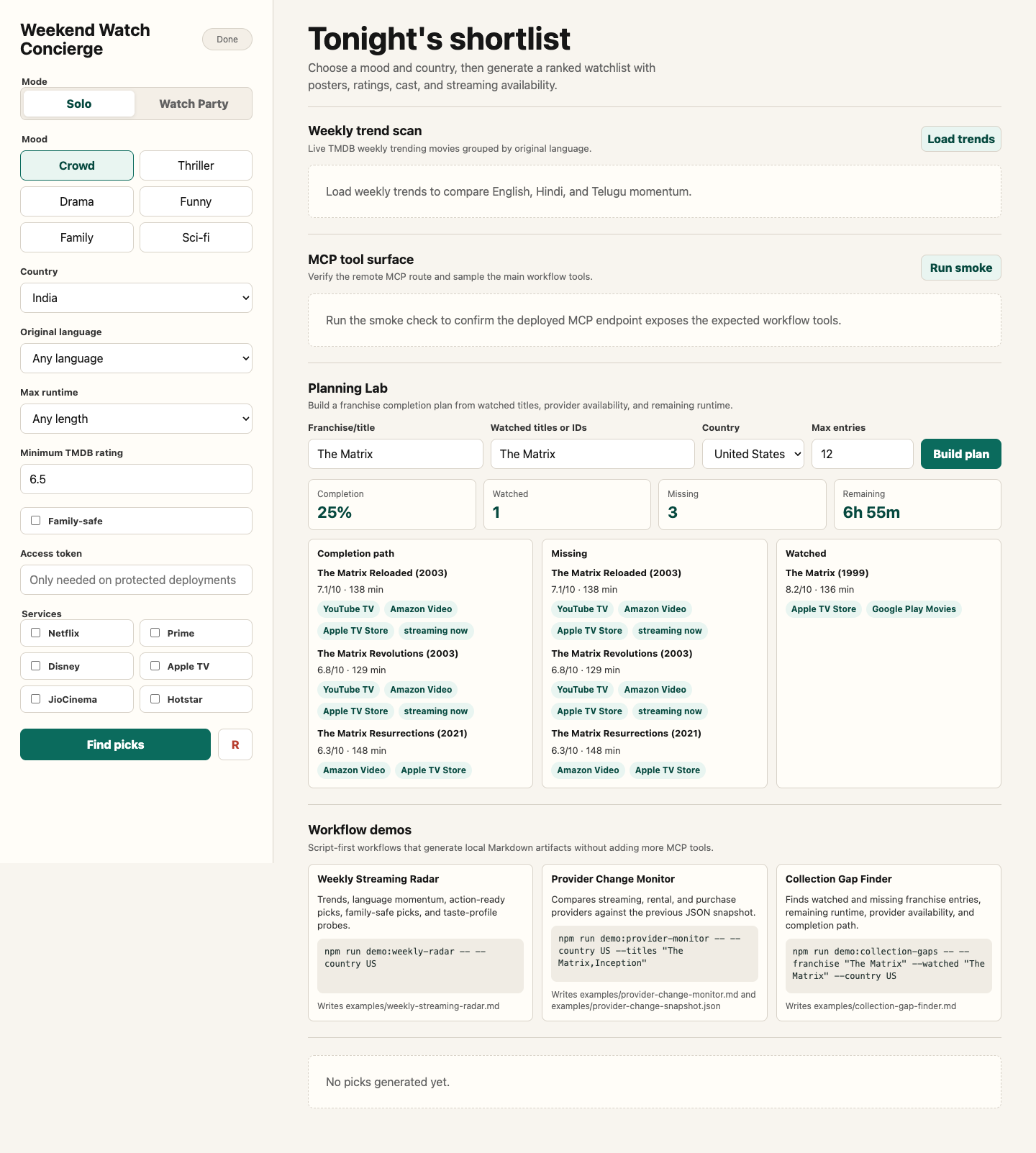
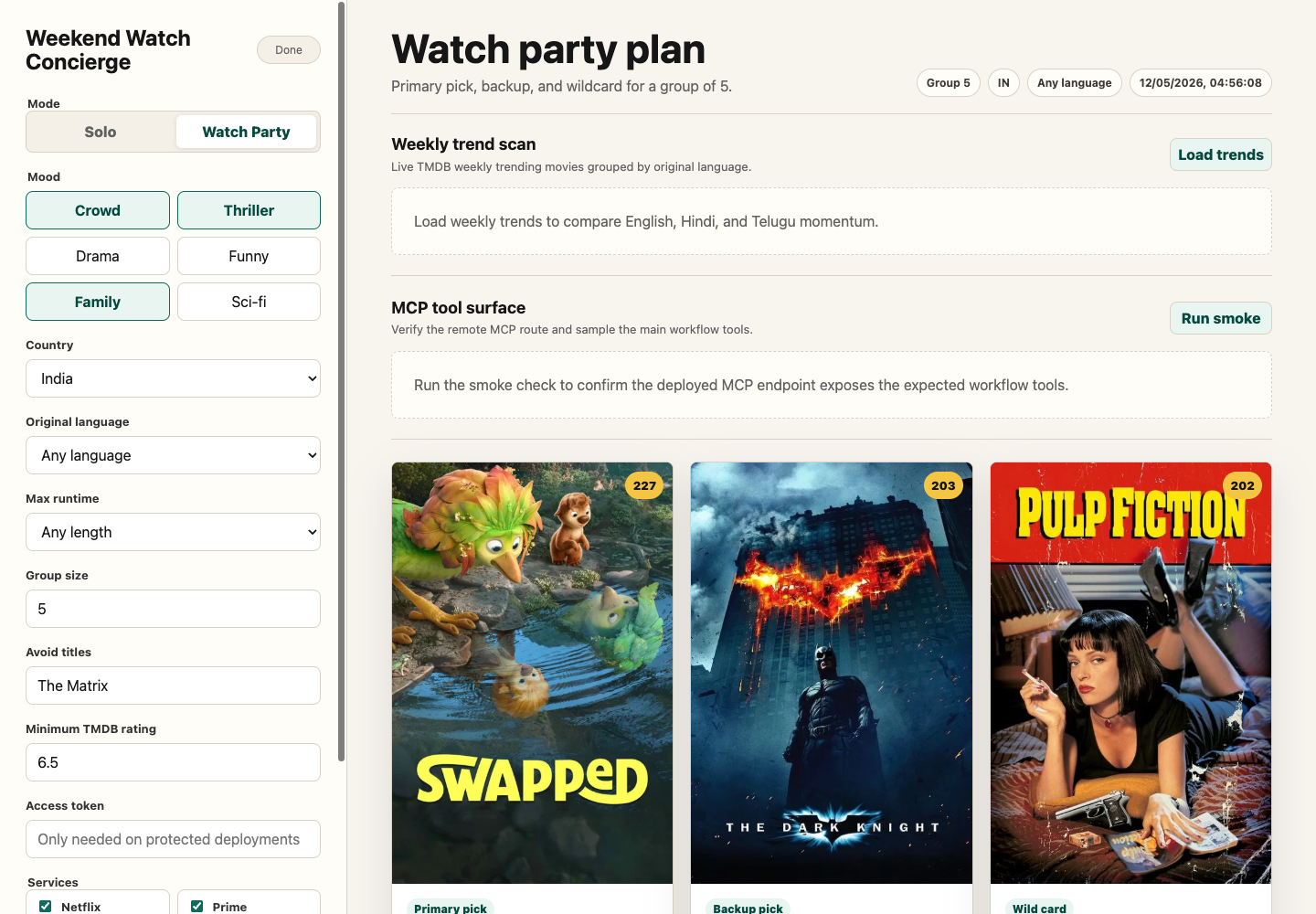
The Worker also serves a browser demo at /: Weekend Watch Concierge. It supports solo picks and Watch Party mode, then builds a ranked movie shortlist using TMDB discovery, trending, now-playing, credits, posters, and watch-provider data. The browser app also includes a Help drawer for Cloudflare usage and a Workflow Demos panel with commands for script-first artifacts such as Weekly Streaming Radar, Provider Change Monitor, and Collection Gap Finder.
The browser demo also includes an MCP tool surface panel that calls the deployed /mcp route, verifies the expected tool contract, and samples compare_movies, find_where_to_watch, get_weekend_watchlist, plan_watch_party, build_franchise_watch_order, build_collection_gap_plan, recommend_from_taste_profile, and build_person_watch_path.
For the complete browser app, deployed Worker, access-token, and MCP handoff, see docs/weekend-watch-concierge.md.
Deploy
1. Log in to Cloudflare:
npx wrangler login2. Store your TMDB key as a Worker secret:
npx wrangler secret put TMDB_API_KEY3. Store an access token as a Worker secret before sharing the deployment:
npx wrangler secret put ACCESS_TOKEN When ACCESS_TOKEN is set, POST /api/concierge and POST /mcp require:
Authorization: Bearer4. Check the Worker bundle:
npm run worker:dry-run5. Deploy:
npm run worker:deployCloudflare will print a URL like:
https://tmdb-mcp..workers.devUse this MCP endpoint in remote clients:
https://tmdb-mcp..workers.dev/mcpUse this browser demo URL:
https://tmdb-mcp..workers.dev/Connect from Claude / Cowork
For Claude custom connectors:
1. Open Claude settings: Customize -> Connectors.
2. Click + -> Add custom connector.
3. Use the deployed Worker MCP URL:
https://tmdb-mcp..workers.dev/mcp4. Enable the connector in a conversation and ask a TMDB question, such as:
What movies are trending this week?For Claude Desktop versions or MCP clients that still require a local command, use the mcp-remote proxy:
{
  "mcpServers": {
    "tmdb-remote": {
      "command": "npx",
      "args": [
        "mcp-remote",
        "https://tmdb-mcp..workers.dev/mcp"
      ]
    }
  }
}
Security note
If ACCESS_TOKEN is not configured, the Worker is authless for easy personal testing. Anyone who has the Worker URL can call the read-only TMDB tools and consume your TMDB API quota. Keep ACCESS_TOKEN configured or use Cloudflare Access before sharing this beyond your own accounts.
Weekend Watch Concierge
Run the offline concierge test:
npm testThis builds the TypeScript project, starts a tiny local TMDB-compatible fixture server, and verifies that createWeekendConcierge ranks a requested streaming-service match first while respecting the runtime filter. It does not need a TMDB API key.
Run the Worker locally:
npm run worker:devThis syncs local values from .env into an untracked .dev.vars file so Wrangler can expose TMDB_API_KEY to the Worker during local development.
For protected local testing, add ACCESS_TOKEN to .env. The browser app has an access-token field and the smoke scripts can read ACCESS_TOKEN or TMDB_MCP_ACCESS_TOKEN from the shell environment.
Open:
http://127.0.0.1:8787/Smoke test the concierge API after the local Worker is running:
npm run smoke:conciergeSmoke test the remote MCP endpoint and call the agent-facing concierge tool:
node scripts/remote-mcp-smoke.mjs http://127.0.0.1:8787/mcp --call-conciergeFor a protected deployment:
TMDB_MCP_ACCESS_TOKEN= node scripts/remote-mcp-smoke.mjs https://tmdb-mcp..workers.dev/mcp --call-conciergeOr test a deployed Worker:
node scripts/concierge-smoke.mjs https://tmdb-mcp..workers.devThe app uses:
POST /api/conciergefor ranked movie picksPOST /api/collection-gap-planfor Planning Lab collection gapsPOST /api/taste-profilefor Planning Lab taste-fit recommendationsPOST /api/person-watch-pathfor Planning Lab person watch pathsGET /healthfor deployment healthPOST /mcpfor remote MCP clients
Agents can call get_weekend_watchlist with:
mood:crowd,thriller,thoughtful,funny,family, ormindbendcountry: watch-provider region, for exampleINorUSlanguage: original language code, for exampleen,hi,ta,te, oranyruntime: maximum minutes, for example120,150, oranyminRating: minimum TMDB ratingservices: preferred streaming servicesfamilySafe: set totrueto exclude common mature genres when TMDB genre data is available
Agents can call plan_watch_party when the decision is for a group. It accepts:
moods: one to three values fromcrowd,thriller,thoughtful,funny,family, ormindbendgroupSize: number of people watchingcountry,language,runtime,minRating, andservices: same meaning as the weekend watchlistavoidTitles: titles the group has already seen or wants excludedfamilySafe: set totrueto exclude common mature genres when TMDB genre data is available
Agents can call build_franchise_watch_order for a collection or universe guide. It accepts:
query: franchise or collection name, for exampleThe Matrix,Dune,Batman, orMission Impossiblecountry: watch-provider region, for exampleINorUSmaxMovies: maximum collection entries to include, from 2 to 20
Agents can call build_collection_gap_plan for franchise completion planning. It accepts:
query: franchise or collection namewatchedTitles: watched titles or TMDB movie IDscountry: watch-provider region, for exampleINorUSservices: preferred streaming servicesmaxMovies: maximum collection entries to include, from 2 to 20
Agents can call recommend_from_taste_profile for personalized recommendations. It accepts:
likedTitles: one to five movies the user likesdislikedTitles: optional movies the user dislikes or wants to avoid stylisticallycountry,services,language,runtime, andminRating: filters and watch-now preferencesmaxResults: number of recommendations to return, from 3 to 10
Agents can call build_person_watch_path for an actor, director, writer, or crew member. It accepts:
name: person name, for exampleKeanu ReevesorChristopher Nolancountry: watch-provider region, for exampleINorUSservices: preferred streaming servicesmaxTitles: number of watch-path entries to return, from 3 to 8
Cloudflare MCP Demo Workflow
For a concrete end-to-end agent workflow, run the now-playing follow-on demo. It uses the MCP server as a remote client would:
1. get_now_playing for current theater discovery in a selected region
2. get_movie_details for the selected title
3. get_watch_providers for watch-now availability
4. get_recommendations, with get_similar_movies fallback for very new titles
5. get_watch_providers for follow-on availability checks
Local stdio MCP:
npm run build
set -a && source ./.env && set +a && npm run demo:now-playing -- --region US
Cloudflare-hosted MCP:
TMDB_MCP_ACCESS_TOKEN= node scripts/now-playing-follow-on-demo.mjs --mcp-url https://tmdb-mcp..workers.dev/mcp --region USThe script writes the final artifact here:
examples/now-playing-follow-on-demo.mdWhat npm run install:local does
The installer uses the repo-owned launcher at plugins/tmdb/scripts/run-server.sh.
For Codex it:
- Registers the launcher as an MCP server
- Installs a local
TMDBplugin payload so it appears in the plugin UI
For Claude Desktop it:
- Registers the same launcher as a local MCP server
It updates:
~/.codex/config.toml~/.codex/.tmp/plugins/.agents/plugins/marketplace.json~/.codex/plugins/cache/openai-curated/tmdb/...~/Library/Application Support/Claude/claude_desktop_config.json
The launcher reads TMDB_API_KEY from your shell environment or from the repo .env file.
Usage with Claude Desktop
If you prefer manual setup, add to ~/Library/Application Support/Claude/claude_desktop_config.json:
{
  "mcpServers": {
    "tmdb-local": {
      "command": "/full/path/to/mcp-server-tmdb/plugins/tmdb/scripts/run-server.sh",
      "args": []
    }
  }
}
Restart Claude Desktop after editing the config.
Usage with Codex
The installer adds these blocks to ~/.codex/config.toml:
[mcp_servers.tmdb_local]
command = "/full/path/to/mcp-server-tmdb/plugins/tmdb/scripts/run-server.sh"

[plugins."tmdb@openai-curated"]
enabled = true
Restart Codex after editing the config. In a fresh Codex session, TMDB should appear in the plugin list and contribute the mcp__tmdb__ namespace.
Validation
Offline smoke test:
TMDB_API_KEY=dummy node plugins/tmdb/scripts/smoke-test.mjsOnline smoke test:
set -a && source ./.env && set +a && node plugins/tmdb/scripts/smoke-test.mjs --onlinePlugin Docs
For plugin packaging, local install behavior, and Codex-specific notes, see plugins/tmdb/README.md.
Usage with BizClaw / NanoClaw
Built into the agent container. Just set TMDB_API_KEY in your .env file — no configuration needed.
Example Prompts
"What's trending in movies this week?"
"Find me Thriller movies from 2023"
"Who is Christopher Nolan and what has he directed?"
"Where can I watch Inception in India?"
"Get details for movie ID 550 (Fight Club)"
"Find movies similar to Interstellar"
"What are the trending TV shows right now?"
License
MIT
Similar MCP
Based on tags & features
Trending MCP
Most active this week