Model Context Protocol (MCP) implementation for iOS simulators
Documentation
📱 MCP Server for iOS Simulator
A server that implements the Model Context Protocol (MCP) for iOS simulators, built on top of appium-ios-simulator and utilizing the MCP TypeScript SDK.
📋 Overview
This project provides a bridge between iOS simulators and the Model Context Protocol, allowing for standardized communication with iOS simulator instances. It enables programmatic control of iOS simulators while leveraging the MCP protocol for consistent interfaces across different environments. The server utilizes stdio as its transport mechanism, making it ideal for integration with Claude Desktop and other MCP-compatible clients.
🎬 Demo
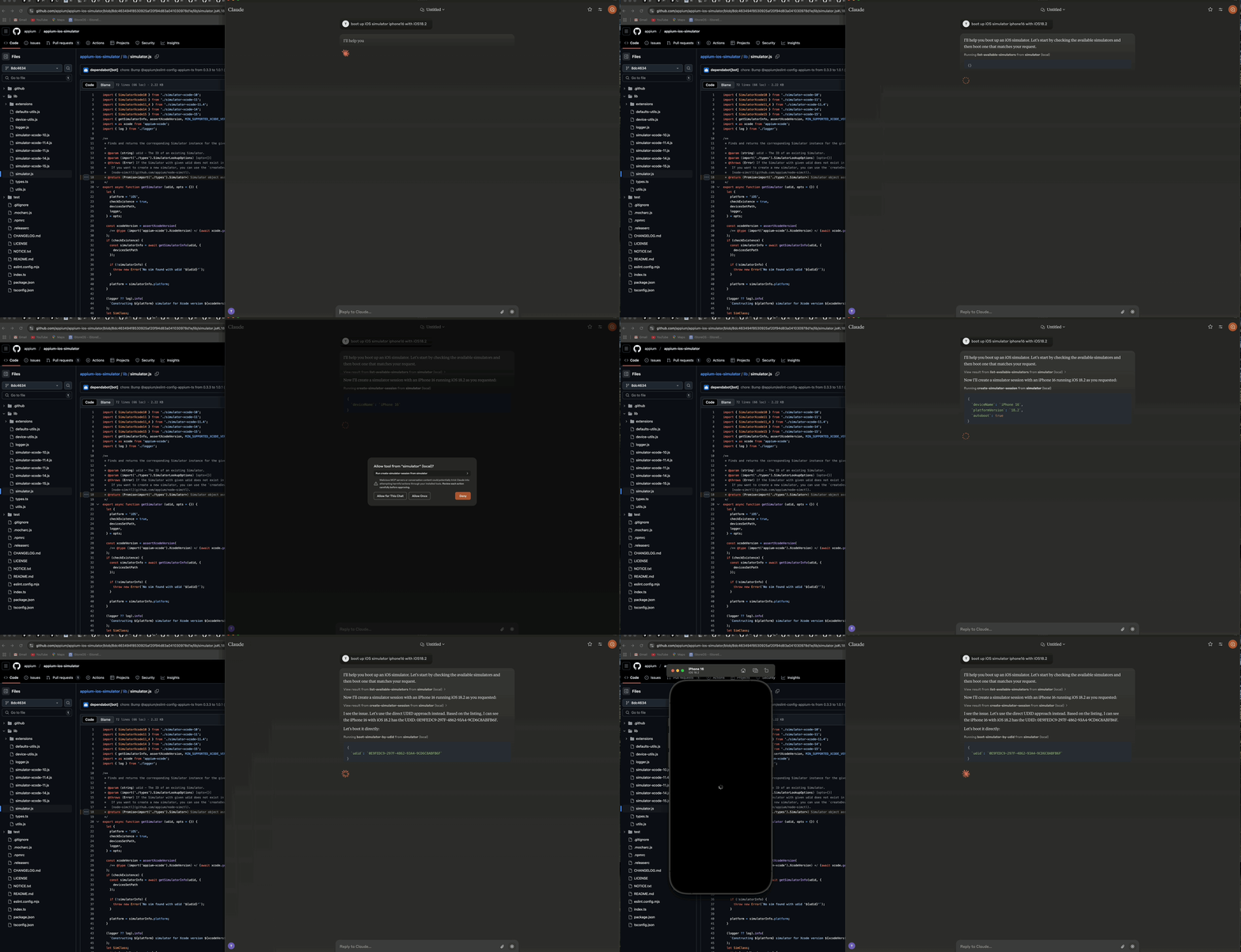
*Demo showing how to boot an iOS simulator using Claude AI Desktop*
🏗️ Architecture
The server consists of three main components:
1. 🔄 Simulator Management Layer - Handles iOS simulator lifecycle and interactions
2. 🔌 MCP Protocol Implementation - Implements the Model Context Protocol using the TypeScript SDK with stdio transport
3. 📊 Logger Component - Provides file-based logging without interfering with the stdio transport
┌─────────────────┐     ┌─────────────────┐     ┌─────────────────┐
│  MCP Protocol   │     │     Stdio       │     │    Simulator    │
│  Implementation │◄────┤    Transport    │◄────┤   Management    │
│                 │     │                 │     │      Layer      │
└─────────────────┘     └─────────────────┘     └─────────────────┘
        ▲                                                ▲
        │                                                │
        ▼                                                ▼
┌─────────────────┐                             ┌─────────────────┐
│   MCP Client    │                             │  iOS Simulator  │
│  (e.g. Claude)  │                             │                 │
└─────────────────┘                             └─────────────────┘
✨ Features
- 🚀 Start, stop, and manage iOS simulator instances
- 🔌 Boot and shutdown simulators
- 📲 Install and launch applications on simulators
- 📸 Take screenshots of simulator screens
- 👆 Perform taps on coordinates
- 🔄 Support for multiple concurrent simulator sessions
- 📝 Comprehensive file-based logging without console output
- 🛡️ Error-resilient operation
📋 Prerequisites
- 🟢 Node.js (v16 or later)
- 🍎 macOS (required for iOS simulators)
- 🛠️ Xcode with iOS simulators installed
- 📜 TypeScript 4.5+
🔧 Installation
Installing via Smithery
To install iOS Simulator Control Server for Claude Desktop automatically via Smithery:
npx -y @smithery/cli install @atom2ueki/mcp-server-ios-simulator --client claudeManual Installation
# Clone the repository
git clone https://github.com/atom2ueki/mcp-server-ios-simulator.git
cd mcp-server-ios-simulator

# Install dependencies
npm install
🐳 Docker
A Dockerfile is provided so the server can be packaged for the Glama MCP directory and other container hosts.
docker build -t mcp-server-ios-simulator .
docker run --rm -i mcp-server-ios-simulator
Note: iOS simulators only run on macOS, so a Linux container can host the MCP process and respond on stdio but cannot drive a real simulator. The container is intended for portability checks and remote MCP environments that bridge to a macOS host.
⚙️ Configuration
Configuration is handled through the src/config.ts file:
const config = {
  simulator: {
    defaultDevice: process.env.SIMULATOR_DEFAULT_DEVICE || 'iPhone 16',
    defaultOS: process.env.SIMULATOR_DEFAULT_OS || '18.2',
    timeout: parseInt(process.env.SIMULATOR_TIMEOUT || '30000', 10),
  }
};
You can customize these settings by setting environment variables:
SIMULATOR_DEFAULT_DEVICE=iPhone 16
SIMULATOR_DEFAULT_OS=18.2
SIMULATOR_TIMEOUT=30000
🚀 Usage
🔨 Building and Starting the Server
# Build the project
npm run build

# Start the server
npm start
🧰 MCP Tools
The server provides two distinct approaches for controlling iOS simulators:
📱 Direct Simulator Management (Recommended)
These tools work directly with simulator UDIDs and don't require maintaining sessions:
- 📋
list-available-simulators- List all available simulators with their UDIDs - ▶️
boot-simulator-by-udid- Boot a simulator directly using its UDID - ⏹️
shutdown-simulator-by-udid- Shutdown a simulator directly using its UDID - 📊
list-booted-simulators- List all currently booted simulators
Use this approach when: You just want to boot, use, and shut down simulators directly.
📱 Session-Based Management (Advanced)
These tools use a session layer that tracks simulators with custom session IDs:
- 📋
list-simulator-sessions- List all active simulator sessions - ➕
create-simulator-session- Create a new simulator session - ❌
terminate-simulator-session- Terminate a session (shuts down simulator and cleans up) - 🔄
create-and-boot-simulator- Create a new simulator session and boot it - ▶️
boot-simulator- Boot a simulator for an existing session - ⏹️
shutdown-simulator- Shutdown a simulator for an existing session
Use this approach when: You need to track simulator metadata, reference simulators by custom IDs, or use the more advanced management features.
📲 Application Management
- 📥
install-app- Install an application on a simulator - 🚀
launch-app- Launch an application on a simulator - 🛑
terminate-app- Terminate a running application on a simulator
🖱️ Interaction Tools
- 📷
take-screenshot- Take a screenshot of the simulator screen - 👆
tap-coordinate- Perform a tap at the specified coordinates
🤖 Example Usage with Claude Desktop
1. Configure Claude Desktop to use this server as an MCP tool:
- Open Claude Desktop
- Go to Settings > Advanced
- Add the following configuration to the "MCP Servers" section:
{
     "mcpServers": {
       "simulator": {
         "command": "node",
         "args": [
           "/path/to/your/mcp-server-ios-simulator/dist/index.js"
         ]
       }
     }
}- Replace
/path/to/yourwith the actual path to where you've installed this repository - Save the settings and restart Claude Desktop
2. Use the provided tools to control iOS simulators directly from Claude Desktop:
Direct UDID Approach (Recommended):
1. First, ask Claude to list available simulators:
"Show me all available iOS simulators"2. Then use the UDID to boot a specific simulator:
"Boot the iOS simulator with UDID 5272EA61-5796-4372-86FE-3B33831D5CC1"3. When finished, shut it down using the same UDID:
"Shut down the simulator with UDID 5272EA61-5796-4372-86FE-3B33831D5CC1"The direct UDID approach is simpler and more reliable for most use cases.
Session-Based Approach (Advanced):
Only use this approach if you need the advanced features of session tracking:
"Create a new simulator session for iPhone 16 Pro with iOS 18.2"
   "Boot the simulator for session abc-123"
   "Take a screenshot of the simulator for session abc-123"
"Terminate the simulator session abc-123"👨💻 Development
📁 Project Structure
src/
├── simulator/       # Simulator management layer
├── mcp/             # MCP protocol implementation
├── bridge/          # Bridge component
├── utils/           # Utility functions including logger
├── config.ts        # Configuration handling
└── index.ts         # Entry point
🔨 Building the Project
# Install development dependencies
npm install

# Run TypeScript compiler
npm run build
📜 License
This project is licensed under the MIT License - see the LICENSE file for details.
🙏 Acknowledgments
- 📱 appium-ios-simulator for providing the iOS simulator interaction capabilities
- 🔌 Model Context Protocol for the protocol specification and TypeScript SDK
Similar MCP
Based on tags & features
Trending MCP
Most active this week