connect to a dust agent via HTTP call
Documentation
MCP Server for Dust Agent Integration
A custom MCP (Multi-Cloud Provider) server that connects to the Dust.tt agent platform via HTTP calls. This server exposes the capabilities of Dust AI agents through the MCP interface.
Table of Contents
- MCP Server for Dust Agent Integration
- Table of Contents
- Features
- Project Structure
- Documentation
- Prerequisites
- Installation
- Configuration
- Dust Agent Setup
- MCP Server Settings
- Running the Server
- Claude Desktop Integration
- 1. Installation
- 2. Initial Setup
- 3. Integration with MCP Server
- 4. Applying Configuration Changes
- 5. Testing in Claude Desktop
- Troubleshooting
- Dust.tt API Workflow
- 1. Create a New Conversation
- 2. Send a Message to the Conversation
- 3. Retrieve Messages from the Conversation
- Important Notes About the API
- Error Handling
- Contributing
Features
- Connect to Dust.tt AI agents via API
- Systems Thinking agent integration with cognitive neuroscience and problem-solving capabilities
- RAG (Retrieval Augmented Generation) support
- Web navigation capability
- Simplified MCP tool interface
- Modular code structure for better maintainability
- Externalized configuration and API client classes
Project Structure
The project follows a modular structure for improved maintainability:
server.py: Main server implementation that registers tools and handles MCP functionalityconfig.py: Contains theDustAgentConfigclass for managing configuration settingsapi_client.py: Contains theDustAPIClientclass for handling API interactions with Dust.tt.env: Environment variables file (not committed to version control).env.example: Template for environment variablesdocs.md: Comprehensive documentation of the project architecture and API
Documentation
For detailed information about the architecture, API, and troubleshooting, please refer to the comprehensive documentation.
Prerequisites
- Python 3.10 or higher
pippackage manager- A Dust.tt account with API access
- An existing Dust agent configuration
Installation
1. Clone this repository:
git clone https://github.com/Ma3u/mcp-server-dust.git
   cd mcp-server-dust
2. Create and activate a virtual environment:
python3 -m venv .venv

   # On macOS/Linux
   source .venv/bin/activate

   # On Windows
   .venv\Scripts\activate
3. Install required dependencies:
pip install --upgrade pip
   pip install mcp requests python-dotenv
Configuration
Dust Agent Setup
Create a .env file in the root directory with your configuration (you can copy from .env.example and modify):
# MCP Server Configuration
MCP_NAME=Dust MCP Server
MCP_HOST=127.0.0.1
MCP_PORT=5001
MCP_TIMEOUT=30

# Dust Agent Configuration
DUST_AGENT_ID=your_agent_id
DUST_DOMAIN=https://dust.tt
DUST_WORKSPACE_ID=your_workspace_id
DUST_WORKSPACE_NAME=your_workspace_name
DUST_API_KEY=your_api_key
DUST_AGENT_NAME=your_agent_name
DUST_TIMEZONE=Europe/Berlin
DUST_USERNAME=your_username
DUST_FULLNAME=Your Full Name
Security Note: Make sure to add
.envto your.gitignorefile to prevent committing sensitive information.
MCP Server Settings
The server configuration parameters are now managed by the DustAgentConfig class in config.py. Parameters are loaded from environment variables with the following defaults:
# MCP Server Configuration
MCP_NAME = "Dust MCP Server"  # Name of your MCP server
MCP_HOST = "127.0.0.1"        # Host to run the server on
MCP_PORT = 5001               # Port to run the server on
MCP_TIMEOUT = 30              # Request timeout in seconds

# Dust Agent Configuration
DUST_AGENT_ID = "8x9nuWdMnR"  # Your Dust agent ID
DUST_DOMAIN = "https://dust.tt" # Dust API domain
# ... and other Dust-specific settings
Running the Server
To start the MCP server:
python server.pyYou should see output similar to:
Starting MCP server 'Dust MCP Server' on 127.0.0.1:5001
Connected to Dust agent 'SystemsThinking' (ID: 8x9nuXXXX)
The server will run until interrupted with Ctrl+C.
Claude Desktop Integration
To configure Claude Desktop for use with this MCP server:
1. Installation
- Download Claude Desktop from the official Anthropic website
- Install the application following the on-screen instructions for your OS
2. Initial Setup
- Launch the app after installation
- Sign in with your Anthropic account (free account is sufficient)
3. Integration with MCP Server
- Launch Claude Desktop and go to Settings
- Select the "Developer" tab on the left sidebar
- Click the "Edit Config" button at the bottom of the screen
- Add your Dust MCP server to the configuration by including it in the
mcpServersarray:
{
    "mcpServers": {
        "dust": {
            "command": "/Users/ma3u/projects/mcp-server-dust/.venv/bin/python",
            "args": [
                "/Users/ma3u/projects/mcp-server-dust/server.py"
            ],
            "host": "127.0.0.1",
            "port": 5001,
            "timeout": 10000
        }
    }
}
Note: If there are existing entries in the
mcpServersarray, add your configuration as a new item.
4. Applying Configuration Changes
- After making changes to your MCP server configuration:
- For Claude Desktop, quit the application completely
- Relaunch Claude Desktop for the new configuration to take effect
- Verify the connection by checking if your server appears in the list in the Developer settings
5. Testing in Claude Desktop
Type the following in Claude Desktop to test your integration:
Use Systemsthinking Agent to explain MCP Protocol.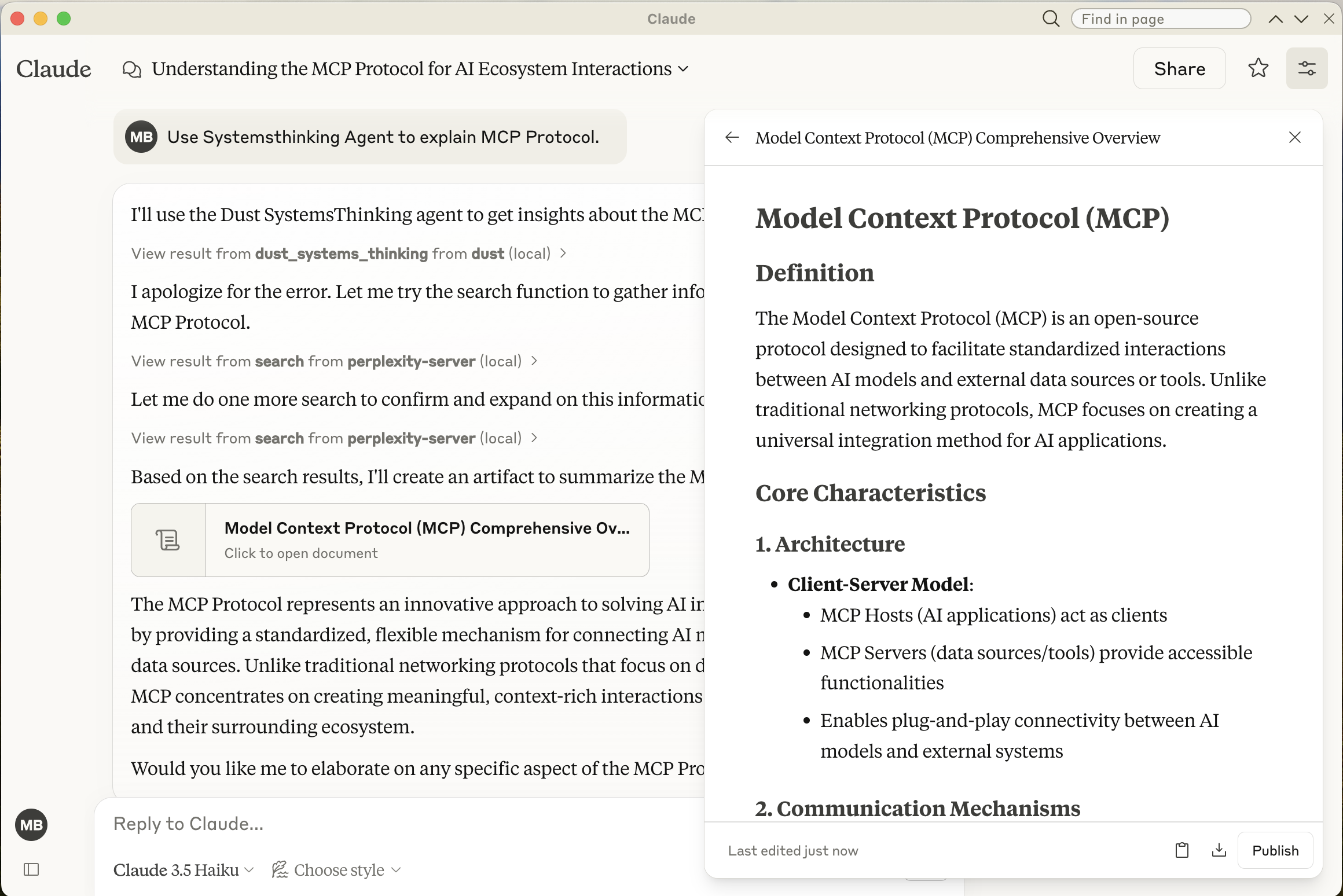
Troubleshooting
View the log file for the Dust MCP server in Claude Desktop:
# macOS/Linux
tail -f ~/Library/Logs/Claude/mcp-server-dust.log

# Windows
Get-Content -Path "C:\Users\{username}\AppData\Local\Logs\Claude\mcp-server-dust.log" -Wait
Dust.tt API Workflow
The MCP Server interfaces with Dust.tt's API through a multi-step workflow. Each Claude request that uses the Dust agent follows this process:
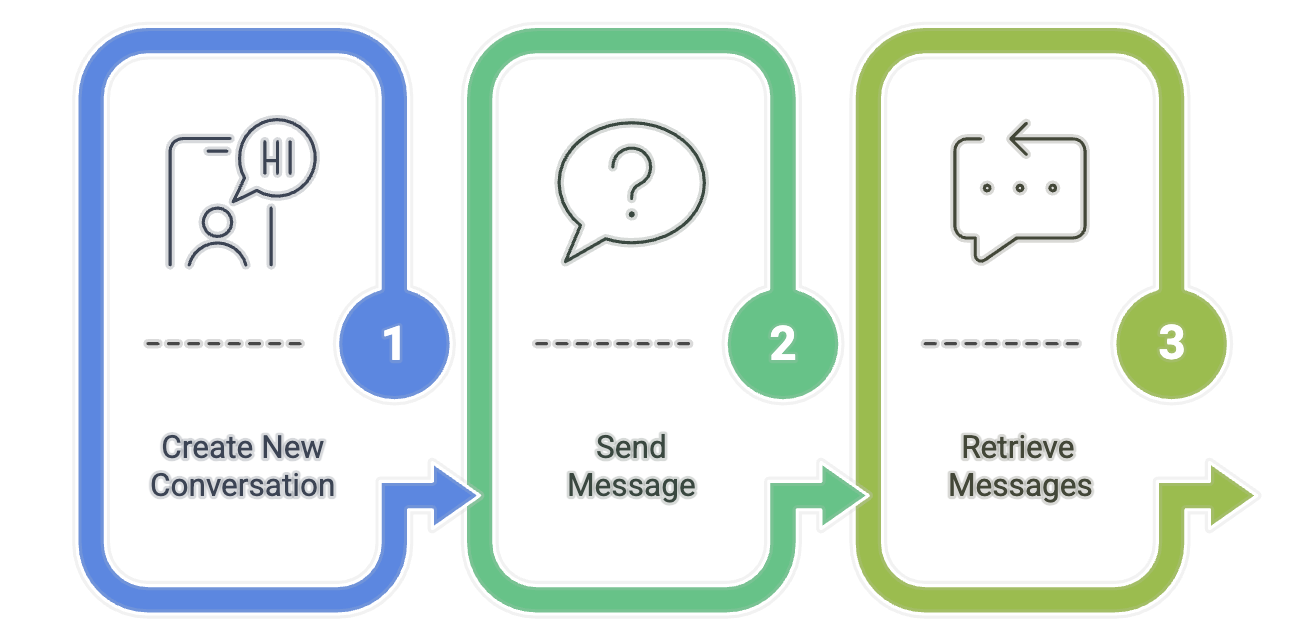
1. Create a New Conversation
First, the server creates a new conversation with the Dust agent:
curl -X POST "https://dust.tt/api/v1/w/{WORKSPACE_ID}/assistant/conversations" \
  -H "Authorization: Bearer {YOUR_API_KEY}" \
  -H "Content-Type: application/json" \
  -d '{
    "title": "Systems Thinking Conversation",
    "model": "claude-3-5-sonnet-20240620"
  }'
This returns a conversation ID that's used in subsequent requests:
{
  "conversation": {
    "sId": "DhvpbhW74S",
    "title": "Systems Thinking Conversation",
    "created_at": 1742923287427
  }
}
2. Send a Message to the Conversation
Next, the server sends the user's query as a message to the conversation:
curl -X POST "https://dust.tt/api/v1/w/{WORKSPACE_ID}/assistant/conversations/{CONVERSATION_ID}/messages" \
  -H "Authorization: Bearer {YOUR_API_KEY}" \
  -H "Content-Type: application/json" \
  -d '{
    "content": "Explain the MCP Protocol in detail",
    "mentions": [{
      "configurationId": "{AGENT_ID}",
      "context": {
        "timezone": "Europe/Berlin",
        "modelSettings": {"provider": "anthropic"}
      }
    }],
    "context": {
      "timezone": "Europe/Berlin"
    }
  }'
The response includes the message ID:
{
  "message": {
    "sId": "qwenj3rusI",
    "conversation_sId": "DhvpbhW74S",
    "content": "Explain the MCP Protocol in detail",
    "author_name": "User",
    "author_type": "user",
    "created_at": 1742923287627
  }
}
3. Retrieve Messages from the Conversation
Finally, the server retrieves the agent's response. This requires a specific format for the message retrieval request:
curl -X POST "https://dust.tt/api/v1/w/{WORKSPACE_ID}/assistant/conversations/{CONVERSATION_ID}/messages" \
  -H "Authorization: Bearer {YOUR_API_KEY}" \
  -H "Content-Type: application/json" \
  -d '{
    "content": "RETRIEVAL_QUERY",
    "mentions": [{
      "configurationId": "{AGENT_ID}",
      "context": {
        "timezone": "Europe/Berlin",
        "modelSettings": {"provider": "anthropic"}
      }
    }],
    "context": {
      "timezone": "Europe/Berlin",
      "username": "api_retrieval",
      "queryType": "history_analysis"
    }
  }'
The response contains all messages in the conversation, including the agent's response:
{
  "messages": [
    {
      "id": "msg_user123",
      "role": "user",
      "content": "Explain the MCP Protocol in detail",
      "timestamp": 1742923287627,
      "status": "processed"
    },
    {
      "id": "msg_agent456",
      "role": "assistant",
      "content": "The MCP (Mission Control Protocol) is a framework designed for...",
      "timestamp": 1742923290000,
      "status": "processed"
    }
  ]
}
Important Notes About the API
- The message retrieval endpoint serves a dual purpose - it can be used to create new messages OR retrieve conversation history
- For message retrieval, a properly structured payload is required even though it's essentially a GET operation
- The content field is required and must be at least one character (we use "RETRIEVAL_QUERY" as a placeholder)
- The mentions and context fields must be structured correctly as shown above
- You need to poll this endpoint multiple times until the agent's response appears
Error Handling
Common errors when working with the Dust.tt API:
- 400 Bad Request: Often indicates malformed JSON or missing required fields in your request payload
- 401 Unauthorized: Check your API key
- 404 Not Found: Verify your workspace ID and conversation ID
- 429 Too Many Requests: You've exceeded API rate limits
For debugging purposes, the server logs all API requests in curl format so you can reproduce and troubleshoot them manually.
Contributing
Contributions are welcome! Please feel free to submit a Pull Request.
Similar MCP
Based on tags & features
Trending MCP
Most active this week