High-performance CCXT MCP server for cryptocurrency exchange integration TypeScript-based implementation.
Documentation
CCXT MCP Server


High-performance cryptocurrency exchange integration using MCP (Model Context Protocol) and CCXT.
Features
- 🚀 Exchange Support: Connects to 20+ cryptocurrency exchanges
- 🔃 Market Types: Supports spot, futures, swap markets and more
- 🔧 Proxy Configuration: Options for accessing exchanges through proxies
- 📊 Fast & Reliable: Optimized caching and rate limiting
- 🌐 MCP Standard: Compatible with LLMs like Claude and GPT via MCP
CCXT MCP Server Integration Architecture
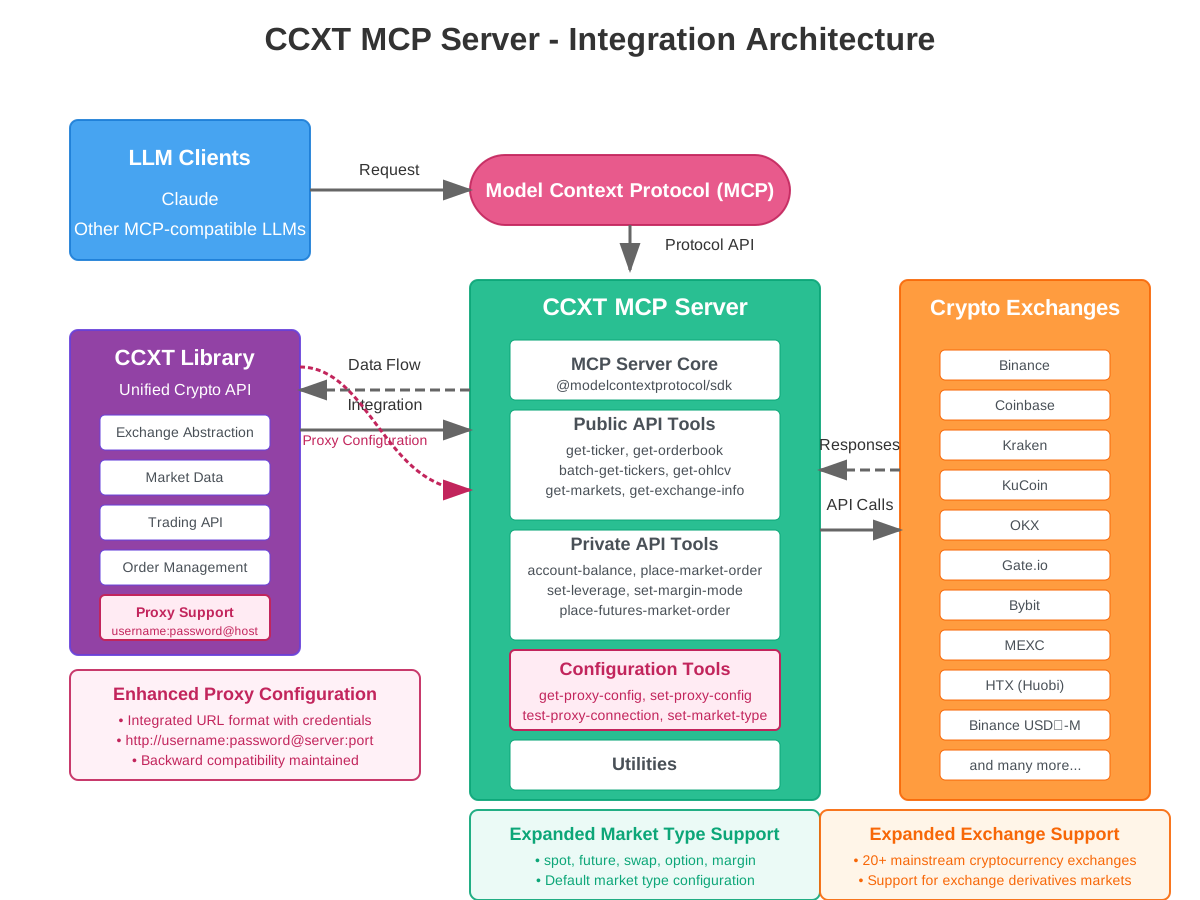
The CCXT MCP Server connects language models to cryptocurrency exchanges through the Model Context Protocol. It serves as a bridge that allows LLMs to access real-time market data and execute trading operations across multiple exchanges through a unified API.
The architecture includes:
- LLM clients (Claude and other MCP-compatible models) that send requests
- The Model Context Protocol (MCP) that standardizes communication
- The CCXT MCP Server that processes requests and manages exchange interactions
- The CCXT Library that provides unified access to exchange APIs
- Connections to multiple cryptocurrency exchanges
CCXT MCP Server Code Architecture
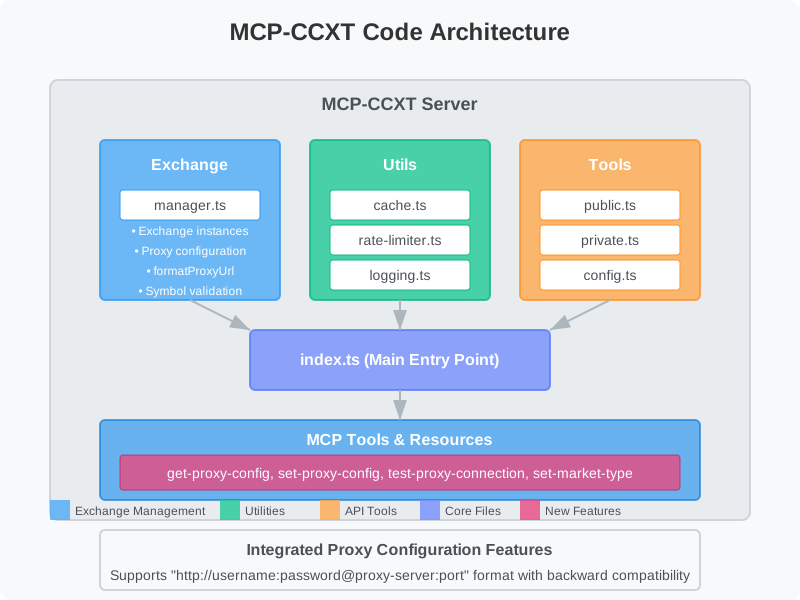
The server is organized into three main modules for better maintainability and extensibility:
- Exchange: Manages exchange instances, credentials, and symbol validation
- Utils: Provides caching, rate limiting, and logging functionality
- Tools: Implements MCP tools and resources for exchange interaction
Quick Start
Installing via Smithery
To install mcp-server-ccxt for Claude Desktop automatically via Smithery:
npx -y @smithery/cli install @doggybee/mcp-server-ccxt --client claudeNPM Package (Recommended)
You can install CCXT MCP Server from npm:
# Install globally
npm install -g @mcpfun/mcp-server-ccxt

# Start the server
mcp-server-ccxt
Or run directly:
npx @mcpfun/mcp-server-ccxtManual Installation
Alternatively, you can clone and build the repository:
# Clone the repository
git clone https://github.com/doggybee/mcp-server-ccxt.git
cd mcp-server-ccxt

# Install dependencies
npm install

# Build the server
npm run build

# Start the server
npm start
Configuration
1. Create an environment file
cp .env.example .env2. Edit the .env file to add your exchange API keys
# Default exchange (optional)
   DEFAULT_EXCHANGE=binance

   # Default market type (optional)
   DEFAULT_MARKET_TYPE=spot

   # API credentials (optional)
   BINANCE_API_KEY=your_api_key
   BINANCE_SECRET=your_api_secret
   # For exchanges requiring passphrase (e.g., KuCoin)
   KUCOIN_API_KEY=your_kucoin_api_key
   KUCOIN_SECRET=your_kucoin_secret
   KUCOIN_PASSPHRASE=your_kucoin_passphrase

   # Proxy configuration (optional)
   USE_PROXY=false
   PROXY_URL=http://username:password@your-proxy-server:port
   # Legacy format (still supported but recommended to use the integrated URL format above)
   # PROXY_USERNAME=
   # PROXY_PASSWORD=
Usage
Note: If you encounter any issues with MCP communication, please see the Troubleshooting Guide for solutions.
Running the Server
Start the server:
# If installed globally via npm
mcp-server-ccxt

# If installed manually
npm start
Using with Claude for Desktop
1. Add the server to your claude_desktop_config.json:
If installed via npm (globally):
{
  "mcpServers": {
    "ccxt": {
      "command": "mcp-server-ccxt"
    }
  }
}
If installed manually:
{
  "mcpServers": {
    "ccxt": {
      "command": "node",
      "args": [
        "/path/to/mcp-server-ccxt/build/index.js"
      ]
    }
  }
}
2. Restart Claude for Desktop
Using as a Module in Another Project
You can also use this package as a module in your own Node.js projects:
// Import the CCXT MCP Server
import '@mcpfun/mcp-server-ccxt';

// The server starts automatically when imported
// You can configure it through environment variables
Example Queries
Here are some example queries you can use with the MCP server:
- "What's the current price of Bitcoin on Binance?"
- "Show me the order book for ETH/USDT on Coinbase"
- "Get the 1-hour OHLCV data for BTC/USDT on Binance for the last 24 candles"
- "Compare the price of SOL/USDT across different exchanges"
- "What's my current balance on Binance?" (requires API keys)
- "Place a market buy order for 0.1 ETH on Kraken" (requires API keys)
Available Tools
Public API Tools
list-exchanges: List all available cryptocurrency exchangesget-ticker: Get current ticker information for a trading pairbatch-get-tickers: Get ticker information for multiple trading pairs at onceget-orderbook/get-order-book: Get market order book for a trading pairget-ohlcv: Get OHLCV candlestick data for a trading pairget-trades: Get recent trades for a trading pairget-markets: Get all available markets for an exchangeget-exchange-info: Get exchange information and statusget-leverage-tiers: Get futures leverage tiersget-funding-rates: Get current funding ratesget-positions: Get open positions informationget-open-orders: Get all open ordersget-order-history: Get order history
Private API Tools (requires API keys)
account-balance: Get your account balance from a crypto exchangeplace-market-order: Place a market order on an exchangeplace-limit-order: Place a limit order on an exchangecancel-order: Cancel an existing ordercancel-all-orders: Cancel all open ordersset-leverage: Set leverage for futuresset-margin-mode: Set margin mode for futuresplace-futures-market-order: Place futures market ordersplace-futures-limit-order: Place futures limit orderstransfer-funds: Transfer funds between accounts (e.g., spot to futures)
Configuration & Utility Tools
cache-stats: Get CCXT cache statisticsclear-cache: Clear CCXT cacheset-log-level: Set logging levelget-proxy-config: Get proxy settingsset-proxy-config: Configure proxy settingsset-market-type: Set default market typeset-default-exchange: Change the default exchangesystem-info: Get system and environment information
Performance Optimizations
MCP-CCXT includes several optimizations to ensure high performance:
1. LRU Caching System:
- Different TTLs for different types of data
- Ticker data: 10 seconds
- Order book data: 5 seconds
- Market data: 1 hour
2. Adaptive Rate Limiting:
- Automatically adjusts request rates based on exchange responses
- Implements exponential backoff for errors
- Manages concurrent requests per exchange
3. Exchange Connection Management:
- Efficient initialization of exchange instances
- Proper error handling and retries
Security Best Practices
API Key Security
1. Create Dedicated API Keys:
- Create separate API keys for different applications/purposes
- Never reuse API keys across different services or applications
2. Limit API Key Permissions:
- Enable only the permissions you need (e.g., read-only for market data)
- Disable withdrawal permissions if you only need trading functionality
- Use IP whitelisting when available to restrict access to known IPs
3. Secure Storage:
- Never commit API keys to version control systems
- Store API keys in environment variables or a secure vault
- Use
.envfiles that are excluded from git via.gitignore
Risk Disclaimer
This software is provided for informational purposes only. Using this software to interact with cryptocurrency exchanges involves significant risks:
- Financial Risk: Cryptocurrency trading involves risk of loss
- API Security: Ensure your API keys have appropriate permission limits
- No Investment Advice: This tool does not provide investment advice
- No Warranty: The software is provided "as is" without warranty of any kind
License
This project is licensed under the MIT License - see the LICENSE.txt file for details.
Copyright and Attribution
This project uses the CCXT library (https://github.com/ccxt/ccxt), which is:
Copyright (c) 2016-2024 CCXT developersCCXT is released under the MIT License, which is included below:
Permission is hereby granted, free of charge, to any person obtaining a copy
of this software and associated documentation files (the "Software"), to deal
in the Software without restriction, including without limitation the rights
to use, copy, modify, merge, publish, distribute, sublicense, and/or sell
copies of the Software, and to permit persons to whom the Software is
furnished to do so, subject to the following conditions:

The above copyright notice and this permission notice shall be included in all
copies or substantial portions of the Software.

THE SOFTWARE IS PROVIDED "AS IS", WITHOUT WARRANTY OF ANY KIND, EXPRESS OR
IMPLIED, INCLUDING BUT NOT LIMITED TO THE WARRANTIES OF MERCHANTABILITY,
FITNESS FOR A PARTICULAR PURPOSE AND NONINFRINGEMENT. IN NO EVENT SHALL THE
AUTHORS OR COPYRIGHT HOLDERS BE LIABLE FOR ANY CLAIM, DAMAGES OR OTHER
LIABILITY, WHETHER IN AN ACTION OF CONTRACT, TORT OR OTHERWISE, ARISING FROM,
OUT OF OR IN CONNECTION WITH THE SOFTWARE OR THE USE OR OTHER DEALINGS IN THE
SOFTWARE.
---
For issues, feature requests, or contributions, please visit the GitHub repository.
Similar MCP
Based on tags & features
Trending MCP
Most active this week