MCP server for interacting with open api spec files
Documentation
MCP OpenAPI Explorer
A Model Context Protocol (MCP) server that analyzes OpenAPI specifications and provides context about interacting with APIs.
Features
- Load OpenAPI specifications from various sources (GitHub, local files, HTTP URLs)
- Parse and provide comprehensive context about API endpoints
- Support for the Model Context Protocol (MCP) via stdin/stdout
- Provide intelligent context about API interactions to LLMs
- Support for both JSON and YAML OpenAPI specifications
- Built with Cobra CLI for easy command-line usage
- Structured logging with Zap
Getting Started
Prerequisites
- Go 1.24.2 or later
- Docker (optional)
Installation
1. Clone the repository:
git clone https://github.com/krypticlabs/mcp-openapi-explorer.git
cd mcp-openapi-explorer
2. Install dependencies:
go mod download3. Build:
go buildConfiguration
MCP OpenAPI Explorer can be configured using a YAML configuration file. You can export a default configuration file using:
./mcp-openapi-explorer config export config.yamlThen, modify the configuration file to suit your needs and run the server with:
./mcp-openapi-explorer --config config.yaml serveCreating a GitHub Token
If you need to access private GitHub repositories or want to avoid rate limits when loading OpenAPI specs from GitHub, you'll need a GitHub token:
1. Go to GitHub Settings
2. Select Developer settings from the left sidebar
3. Select Personal access tokens → Fine-grained tokens
4. Click Generate new token → Generate new token
5. Give your token a descriptive name and description
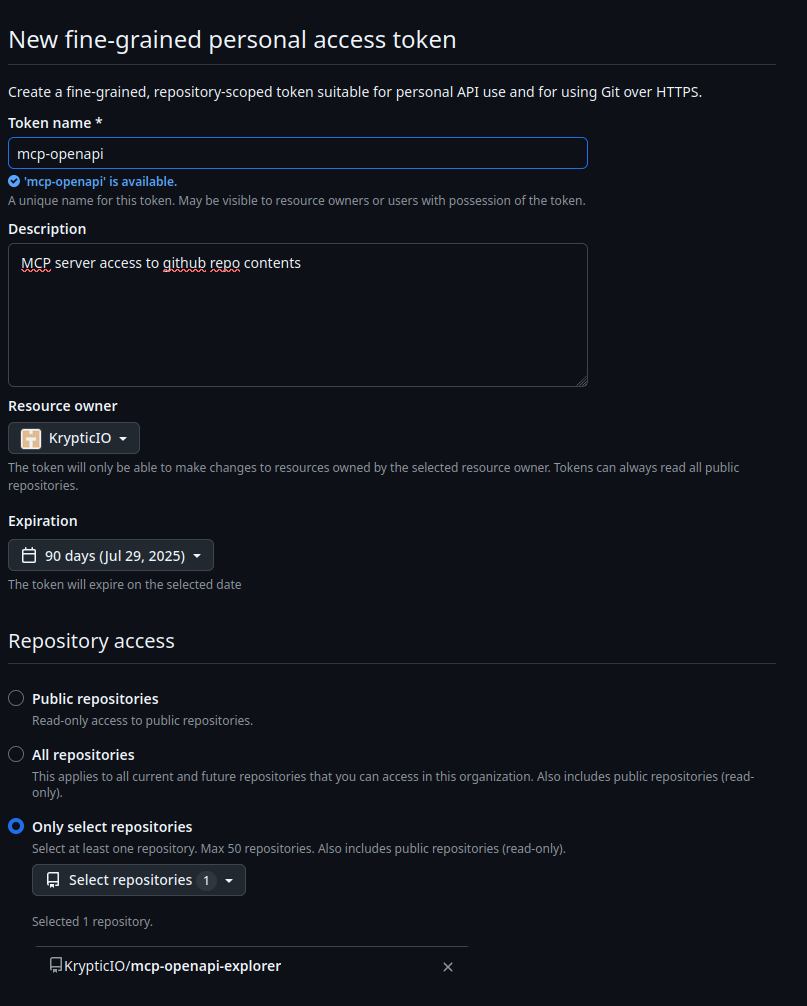
6. Repository access: only select repositories
- then select the repositories you want to give this PAT access to
7. Permissions:
- The only permission this needs is the contents permission and read-only access

8. Click Generate token
9. Copy the token (you won't be able to see it again!)
Add this token to your configuration file or provide it via the environment variable MCP_OPENAPI_GITHUB_TOKEN.
Configuring MCP Clients
You can integrate MCP OpenAPI Explorer with MCP clients by adding it to your MCP client configuration. This allows the client to automatically start and communicate with the MCP server.
Download the Binary
Download the appropriate binary for your platform from the GitHub Releases page.
MCP Client Configuration
Add the MCP OpenAPI Explorer to your MCP client configuration file (typically ~/.mcp/config.json or similar):
{
  "mcpServers": {
    "openapi-explorer": {
      "command": "/path/to/mcp-openapi-explorer",
      "args": ["serve", "--config", "~/.mcp-openapi.yaml"]
    }
  }
}
Replace /path/to/mcp-openapi-explorer with the actual path to the binary on your system. The environment section is optional and can be used to set environment variables for the MCP server.
MCP Usage
The MCP server operates via stdin/stdout, which is the preferred approach for integrating with LLMs. This avoids networking complexities and works well with various LLM integrations.
Start the server
./mcp-openapi-explorer serveOptions:
-v, --verbose- Enable verbose output-c, --config string- Path to configuration file
GitHub Repository Support
You can load OpenAPI specifications directly from GitHub repositories, including private ones with a token:
specs:
  - "@github.com/yourOrg/yourRepo/blob/main/pathToSpec.json|yaml"
Available MCP Tools
The MCP server exposes the following tools:
get_api_info
Get comprehensive information about API endpoints from loaded OpenAPI specifications.
Parameters:
query(string, required): Query about API endpoints (e.g. 'How do I create a new user?', 'What endpoints are available for pet management?')
load_api_spec
Load an OpenAPI specification from a URL or file path.
Parameters:
url(string, required): URL or file path to the OpenAPI spec. Supports:- HTTP/HTTPS URLs (e.g., 'https://petstore3.swagger.io/api/v3/openapi.json')
- GitHub URLs with '@' prefix (e.g., '@github.com/org/repo/blob/main/api.yaml')
- Local file paths (e.g., 'file:///path/to/spec.json' or just '/path/to/spec.json')
- Both JSON and YAML formats are supported
When loading a new API spec with a specified configuration file, the spec URL will be automatically added to the configuration file's specs list for persistence.
list_api_specs
List all loaded OpenAPI specifications.
delete_api_spec
Delete a loaded OpenAPI specification.
Parameters:
spec_id(string, required): ID of the API spec to delete (use list_api_specs to see available specs)
When deleting an API spec with a specified configuration file, the spec URL will be automatically removed from the configuration file's specs list for persistence.
refresh_api_spec
Refresh one or more OpenAPI specifications by re-downloading them from their source.
Parameters:
spec_id(string, optional): ID of the API spec to refresh. If not provided, all loaded specs will be refreshed.
Get information about API endpoints
echo '{"jsonrpc":"2.0","id":5,"method":"tools/call","params":{"name":"get_api_info","arguments":{"query":"How do I find pets by status?"}}}' | ./mcp-openapi-explorer serveDelete a loaded API specification
echo '{"jsonrpc":"2.0","id":6,"method":"tools/call","params":{"name":"delete_api_spec","arguments":{"spec_id":"Swagger Petstore - OpenAPI 3.0"}}}' | ./mcp-openapi-explorer serveRefresh all loaded API specifications
echo '{"jsonrpc":"2.0","id":7,"method":"tools/call","params":{"name":"refresh_api_spec","arguments":{}}}' | ./mcp-openapi-explorer serveRefresh a specific API specification
echo '{"jsonrpc":"2.0","id":8,"method":"tools/call","params":{"name":"refresh_api_spec","arguments":{"spec_id":"Swagger Petstore - OpenAPI 3.0"}}}' | ./mcp-openapi-explorer serveHow It Works
1. Users load OpenAPI specifications into the server (configured in the config file)
2. The server parses and stores these specifications (supporting both JSON and YAML formats)
3. When a user asks about an API endpoint, the server provides comprehensive context about all available endpoints
4. The LLM uses this context to answer user queries accurately
Docker
docker build -t mcp-openapi-explorer .

# Run the server with input from stdin
docker run -i mcp-openapi-explorer serve < your-jsonrpc-request.json

# Run the server with a configuration file
docker run -i -v $(pwd)/config.yaml:/app/config.yaml mcp-openapi-explorer --config /app/config.yaml serve
License
MIT
Similar MCP
Based on tags & features
Trending MCP
Most active this week