Documentation
Claude MCP Memory Visualization Tools
Graph visualization utilities for exploring and analyzing Claude's memory data captured by Anthropic's Memory MCP server.
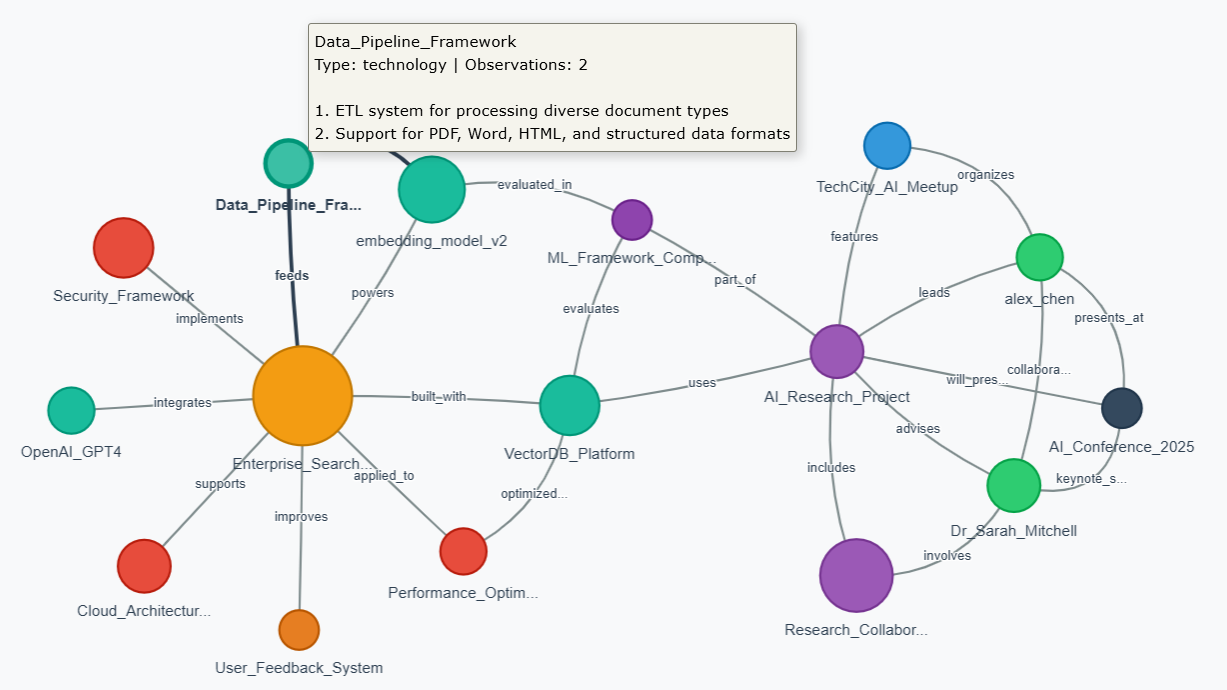
🌐 Try It Now!
**Launch Interactive Web Visualizer →**
No installation needed! Upload your memory.json file directly in your browser.
- 🔒 100% Private - All processing happens locally in your browser
- 📊 Interactive - Drag, zoom, search, and explore
- 🎨 Beautiful - Color-coded entities with smooth animations
- 📱 Works Everywhere - No Python or dependencies required
Overview
This repository provides three ways to visualize your Claude memory data:
1. 🌐 Web Visualizer - Interactive browser-based visualization (no installation required!)
2. 📊 Python Static Analysis - NetworkX-based statistical analysis and high-res graphs
3. 🔍 Python Interactive - PyVis-powered browser visualization with Python processing
Perfect for:
- Memory Analysis: Understanding what Claude remembers about your conversations
- Knowledge Mapping: Visualizing entity relationships and connections
- Memory Cleanup: Identifying redundant or sparse entities for optimization
- Research: Exploring how AI memory systems organize information
Quick Start
Option 1: Web Visualizer (Easiest!)
Simply visit: **https://dzivkovi.github.io/mcp-memory-visualizer/**
- No installation required
- Works on any device with a web browser
- Drag & drop your memory.json file
- 100% private - all processing happens in your browser
Option 2: Python Tools
For advanced analysis and batch processing:
# Install dependencies
pip install -r requirements.txt

# Run static analysis
python visualize_memory.py

# Run interactive Python version
python visualize_memory_interactive.py
Memory File Location
Default Location (Problematic)
The Memory MCP server stores memory.json by default in:
C:\Users\[username]\AppData\Local\npm-cache\_npx\[hash]\node_modules\@modelcontextprotocol\server-memory\dist\memory.json⚠️ Warning: This location is temporary and gets wiped during npm cache clears or package updates.
Recommended Setup
Always configure a persistent location using the MEMORY_FILE_PATH environment variable in your Claude Desktop config:
{
  "mcpServers": {
    "memory": {
      "command": "npx",
      "args": ["-y", "@modelcontextprotocol/server-memory"],
      "env": {
        "MEMORY_FILE_PATH": "C:\\Users\\[username]\\Documents\\claude-memory\\memory.json"
      }
    }
  }
}
Safe Storage Locations
C:\Users\[username]\Documents\claude-memory\memory.jsonC:\Users\[username]\AppData\Roaming\claude-memory\memory.jsonC:\claude-memory\memory.json(requires admin rights)
Note: Create the directory first and use double backslashes (\\) in Windows paths for proper JSON escaping.
Tool Comparison
| Feature | Web Visualizer | Python Static | Python Interactive |
|---|---|---|---|
| Installation | None | Python + libs | Python + libs |
| Privacy | 100% local | Local | Local |
| Interactivity | High | None | High |
| Analysis | Visual | Statistical | Both |
| Export | Screenshot | PNG + stats | HTML |
| Best For | Quick exploration | Research/reports | Deep analysis |
Demo Data
The repository includes a demo memory.json file with realistic but fictional data showcasing:
- 16 entities across 9 different types (person, technology, project, etc.)
- 25 relationships forming a connected knowledge graph
- Complex connections between AI research, enterprise systems, and academic collaboration
- Varied node sizes from 1 to 10 observations
Features
Web Visualizer
- Drag & Drop file upload
- Search entities and observations
- Interactive Graph with physics simulation
- Detail Panel showing observations and relationships
- Auto-layout with zoom controls
- Privacy-first design with clear messaging
Python Static Analysis (visualize_memory.py)
- Network statistics (nodes, edges, connected components)
- Centrality analysis (most connected entities)
- Redundancy detection (similar entities, sparse nodes)
- High-resolution graph visualization (300 DPI)
- Detailed terminal analysis output
Python Interactive (visualize_memory_interactive.py)
- Browser-based interactive visualization
- Hover tooltips with full entity details
- Physics-based node positioning
- Zoom, pan, and node dragging
- HTML export for sharing
Memory File Format
These tools work with memory.json files in JSONL format (one JSON object per line):
{"type": "entity", "name": "Python", "entityType": "technology", "observations": ["Used for data analysis", "Popular ML language"]}
{"type": "relation", "from": "Python", "to": "Data Science", "relationType": "used_in"}
Technical Details
Web Visualizer
- D3.js for powerful data visualization
- Force-directed graph layout
- Client-side processing for privacy
- Responsive design for all screen sizes
Python Tools
- NetworkX for graph analysis
- Matplotlib for static visualization
- PyVis for interactive HTML output
- Force-directed algorithms for natural clustering
Contributing
Feel free to extend these tools with additional features:
- Export formats (GraphML, GEXF, JSON)
- Filtering options (entity types, date ranges)
- Advanced metrics (betweenness centrality, clustering coefficients)
- Memory editing capabilities
Credits
Built for exploring Claude's memory data from Anthropic's Memory MCP server.
Philosophy: "Perfection is achieved, not when there is nothing more to add, but when there is nothing left to take away." - Antoine de Saint-Exupéry
Similar MCP
Based on tags & features
Trending MCP
Most active this week