IP Geolocation MCP server using IP2Location.io API
Documentation
IP2Location.io MCP server
This is a simple Model Context Protocol (MCP) server implementation for IP2Location.io API. It will return a detailed geolocation information for any given IPv4 or IPv6 address.

Features
- Comprehensive Geolocation Data: Retrieves a wide range of information, including country, region, city, latitude, longitude, ZIP code, time zone, and more.
- Network Details: Provides network-related data such as ASN, ISP, domain, and network speed.
- Security Insights: Detects proxy information, including proxy type and provider.
- Simple Integration: Built as a
FastMCPtool, allowing for easy integration into compatible systems. - Asynchronous: Utilizes
httpxfor non-blocking asynchronous API requests.
Requirement
This MCP server supports queries without an API key, with a limitation of 1,000 queries per day. You can also sign up for a free API key and enjoy up to 50,000 queries per month.
If you use the cloud-hosted MCP server, you only need Claude Desktop and npx, because the server is hosted remotely. If you want to run the original MCP server locally, the local setup uses uv, which can be installed by following the guide.
Setup
You can use this MCP server in Claude Desktop in either of the following ways:
- Cloud-hosted MCP server: Recommended if you want to connect directly to the hosted IP2Location.io MCP server.
- Local MCP server: Use this if you want to download and run the original MCP server on your own machine.
Option 1: Cloud-hosted MCP server
Follow the steps below to use the cloud-hosted IP2Location.io MCP server with Claude Desktop:
1. Make sure you have installed Claude Desktop. If you have not installed it yet, download it from here for Windows and macOS, or follow this guide for Linux users.
2. Open the claude_desktop_config.json file in your choice of editor. If you do not have one yet, follow this guide to create one.
3. Add the following to your claude_desktop_config.json:
{
  "mcpServers": {
    "ip2location": {
      "command": "npx",
      "args": [
        "-y",
        "mcp-remote@latest",
        "https://mcp.ip2location.io/",
        "--header",
        "X-API-Key:YOUR_API_KEY"
      ]
    }
  }
}
4. Replace YOUR_API_KEY with your actual IP2Location.io API key. To get your API key, log in to your dashboard.
5. Restart Claude Desktop after saving the changes, and you should see the MCP server appear in the Connectors menu.
Option 2: Local MCP server
Follow the steps below if you want to run the original MCP server locally with Claude Desktop:
1. Set up the uv package manager. You can refer to the guide to do so.
2. Make sure you have installed Claude Desktop. If you have not installed it yet, download it from here for Windows and macOS, or follow this guide for Linux users.
3. Open the claude_desktop_config.json file in your choice of editor. If you do not have one yet, follow this guide to create one.
4. Add the following to your claude_desktop_config.json:
{
  "mcpServers": {
    "ip2locationio": {
      "command": "uvx",
      "args": [
        "mcp-ip2location-io"
      ],
      "env": {
        "IP2LOCATION_API_KEY": ""
      }
    }
  }
}
5. To get your API key, log in to your dashboard. Replace `` in the example above with your actual API key.
6. Restart Claude Desktop after saving the changes, and you should see it appear in the Connectors menu.
Usage
Just enter your query about the IP in a chat in Claude Desktop. Some of the example query will be:
- Where is the location of (IP)?
- Where is (IP) located?
- What is the coordinate of (IP)?
For instance, below is the result of the IP 8.8.8.8:
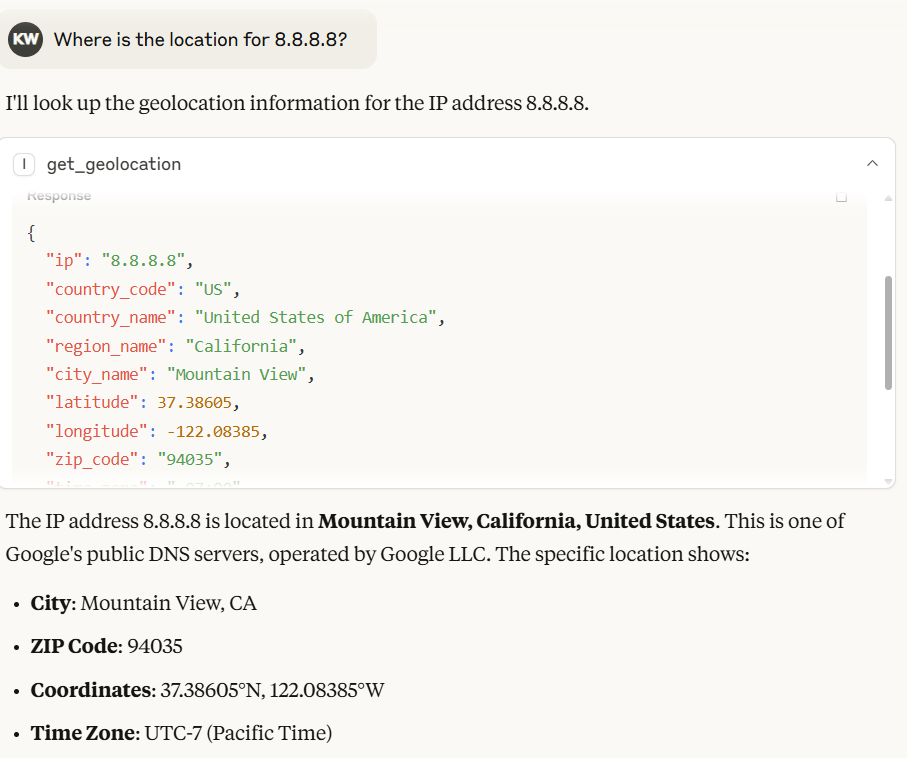
In Claude Desktop, the model will automatically generate the output based on the result returned by IP2Location.io MCP server.
You can also utilize IP2Location.io Bulk IP Geolocation API to query for multiple IP addresses. Just input all IP addresses with the space in between of each IP address. For example 8.8.8.8 8.8.6.6.
[!NOTE]
IP2Location.io Bulk IP Geolocation API requires a paid plan to work.
Environment Variable
IP2LOCATION_API_KEY
The IP2Location.io API key, which allows you to query up to 50,000 per month and more details of the IP address. You can sign up for a free API key, or subscribe to a plan to enjoy more benefits.
Tool
get_geolocation
Description
Fetch geolocation for the given IP address or a batch of IP addresses. It helps users retrieve detailed information such as country, region, city, latitude, longitude, ZIP code, time zone, ASN, and proxy information for any IPv4 or IPv6 address. It automatically routes requests to the IP2Location.io Bulk API for efficient processing when multiple IPs are detected.
Arguments
ip(str): The IP address (IPv4 or IPv6) to analyze. You can query multiple IPs at once by passing them as a single string separated by commas, spaces, or newlines (e.g.,"1.1.1.1, 2.2.2.2").
Returns
A JSON string containing the geolocation data. If multiple IPs are queried, it returns a JSON object where each key is an IP address mapped to its respective data. The result may include the following fields, depending on your API plan:
- Location & Geography: Country, region, district, city, ZIP code, latitude & longitude, time zone.
- Network & Connectivity: ASN (Autonomous System Number), ISP (Internet Service Provider), domain, net speed, IDD code, area code, address type, usage type.
- Mobile Information: MNC (Mobile Network Code), MCC (Mobile Country Code), Mobile Brand.
- Currency & Language: currency code, currency name, currency symbol, language code, language name.
- Proxy & Security: proxy type, last seen, threat level/type, proxy provider, fraud score.
- Others: IAB category, weather, elevation, population, and more.
If a single IP request fails or the IP is invalid, the tool returns an error message as a string. For bulk requests, any individual failed IPs will return an error object mapped to that specific IP address without failing the entire batch.
License
See the LICENSE file.
Similar MCP
Based on tags & features
Trending MCP
Most active this week