Documentation
MCP-Creator-MCP 🚀
A meta-MCP server that democratizes MCP server creation through AI-guided workflows and intelligent templates.
Transform vague ideas into production-ready MCP servers with minimal cognitive overhead and maximum structural elegance.
🎯 Vision
Creating MCP servers should be as simple as describing what you want. MCP Creator bridges the gap between idea and implementation, providing intelligent guidance, proven templates, and streamlined workflows.
✨ Core Features
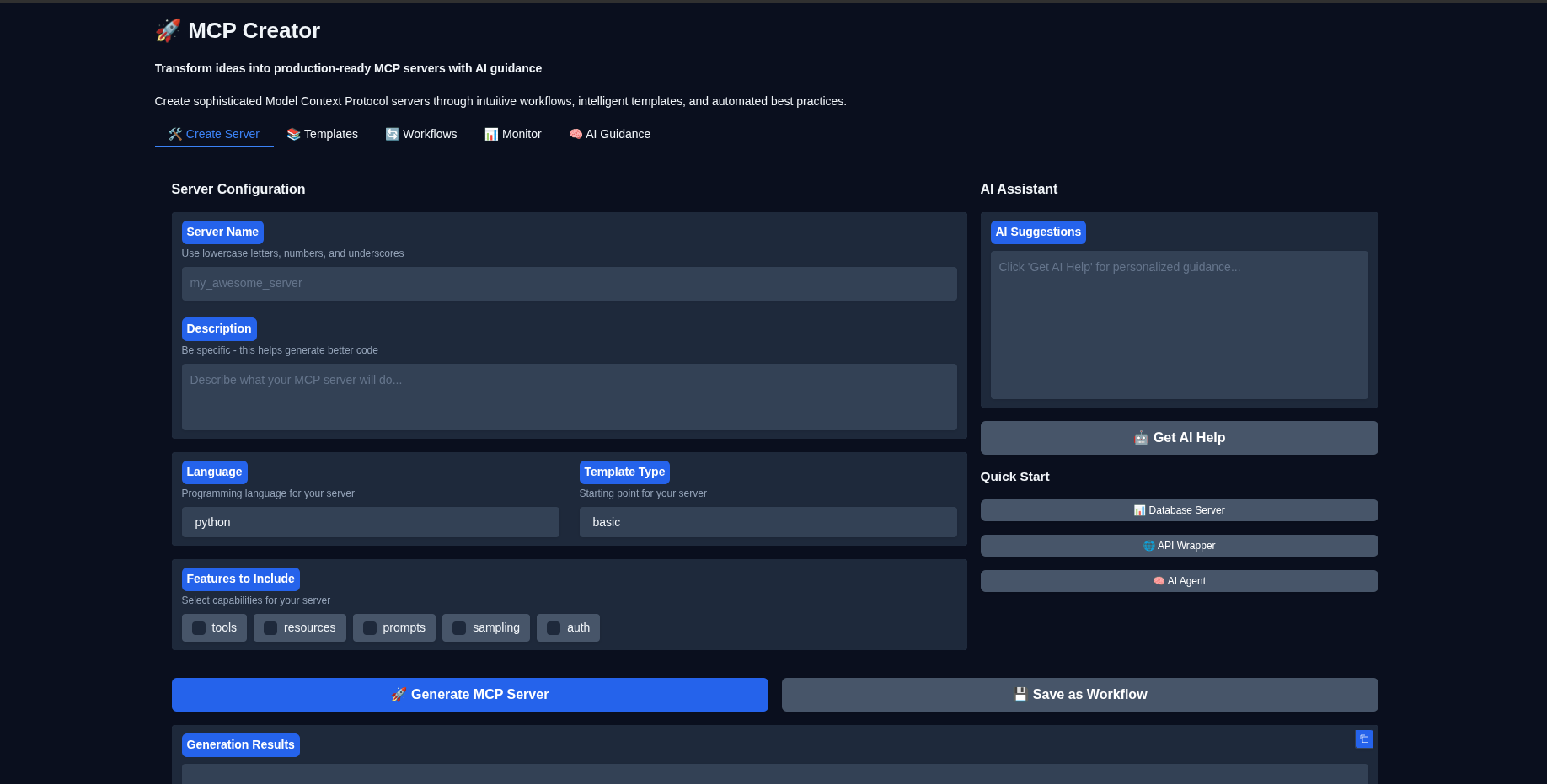
- 🤖 AI-Guided Creation: Get intelligent suggestions and best practices tailored to your use case
- 📚 Template Library: Curated collection of proven MCP server patterns
- 🔄 Workflow Engine: Save and reuse creation workflows for consistent results
- 🎨 Gradio Interface: User-friendly web interface for visual server management
- 🔧 Multi-Language Support: Python, Gradio, and expanding language ecosystem
- 📊 Built-in Monitoring: Server health checks and operational visibility
- 🛡️ Best Practices: Automated validation and security recommendations
🚀 Quick Start
Prerequisites
- Python 3.10 or higher
- uv package manager
- Claude Desktop (for MCP integration)
Installation
# Clone and set up the project
git clone https://github.com/angrysky56/mcp-creator-mcp.git
cd mcp-creator-mcp

# Create and activate virtual environment
uv venv --python 3.12 --seed
source .venv/bin/activate

# Install dependencies
uv add -e .

# Configure environment
cp .env.example .env
# Edit .env with your API keys (see Configuration section)
Basic Usage
Option 1: As an MCP Server (Recommended)
1. Configure Claude Desktop:
# Copy the example config
   cp example_mcp_config.json ~/path/to/claude_desktop_config.json
   # Edit paths and API keys as needed
2. Start using in Claude Desktop:
- Restart Claude Desktop
- Use tools like
create_mcp_server,list_templates,get_ai_guidance
Option 2: Standalone Interface
# Launch the Gradio interface
uv run gradio_interface.py

# Or use the CLI
uv run mcp-creator-gui
📖 Configuration
Environment Variables
Create a .env file with your settings:
# AI Model Providers (at least one required for AI guidance)
ANTHROPIC_API_KEY=your_anthropic_key_here
OPENAI_API_KEY=your_openai_key_here
OLLAMA_BASE_URL=http://localhost:11434

# MCP Creator Settings
DEFAULT_OUTPUT_DIR=./mcp_servers
LOG_LEVEL=INFO

# Gradio Interface
GRADIO_SERVER_PORT=7860
GRADIO_SHARE=false
Claude Desktop Integration
1. Edit your Claude Desktop config (usually at ~/.config/Claude/claude_desktop_config.json):
{
  "mcpServers": {
    "mcp-creator": {
      "command": "uv",
      "args": [
        "--directory",
        "/path/to/mcp-creator-mcp",
        "run",
        "python",
        "main.py"
      ],
      "env": {
        "ANTHROPIC_API_KEY": "your_key_here"
      }
    }
  }
}
2. Restart Claude Desktop
🛠️ Usage Examples
Creating Your First MCP Server
# In Claude Desktop, ask:
"Create an MCP server called 'weather_helper' that provides weather data and forecasts"

# Or use the tool directly:
create_mcp_server(
    name="weather_helper",
    description="Provides weather data and forecasts",
    language="python",
    template_type="basic",
    features=["tools", "resources"]
)
Getting AI Guidance
# Ask for specific guidance:
get_ai_guidance(
    topic="security",
    server_type="database"
)

# Or access guidance resources:
# Use resource: mcp-creator://guidance/sampling
Managing Templates
# List available templates
list_templates()

# Filter by language
list_templates(language="python")
🏗️ Architecture
Core Principles
- Simplicity: Each component has a single, clear responsibility
- Predictability: Consistent patterns reduce cognitive load
- Extensibility: Modular design enables easy customization
- Reliability: Comprehensive error handling and graceful degradation
Component Overview
├── src/mcp_creator/
│   ├── core/              # Core server functionality
│   │   ├── config.py      # Clean configuration management
│   │   ├── template_manager.py  # Template system
│   │   └── server_generator.py # Server creation engine
│   ├── workflows/         # Workflow management
│   ├── ai_guidance/       # AI assistance system
│   └── utils/             # Shared utilities
├── templates/             # Template library
├── ai_guidance/           # Guidance content
└── mcp_servers/          # Generated servers (default)
📚 Template System
Available Templates
- Python Basic: Clean, well-structured foundation
- Python with Resources: Database and API integration patterns
- Python with Sampling: AI-enhanced server capabilities
- Gradio Interface: Interactive UI with MCP integration
Creating Custom Templates
Templates use Jinja2 with clean abstractions:
# Template structure
templates/languages/{language}/{template_name}/
├── metadata.json          # Template configuration
├── template.py.j2        # Main template file
└── README.md.j2          # Documentation template
🔄 Workflow System
Saving Workflows
save_workflow(
    name="Database MCP Server",
    description="Complete database integration workflow",
    steps=[
        {
            "id": "collect_requirements",
            "type": "input",
            "config": {"fields": ["db_type", "connection_string"]}
        },
        {
            "id": "security_review",
            "type": "ai_guidance",
            "config": {"topic": "database_security"}
        },
        {
            "id": "generate_server",
            "type": "generation",
            "config": {"template": "python:database"}
        }
    ]
)
🔧 Development
Project Structure
The codebase follows clean architecture principles:
- Separation of Concerns: Each module has a single responsibility
- Dependency Injection: Components are loosely coupled
- Error Boundaries: Graceful failure handling throughout
- Type Safety: Comprehensive type hints and validation
Adding New Templates
1. Create template directory: templates/languages/{lang}/{name}/
2. Add metadata.json with template configuration
3. Create template.{ext}.j2 with Jinja2 template
4. Test with the template manager
Contributing
1. Fork the repository
2. Create a feature branch with descriptive name
3. Follow the existing code patterns and style
4. Add tests for new functionality
5. Submit a pull request with clear description
🛡️ Security & Best Practices
Built-in Protections
- Input Validation: All user inputs are validated and sanitized
- Process Management: Proper cleanup prevents resource leaks
- Error Handling: Graceful failure with helpful messages
- Logging: Comprehensive operational visibility
Recommended Practices
- Use environment variables for sensitive data
- Implement rate limiting for production deployments
- Regular security audits of generated servers
- Monitor server performance and resource usage
🐛 Troubleshooting
Common Issues
Server won't start:
# Check dependencies
uv add -e .

# Verify configuration
cat .env

# Check logs
tail -f logs/mcp-creator.log
Claude Desktop integration:
# Verify config file syntax
python -m json.tool claude_desktop_config.json

# Check server connectivity
python main.py --test
Template errors:
# List available templates
uv run python -c "from src.mcp_creator import TemplateManager; print(TemplateManager().list_templates())"
📊 Monitoring & Operations
Health Checks
The server provides built-in health monitoring:
- Resource usage tracking
- Error rate monitoring
- Performance metrics
- Template validation
Logging
All operations are logged to stderr (MCP compliance):
# View logs in real-time
python main.py 2>&1 | tee mcp-creator.log
🚀 What's Next?
- Multi-language expansion: TypeScript, Go, Rust templates
- Cloud deployment: Integration with major cloud platforms
- Collaboration features: Team workflows and template sharing
- Advanced AI: Enhanced code generation and optimization
- Marketplace: Community template and workflow ecosystem
📝 License
MIT License - see LICENSE for details.
🤝 Contributing
We welcome contributions! Please see CONTRIBUTING.md for guidelines.
💬 Support
- Issues: GitHub Issues
- Discussions: GitHub Discussions
- Documentation: Wiki
---
Built with ❤️ for the MCP community
*MCP Creator makes sophisticated AI integrations accessible to everyone, from hobbyists to enterprise teams.*
Similar MCP
Based on tags & features
Trending MCP
Most active this week