MCP Server for AdGuard Home
Documentation
🛡️ AdGuard Home MCP
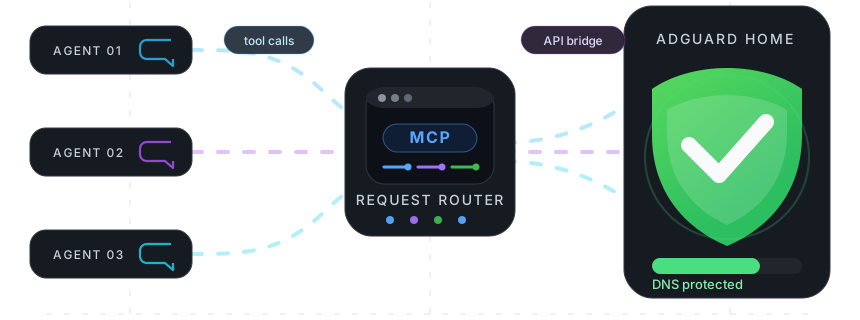
A Model Context Protocol (MCP) server for AdGuard Home. Manage DNS rewrite records, filtering rules, and filter lists via AI agents.


📦 Installation
npm i -g @fcannizzaro/mcp-adguard-home⚙️ Credentials
For the CLI, run:
adguard-cli loginThis prompts for your AdGuard Home URL, username, and password, then saves them to ~/.config/mcp-adguard-home/config.json. Saved credentials are loaded automatically on start. If no saved credentials are available, the package falls back to these environment variables:
| Variable | Description |
|---|---|
ADGUARD_URL | Base URL of your AdGuard Home instance (e.g. http://192.168.1.1) |
ADGUARD_USERNAME | AdGuard Home username |
ADGUARD_PASSWORD | AdGuard Home password |
🚀 Configuration
Claude Desktop
Edit ~/Library/Application Support/Claude/claude_desktop_config.json (macOS) or %APPDATA%\Claude\claude_desktop_config.json (Windows):
{
	"mcpServers": {
		"adguard-home": {
			"command": "npx",
			"args": ["-y", "@fcannizzaro/mcp-adguard-home"],
			"env": {
				"ADGUARD_URL": "http://192.168.1.1",
				"ADGUARD_USERNAME": "admin",
				"ADGUARD_PASSWORD": "your-password"
			}
		}
	}
}
Cursor
Edit .cursor/mcp.json in your project root (or ~/.cursor/mcp.json globally):
{
	"mcpServers": {
		"adguard-home": {
			"command": "npx",
			"args": ["-y", "@fcannizzaro/mcp-adguard-home"],
			"env": {
				"ADGUARD_URL": "http://192.168.1.1",
				"ADGUARD_USERNAME": "admin",
				"ADGUARD_PASSWORD": "your-password"
			}
		}
	}
}
VS Code
Edit .vscode/mcp.json in your project root:
{
	"servers": {
		"adguard-home": {
			"type": "stdio",
			"command": "npx",
			"args": ["-y", "@fcannizzaro/mcp-adguard-home"],
			"env": {
				"ADGUARD_URL": "http://192.168.1.1",
				"ADGUARD_USERNAME": "admin",
				"ADGUARD_PASSWORD": "your-password"
			}
		}
	}
}
Windsurf
Edit ~/.codeium/windsurf/mcp_config.json:
{
	"mcpServers": {
		"adguard-home": {
			"command": "npx",
			"args": ["-y", "@fcannizzaro/mcp-adguard-home"],
			"env": {
				"ADGUARD_URL": "http://192.168.1.1",
				"ADGUARD_USERNAME": "admin",
				"ADGUARD_PASSWORD": "your-password"
			}
		}
	}
}
Claude Code CLI
claude mcp add adguard-home \
  -e ADGUARD_URL=http://192.168.1.1 \
  -e ADGUARD_USERNAME=admin \
  -e ADGUARD_PASSWORD=your-password \
  -- npx -y @fcannizzaro/mcp-adguard-home
🧰 Available Tools
The package also installs a regular CLI for agents or scripts that do not use MCP:
adguard-cli login
adguard-cli list_rewrite_dns_records
adguard-cli add_rewrite_dns_record --domain example.test --ip 192.168.1.10
adguard-cli manage_dns_filtering_rules --domains ads.example --allowed false
CLI arguments can also be passed as a JSON object:
adguard-cli add_rewrite_dns_record '{"domain":"example.test","ip":"192.168.1.10"}'DNS Rewrite Records
| Tool | Description | Parameters |
|---|---|---|
list_rewrite_dns_records | List all DNS rewrite records | — |
add_rewrite_dns_record | Add a DNS rewrite record | domain: string, ip: string |
remove_rewrite_dns_record | Remove a DNS rewrite record | domain: string, ip: string |
DNS Filtering Rules
| Tool | Description | Parameters |
|---|---|---|
list_dns_filtering_rules | List all custom DNS filtering rules | — |
manage_dns_filtering_rules | Block or allow domains | domains: string[], allowed: boolean |
remove_rdns_filtering_rules | Remove custom filtering rules | domains: string[] |
Filter Lists
| Tool | Description | Parameters |
|---|---|---|
list_filter_lists | List all configured filter lists | — |
toggle_filter_list | Enable or disable a filter list | id: number, enabled: boolean |
refresh_filter_lists | Force update of all filter lists | — |
📄 License
Licensed under the MIT License.
Similar MCP
Based on tags & features
Trending MCP
Most active this week