LYRAI is a Model Context Protocol (MCP) operating system for multi-AI AGENTs designed to extend the functionality of AI applications by enabling them to inte...
Documentation
LYRAIOS
Overview & Technical Foundation
LYRAI is a Model Context Protocol (MCP) operating system for multi-AI AGENTs designed to extend the functionality of AI applications (such as Claude Desktop and Cursor) by enabling them to interact with financial networks and blockchain public chains. The server offers a range of advanced AI assistants, including blockchain public chain operations (SOLANA, ETH, etc. - retrieving wallet addresses, listing wallet balances, transferring funds, deploying smart contracts, on-chain lending, calling contract functions, managing tokens), fintech market analysis and summary reports, and learning and training systems for the education sector.
In the future operation of LYRAIOS, advanced VIP features will exclusively support payment using LYRAI on solana, with LYRAI's CA :
A6MTWuHbXqjH3vYEfbs3mzvGThQtk5S12FjmdpVkpump
Welcome to check out the demo of our LYRA MCP-OS!
https://github.com/user-attachments/assets/479cad58-ce4b-4901-93ff-e60a98c477d4
Core Innovations & Differentiated Value
LYRAIOS aims to create the next generation AI Agent operating system with technological breakthroughs in three dimensions:
1. Open Protocol Architecture: Pioneering modular integration protocol supporting plug-and-play third-party tools/services, compatible with multi-modal interaction interfaces (API/plugins/smart hardware), with 80%+ improved extensibility compared to traditional frameworks
2. Multi-Agent Collaboration Engine: Breaking through single Agent capability boundaries through distributed task orchestration system enabling dynamic multi-agent collaboration, supporting enterprise-grade complex workflow automation and conflict resolution
3. Cross-Platform Runtime Environment: Building cross-terminal AI runtime environment, enabling smooth migration from personal intelligent assistants to enterprise digital employees, applicable for validating multi-scenario solutions in finance, healthcare, intelligent manufacturing and other fields
For detailed architecture information, see the Architecture Documentation.
System Architecture
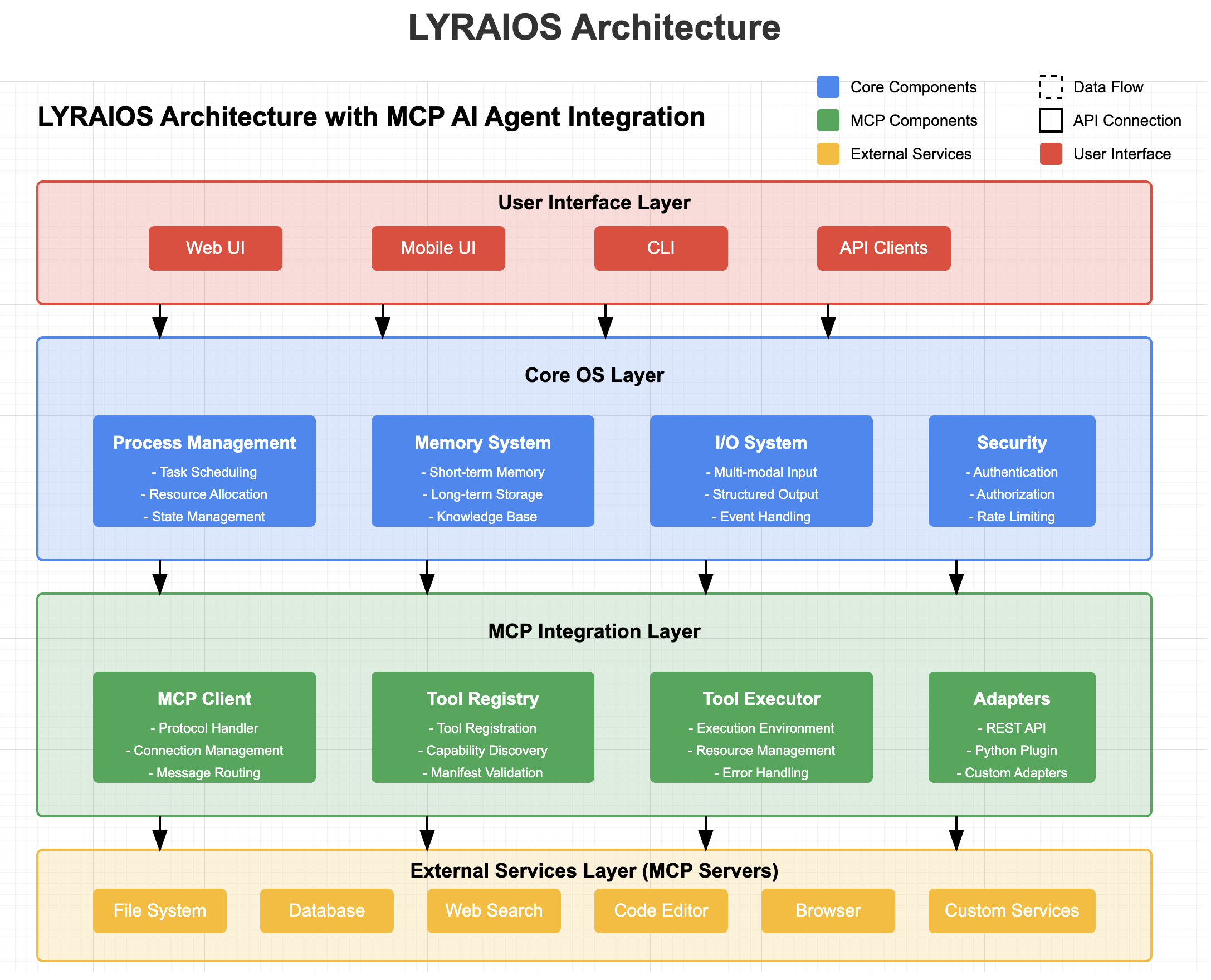
LYRAIOS adopts a layered architecture design, from top to bottom, including the user interface layer, core OS layer, MCP integration layer, and external services layer.
VS
User Interface Layer
The user interface layer provides multiple interaction modes, allowing users to interact with the AI OS.
Components:
- Web UI: Based on Streamlit, providing an intuitive user interface
- Mobile UI: Mobile adaptation interface, supporting mobile device access
- CLI: Command line interface, suitable for developers and advanced users
- API Clients: Provide API interfaces, supporting third-party application integration
Core OS Layer
The core OS layer implements the basic functions of the AI operating system, including process management, memory system, I/O system, and security control.
Components:
- Process Management
- Task Scheduling: Dynamic allocation and scheduling of AI tasks
- Resource Allocation: Optimize AI resource usage
- State Management: Maintain AI process state
- Memory System
- Short-term Memory: Session context maintenance
- Long-term Storage: Persistent knowledge storage
- Knowledge Base: Structured knowledge management
- I/O System
- Multi-modal Input: Handle text, files, APIs, etc.
- Structured Output: Generate formatted output results
- Event Handling: Respond to system events
- Security & Access Control
- Authentication: User authentication
- Authorization: Permission management
- Rate Limiting: Prevent abuse
MCP Integration Layer
MCP Integration Layer is the core innovation of the system, achieving seamless integration with external services through the Model Context Protocol.
Components:
- MCP Client
- Protocol Handler: Process MCP protocol messages
- Connection Management: Manage connections to MCP servers
- Message Routing: Route messages to appropriate processors
- Tool Registry
- Tool Registration: Register external tools and services
- Capability Discovery: Discover tool capabilities
- Manifest Validation: Validate tool manifests
- Tool Executor
- Execution Environment: Provide an execution environment for tool execution
- Resource Management: Manage the resources used by tool execution
- Error Handling: Handle errors during tool execution
- Adapters
- REST API Adapter: Connect to REST API services
- Python Plugin Adapter: Integrate Python plugins
- Custom Adapter: Support other types of integration
External Services Layer
The external services layer includes various services integrated through the MCP protocol, which act as MCP servers providing capabilities.
Components:
- File System: Provide file read and write capabilities
- Database: Provide data storage and query capabilities
- Web Search: Provide internet search capabilities
- Code Editor: Provide code editing and execution capabilities
- Browser: Provide web browsing and interaction capabilities
- Custom Services: Support other custom services integration
Tool Integration Protocol
The Tool Integration Protocol is a key component of LYRAIOS's Open Protocol Architecture. It provides a standardized way to integrate third-party tools and services into the LYRAIOS ecosystem.
Key Features
- Standardized Tool Manifest: Define tools using a JSON schema that describes capabilities, parameters, and requirements
- Pluggable Adapter System: Support for different tool types (REST API, Python plugins, etc.)
- Secure Execution Environment: Tools run in a controlled environment with resource limits and permission checks
- Versioning and Dependency Management: Track tool versions and dependencies
- Monitoring and Logging: Comprehensive logging of tool execution
Getting Started with Tool Integration
1. Define Tool Manifest: Create a JSON file describing your tool's capabilities
2. Implement Tool: Develop the tool functionality according to the protocol
3. Register Tool: Use the API to register your tool with LYRAIOS
4. Use Tool: Your tool is now available for use by LYRAIOS agents
For examples and detailed documentation, see the Tool Integration Guide.
MCP Protocol Overview
Model Context Protocol (MCP) is a client-server architecture protocol for connecting LLM applications and integrations. In MCP:
- Hosts are LLM applications (such as Claude Desktop or IDE) that initiate connections
- Clients maintain a 1:1 connection with servers in host applications
- Servers provide context, tools, and prompts to clients
MCP Function Support
LYRAIOS supports the following MCP functions:
- Resources: Allow attaching local files and data
- Prompts: Support prompt templates
- Tools: Integrate to execute commands and scripts
- Sampling: Support sampling functions (planned)
- Roots: Support root directory functions (planned)
Data Flow
User Request Processing Flow
1. User sends request through the interface layer
2. Core OS layer receives the request and processes it
3. If external tool support is needed, the request is forwarded to the MCP integration layer
4. MCP client connects to the corresponding MCP server
5. External service executes the request and returns the result
6. The result is returned to the user through each layer
Tool Execution Flow
1. AI Agent determines that a specific tool is needed
2. Tool registry looks up tool definition and capabilities
3. Tool executor prepares execution environment
4. Adapter converts request to tool-understandable format
5. Tool executes and returns the result
6. The result is returned to the AI Agent for processing
Overview
LYRAIOS (LLM-based Your Reliable AI Operating System) is an advanced AI assistant platform built with Streamlit, designed to serve as an operating system for AI applications.
Core OS Features
- AI Process Management:
- Dynamic task allocation and scheduling
- Multi-assistant coordination and communication
- Resource optimization and load balancing
- State management and persistence
- AI Memory System:
- Short-term conversation memory
- Long-term vector database storage
- Cross-session context preservation
- Knowledge base integration
- AI I/O System:
- Multi-modal input processing (text, files, APIs)
- Structured output formatting
- Stream processing capabilities
- Event-driven architecture
Built-in Tools
- Calculator: Advanced mathematical operations including factorial and prime number checking
- Web Search: Integrated DuckDuckGo search with customizable result limits
- Financial Analysis:
- Real-time stock price tracking
- Company information retrieval
- Analyst recommendations
- Financial news aggregation
- File Management: Read, write, and list files in the workspace
- Research Tools: Integration with Exa for comprehensive research capabilities
Specialized Assistant Team
- Python Assistant:
- Live Python code execution
- Streamlit charting capabilities
- Package management with pip
- Research Assistant:
- NYT-style report generation
- Automated web research
- Structured output formatting
- Source citation and reference management
Technical Architecture
- FastAPI Backend: RESTful API with automatic documentation
- Streamlit Frontend: Interactive web interface
- Vector Database: PGVector for efficient knowledge storage and retrieval
- PostgreSQL Storage: Persistent storage for conversations and assistant states
- Docker Support: Containerized deployment for development and production
System Features
- Knowledge Management:
- PDF document processing
- Website content integration
- Vector-based semantic search
- Knowledge graph construction
- Process Control:
- Task scheduling and prioritization
- Resource allocation
- Error handling and recovery
- Performance monitoring
- Security & Access Control:
- API key management
- Authentication and authorization
- Rate limiting and quota management
- Secure data storage
Security Considerations
Transmission Security
- Use TLS for remote connections
- Verify connection source
- Implement authentication when needed
Message Validation
- Verify all incoming messages
- Clean input
- Check message size limits
- Verify JSON-RPC format
Resource Protection
- Implement access control
- Verify resource paths
- Monitor resource usage
- Limit request rate
Error Handling
- Do not leak sensitive information
- Record security-related errors
- Implement appropriate cleanup
- Handle DoS scenarios
Roadmap 📍
Core Platform
- ✅ Basic AI Assistant Framework
- ✅ Streamlit Web Interface
- ✅ FastAPI Backend
- ✅ Database Integration (SQLite/PostgreSQL)
- ✅ OpenAI Integration
- ✅ Docker Containerization
- ✅ Environment Configuration System
- 🔄 Multi-modal Input Processing (Partial)
- 🚧 Advanced Error Handling & Recovery
- 🚧 Performance Monitoring Dashboard
- 📅 Distributed Task Queue
- 📅 Horizontal Scaling Support
- 📅 Custom Plugin Architecture
AI Process Management
- ✅ Basic Task Allocation
- ✅ Multi-assistant Team Structure
- ✅ State Management & Persistence
- 🔄 Dynamic Task Scheduling (Partial)
- 🚧 Resource Optimization
- 🚧 Load Balancing
- 📅 Process Visualization
- 📅 Workflow Designer
- 📅 Advanced Process Analytics
Memory System
- ✅ Short-term Conversation Memory
- ✅ Basic Vector Database Integration
- ✅ Session Context Preservation
- 🔄 Knowledge Base Integration (Partial)
- 🚧 Memory Optimization Algorithms
- 🚧 Cross-session Learning
- 📅 Hierarchical Memory Architecture
- 📅 Forgetting Mechanisms
- 📅 Memory Compression
Tools & Integrations
- ✅ Calculator
- ✅ Web Search (DuckDuckGo)
- ✅ Financial Analysis Tools
- ✅ File Management
- ✅ Research Tools (Exa)
- ✅ PDF Document Processing
- ✅ Website Content Integration
- 🔄 Python Code Execution (Partial)
- 🚧 Advanced Data Visualization
- 🚧 External API Integration Framework
- 📅 Image Generation & Processing
- 📅 Audio Processing
- 📅 Video Analysis
Security & Access Control
- ✅ Basic API Key Management
- ✅ Simple Authentication
- 🔄 Authorization System (Partial)
- 🚧 Rate Limiting
- 🚧 Quota Management
- 📅 Role-based Access Control
- 📅 Audit Logging
- 📅 Compliance Reporting
Open Protocol Architecture
- 🔄 Module Interface Standards (Partial)
- 🚧 Third-party Tool Integration Protocol
- 🚧 Service Discovery Mechanism
- 📅 Universal Connector Framework
- 📅 Protocol Validation System
- 📅 Compatibility Layer for Legacy Systems
Multi-Agent Collaboration
- ✅ Basic Team Structure
- 🔄 Inter-agent Communication (Partial)
- 🚧 Task Decomposition Engine
- 🚧 Conflict Resolution System
- 📅 Collaborative Planning
- 📅 Emergent Behavior Analysis
- 📅 Agent Specialization Framework
Cross-Platform Support
- ✅ Web Interface
- 🔄 API Access (Partial)
- 🚧 Mobile Responsiveness
- 📅 Desktop Application
- 📅 CLI Interface
- 📅 IoT Device Integration
- 📅 Voice Assistant Integration
Legend
- ✅ Completed
- 🔄 Partially Implemented
- 🚧 In Development
- 📅 Planned
Setup Workspace
# Clone the repo
git clone https://github.com/GalaxyLLMCI/lyraios
cd lyraios

# Create + activate a virtual env
python3 -m venv aienv
source aienv/bin/activate

# Install phidata
pip install 'phidata[aws]'

# Setup workspace
phi ws setup

# Copy example secrets
cp workspace/example_secrets workspace/secrets

# Create .env file
cp example.env .env

# Run Lyraios locally
phi ws up

# Open [localhost:8501](http://localhost:8501) to view the Streamlit App.

# Stop Lyraios locally
phi ws down
Run Lyraios locally
1. Install docker desktop
2. Export credentials
We use gpt-4o as the LLM, so export your OpenAI API Key
export OPENAI_API_KEY=sk-***

# To use Exa for research, export your EXA_API_KEY (get it from [here](https://dashboard.exa.ai/api-keys))
export EXA_API_KEY=xxx

# To use Gemini for research, export your GOOGLE_API_KEY (get it from [here](https://console.cloud.google.com/apis/api/generativelanguage.googleapis.com/overview?project=lyraios))
export GOOGLE_API_KEY=xxx

# OR set them in the `.env` file
OPENAI_API_KEY=xxx
EXA_API_KEY=xxx
GOOGLE_API_KEY=xxx

# Start the workspace using:
phi ws up

# Open [localhost:8501](http://localhost:8501) to view the Streamlit App.

# Stop the workspace using:
phi ws down
API Documentation
REST API Endpoints
Assistant API
POST /api/v1/assistant/chat- Process chat messages with the AI assistant
- Supports context-aware conversations
- Returns structured responses with tool usage information
Health Check
GET /api/v1/health- Monitor system health status
- Returns version and status information
API Documentation
- Interactive API documentation available at
/docs - ReDoc alternative documentation at
/redoc - OpenAPI specification at
/openapi.json
Development Guide
Project Structure
lyraios/
├── ai/                     # AI core functionality
│   ├── assistants.py       # Assistant implementations
│   ├── llm/                # LLM integration
│   └── tools/              # AI tools implementations
├── app/                    # Main application
│   ├── components/         # UI components
│   ├── config/             # Application configuration
│   ├── db/                 # Database models and storage
│   ├── styles/             # UI styling
│   ├── utils/              # Utility functions
│   └── main.py             # Main application entry point
├── assets/                 # Static assets like images
├── data/                   # Data storage
├── tests/                  # Test suite
├── workspace/              # Workspace configuration
│   ├── dev_resources/      # Development resources
│   ├── settings.py         # Workspace settings
│   └── secrets/            # Secret configuration (gitignored)
├── docker/                 # Docker configuration
├── scripts/                # Utility scripts
├── .env                    # Environment variables
├── requirements.txt        # Python dependencies
└── README.md               # Project documentation
Environment Configuration
1. Environment Variables Setup
# Copy the example .env file
cp example.env .env

# Required environment variables
EXA_API_KEY=your_exa_api_key_here        # Get from https://dashboard.exa.ai/api-keys
OPENAI_API_KEY=your_openai_api_key_here  # Get from OpenAI dashboard
OPENAI_BASE_URL=your_openai_base_url     # Optional: Custom OpenAI API endpoint

# OpenAI Model Configuration
OPENAI_CHAT_MODEL=gpt-4-turbo-preview    # Default chat model
OPENAI_VISION_MODEL=gpt-4-vision-preview  # Model for vision tasks
OPENAI_EMBEDDING_MODEL=text-embedding-3-small  # Model for embeddings

# Optional configuration
STREAMLIT_SERVER_PORT=8501  # Default Streamlit port
API_SERVER_PORT=8000       # Default FastAPI port
2. OpenAI Configuration Examples
# Standard OpenAI API
OPENAI_API_KEY=sk-***
OPENAI_BASE_URL=https://api.openai.com/v1
OPENAI_CHAT_MODEL=gpt-4-turbo-preview

# Azure OpenAI
OPENAI_API_KEY=your_azure_api_key
OPENAI_BASE_URL=https://your-resource.openai.azure.com/openai/deployments/your-deployment
OPENAI_CHAT_MODEL=gpt-4

# Other OpenAI API providers
OPENAI_API_KEY=your_api_key
OPENAI_BASE_URL=https://your-api-endpoint.com/v1
OPENAI_CHAT_MODEL=your-model-name
2. Streamlit Configuration
# Create Streamlit config directory
mkdir -p ~/.streamlit

# Create config.toml to disable usage statistics (optional)
cat > ~/.streamlit/config.toml << EOL
[browser]
gatherUsageStats = false
EOL
Development Scripts
The project includes convenient development scripts to manage the application:
1. Using dev.py Script
# Run both frontend and backend
python -m scripts.dev run

# Run only frontend
python -m scripts.dev run --no-backend

# Run only backend
python -m scripts.dev run --no-frontend

# Run with custom ports
python -m scripts.dev run --frontend-port 8502 --backend-port 8001
2. Manual Service Start
# Start Streamlit frontend
streamlit run app/app.py

# Start FastAPI backend
uvicorn api.main:app --reload
Dependencies Management
1. Core Dependencies
# Install production dependencies
pip install -r requirements.txt

# Install development dependencies
pip install -r requirements-dev.txt

# Install the project in editable mode
pip install -e .
2. Additional Tools
# Install python-dotenv for environment management
pip install python-dotenv

# Install development tools
pip install black isort mypy pytest
Development Best Practices
1. Code Style
- Follow PEP 8 guidelines
- Use type hints
- Write docstrings for functions and classes
- Use black for code formatting
- Use isort for import sorting
2. Testing
# Run tests
pytest

# Run tests with coverage
pytest --cov=app tests/
3. Pre-commit Hooks
# Install pre-commit hooks
pre-commit install

# Run manually
pre-commit run --all-files
Deployment Guide
Docker Deployment
1. Development Environment
# Build development image
docker build -f docker/Dockerfile.dev -t lyraios:dev .

# Run development container
docker-compose -f docker-compose.dev.yml up
2. Production Environment
# Build production image
docker build -f docker/Dockerfile.prod -t lyraios:prod .

# Run production container
docker-compose -f docker-compose.prod.yml up -d
Configuration Options
1. Environment Variables
# Application Settings
DEBUG=false
LOG_LEVEL=INFO
ALLOWED_HOSTS=example.com,api.example.com

# AI Settings
AI_MODEL=gpt-4
AI_TEMPERATURE=0.7
AI_MAX_TOKENS=1000

# Database Settings
DATABASE_URL=postgresql://user:pass@localhost:5432/dbname
2. Scaling Options
- Configure worker processes via
GUNICORN_WORKERS - Adjust memory limits via
MEMORY_LIMIT - Set concurrency via
MAX_CONCURRENT_REQUESTS
Monitoring and Maintenance
1. Health Checks
- Monitor
/healthendpoint - Check system metrics via Prometheus endpoints
- Review logs in
/var/log/lyraios/
2. Backup and Recovery
# Backup database
python scripts/backup_db.py

# Restore from backup
python scripts/restore_db.py --backup-file backup.sql
3. Troubleshooting
- Check application logs
- Verify environment variables
- Ensure database connectivity
- Monitor system resources
Database Configuration
The system supports both SQLite and PostgreSQL databases:
1. SQLite (Default)
# SQLite Configuration
DATABASE_TYPE=sqlite
DATABASE_PATH=data/lyraios.db
2. PostgreSQL
# PostgreSQL Configuration
DATABASE_TYPE=postgres
POSTGRES_HOST=localhost
POSTGRES_PORT=5432
POSTGRES_DB=lyraios
POSTGRES_USER=postgres
POSTGRES_PASSWORD=your_password
The system will automatically use SQLite if no PostgreSQL configuration is provided.
Contributing
We welcome contributions! Please see the CONTRIBUTING.md file for details.
License
This project is licensed under the Apache License 2.0 - see the LICENSE file for details.
Similar MCP
Based on tags & features
Trending MCP
Most active this week